
1. Sarrera
Thank you for choosing the Angrox Backlit Universal Remote Control for LG Smart TVs. This remote is designed to provide a seamless and enhanced television viewing experience, especially in low-light conditions. It serves as a direct replacement for your original LG TV remote, offering broad compatibility and ease of use without requiring complex setup procedures. This manual provides detailed instructions for setting up, operating, maintaining, and troubleshooting your new remote control.
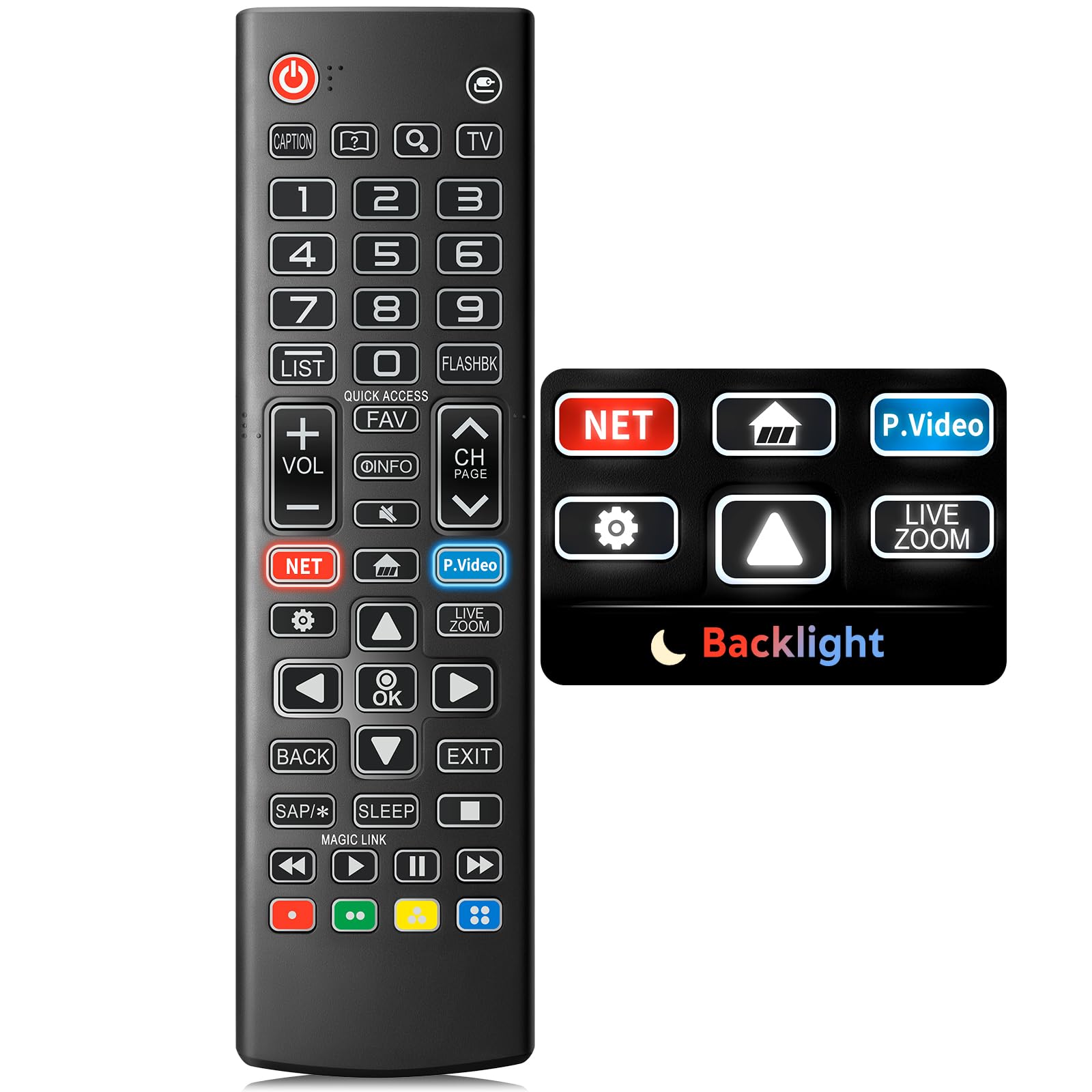
Image: The Angrox Backlit Universal Remote Control, a sleek black remote with clearly labeled buttons.
2. Ezaugarri nagusiak
- Easy Nighttime Operation: Features soft glow buttons that illuminate, allowing for clear visibility and use in dark environments without causing glare. The backlight activates with any button press and automatically turns off after 10 seconds of inactivity.
- Bateragarritasun Unibertsala: Designed as a direct replacement for LG TV remotes, compatible with all LG TV models. No programming or complex pairing is required; it works immediately out of the box.
- High-Quality Performance: Equipped with sensitive buttons and stable signal transmission for smooth and responsive operation.
- Diseinu ergonomikoa: Shaped to fit comfortably in the hand, reducing fatigue during extended use. The button layout is intuitive for users of all ages.
- Iraunkorra eta fidagarria: Constructed from high-quality, sturdy materials to withstand daily use and accidental drops, ensuring a long lifespan.

Image: A comparison showing the remote control with its backlight off and then with its buttons illuminated, highlighting the easy nighttime operation feature.

Image: The remote control displayed alongside various LG TV models (OLED, UHD, QNED, NanoCell), illustrating its broad compatibility.
3. Konfiguratzeko argibideak
3.1 Bateriaren instalazioa
- Kokatu bateriaren konpartimentuaren estalkia urrutiko agintearen atzealdean.
- Irristatu estalkia beherantz edo sakatu giltzarrapoa konpartimentua irekitzeko.
- Sartu bi (2) AAA bateria, ziurtatuz terminal positiboa (+) eta negatiboa (-) konpartimentu barruko adierazleekin behar bezala lerrokatuta daudela.
- Jarri bateriaren konpartimentuaren estalkia berriro bere lekuan sartuz, ondo klik egin arte.
Oharra: Batteries are not included with the remote control. Please use new AAA alkaline batteries for optimal performance.

Image: A visual guide demonstrating the correct insertion of two AAA batteries into the remote control's battery compartment.
3.2 Initial Use (No Pairing Required)
The Angrox Backlit Universal Remote Control is designed for immediate use with LG Smart TVs. No pairing or programming steps are necessary. Once batteries are installed, the remote is ready to control your LG television.
4. Funtzionamendu-argibideak
This section details the functions of the buttons on your Angrox remote control.

Image: A comprehensive layout of the remote control, with labels pointing to each button and describing its primary function.
4.1 Oinarrizko funtzioak
- Boterea (
 ): Telebista pizten edo itzaltzen du.
 - Sarrera (): Changes the input source (e.g., HDMI 1, HDMI 2).
- Bolumena igo/behera (VOL +/-): Bolumen-maila doitzen du.
- Kanala Gora/Behera (CH Page): Telebista katea aldatzen du.
- Isildu (): Telebistaren audioa desaktibatu edo aktibatzen du.
- Zenbaki-botoiak (0-9): Directly enters channel numbers or other numerical inputs.
- Nabigazio botoiak (Gora/Behera/Ezkerra/Eskuina): Menuetan eta aukeretan zehar mugitzeko erabiltzen da.
- Ados botoia: Selects menu items or confirms your input.
4.2 Special Function Buttons
- Netflix botoia: Launches the Netflix application directly.
- Amazon Prime Video Button: Launches the Amazon Prime Video application directly.
- Sarbide azkarra: A feature that allows you to enter a specified app or Live TV directly by pressing and holding the number buttons.
- Zerrenda: Gordetako programen zerrendara sartzen da.
- Flashback: Aurrekora itzultzen da viewed kanala edo sarrera.
- Informazioa: Displays information on the current program.
- Gogokoena: Sartu zure gogoko kanalen zerrenda.
- Ezarpenak (): Accesses the Quick Settings menu.
- Itzuli: Pantailako pantailak garbitzen ditu eta telebistara itzultzen da viewing.
- Irteera: Uneko menutik irteten da.
- Lo egin: Accesses the sleep timer.
- Media Control Buttons (Play, Pause, Stop, Fast Forward, Rewind): Controls media content playback.
4.3 Atzeko argiztapen funtzioa
The remote control features a soft backlight for easy use in the dark. Simply press any button, and the backlight will turn on. It will automatically turn off after 10 seconds of inactivity to conserve battery life.
Video: A demonstration of the Angrox Backlit Remote for LG Smart TV, showcasing its easy nighttime use and responsive buttons. This video highlights the convenience of the backlit feature in dark environments.
5. Zehaztapenak
| Marka | Angrox |
| Ereduaren izena | AKB75095307 |
| Modelo zenbakia | AKB75095307 |
| Ezaugarri bereziak | Backlit, Ergonomic, Lightweight, No Programming Required, Universal |
| Gailu bateragarriak | Television (All LG TV models) |
| Onartutako gailuen gehienezko kopurua | 1 |
| Konektibitate Teknologia | Infragorriak |
| Botoi kopurua | 30 |
| Kontrolagailu mota | Botoien Kontrola |
| Gehienezko irismena | 10 metro (gutxi gorabehera 33 oin) |
| Beharrezko bateria kopurua | 2 AAA bateria |
| Bateria mota | Alkalinoa |
| Elementuaren neurriak (L x W x H) | 9.25"L x 1.89"Z x 0.73"A |
6. Arazoak
Urrutiko agintearekin arazoak badituzu, jo ezazu honako ohiko irtenbide hauetara:
- Urrunekoek ez dute erantzuten:
- Ziurtatu bateriak behar bezala sartuta daudela, polaritate zuzenarekin (+/-).
- Ordeztu pila zaharrak AAA pila alkalino berriekin.
- Egiaztatu urrutiko agintearen eta telebistaren infragorri hargailuaren artean oztoporik dagoen.
- Ensure you are within the maximum operating range (10 meters) of the TV.
- Atzeko argia ez dabil:
- Verify battery power. Low batteries may affect backlight functionality.
- The backlight is designed to turn off after 10 seconds of inactivity. Press any button to reactivate it.
- Specific buttons not working (e.g., Netflix, Amazon Prime):
- Ensure your LG Smart TV is connected to the internet and the respective applications are installed and updated.
- Some smart TV features or app shortcuts may vary slightly depending on your TV's model and region.
- Remote feels sluggish or unresponsive:
- Ordeztu bateriak berriekin.
- Clean the remote's infrared emitter (at the top) and the TV's IR receiver with a soft, dry cloth to ensure a clear signal path.
7. Mantentzea
To ensure the longevity and optimal performance of your Angrox remote control, follow these maintenance guidelines:
- Garbiketa: Use a soft, dry cloth to clean the remote's surface. Avoid using liquid cleaners, aerosols, or harsh chemicals, as they may damage the remote.
- Bateria ordezkatzea: Replace batteries promptly when the remote's performance declines or if the backlight becomes dim. Remove batteries if the remote will not be used for an extended period to prevent leakage.
- Biltegiratzea: Gorde urrutiko agintea leku fresko eta lehor batean, eguzki-argitik, muturreko tenperaturetatik eta hezetasun handitik babestuta.
- Saihestu tantoak: Iraunkorra izan arren, erorketa errepikatuek barneko osagaiak kaltetu ditzakete. Kontuz ibili urrutiko agintea erabiliz.
8. Bermea eta laguntza
8.1 Bermearen informazioa
The Angrox Backlit Universal Remote Control (Model AKB75095307) is covered by a 90 eguneko bermea from the date of purchase. This warranty covers manufacturing defects and ensures the product functions as described under normal use. It does not cover damage caused by misuse, accidents, unauthorized modifications, or normal wear and tear.
8.2 Bezeroarentzako laguntza
For any questions, technical assistance, or warranty claims, please contact Angrox customer support through the retailer where you purchased the product or visit the official Angrox store online. Please have your purchase receipt and product model number available when contacting support.