
1. Produktua amaitu daview
The TECKNET TK-KB041 is a versatile, slim wireless keyboard designed for multi-device compatibility and comfortable typing. It offers both 2.4GHz USB-A and Bluetooth connectivity, allowing seamless switching between up to three devices. Its low-profile scissor-switch keys provide a quiet and fluid typing experience, while the integrated numeric keypad enhances productivity. The keyboard features a rechargeable battery with long standby time and power-saving auto-sleep functionality.

Figure 1: TECKNET TK-KB041 Slim Wireless Keyboard.
2. Zer dago kutxan
- Wireless Keyboard (Model TK-KB041) x 1
- USB-C kargatzeko kablea x 1
- Erabiltzailearen eskuliburua x 1
- USB-A Receiver (stored in the keyboard's back slot) x 1
3. Konfiguratzeko argibideak
3.1 Powering On the Keyboard
- Locate the ON/OFF switch on the side of the keyboard.
- Slide the switch to the "ON" position.

Figure 2: The keyboard's ultra-slim profile, highlighting its compact design.
3.2 Connecting via 2.4GHz USB-A Receiver
- Locate the USB-A receiver stored in the magnetic slot on the back of the keyboard.
- Plug the USB-A receiver into an available USB port on your computer or device.
- Teklatua automatikoki konektatu beharko litzateke.

Figure 3: Location of the USB-A receiver slot on the back of the keyboard.
3.3 Bluetooth bidez konektatzea
- Ziurtatu teklatua piztuta dagoela.
- Eduki sakatuta Fn tekla eta Bluetooth kanalaren tekletako bat (Fn + 1, Fn + 2, edo Fn + 3) for 3 seconds. The corresponding Bluetooth indicator light (B1, B2, or B3) on the keyboard will start blinking, indicating it's in pairing mode.
- Zure gailuan (ordenagailua, tableta, telefonoa), joan Bluetooth ezarpenetara.
- Bilatu available devices and select "TK-KB041" (or similar name) from the list.
- Follow any on-screen prompts to complete the pairing process. The indicator light on the keyboard will stop blinking and remain solid for a few seconds, then turn off, indicating a successful connection.
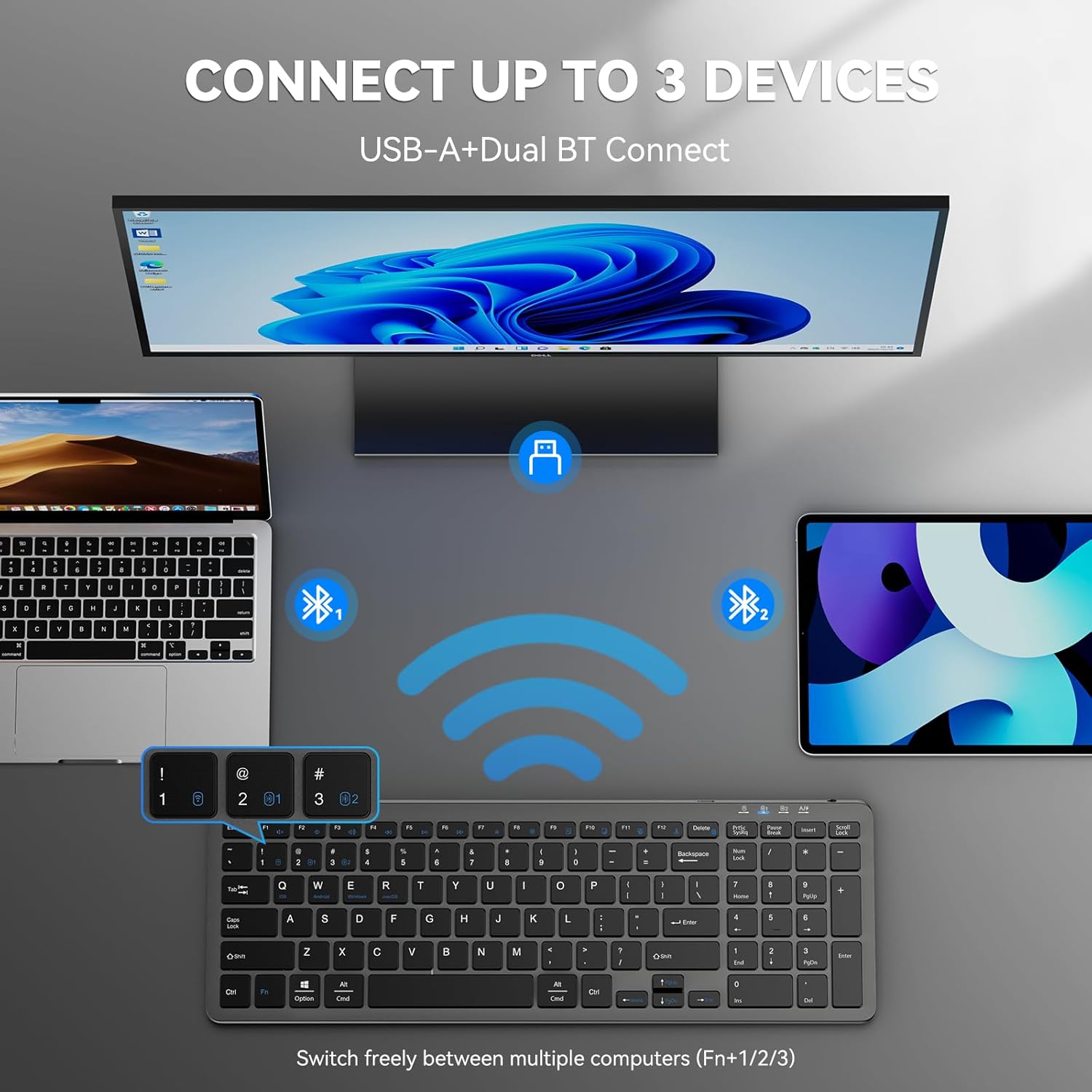
Figure 4: The keyboard connected to multiple devices via Bluetooth and USB-A.
4. Funtzionamendu-argibideak
4.1 Konektatutako gailuen artean aldatzea
The keyboard supports connecting to up to three devices via Bluetooth and one via 2.4GHz USB-A. To switch between devices:
- Bluetooth gailuetarako: Sakatu fn+1, fn+2, edo fn+3 to switch to the corresponding Bluetooth-paired device.
- For 2.4GHz USB-A device: Press fn+4 to switch to the device connected via the USB-A receiver.
4.2 Sistema eragilearen aldaketa
The keyboard is compatible with Windows, macOS, iOS, and Android. To optimize key functions for your operating system:
- For Windows: Press Fn + W
- For macOS: Press Fn + E
- For iOS: Press Fn + Q
- For Android: Press Fn + R

Figure 5: Keyboard layout highlighting function keys and OS switch keys.
4.3 Multimedia Function Keys (F1-F12)
The F1-F12 keys have secondary multimedia functions. To use these functions, press the Fn tekla nahi den F teklarekin batera sakatu.
- F1: Home
- F2: Bilatu
- F3: Hautatu Guztiak
- F4: Kopiatu
- F5: Itsatsi
- F6: moztu
- F7: Aurreko Pista
- F8: Erreproduzitu/Pausatu
- F9: Hurrengo pista
- F10: Isildu
- F11: Bolumena jaitsi
- F12: Bolumena igo

Figure 6: Illustration of the multimedia function keys (F1-F12).
4.4 Adierazle argiak
The keyboard features several indicator lights:
- B1/B2/B3: Bluetooth connection indicators. Blink during pairing, solid when connected, then turn off.
- Maiuskulak blokeatzea: Maiuskulak aktibo dagoenean pizten da.
- Blokeo zenbakia: Blokeo numerikoa aktibo dagoenean pizten da.
- Karga-egoera: A red light indicates charging. A green light indicates fully charged.
- Bateria baxua: The charging state indicator will blink blue when the battery is low, signaling that a recharge is needed.
5. Mantentzea
5.1 Teklatua kargatzea
The keyboard has a built-in 280mAh rechargeable battery. To charge:
- Connect the provided USB-C charging cable to the USB-C port on the keyboard.
- Konektatu kablearen beste muturra USB elikatze-iturri batera (adibidez, ordenagailuko USB ataka, USB hormako egokitzailea).
- The charging indicator light will illuminate red during charging and turn green when fully charged.
- A full charge takes approximately 2 hours and provides up to 200 hours of use or 90 days of standby time. The keyboard can be used while charging.

Figure 7: USB-C charging port on the keyboard.
5.2 Garbiketa
- Itzali teklatua garbitu aurretik.
- Erabili biguna, damp cloth to wipe the surface of the keyboard.
- Saihestu produktu kimiko gogorrak edo material urratzaileak erabiltzea.
- For cleaning between keys, use compressed air or a soft brush.
5.3 Energia aurrezteko modua
The keyboard automatically enters sleep mode after 10 minutes of inactivity to conserve power. Press any key to wake it up.
6. Arazoak
6.1 Teklatua ez da konektatzen
- Ziurtatu teklatua piztuta dagoela.
- Egiaztatu bateriaren maila; kargatu behar izanez gero.
- For 2.4GHz connection: Ensure the USB-A receiver is securely plugged into your device. Try a different USB port.
- Bluetooth konexiorako:
- Ziurtatu Bluetootha gaituta dagoela zure gailuan.
- Put the keyboard into pairing mode (Fn + 1/2/3 for 3 seconds).
- Remove any previous "TK-KB041" pairings from your device's Bluetooth list and try pairing again.
- Ensure the keyboard is within the 33ft (10m) operating range.
6.2 Teklek ez dute erantzuten
- Check the connection (USB-A or Bluetooth) as described above.
- Ziurtatu teklatuaren bateria kargatuta dagoela.
- Berrabiarazi gailua eta saiatu berriro konektatzen.
6.3 Incorrect Key Output
- Ensure the correct operating system mode is selected (Fn + Q/W/E/R).
- Egiaztatu zure gailuaren hizkuntza eta teklatuaren diseinuaren ezarpenak.
7. Produktuaren zehaztapenak
| Ezaugarri | Xehetasuna |
|---|---|
| Modelo zenbakia | TK-KB041 |
| Konektibitate Teknologia | 2.4GHz USB-A, Bluetooth |
| Gailu bateragarriak | PC, Laptop, Mac, MacBook, Tablet, Smartphone, iPhone, iPad (Windows, macOS, iOS, Android) |
| Bateria Edukiera | 280mAh (Kargagarria) |
| Kargatzeko Denbora | Gutxi gorabehera. 2 ordu |
| Funtzionamendu Denbora | Gehienez 200 ordu |
| Egonean Denbora | 90 egun arte |
| Eragiketa-eremua | Gehienez 33 oin (10 metro) |
| Teklatu mota | Pro baxuafile Guraizeen etengailua |
| Produktuaren neurriak | 14.42 x 5 x 0.46 hazbete (36.63 x 12.7 x 1.17 cm) |
| Elementuaren pisua | 14.1 ontza (400 gramo) |
| Materiala | Plastikoa |
| Kolorea | Beltza |
8. Bermea eta Laguntza
TECKNET provides 36-Month Support for registered products. If you encounter any problems in using the product, please reach out to the TECKNET professional customer service team for assistance.
For further support and warranty registration, please visit the official TECKNET webgunera edo jarri harremanetan zuzenean bezeroarentzako arreta-zerbitzuarekin.

Figure 8: TECKNET's commitment to technology and customer support.
9. Bideo-gida
Video 1: Official product video demonstrating the features and usage of the Tecknet Slim Rechargeable Bluetooth Wireless Keyboard.