
1. Sarrera
The ZTE U60 Pro MU5250 is a portable 5G Wi-Fi 7 router designed to provide high-speed internet connectivity on the go. It features an ultra-high-speed 5G-A network, the flagship Snapdragon X75 chip platform, and advanced Wi-Fi 7 technology. This device is equipped with a 10,000 mAh high-capacity battery, offering extended usage and the ability to function as a power bank for other electronic devices. Its 3.5-inch HD touchscreen allows for easy network management and traffic monitoring. The U60 Pro supports up to 64 simultaneous device connections and offers convenient NFC one-touch connectivity, intelligent AI scenes, and AI voice management for a fast, stable, and efficient internet experience.

1.1. irudia: Aurrealdea view of the ZTE U60 Pro MU5250, showing its 3.5-inch display with network information.
2. Konfigurazioa
2.1 Paketearen edukia
Hasi aurretik, ziurtatu osagai guztiak daudela:
- ZTE U60 Pro MU5250 5G Pocket Wi-Fi 7 Router
- AC egokigailua
- Erabiltzailearen eskuliburua (dokumentu hau)
2.2 SIM txartelaren instalazioa
To enable 5G connectivity, a compatible SIM card must be installed.
- Bilatu SIM txartelaren zirrikitua gailuaren alboan.
- Using the provided SIM ejector tool (if applicable) or a small pin, gently press into the small hole next to the SIM tray to eject it.
- Place your 5G-enabled Nano-SIM card into the tray, ensuring proper orientation.
- Kontu handiz sartu berriro SIM txartelaren erretilua gailuan, bere lekuan klik egin arte.
2.3 Piztu/Itzaltzea
To power on the device, press and hold the power button located on the side until the screen illuminates. To power off, press and hold the power button until the power-off options appear on the screen, then select 'Power Off'.
2.4 Hasierako Wi-Fi konexioa
After powering on, the device will automatically search for a 5G network. You can connect to the Wi-Fi network using one of the following methods:
- Eskuzko konexioa: On your device (phone, laptop, etc.), search for available Wi-Fi networks. Select the network name (SSID) displayed on the U60 Pro's screen and enter the password (also displayed on the screen).
- NFC Ukitu Bakarreko Konexioa: For Android phones with NFC enabled, tap your phone against the NFC area on the U60 Pro. Your phone will automatically connect to the Wi-Fi network without requiring a password.

Image 2.1: Illustrates the NFC one-touch connection process for quick Wi-Fi access.
3. Funtzionamendu-argibideak
3.1 Ukipen-pantailaren interfazea
The 3.5-inch HD touchscreen provides a minimalist user interface for managing the device. You can view network status, data usage, signal strength, battery level, and adjust basic settings directly from the screen. Swipe and tap gestures are used for navigation.
3.2 Hainbat gailu konektatzea
The ZTE U60 Pro supports simultaneous connections for up to 64 devices, allowing multiple users to share the 5G network. Connect devices using the standard Wi-Fi connection method as described in Section 2.4.
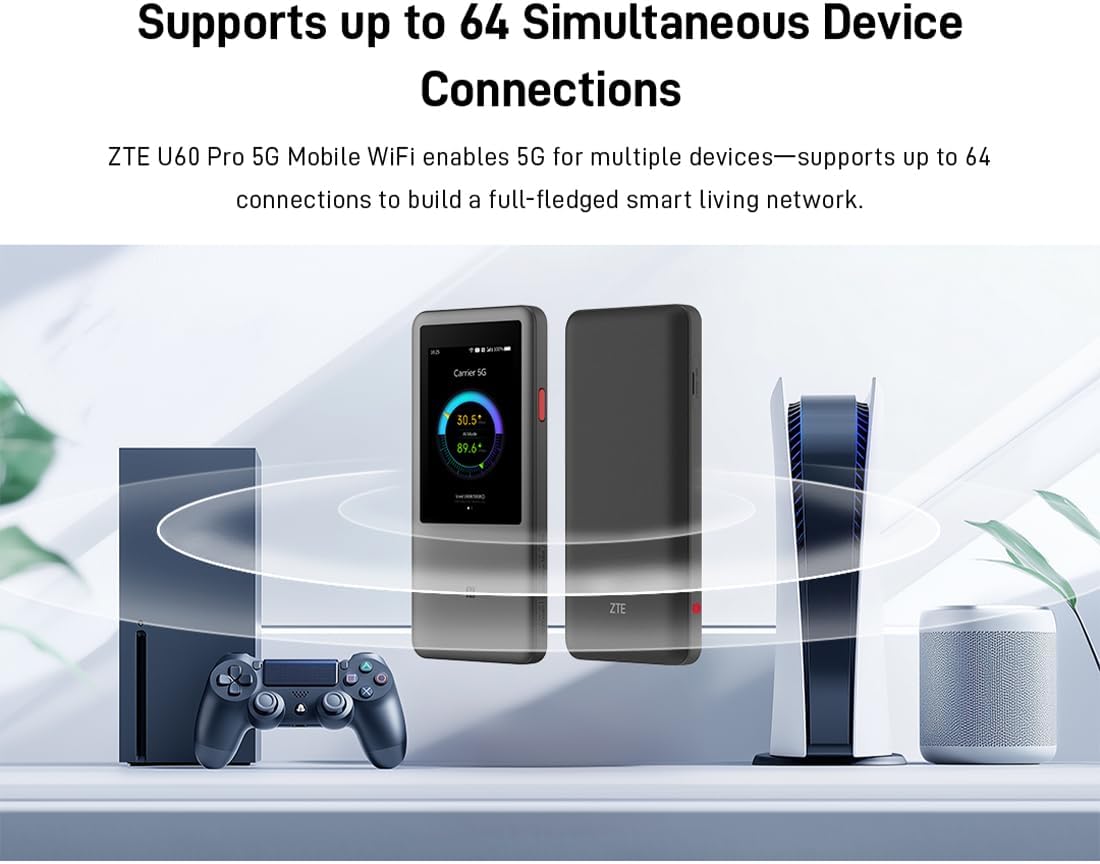
Image 3.1: The ZTE U60 Pro providing 5G Wi-Fi connectivity to various electronic devices.
3.3 AI Smart Scene Modes
The device features intelligent AI Scene technology with dynamic bandwidth allocation. It adjusts bandwidth and priority for applications based on user usage patterns to ensure smooth operation. Available modes include:
- Anchor Mode: Optimized for live streaming.
- Konferentzia modua: Prioritizes video conferencing applications.
- Bideo modua: Enhances video playback and streaming.
- Abiadura modua: Maximizes overall network speed.
- Joko modua: Reduces latency for online gaming.
3.4 AI Voice Management (via ZTE Smart Life APP)
The ZTE Smart Life APP enables effortless device management, including AI voice control. This feature allows for intelligent management of the router through voice commands. Download the ZTE Smart Life APP from your device's app store.

Image 3.2: The ZTE Smart Life APP interface demonstrating AI voice management capabilities.
3.5 Energia Bankuaren Funtzionalitatea
The U60 Pro can also serve as a power bank. With its 10,000 mAh battery and 18W reverse fast charging, you can charge other electronic devices by connecting them to the router's appropriate port (e.g., USB-C).
4. Mantentzea
4.1 Bateria zaintzea
Gailuak 10,000 mAh-ko bateria du. Bateriaren iraupena maximizatzeko:
- Saihestu muturreko tenperaturak.
- Use the provided 27W fast charger for optimal charging.
- Epe luzerako biltegiratzeko, kargatu bateria % 50era gutxi gorabehera eta gorde leku fresko eta lehor batean.
4.2 Gailuaren zaintza orokorra
To ensure the longevity and optimal performance of your ZTE U60 Pro:
- Mantendu gailua garbi eta hautsik gabe. Erabili zapi leun eta lehor bat garbitzeko.
- Saihestu gailua uretan edo hezetasun gehiegizkoan jartzea.
- Ez erori edo ez jarri gailua kolpe handirik.
- Berotu gehiegizko tenperatura saihesteko, ziurtatu aireztapen egokia erabiltzen ari zarenean.
5. Arazoak
If you encounter issues with your ZTE U60 Pro, refer to the following common solutions:
5.1 Sare konexiorik ez
- Egiaztatu SIM txartela: Ensure the SIM card is correctly inserted and activated with a 5G data plan.
- Seinalearen indarra: Verify the signal strength indicator on the device's screen. Move to an area with better 5G coverage if the signal is weak.
- Berrabiarazi gailua: Power off and then power on the U60 Pro.
- Sarearen ezarpenak: Check network settings via the touchscreen or ZTE Smart Life APP to ensure APN settings are correct (usually automatic).
5.2 Wi-Fi konexio arazoak
- Pasahitz okerra: Double-check the Wi-Fi password displayed on the U60 Pro's screen.
- Gailuaren muga: Ensure you have not exceeded the maximum of 64 connected devices.
- Restart Connected Device: Restart the device attempting to connect to the Wi-Fi.
- Routerraren berrabiarazpena: Restart the ZTE U60 Pro.
5.3 Interneteko abiadura motela
- Seinalearen indarra: A weak 5G signal will result in slower speeds.
- Datu-muga: Check if your data plan has a fair usage policy or if you have exceeded a data cap, which might throttle speeds.
- AI Scene Mode: Ensure the appropriate AI Scene mode (e.g., Speed Mode) is selected for your activity.
- Interferentzia: Move the device away from other electronic devices that might cause interference.
6. Zehaztapenak
The following table details the technical specifications of the ZTE U60 Pro MU5250:

Image 6.1: The Snapdragon X75 Flagship Chip-set Platform, central to the router's performance.
| Ezaugarri | Xehetasuna |
|---|---|
| Marka | ZTE |
| Ereduaren izena | MU5250 |
| Elementuaren eredu-zenbakia | MU5250 |
| Fabrikatzailea | ZTE |
| Ezaugarri Berezia | 5G Connection, Wi-Fi 7, AI Scenes, Voice Control, Power Bank |
| Konektibitate Teknologia | 5G, Wi-Fi |
| Wi-Fi Sorkuntza | Wi-Fi 7 |
| Haririk gabeko komunikazio estandarra | 802.11a, 802.11ac, 802.11b, 802.11g, 802.11n |
| Maiztasun Banda Klasea | Banda Bikoitza |
| Maiztasuna | 5 GHz |
| Datuen transferentzia-tasa | 4.29 Gigabits per second (Download) |
| Maximum Upstream Data Transfer Rate | 3600 Megabits per second (Wi-Fi 7 Peak Throughput) |
| Antena kopurua | 9 (Omnidirectional 5G Array) |
| Estaldura | Wide and complete (360° full-band coverage) |
| Kontrol-metodoa | Ukitu |
| Sistema eragilea | ZyNOS |
| Segurtasun Protokoloa | WPA3 |
| Router Firewall Security Level | Oinarrizkoa |
| Bateria(k) | 1 AAA - included (Note: Product description mentions 10,000 mAh, likely internal) |
| Elementuaren pisua | 435 gramo |
| Dakarten osagaiak | AC egokigailua |
| Gailu bateragarriak | Game Console, various Wi-Fi enabled devices |
| Produkturako gomendatutako erabilerak | Streaming, Gaming, Outdoor/Travel, Small Office |
| Interneteko konexioa | Bai |
| Modem Compatible | No (Functions as a standalone 5G router) |
| Etxe adimendunen bateragarritasuna | Not Smart Home Compatible |
| Ordezko piezen erabilgarritasuna | Informazioa ez dago erabilgarri |
| Software eguneraketak bermatuta arte | Informazioa ez dago eskuragarri |

Image 6.2: Highlighting the 5G ultra-high-speed network of the ZTE U60 Pro MU5250.

Image 6.3: Illustration of the 9 omnidirectional 5G antennas providing 360° full-band coverage.
7. Laguntza eta Bermea
7.1 Bezeroarentzako laguntza
For further assistance, technical support, or inquiries not covered in this manual, please refer to the official ZTE support channels or contact your retailer.
7.2 Bermearen informazioa
Warranty terms and conditions may vary by region and retailer. Please refer to the warranty card included with your product or consult your point of purchase for detailed warranty information.