
1. Sarrera
The Orange Pi 6 Plus is a high-performance single board computer featuring a CIX CD8180/CD8160 SoC with a 12-core 64-bit processor and an integrated NPU. This device is equipped with 16GB of LPDDR5 RAM and offers 45 TOPS of AI computing power, making it suitable for a wide range of applications from smart office and edge computing to AI development workstations. It supports multiple operating systems including Debian, Ubuntu, Android, Windows, and ROS2.
2. Produktua amaitu daview
2.1 Ezaugarri nagusiak
- High Performance CIX SoC: Features a 12-core 64-bit processor and NPU, with 16GB LPDDR5 RAM.
- Biltegiratzeko aukerak: Includes two M.2 KEY-M 2280 interfaces for NVMe SSDs, SPI FLASH, and TF card slots.
- 45 TOPS AI Computing Power: Enhances AI development and deployment, supporting generative AI models and 3D graphics applications.
- Konexio aberatsa: Equipped with USB3.0, USB2.0, HDMI, 5G Ethernet, MIPI camera interface, Type-C power supply, 40Pin expansion connector, and fan connector.
- Broad Application Scenarios: Ideal for smart office, edge computing, smart security, industrial automation, smart retail, home servers, and AI development.
- Excellent Software Compatibility: Supports Debian, Ubuntu, Android, Windows, and ROS2 operating systems.
2.2 Barne dauden osagaiak
- Orange Pi 6 Plus 16GB Single Board Computer
- Cooling Fan (assembled)
2.3 Board Layout and Interfaces
The Orange Pi 6 Plus board features a comprehensive set of interfaces for various applications. Below are diagrams illustrating the main components and port locations.
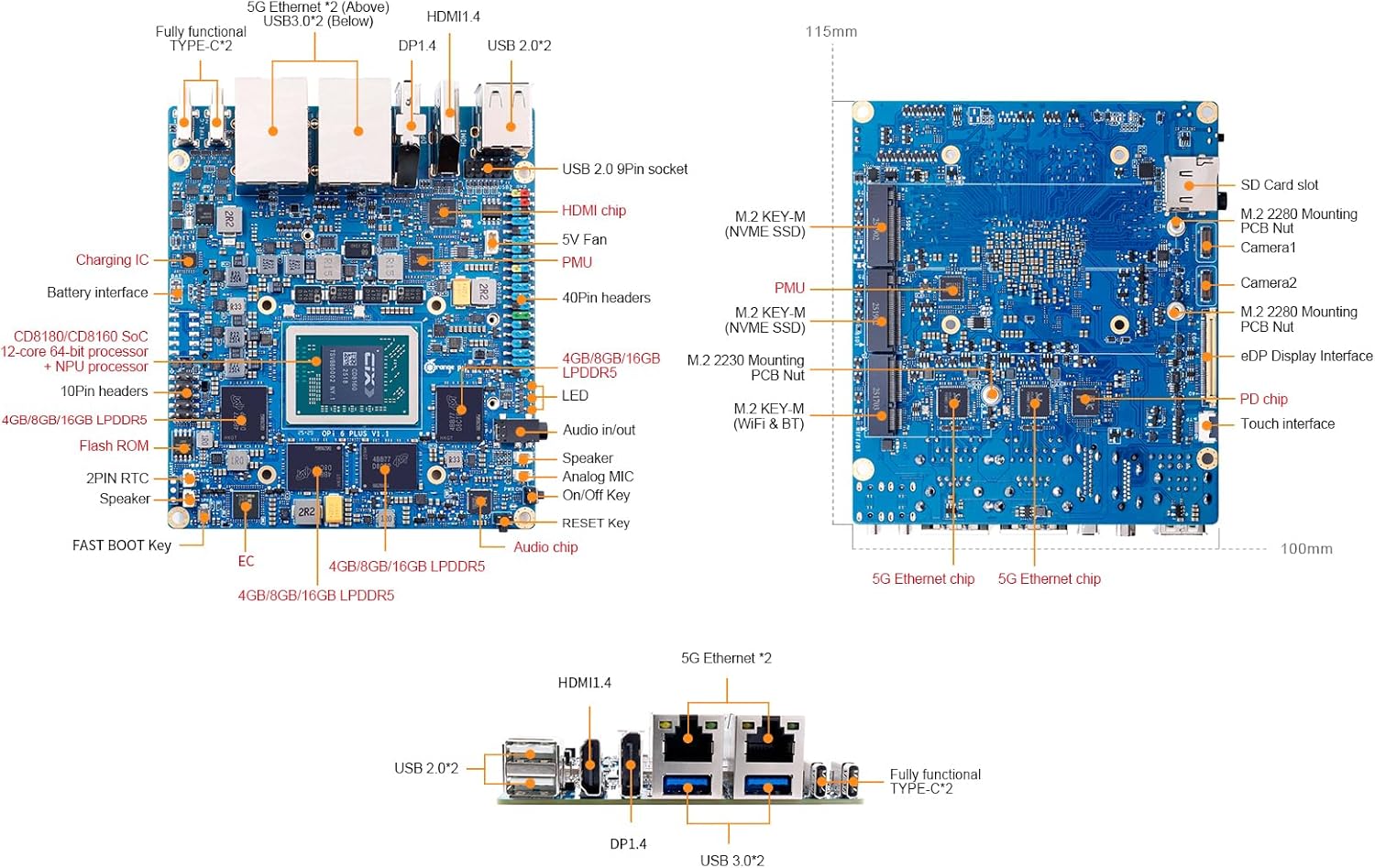
Figure 1: Detailed layout of the Orange Pi 6 Plus board, showing the placement of the CIX SoC, LPDDR5 RAM, M.2 interfaces, USB ports, HDMI, Ethernet, MIPI camera interface, TF slot, Type-C port, 40Pin expansion connector, and other key components.
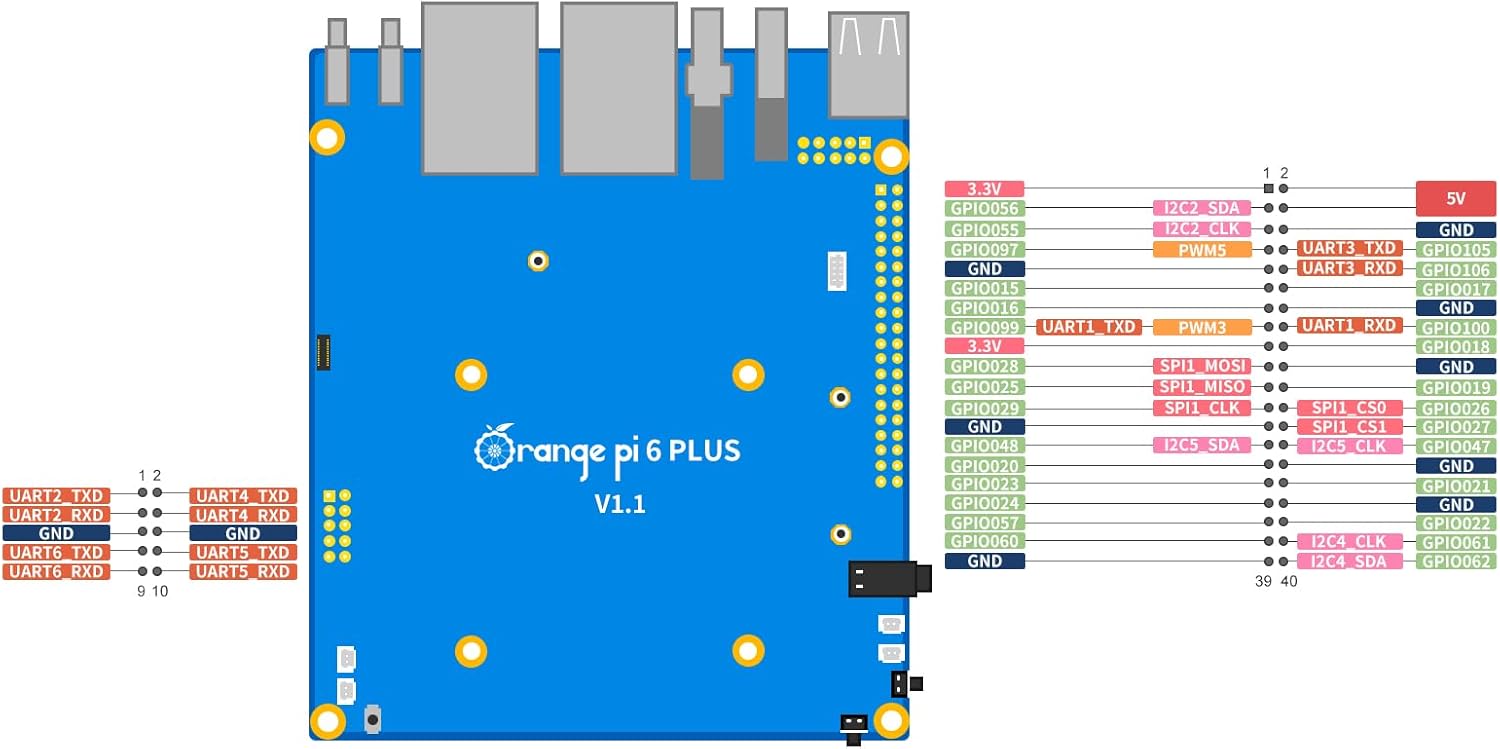
Figure 2: GPIO pinout diagram for the Orange Pi 6 Plus, detailing the functions of each pin on the 40-pin expansion header.
3. Konfigurazioa
This section outlines the general steps for setting up your Orange Pi 6 Plus. For detailed operating system installation and configuration, please refer to the official Orange Pi website documentation.
3.1 Hasierako muntaketa
- Cooling Fan Installation: The cooling fan is typically pre-assembled. Ensure it is securely attached to the board for optimal heat dissipation.
- Biltegiratze instalazioa: If using an NVMe SSD, carefully insert it into one of the M.2 KEY-M 2280 slots. For TF card storage, insert the card into the designated slot.

Figure 3: The Orange Pi 6 Plus board shown alongside its cooling fan assembly, which is included and typically pre-installed.
3.2 Periferikoak konektatzea
- Pantaila: Connect a monitor via the HDMI or DP port.
- Sarrera-gailuak: Connect a keyboard and mouse to the USB3.0 or USB2.0 ports.
- Sarea: Connect an Ethernet cable to one of the 5G Ethernet ports for wired network access.
- Elikatze-iturria: Connect a compatible Type-C power adapter to the Type-C power supply port.
3.3 Sistema eragilearen instalazioa
The Orange Pi 6 Plus supports various operating systems. You will need to flash the desired OS image onto a storage device (TF card or NVMe SSD) and potentially flash a corresponding BIOS for successful booting. Detailed instructions and OS images are available on the official Orange Pi webgunea.
4. Funtzionamendu-argibideak
Once the Orange Pi 6 Plus is set up with an operating system, you can begin using it for various tasks. The device's powerful CIX SoC and NPU enable a wide range of applications.
4.1 Piztea eta itzaltzea
- Piztu: After connecting the power supply, the board should automatically power on. Some models may have a dedicated power button.
- Itzali: Always shut down the operating system gracefully before disconnecting power to prevent data corruption.
4.2 Softwarearen bateragarritasuna
The Orange Pi 6 Plus is compatible with several operating systems, including:
- Debian
- Ubuntu
- Android
- Windows (ARM versions)
- ROS2
Ensure you use the correct OS image and follow the specific installation instructions provided by Orange Pi for optimal performance.
4.3 AI and Graphics Applications
With 45 TOPS of AI computing power, the Orange Pi 6 Plus can handle demanding AI tasks and generative AI applications. Its integrated graphics processor supports desktop 3D graphics, making it suitable for gaming and industrial design software.
5. Mantentzea
Proper maintenance ensures the longevity and stable operation of your Orange Pi 6 Plus.
- Mantendu garbi: Regularly clean the board and cooling fan to prevent dust buildup, which can hinder heat dissipation. Use compressed air or a soft brush.
- Ziurtatu aireztapen egokia: Operate the device in a well-ventilated area. If using an enclosure, ensure it has adequate airflow.
- Elikatze-iturria: Use only the recommended Type-C power supply to avoid damage.
- Software eguneraketak: Keep your operating system and drivers updated to benefit from performance improvements and security patches.
6. Arazoak
Atal honek aurki ditzakezun arazo ohikoenei irtenbideak eskaintzen ditu.
6.1 Ez dago pantaila-irteerarik
- Egiaztatu kableak: Ensure HDMI/DP cables are securely connected to both the Orange Pi and the monitor.
- Elikatze-iturria: Verify the power supply is connected and providing adequate power.
- OS Image: Confirm the OS image is correctly flashed and compatible with your display.
6.2 Operating System Not Booting
- Correct BIOS/OS: Ensure you have flashed the correct BIOS and OS image for your specific Orange Pi 6 Plus model. Refer to the official Orange Pi weborientaziorako gunea.
- Biltegiratze gailua: Check if the TF card or NVMe SSD is properly inserted and not corrupted. Try re-flashing the OS image.
6.3 Errendimendu arazoak
- Hoztea: Ensure the cooling fan is operating correctly and there is no dust buildup. Overheating can lead to performance throttling.
- Elikatze-iturria: An insufficient power supply can cause instability and reduced performance.
- Softwarearen optimizazioa: For Android OS, some users have reported needing to resize dynamic partitions after initial flashing to utilize the full storage capacity. Consult community forums or official documentation for specific steps.
6.4 Limited English Support
While official documentation is available, community support in English might be less extensive compared to other platforms. Utilize official resources and consider online translation tools for non-English forums if necessary.
7. Zehaztapenak
Below are the detailed specifications for the Orange Pi 6 Plus 16GB Single Board Computer.
| Ezaugarri | Zehaztapena |
|---|---|
| Marka | Pi laranja |
| Ereduaren izena | Orange Pi 6 Plus |
| RAM | 16 GB LPDDR5 |
| Prozesadorearen marka | Rockchip (CIX CD8180/CD8160 SoC) |
| Prozesadore kopurua | 12-Nukleoa |
| AI NPU errendimendua | 45 TOPAK |
| Sistema eragilearen euskarria | Debian, Linux, ROS2, Ubuntu, Android, Windows |
| Konektibitate Teknologia | Ethernet (5G dual LAN ports) |
| Biltegiratze interfazeak | 2x M.2 KEY-M 2280 for NVMe SSD, SPI FLASH, TF slot |
| Bideo Irteera | HDMI, DP1.4 |
| USB atakak | USB3.0, USB2.0, Type-C (fully functional) |
| Hedapena | 40Pin GPIO header |
| Elementuaren pisua | 2 ontza |
| Paketearen neurriak | 3.5 x 2.2 x 0.5 hazbete |
| Fabrikatzailea | Shenzhen Xunlong Software CO.,Limited |
8. Bermea eta Laguntza
For warranty information, technical support, and the latest documentation, please visit the official Orange Pi website. You can also contact the seller, Orange Pi Official, for product-specific inquiries.
Ofiziala Webgunea: www.orangepi.org (Adibample link, please verify actual official site)