
1. Sarrera
This manual provides detailed instructions for the installation, operation, and maintenance of your Hikity 4+64G Android Car Radio. This unit is designed to enhance your driving experience with advanced features such as wireless CarPlay, Android Auto, a 9-inch Incell touchscreen, Bluetooth 5.0, GPS navigation, FM/RDS radio, and rear camera support. It is specifically compatible with Fiat Doblo models from 2010-2015 and Opel Combo models from 2011-2018.

Irudia: Gainetikview of the Hikity Android Car Radio's key features and user interface.
2. Segurtasun informazioa
Please read all safety instructions carefully before installation and operation. Improper installation or use can lead to damage to the device, vehicle, or personal injury. Always consult a professional for installation if you are unsure.
- Ez erabili gailua gidatzeaz distraitzen zaituen moduan.
- Ziurtatu kableatu guztiak behar bezala konektatuta daudela zirkuitulaburrak edo arrisku elektrikoak saihesteko.
- Keep the device away from water and excessive heat.
- Erabili soilik fabrikatzaileak zehaztutako osagarriak.
3. Paketearen edukia
Egiaztatu behean zerrendatutako elementu guztiak zure paketean sartuta daudela:
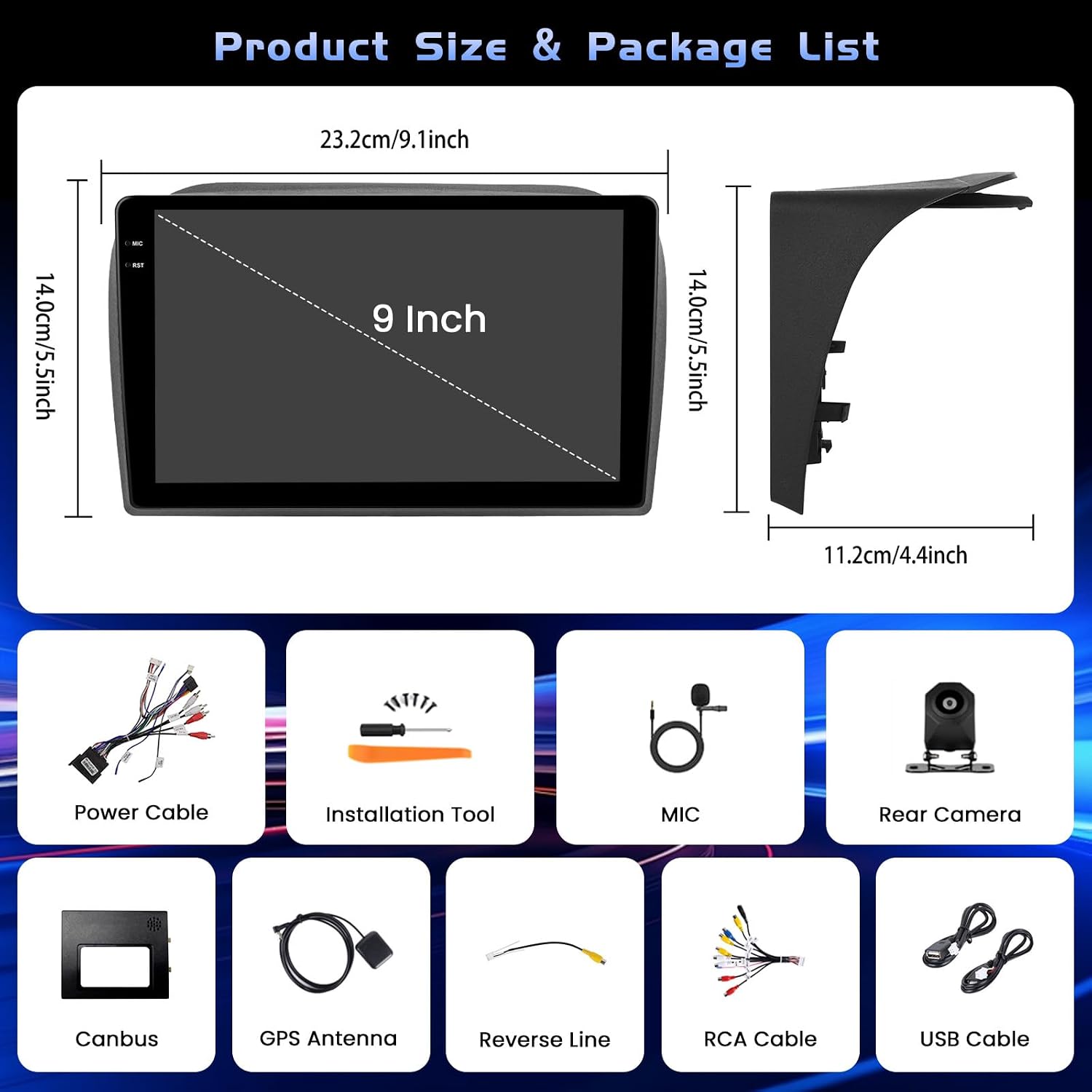
Image: Product dimensions and a visual representation of all included accessories.
- 1 x Android Car Radio
- 1 x Elikatze-kablea
- 1 x GPS antena
- 1 x Input Cable for Reversing Camera
- 1 x RCA kablea
- 2 x USB kableak
- 2 x euskarriak
- 4 x Torlojuak
- 1 x Argibide eskuliburua
- 1 x Reversing Camera
- 1 x Mikrofonoa
- 1 x Canbus
4. Konfigurazioa eta instalazioa
Proper installation is crucial for optimal performance. If you are not experienced with car audio installation, it is recommended to seek professional assistance.
4.1 Instalazio orokorra

Irudia: Instalazioa baino lehen eta ondoren view of the car radio in a compatible vehicle dashboard.
The unit is designed for a seamless fit in Fiat Doblo (2010-2015) and Opel Combo (2011-2018) models. Ensure the dashboard opening matches the unit's dimensions before proceeding.
4.2 Wire Harness Connection
Connect the main power cable, RCA cables, USB cables, reversing input cable, and GPS antenna to their respective ports on the back of the head unit. Refer to the diagram for correct connections.

Image: Detailed diagram for connecting the main wire harness components.
4.3 Atzerako kameraren kableatua
Connect the reversing camera as shown in the diagram. The backup input cable must be plugged in, even if the camera is not in use, to avoid affecting Bluetooth and WiFi signal reception.

Image: Wiring instructions for the reversing camera system.
4.4 Bolantearen Kontrolaren (SWC) Konfigurazioa
To enable steering wheel controls, connect the RX/TX cable and configure settings via the Canbus Box. Navigate to: Settings > Factory Setup (1234) > Can Settings.

Image: Instructions for setting up steering wheel controls.
5. Funtzionamendu-argibideak
5.1 Android System and Performance
The unit features a 4GB RAM and 64GB ROM configuration, ensuring stable processing and quick switching between applications like maps and music. The latest Android system provides a responsive and smooth user experience.
5.2 Bistaratzeko Ezaugarriak
The 9-inch Incell touchscreen offers a resolution of 1280 x 720 pixels, displaying vivid and clear colors. The Incell technology makes the screen thinner, brighter, sharper in sunlight, and smoother to touch.

Image: Explanation of Incell screen advantages.
The unit supports multiple UI designs and a split-screen display mode, allowing you to easily switch between maps, media, and contacts simultaneously.

Irudia: Adibamples of different user interfaces and split-screen mode.
5.3 Connectivity (CarPlay, Android Auto, Bluetooth, WiFi)
Enjoy seamless integration with your smartphone via wireless or wired CarPlay/Android Auto. This allows for hands-free calls, music playback, and navigation.

Image: Wired and wireless connectivity options including CarPlay, Android Auto, and Mirror Link.
Bluetooth 5.0 ensures stable connections for hands-free calling and clear music streaming. The integrated 5G WiFi provides fast data transmission for online navigation and media playback.

Image: Bluetooth, SWC, FM RDS, and EQ features.
5.4 GPS nabigazioa
The built-in GPS supports both online and offline maps, offering voice guidance and real-time traffic information to ensure a smooth journey.

Image: Features including WiFi, GPS navigation, and AHD backup camera.
5.5 FM/RDS irratia
The FM/RDS tuner provides access to radio stations, music, news, and traffic announcements with high clarity.
5.6 AHD atzerako kamera
The included AHD backup camera offers a 1280*720 resolution with super night vision, waterproof design (IP68), and reversing reference lines for safer parking maneuvers.
6. Mantentzea
To ensure the longevity and optimal performance of your Hikity car radio, follow these maintenance guidelines:
- Garbiketa: Erabili zapi leun eta lehor bat pantaila eta kanpoaldea garbitzeko. Saihestu garbitzaile edo disolbatzaile urratzaileak.
- Software eguneraketak: Periodically check for software updates to ensure the system runs efficiently and securely.
- Ingurumen-baldintzak: Saihestu unitatea tenperatura altuen edo eguzki-argiaren eraginpean denbora luzez jartzea.
7. Arazoak
If you encounter any issues with your car radio, refer to the following common troubleshooting steps:
- Potentziarik gabe: Check all power connections and fuses. Ensure the car's ignition is on.
- Soinurik ez: Egiaztatu bozgorailuen konexioak, bolumenaren ezarpenak eta audio iturriaren hautaketa.
- Ukipen-pantailak ez du erantzuten: Try restarting the unit. If the issue persists, a factory reset might be necessary (refer to settings).
- GPS seinalearen galera: Ziurtatu GPS antena behar bezala instalatuta dagoela eta argia duela. view zeruko.
- Bluetooth konexio-arazoak: Delete previous pairings on both the radio and your phone, then attempt to pair again.
Arazo konplexuagoetarako, jarri harremanetan bezeroarentzako arreta-zerbitzuarekin.
8. Zehaztapenak
| Ezaugarri | Zehaztapena |
|---|---|
| Produktuaren neurriak | 25.5 x 18.5 x 10 cm |
| Produktuaren pisua | 1.68 kg |
| Fabrikatzailearen eredu-zenbakia | Hikity-A8076A4291H6MI2-EU20 |
| Konektibitate Teknologia | Bluetootha, WiFia |
| Kontrolagailu mota | Android |
| Ezaugarri bereziak | 4+64G, 5G WiFi, Incell Touchscreen (1280x720), CarPlay, Android Auto, Bluetooth 5.0, GPS Navigation, FM RDS, Customizable Homepage App, Split Screen |
| Gailu bateragarriak | Amplifier, Smartphone |
| Konektore mota | 3.5 mm-ko Jack, RCA |
| Audio irteera modua | Estereoa |
| Bideo-kodeketa | MKV/RMVB/AVI/MP4/MDV |
| Irteera Potentzia | 45 Watts (180 Watts total) |
| Kanal kopurua | 4 |
| Internet Applications | Blockbuster, Browser, Netflix, Pandora, iTunes |
| Audio irteera mota | Hizlariak |
| Onartutako formatuak | AVI, WAV, WMA |
9. Bermea eta Laguntza
9.1 Bermearen informazioa
Produktu hau a 12 hilabeteko bermea. This warranty covers manufacturing defects and ensures online consultation support with a 24-hour response time.
9.2 Bezeroarentzako laguntza
For any questions, technical assistance, or warranty claims, please contact Hikity Tech Hub. Our support team is available to assist you.

Image: How to contact customer support.
You can reach us via email at: hikityservices@163.com
We aim to respond to all inquiries within 24 hours.