
1. Segurtasun informazio garrantzitsua
Mesedez, irakurri arretaz argibide guztiak monitore hau erabili aurretik. Gorde eskuliburu hau etorkizunean erreferentzia gisa.
- Ez jarri monitoreari euriari, hezetasunari edo muturreko tenperaturei.
- Ziurtatu aireztapen egokia monitorearen inguruan, gehiegi berotu ez dadin.
- Use only the power adapter provided with the monitor.
- Saihestu objektu astunak kablearen edo monitorearen gainean jartzea.
- Deskonektatu entxufea entxufetik monitoreak denbora luzez erabiliko ez badu.
- Ez saiatu monitorearen konponketa zeuk egiten. Konponketa guztiak langile kualifikatuei eskatu.
2. Paketearen edukia
Egiaztatu elementu guztiak zure paketean daudela:
- 27-inch QHD 210Hz Monitor (1 unit)
- Monitor Stand (1 unit)
- Quick Start Guide (QSG) (1 unit)
- DP Cable (1 unit)
- Power Adaptor (1 unit)
- Kable elektrikoa (unitate 1)
- Shielding Hood (2 units)

Video: KTC 27M1 27 Inch 210Hz Gaming Monitor. This video provides a visual overview of the monitor and its features.
3. Konfiguratzeko argibideak
3.1 Monitorearen euskarria muntatzea
- Kontu handiz atera monitorearen eta euskarriaren osagaiak paketetik.
- Attach the stand base to the stand arm using the provided screw.
- Align the stand arm with the mounting slot on the back of the monitor and push until it clicks into place.
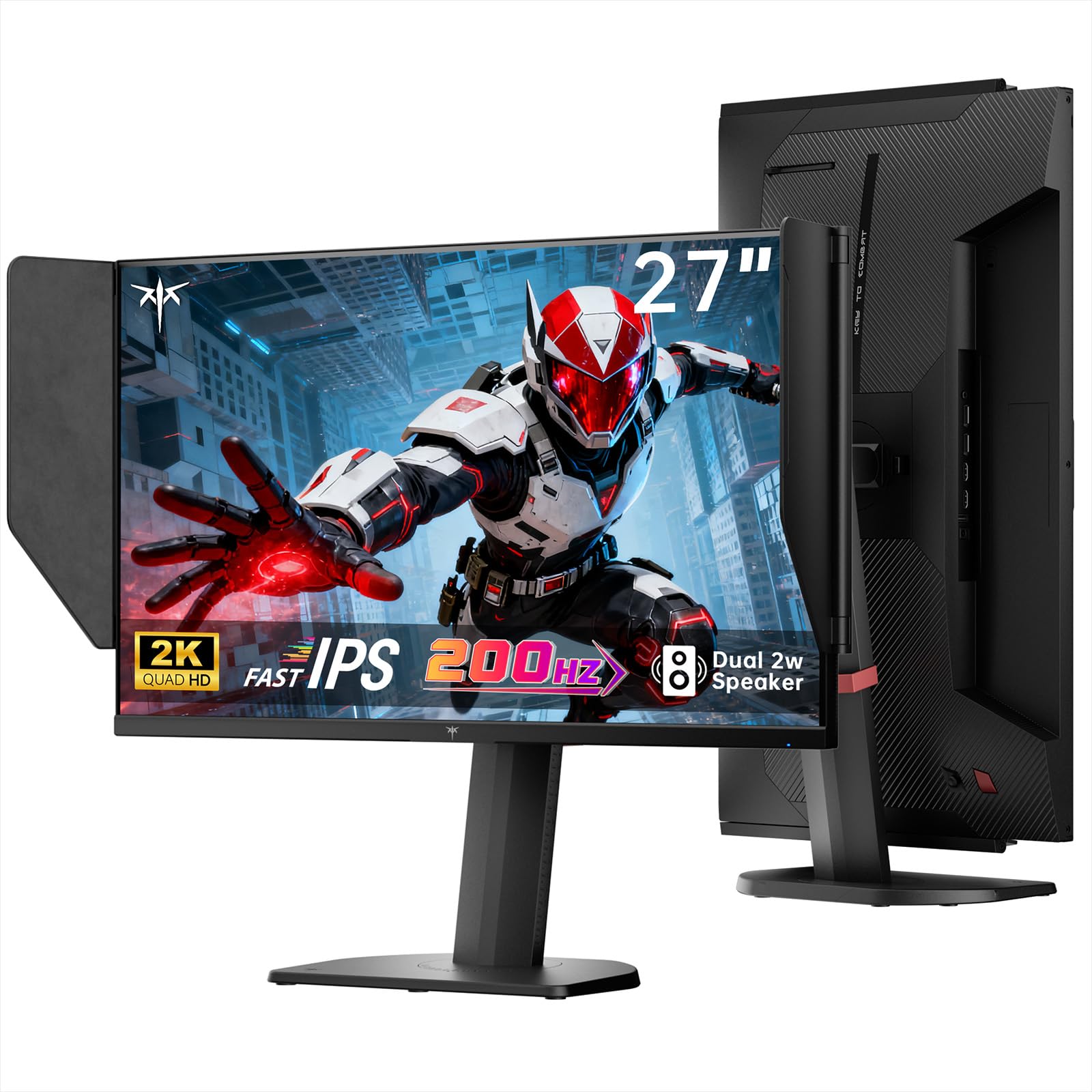
Image: The KTC 27M1 monitor with its stand fully assembled, ready for use.
3.2 Attaching the Shielding Hood
The shielding hood helps reduce glare and reflections for an optimal viewesperientzia.
- Locate the two shielding hood pieces.
- Align each piece with the designated slots on the sides of the monitor and gently slide them into place until secure.

Image: The KTC 27M1 monitor shown with the shielding hood attached, designed to block reflected light.
3.3 Konektatzeko kableak
Konektatu monitorea zure ordenagailura edo beste gailu batzuetara kable egokiak erabiliz:
- DisplayPort (DP): For 200Hz (overclockable to 210Hz) refresh rates, connect the DP cable from your graphics card to the monitor's DP 1.4 port.
- HDMI: For 144Hz refresh rates, connect an HDMI 2.0 cable from your device to one of the monitor's HDMI ports.
- Potentzia: Connect the power adapter to the DC input on the monitor, then plug the power cord into a wall outlet.
- Audioa: Connect headphones or external speakers to the 3.5mm earphone jack if desired.

Irudia: Gertuko planoa view of the KTC 27M1 monitor's rear ports, including HDMI, DisplayPort, USB, and earphone jack.
4. Funtzionamendu-argibideak
4.1 Piztu/Itzali
Press the 5-way navigation joystick located on the back of the monitor to power it on or off.
4.2 OSD menuko nabigazioa
The 5-way navigation joystick is used to access and navigate the On-Screen Display (OSD) menu:
- Sakatu joystick-a OSD menua irekitzeko.
- Move the joystick Up/Down/Left/Right to navigate through menu options.
- Sakatu berriro joystick-a aukera bat hautatzeko edo ezarpen bat berresteko.
- Move the joystick Left to go back to the previous menu or exit the OSD.
4.3 Pantailaren ezarpenak doitzea
OSD menuan, hainbat pantaila-ezarpen doi ditzakezu:
- Distira/Kontrastea: Doitu luminantzia eta kontraste maila orokorrak.
- Kolore ezarpenak: Modify color temperature (Warm, Cool, User), gamma, hue, and saturation. The monitor offers 130% sRGB color gamut and ΔE<2 for accurate color reproduction.
- Jokoen konfigurazioa: Enable/disable Adaptive Sync (FreeSync/G-Sync Compatible), adjust Overdrive (Ultra Fast recommended for gaming), and activate Game Assist features.
- Ezarpen aurreratuak: Toggle HDR (Auto/Off) and OverClock (to achieve 210Hz refresh rate).
- Sarrera: Manually select the input source (DP, HDMI1, HDMI2).
- Sistema multzoa: Change OSD language, LED indicator, audio volume, and other system preferences.
4.4 Doikuntza ergonomikoak
The monitor stand supports multiple ergonomic adjustments for comfortable viewesan:
- Altuera doitzea: Adjust the monitor height by 150±5mm.
- okertu: Tilt the screen from -5° to 35°.
- Birakaria: Swivel the monitor ±60°.
- Pibota: Pivot the screen from -5° to 90° for vertical orientation.

Image: Visual representation of the KTC 27M1 monitor's tilt, swivel, elevate, and pivot adjustments.
5. Ezaugarriak
- Pantaila: 27-inch QHD (2560x1440) Fast IPS panel.
- Freskatze-tasa: 200Hz, overclockable to 210Hz.
- Erantzun denbora: 1ms (MPRT) for sharp visuals.
- Koloreen zehaztasuna: 130% sRGB color gamut, 99% DCI-P3 coverage, ΔE<2, 450 cd/m² brightness, 1.07 Billion Colors, 1000:1 Contrast Ratio.
- Sinkronizazio egokitzailea: FreeSync and G-Sync Compatible to eliminate screen tearing.
- Begiak zaintzea: Flicker-free and low blue light modes for extended comfortable viewing.
- Audioa: Built-in dual 2W speakers.
- Konektibitatea: 2x HDMI 2.0 ports, 1x DisplayPort 1.4 port, 1x USB 2.0 port, 1x Earphone jack.
- Muntaketa: 100x100mm VESA mount compatible.
- Diseinua: Includes a detachable shielding hood to block reflected light.

Image: The KTC 27M1 monitor displaying vibrant colors, highlighting its color accuracy and brightness features.
6. Zehaztapenak
| Ezaugarri | Zehaztapena |
|---|---|
| Marka | CTC |
| Modelo zenbakia | H27T8 (Marketed as 27M1) |
| Pantailaren tamaina | 27 hazbete |
| Berezko Ebazpena | 2560x1440 (QHD) |
| Bistaratzeko Teknologia | IPS azkarra |
| Freskatze tasa | 200 Hz (Overclockable to 210 Hz) |
| Erantzun Denbora | 1 Milisegundo (MPRT) |
| Distira | 450 Kandela (cd/m²) |
| Kontraste-erlazioa | 1000:1 |
| Kolore gama | % 130 sRGB, % 99 DCI-P3 |
| Viewangelua | 178 gradu |
| HDR euskarria | Bai |
| Sinkronizazio egokitzailea | FreeSync, G-Sync Compatible |
| Bozgorailu integratuak | 2x 2W Speakers |
| Konektibitatea | 2x HDMI 2.0, 1x DisplayPort 1.4, 1x USB 2.0, 1x Earphone |
| VESA mendia | 100x100mm |
| Ergonomia | Altuera, Inklinazioa, Biraketa, Pibotearen Doikuntza |
| Energia-kontsumoa | 48 Watt |
7. Mantentzea eta Zainketa
- Pantaila garbitzea: Garbitu pantaila astiro-astiro zapi leun eta pelusik gabeko batekin. Orba egoskorrak kentzeko, garbituampen the cloth with a mild, non-abrasive screen cleaner.
- C garbiketaasing: Erabili zapi leun eta lehor bat monitorearen garbiketa egiteko.asing. Saihestu detergente indartsuak edo garbitzaile urratzaileak erabiltzea.
- Aireztapena: Ensure the ventilation openings on the monitor are clear and unobstructed to prevent overheating.
- Biltegiratzea: Monitorea denbora luzez gordetzen baduzu, deskonektatu korrontetik eta gorde leku fresko eta lehor batean.
8. Arazoak
8.1 Potentziarik gabe
- Egiaztatu elikatze-kablea monitoreari eta entxufeari ondo konektatuta dagoen.
- Egiaztatu entxufea behar bezala funtzionatzen duela beste gailu bat konektatuz.
- Ziurtatu korronte-egokigailua behar bezala konektatuta dagoela.
8.2 No Signal/Blank Screen
- Confirm that the video cable (DP or HDMI) is securely connected to both the monitor and your computer/device.
- Press the OSD joystick to open the menu and manually select the correct input source.
- Ensure your computer/device is powered on and not in sleep mode.
- Try using a different video cable or port to rule out cable/port issues.
8.3 Flickering/Distorted Image
- Egiaztatu bideo-kablea kalterik edo konexio solterik dagoen.
- Adjust the refresh rate in your computer's display settings to match the monitor's native refresh rate (200Hz or 210Hz if overclocked).
- Enable Adaptive Sync (FreeSync/G-Sync Compatible) in the monitor's OSD menu and your graphics card settings.
- Ziurtatu zure txartel grafikoaren kontrolatzaileak eguneratuta daudela.
8.4 No Sound from Built-in Speakers/Earphone Jack
- Check the volume settings in the monitor's OSD menu and your computer's operating system.
- Ziurtatu ordenagailuaren soinu ezarpenetan audio irteerako gailu zuzena hautatuta dagoela.
- Verify that the audio cable (if using external speakers) or headphones are properly connected.
9. Bermea eta Laguntza
KTC is committed to providing quality service and support for your monitor.
- Bermea: This product comes with a 3-year quality guarantee.
- Laguntza teknikoa: Lifetime technical support is available for all KTC products.
- Jarri gurekin harremanetan: If you have any questions or encounter issues, please contact KTC customer support. Solutions will be provided within 24 hours.


