
Sarrera
This manual provides essential instructions for the setup, operation, maintenance, and troubleshooting of your GOBOULT Saber Smart Watch. Please read this manual thoroughly before using your device to ensure proper function and longevity.
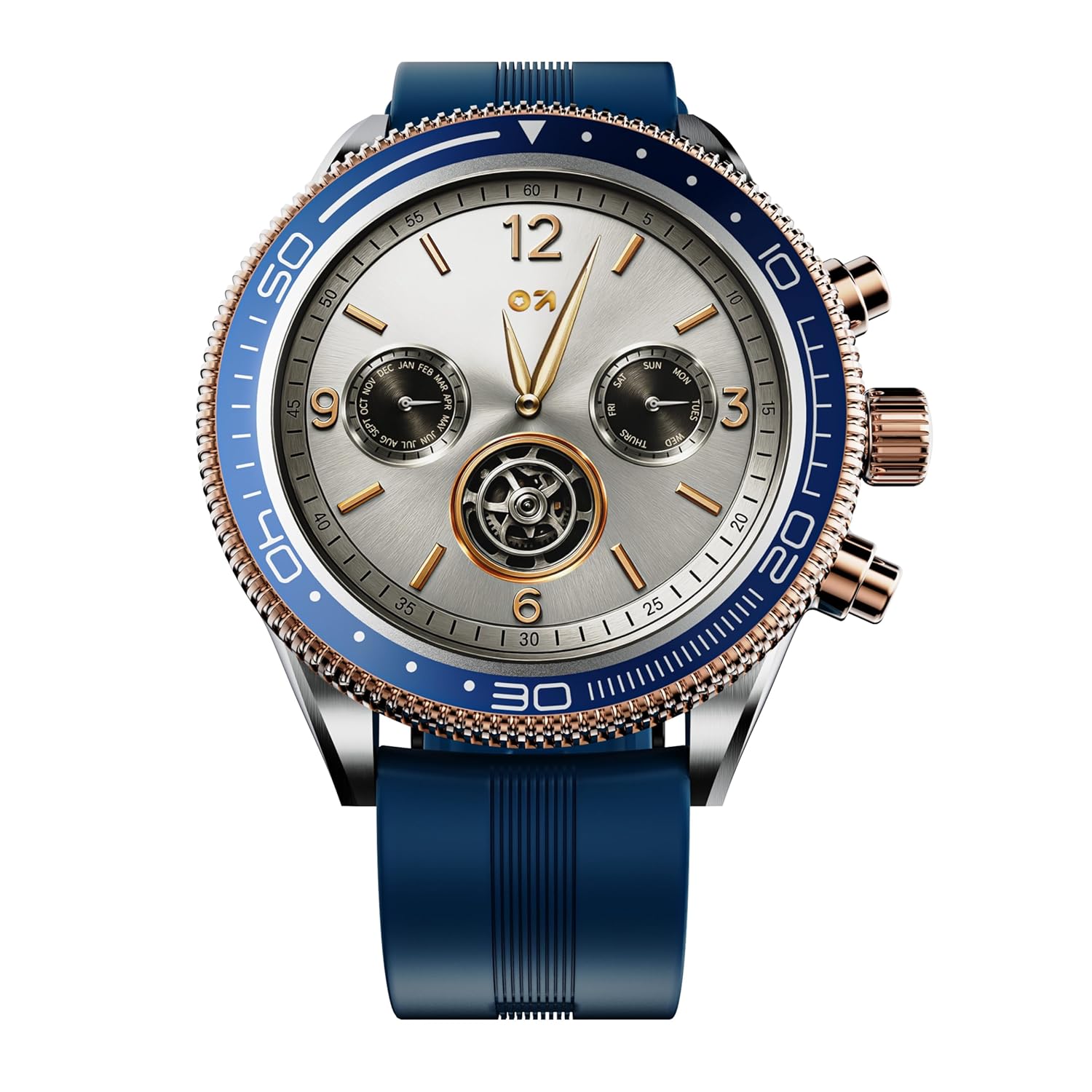
Image: The GOBOULT Saber Smart Watch, featuring a round display, blue silicone strap, and metallic accents.
1. Konfigurazioa
1.1 Paketearen edukia
Ziurtatu elementu guztiak paketean daudela:
- GOBOULT Saber Smart Watch
- Kargatzeko kablea
- Erabiltzailearen eskuliburua
1.2 Erloju adimenduna kargatzea
Before first use, fully charge your smart watch. Connect the provided charging cable to the charging port on the back of the watch and to a standard USB power adapter (not included). A full charge takes approximately 1 hour and 40 minutes.
1.3 Piztu/Itzaltzea
- Pizteko: Press and hold the side button until the GOBOULT logo appears on the screen.
- Itzaltzeko: Press and hold the side button, then select 'Power Off' from the options on the screen.
1.4 Zure telefonoarekin parekatzea
To unlock the full functionality of your Saber Smart Watch, pair it with your smartphone via Bluetooth.
- Download the official GOBOULT companion app from your smartphone's app store.
- Ziurtatu Bluetootha gaituta dagoela zure telefonoan.
- Ireki GOBOULT aplikazioa eta jarraitu pantailan agertzen diren argibideei gailu berri bat gehitzeko.
- Select 'Saber' from the list of available devices. Confirm the pairing request on both your watch and smartphone.

Image: A visual representation of the Bluetooth pairing process between the smart watch and a mobile device.
2. Funtzionamendu-argibideak
2.1 Pantaila eta nabigazioa
The Saber Smart Watch features a 1.43-inch AMOLED touchscreen display with 700 nits brightness for clear visibility. Navigation is intuitive:
- Ukipen-pantaila: Irristatu gora, behera, ezkerrera edo eskuinera menuetan eta jakinarazpenetan nabigatzeko. Sakatu elementuak hautatzeko.
- Biratzen den bezel-a: Rotate the physical bezel around the display to scroll through lists, adjust settings, or navigate interfaces seamlessly.
- Alboko botoiak: Use the side buttons for quick access to functions or to return to the home screen.

Image: The vibrant 1.43-inch AMOLED display of the smart watch, showcasing its clarity.

Irudia: Xehetasun zehatza view highlighting the functional rotating bezel for seamless navigation.
2.2 Erlojuaren aurpegiak pertsonalizatzea
The Saber Smart Watch offers over 200 watch faces. To change your watch face:
- Long-press on the current watch face on your watch.
- Irristatu ezkerrera edo eskuinera eskuragarri dauden erloju-esferak arakatzeko.
- Tap to select and apply your desired watch face.
- More options are available through the companion app.

Image: A selection of diverse watch faces available for personalization on the Saber Smart Watch.
2.3 Bluetooth bidezko deiak
With Bluetooth 5.3 connectivity, you can make and receive calls directly from your wrist. Ensure your watch is paired with your smartphone.
- Deiak egitea: Dei bat hasteko, sartu erlojuaren markagailura edo kontaktuen zerrendara.
- Deiak jasotzea: Dei bat jasotzen duzunean, erlojuaren pantailatik zuzenean erantzun edo ukatu dezakezu.
2.4 AI Ahots Laguntzailea
Activate the AI Voice Assistant on your watch to perform tasks using voice commands. This feature requires your watch to be connected to your smartphone and an active internet connection.

Image: The smart watch screen showing the AI Voice Assistant interface, ready for voice commands.
2.5 Kirol Moduak eta Jardueren Jarraipena
The watch supports over 120 sports modes to track various physical activities. Select your desired sport from the activity menu to begin tracking metrics such as steps, distance, calories burned, and heart rate.

Image: The smart watch tracking activity, illustrating its capability for over 120 sports modes.
2.6 Osasunaren Zaintza
The Saber Smart Watch provides comprehensive health monitoring features:
- Bihotz-taupadak: Zure bihotz-maiztasuna etengabe kontrolatzen du.
- SpO2 monitore: Odoleko oxigeno saturazio mailak neurtzen ditu.
- Odol-presioa: Odol-presioaren irakurketa estimatuak ematen ditu.
- Estresaren monitore: Helps track and manage stress levels.
- Period Tracking: For female users, tracks menstrual cycles.
Note: Health monitoring features are for general wellness and fitness purposes only and are not intended for medical diagnosis or treatment.

Irudia: Gehiagoview of the Health Suite features, including heart rate, SpO2, blood pressure, stress, and period tracking.
2.7 Always-On Display
The Always-On Display feature allows the watch face to remain visible at a low power state, showing essential information without needing to raise your wrist or tap the screen. This can be enabled or disabled in the watch settings.

Irudia: Erloju adimendunaren erakustaldiaasing its Always-On Display functionality.
2.8 Ezaugarri gehigarriak
Your Saber Smart Watch includes several utility features:
- Urruneko kameraren kontrola: Control your smartphone's camera remotely from your watch.
- Linterna: Use the watch screen as a temporary flashlight.
- Eguraldiaren eguneraketak: Lortu eguraldiaren informazioa denbora errealean.
- Aurkitu nire telefonoa: Bilatu parekatutako telefonoa joaraziz.
- Munduko Erlojua: View ordu-eremu desberdinetako orduak.

Image: The smart watch interface showing various utility features like remote camera control and flashlight.
3. Mantentzea
3.1 Zure erloju adimenduna garbitzea
Zure erlojuaren itxura eta funtzionaltasuna mantentzeko:
- Wipe the screen and strap regularly with a soft, lint-free cloth.
- Zikinkeria egoskorrerako, apur bat lehortuampGarbitu oihalak urarekin. Saihestu produktu kimiko gogorrak edo material urratzaileak.
- Kargatu aurretik, ziurtatu kargatzeko kontaktuak garbi eta lehor daudela.
3.2 Urarekiko eta hautsarekiko erresistentzia (IP67)
The GOBOULT Saber Smart Watch is rated IP67, meaning it is resistant to dust and can withstand immersion in water up to 1 meter for 30 minutes. This makes it suitable for daily use, including hand washing and light rain.
- Avoid prolonged immersion in water, hot water, or exposure to high-pressure water jets.
- Do not operate the watch buttons while submerged in water.
- Lehortu ondo erlojua urarekin kontaktuan egon ondoren.

Image: The smart watch demonstrating its IP67 water and dust resistance.
3.3 Bateria zaintzea
Bateriaren iraupena eta errendimendua maximizatzeko:
- Charge the watch regularly, avoiding complete discharge.
- Gorde erlojua leku fresko eta lehor batean denbora luzez erabiltzen ez duzunean.
- Saihestu erlojua muturreko tenperaturetara jartzea.

Irudia: Xehetasun zehatza view of the smart watch, emphasizing its battery endurance of up to 7 days.
4. Arazoak
If you encounter issues with your GOBOULT Saber Smart Watch, refer to the following common solutions:
- Erlojua ez da pizten: Ziurtatu erlojua guztiz kargatuta dagoela. Konektatu kargagailura gutxienez 10 minutuz berriro pizten saiatu aurretik.
- Ezin da telefonoarekin parekatu:
- Ziurtatu Bluetooth gaituta dagoela telefonoan eta erlojuan.
- Ziurtatu erlojua telefonoaren irismen-eremuan dagoela.
- Berrabiarazi erlojua eta telefonoa.
- Garbitu telefonoaren Bluetooth cachea (hala badagokio) eta saiatu berriro parekatzen.
- Osasun-datu okerrak: Ensure the watch is worn snugly on your wrist, about one finger's width above your wrist bone. Avoid excessive movement during measurements. Remember, these are for reference and not medical grade.
- Bateriaren iraupen laburra:
- Murriztu pantailaren distira.
- Desgaitu Beti Piztuta Pantaila beharrezkoa ez bada.
- Limit frequent use of power-intensive features like continuous heart rate monitoring or Bluetooth calling.
- Ziurtatu atzeko planoan dauden aplikazioek ez dutela gehiegizko energia xahutzen.
- Ukipen-pantailak ez du erantzuten: Berrabiarazi erlojua. Arazoak jarraitzen badu, ziurtatu pantaila garbi eta lehor dagoela.
If these steps do not resolve your issue, please contact GOBOULT customer support.
5. Zehaztapenak
| Ezaugarri | Xehetasuna |
|---|---|
| Marka | GOBOULT |
| Ereduaren izena | Sabre |
| Bistaratzeko tamaina | 1.43 hazbete |
| Bistaratzeko mota | AMOLED |
| Distira | 700 nit |
| Konektibitatea | Bluetooth 5.3 |
| Bateria Edukiera | 300 mAh |
| Bateriaren batez besteko iraupena | Gehienez 7 egun |
| Bateria kargatzeko denbora | 1 hour 40 minutes (100 Minutes) |
| Uraren Erresistentzia | IP67 (Splash & Dust Resistant) |
| Osasunaren Jarraipena | Heart Rate, SpO2, Blood Pressure, Stress, Period Tracking |
| Kirol modalitateak | 120+ |
| AI Ahots Laguntzailea | Bai |
| Dakarten osagaiak | Erloju adimenduna, kargatzeko kablea, erabiltzailearen eskuliburua |
| Elementuaren pisua | 130 g |
| Fabrikatzailea | Exotic Mile Private Limited |
| Jatorrizko Herrialdea | Txina |
6. Bermea eta Laguntza
6.1 Bermearen informazioa
Your GOBOULT Saber Smart Watch comes with a limited manufacturer's warranty. Please refer to the warranty card included in your product packaging for specific terms, conditions, and duration of the warranty. Keep your purchase receipt as proof of purchase for warranty claims.
6.2 Bezeroarentzako laguntza
For further assistance, technical support, or warranty inquiries, please contact GOBOULT customer service. Contact details can typically be found on the GOBOULT official webgunean edo produktuarekin batera emandako berme-txartelean.
Lineako laguntza lortzeko, bisitatu: GOBOULT Support (Adibampesteka, mesedez, kontsultatu produktuaren dokumentazio zuzena URL).


