
1. Sarrera
Eskerrik asko erosketagatik.asing the ULTIMEA Aura A60 U2621 7.1ch Dolby Atmos Soundbar System. This manual provides essential information for setting up, operating, and maintaining your new sound system. Please read this manual thoroughly before use to ensure proper functionality and to maximize your audio experience.

Figure 1.1: Immersive audio experience with the ULTIMEA Aura A60 system.
2. Segurtasun informazioa
To reduce the risk of electric shock, fire, or damage to your device, please observe the following safety precautions:
- Ez jarri aparatu hau euri edo hezetasunera.
- Ez jarri likidoz betetako objekturik, adibidez, loreontziak, aparatuan.
- Ziurtatu aireztapen egokia dagoela. Ez blokeatu aireztapen-irekidurak.
- Ez instalatu bero-iturri inongo ondoan, esate baterako, erradiadoreak, bero-erregistroak, sukaldeak edo beste aparatu batzuk (barne ampberoa sortzen duten argitzaileak).
- Babestu korronte-kablea oinez ibiltzetik edo atxilotzetik, batez ere entxufeetan, erosotasun-harguneetan eta aparatutik irteten diren puntuetan.
- Erabili soilik fabrikatzaileak zehaztutako eranskinak/osagarriak.
- Deskonektatu aparatu hau tximista-ekaitzetan edo denbora luzez erabiltzen ez duzunean.
- Jarri zerbitzu-zerbitzu guztiak zerbitzu-pertsonal kualifikatuari.
3. Paketearen edukia
Mesedez, egiaztatu elementu guztiak bertan daudela eta egoera onean daudela:
- ULTIMEA Aura A60 Soundbar
- Wireless Subwoofer (4-inch, BassMX Technology)
- 4 x Surround Speakers (2 front, 2 rear)
- Urruneko Kontrola
- HDMI kablea
- Power Adapter/Cables
- Erabiltzailearen eskuliburua (dokumentu hau)
4. Produktua amaitu daview
The ULTIMEA Aura A60 U2621 is a 7.1ch Dolby Atmos soundbar system designed to deliver an immersive home theater audio experience. It features a main soundbar unit, a powerful wireless subwoofer with BassMX technology, and four surround speakers.
4.1 Main Soundbar Unit
The main soundbar unit houses 3 main channels for clear dialogue and primary audio. It serves as the central hub for all audio connections.

Figure 4.1: Main soundbar unit with front surround speakers.
4.2 Haririk gabeko subwoofer
The dedicated 4-inch wireless subwoofer incorporates BassMX technology to enhance low frequencies, providing deep and resonant bass for a more impactful audio experience.

Figure 4.2: Wireless subwoofer with BassMX technology.
4.3 Surround bozgorailu
The system includes four surround speakers: two front and two rear. The rear speakers connect wirelessly to the soundbar, minimizing cable clutter and allowing flexible placement to create an expansive acoustic space.

Figure 4.3: Diagram of 7.1ch sound distribution.
4.4 Sarrera/Irteera Portuak
The soundbar features multiple input options for versatile connectivity:
- HDMI eARC: For high-quality audio transmission and seamless TV integration.
- Optikoa: Audio sarrera digitala.
- AUX: Audio sarrera analogikoa.
- USBa: Multimedia erreproduzitzeko.
- Bluetootha: Haririk gabeko audio erreprodukzioa.

Figure 4.4: Rear panel connections, including HDMI eARC.
5. Konfigurazioa
5.1 Kokapen fisikoa
Optimal placement of your sound system components is crucial for the best audio experience.
- Soinu barra: Jarri soinu-barra telebistaren azpian, erdigunean. Ziurtatu ez dagoela oztoporik.
- Subwoofer-a: Position the wireless subwoofer on the floor near the soundbar. Experiment with placement to find the best bass response for your room.
- Front Surround Speakers: Place the two wired front surround speakers to the left and right of your TV, ideally at ear level when seated.
- Atzeko bozgorailuak: Position the two wireless rear surround speakers behind your primary listening position, to the left and right. These speakers will automatically connect wirelessly to the soundbar once powered on.

Figure 5.1: Recommended speaker placement for Dolby Atmos.
5.2 Konexioak
Jarraitu urrats hauek zure soinu-barra sistema konektatzeko:
- Potentzia-konexioa: Connect the power cables to the soundbar, subwoofer, and surround speakers, then plug them into a power outlet.
- HDMI eARC (Gomendatua): Connect one end of the provided HDMI cable to the HDMI eARC port on your soundbar and the other end to the HDMI eARC/ARC port on your TV. This connection supports Dolby Atmos and allows for TV remote control of the soundbar.
- Konexio optikoa (alternatiboa): If your TV does not have an HDMI eARC/ARC port, connect an optical cable (not included) from your TV's optical output to the OPTICAL input on the soundbar.
- AUX Connection (Alternative): For analog audio sources, connect a 3.5mm AUX cable (not included) from your device's audio output to the AUX input on the soundbar.
- USB konexioa: Insert a USB drive into the USB port on the soundbar for direct media playback.
- Bluetooth bidezko lotura To connect a Bluetooth device, select the Bluetooth input on the soundbar. On your device, search for 'ULTIMEA Aura A60' and pair.
6. Funtzionamendu-argibideak
6.1 Piztu/Itzali
Press the Power button on the soundbar or the remote control to turn the system on or off.
6.2 Sarrera hautatzea
Use the 'Input' button on the remote control or the soundbar to cycle through available input sources: HDMI eARC, Optical, AUX, USB, and Bluetooth.

Figure 6.1: Remote control for easy operation.
6.3 Bolumen kontrola
Adjust the master volume using the 'Volume Up' and 'Volume Down' buttons on the remote control or the soundbar. You can also adjust subwoofer and surround speaker levels independently.
6.4 Sound Modes and EQ Presets
The Aura A60 offers various sound modes and EQ presets to optimize audio for different content and preferences.
- Dedicated Modes: Select from 6 specialized modes: Movie, Music, Voice, Sports, Game, and Night.
- EQ aurrezarpenak: Access 121 professional EQ presets for genres like Bass, Pop, Classical, and Rock via the ULTIMEA app.

Figure 6.2: 121 preset EQ matrix for customized audio.
6.5 Aplikazioen kontrola
Download the ULTIMEA app to your smartphone for advanced control and customization options, including a 10-band EQ and access to all EQ presets.
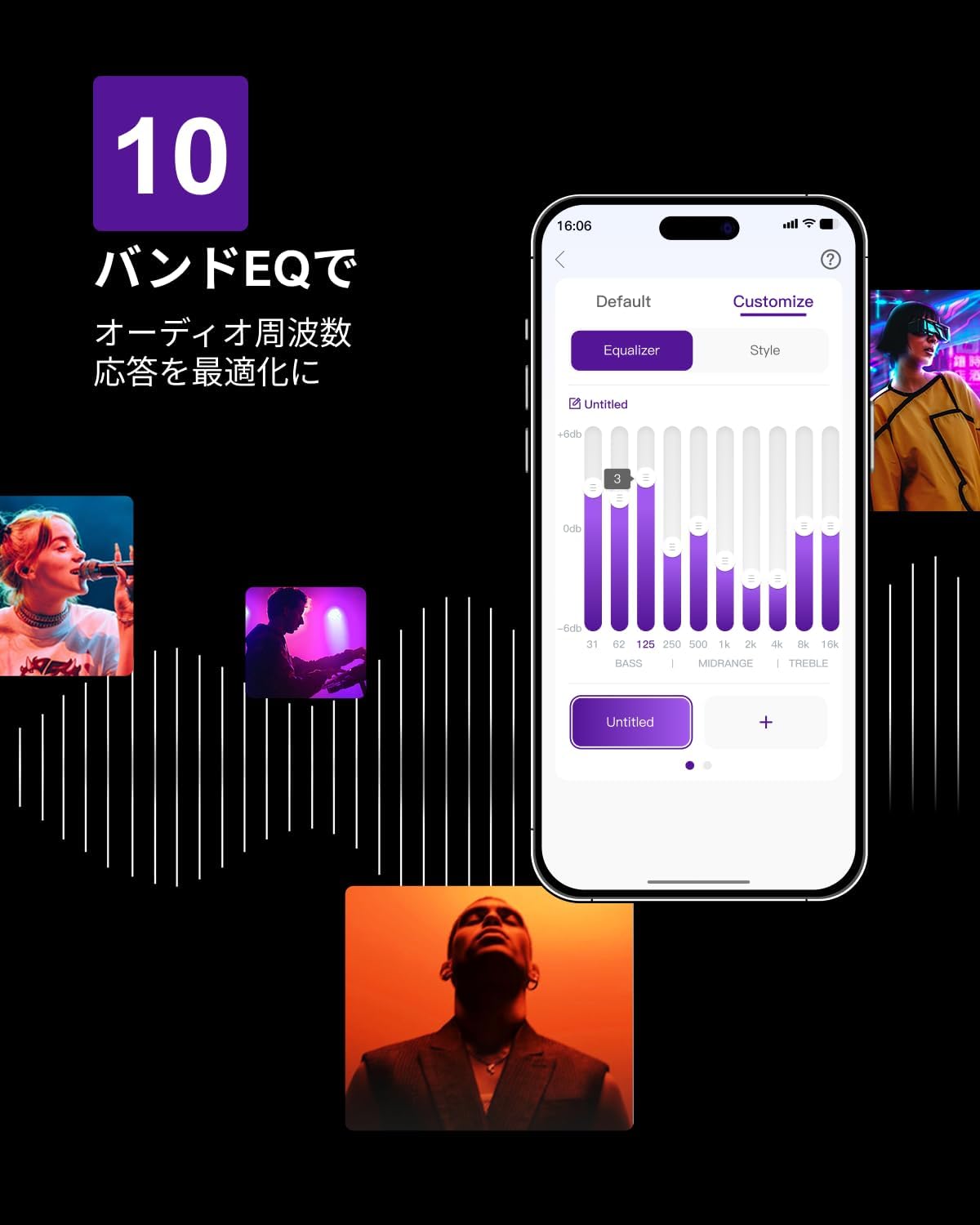
Figure 6.3: ULTIMEA mobile application interface.
7. Mantentzea
To ensure the longevity and optimal performance of your ULTIMEA Aura A60 soundbar system, follow these simple maintenance guidelines:
- Garbiketa: Use a soft, dry cloth to wipe the surfaces of the soundbar, subwoofer, and speakers. Do not use liquid cleaners or abrasive materials, as they may damage the finish.
- Aireztapena: Ensure that all ventilation openings remain clear and unobstructed to prevent overheating.
- Biltegiratzea: Sistema denbora luzez gordetzen baduzu, deskonektatu korrontetik eta gorde leku fresko eta lehor batean, eguzki-argitik eta muturreko tenperaturetatik urrun.
8. Arazoak
If you encounter issues with your soundbar system, refer to the following common problems and solutions:
| Arazoa | Kausa posiblea | Irtenbidea |
|---|---|---|
| Soinu barratik ez dago soinurik. | Incorrect input selected, volume too low, cables not connected properly. | Verify the correct input source. Increase volume. Check all cable connections (HDMI, Optical, AUX). Ensure the soundbar is powered on. |
| No sound from subwoofer/surround speakers. | Subwoofer/speakers not paired or powered on, volume too low. | Ensure subwoofer and surround speakers are powered on. They should automatically pair. If not, refer to the pairing instructions in the full manual (if available) or contact support. Increase their individual volume levels. |
| Soinu-kalitate distortsionatua edo eskasa. | Incorrect audio settings, poor source quality, interference. | Adjust EQ settings or try different sound modes. Ensure the audio source is high quality. Check for nearby electronic devices causing interference. |
| Bluetooth konexio arazoak. | Device out of range, not in pairing mode, interference. | Ensure the soundbar is in Bluetooth pairing mode. Move your device closer to the soundbar. Disconnect and re-pair the device. |
If the problem persists after trying these solutions, please contact ULTIMEA customer support.
9. Zehaztapenak
| Ezaugarri | Xehetasuna |
|---|---|
| Marka | ULTIMEA |
| Ereduaren izena | Aura A60 |
| Modelo zenbakia | U2621 |
| Hizlari mota | Soundbar with 7.1ch Surround Sound |
| Audio Teknologia | Dolby Atmos, BassMX Technology |
| Konektibitatea | HDMI eARC, Bluetooth, Optical, AUX, USB |
| Subwoofer | 4-inch Wired Subwoofer (integrated BassMX) |
| Inguruko bozgorailuak | 4 (2 wired front, 2 wireless rear) |
| Kontrola | Remote Control, ULTIMEA App |
| Kolorea | Beltza |
| Neurriak (L x W x H) | 9 cm x 40 cm x 7 cm (Soundbar, approximate) |
| Jatorrizko Herrialdea | Txina |
10. Bermea eta Laguntza
ULTIMEA is committed to providing high-quality products and customer satisfaction. Your Aura A60 U2621 soundbar system comes with comprehensive support.
10.1 Bermearen informazioa
Specific warranty details may vary by region. Please refer to the warranty card included with your product or visit the official ULTIMEA webwebgunea bisitatu berme-baldintza eguneratuenak ikusteko.
10.2 Bezeroarentzako laguntza
For any questions, technical assistance, or troubleshooting not covered in this manual, please contact our dedicated support team:
- 365-Day Support: Our expert staff is available year-round to assist you.
- Zuzeneko txata: Instant responses are available via live chat on our webgunea.
- Itzulketak: We offer a 30-day return policy with free shipping for your peace of mind.

365-Day Expert Support

Instant Live Chat

30 eguneko Doako Itzulketak
Laguntza gehiago behar baduzu, bisitatu ULTIMEA Brand Store.


