
1. Sarrera
Thank you for choosing the GOBOULT Z40 V2.0 True Wireless Earbuds. These earbuds are designed to provide a high-quality audio experience with features such as extended playtime, clear call quality, and low-latency gaming. This manual provides instructions for setup, operation, maintenance, and troubleshooting to ensure optimal use of your device.

Image 1.1: GOBOULT Z40 V2.0 True Wireless Earbuds and Charging Case.
2. Produktua amaitu daview
2.1 Barne dauden osagaiak
Paketeak honako elementu hauek ditu:
- GOBOULT Z40 V2.0 Earbuds
- Kargatzeko kaxa
- USB kargatzeko kablea
- Belarri-puntak (tamaina desberdinak)
- Erabiltzailearen eskuliburua
- Berme Txartela
2.2 Ezaugarri nagusiak
- Gehienez 70 ordu jolasteko denbora
- Quad Mic Environmental Noise Cancellation (ENC) for clear calls
- 13mm Bass Drivers for enhanced audio
- 45ms Low Latency Gaming Mode
- Bluetooth v5.4 for stable connectivity
- IPX5 Uraren Erresistentzia
- Smart Touch Controls with Voice Assistant support
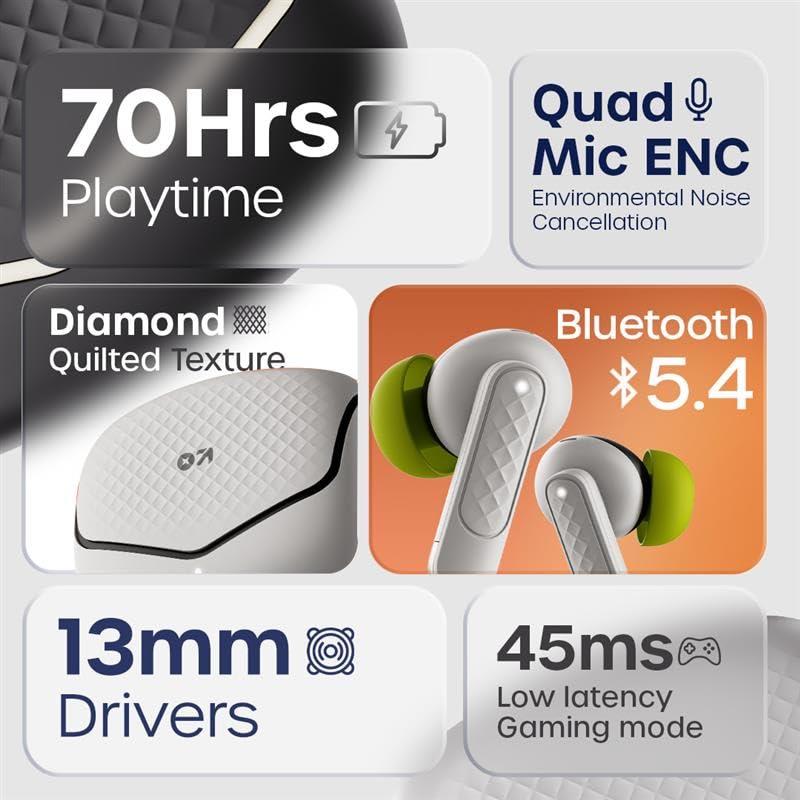
2.1. irudia: Amaituview of GOBOULT Z40 V2.0 key features.
3. Konfiguratzeko argibideak
3.1 Entzungailuak eta zorroa kargatzea
Lehenengo aldiz erabili aurretik, kargatu guztiz entzungailuak eta kargatzeko zorroa.
- Jarri entzungailuak kargatzeko zorroan.
- Konektatu USB kargatzeko kaxako kargatzeko atakara eta energia-iturri batera.
- Kaxako adierazle-argiak kargatze-egoera erakutsiko du.
- A 10-minute charge provides approximately 120 minutes of playtime. The case offers up to 70 hours of total battery life for the earbuds.

Image 3.1: Charging and battery life details.
3.2 Bluetooth parekatzea
The GOBOULT Z40 V2.0 earbuds utilize Bluetooth v5.4 for quick and reliable pairing.
- Open the charging case. The earbuds will automatically enter pairing mode (Blink&Pair™ Tech).
- Zure gailuan (telefono adimenduna, tableta, ordenagailu eramangarria), gaitu Bluetooth-a.
- Bilatu available Bluetooth devices and select "GOBOULT Z40 V2.0" from the list.
- Behin konektatuta, entzungailuek parekatzea behar bezala egin dela adieraziko dute.
- The earbuds will automatically reconnect to the last paired device when removed from the case.

Image 3.2: Bluetooth 5.4 and Blink&Pair™ technology.
4. Funtzionamendu-argibideak
4.1 Ukitu Kontrolak
The earbuds feature intuitive touch controls for managing various functions:
- Erreproduzitu/Pausatu: Sakatu bakar batean entzungailu batean.
- Hurrengo ibilbidea: Sakatu birritan eskuineko entzungailuan.
- Aurreko pista: Sakatu bi aldiz ezkerreko entzungailuan.
- Deia erantzun/amaitu: Sakatu bakar batean entzungailu batean.
- Deia baztertu: Eduki sakatuta aurikularretako bat 2 segundoz.
- Aktibatu Ahots Laguntzailea: Sakatu hiru aldiz entzungailuetako edozeinetan.
- Joko modua aktibatu/desaktibatu: Press and hold the right earbud for 2 seconds (specific gesture may vary, refer to quick start guide).

Image 4.1: Hands-free control and voice assistant activation.
4.2 Deiak egitea eta jasotzea
The Quad Mic ENC system ensures clear voice transmission during calls by reducing environmental noise.
- Ensure earbuds are connected to your device.
- Use the touch controls to answer, end, or reject calls.

Image 4.2: Quad Mic ENC for clear calls.
4.3 Joko modua
Activate Combat™ Gaming Mode for a low-latency audio experience, ideal for gaming and video playback.
- Refer to the touch control section for activating Gaming Mode (typically a press and hold gesture).
- This mode reduces audio latency to 45ms, providing synchronized sound with on-screen action.

Image 4.3: Low Latency Gaming Mode.
5. Mantentzea
5.1 Garbiketa
Aurikularren errendimendua eta iraupena mantentzen laguntzen du aldizka garbitzeak.
- Erabili zapi leun, lehor eta lihorik gabeko bat entzungailuak eta kargatzeko zorroa garbitzeko.
- Gently remove any earwax or debris from the eartips and speaker mesh using a small brush or cotton swab.
- Saihestu material urratzaileak, alkohola edo garbitzaile kimikoak erabiltzea.
5.2 Urarekiko Erresistentzia (IPX5)
The earbuds are rated IPX5 water-resistant, meaning they can withstand sweat and light splashes.
- Ez murgildu entzungailuak uretan.
- Avoid exposing them to heavy rain or strong water jets.
- Ziurtatu entzungailuak lehor daudela kargatzeko zorroan berriro sartu aurretik, kalteak ekiditeko.
Image 5.1: IPX5 Water Resistance.
6. Arazoak
If you encounter any issues with your GOBOULT Z40 V2.0 earbuds, please refer to the following common solutions:
- Soinurik ez: Ensure the earbuds are charged and properly paired with your device. Check the volume level on both the earbuds and your device.
- Parekatzeko arazoak: Ziurtatu Bluetooth-a gaituta dagoela zure gailuan eta entzungailuak parekatze moduan daudela. Saiatu entzungailuak desparekatzen eta berriro parekatzen.
- Etengabeko konexioa: Ensure you are within the 10-meter Bluetooth range. Avoid obstacles between the earbuds and your device.
- Kargatzeko arazoak: Verify the charging cable is securely connected and the power source is active. Clean the charging contacts on both the earbuds and the case.
- Mikrofonoa ez dabil: Ensure the earbuds are properly seated in your ears. Check if any debris is blocking the microphone ports.
If the problem persists, please contact GOBOULT customer support for further assistance.
7. Zehaztapenak
Detailed technical specifications for the GOBOULT Z40 V2.0 True Wireless Earbuds:
| Ezaugarri | Zehaztapena |
|---|---|
| Ereduaren izena | Z40 V2.0 (Airbass Earbuds) |
| Konektibitate Teknologia | Haririk gabeko (Bluetooth) |
| Bluetooth bertsioa | 5.4 |
| Bluetooth barrutia | 10 metro |
| Audio kontrolatzailearen tamaina | 13 milimetro |
| Audio kontrolatzaile mota | Gidari dinamikoa |
| Maiztasun Erantzuna | 20 Hz |
| Sentikortasuna | 115 dB |
| Bateriaren iraupena (entzungailuak) | Gehienez 70 ordu (kargatzeko zorroarekin) |
| Kargatzeko Denbora | 10 Minutes for 120 minutes playtime |
| Mikrofonoa | Quad Mic with ENC |
| Audio latentzia | 45 milisegundo (joko modua) |
| Uraren Erresistentzia | IPX5 |
| Kontrolagailu mota | Ukitu |
| Hardware interfazea | USB C mota |
| Belarrien Kokatzea | Belarrian |
| Produktuaren neurriak | 5.8 x 4 x 4.9 cm |
| Elementuaren pisua | 600 g (total package weight) |

Image 7.1: 13mm Bass Drivers for enhanced audio.
8. Bermea eta Laguntza
8.1 Fabrikatzailearen bermea
The GOBOULT Z40 V2.0 True Wireless Earbuds come with a 1-year manufacturer’s warranty. This warranty covers manufacturing defects and ensures product quality and durability.
8.2 Bezeroarentzako laguntza
For any product-related queries, technical assistance, or warranty claims, please contact GOBOULT customer support. Refer to the warranty card included in your package for contact details or visit the official GOBOULT webgunea.