
1. Sarrera
This manual provides instructions for the Vention Wireless HDMI Transmitter and Receiver Kit, Model 1TX to 4RX. This kit allows for wireless transmission of HDMI signals from a source device to up to four display devices, supporting 4K decoding with a crystal-clear 1080p@60Hz output. It is designed for various applications, including home entertainment, business meetings, and educational presentations.
2. Paketearen edukia
Mesedez, egiaztatu elementu guztiak zure paketean daudela:
- 1 x Vention Wireless HDMI Transmitter (TX Unit)
- 4 x Vention Wireless HDMI Receiver (RX Unit)
- 5 x USB-C Power Cables
- 1 x HDMI Extension Cable (if included)
- 1 x Mini HDMI Adapter (if included)
- 1 x Micro HDMI Adapter (if included)
- Erabiltzailearen eskuliburua (dokumentu hau)
Note: The number of adapters and cables may vary slightly based on the specific kit configuration.
3. Produktuaren ezaugarriak
- Wireless Multi-Screen Extension: Transmit HDMI signals to up to four displays simultaneously.
- Ultra-Long Distance Transmission: Supports wireless transmission up to 656 feet (200 meters) for 1TX to 1RX configuration. Distances vary for multiple receivers.
- Plug and Play: No drivers or complex setup required.
- 4K Decoding to 1080p@60Hz Output: Decodes 4K input signals and outputs them in crystal-clear 1080p at 60Hz.
- Haririk gabeko teknologia aurreratua: Utilizes 2.4G and 5G dual-band Wi-Fi with MIMO & LDS technology for stable and low-latency signal transmission.
- Live Status Display: Integrated OLED screen on units shows signal strength, connection status, and error indications.
- Hozte eraginkorra: Designed with integrated heat dissipation for stable long-term operation.
- Bateragarritasun Unibertsala: Works with various HDMI source devices (laptops, PCs, game consoles, cameras) and display devices (TVs, monitors, projectors).
- HDCP euskarria: Compatible with content protected by HDCP, allowing playback from streaming services.

Irudia: Gainetikview of Vention Wireless HDMI Extender features, including 4K decoding to 1080p, integrated heat dissipation, and extension/mirroring modes.
4. Konfiguratzeko argibideak
- Konektatu transmisorea (TX):
- Plug the Vention Wireless HDMI Transmitter (TX unit) into the HDMI output port of your source device (e.g., laptop, PC, game console).
- Connect a USB-C power cable to the TX unit and plug the other end into a 5V/2A USB power adapter (not always included) or a powered USB port on your source device. Ensure adequate power for stable operation.
- Connect the Receiver(s) (RX):
- Plug each Vention Wireless HDMI Receiver (RX unit) into an available HDMI input port on your display device(s) (e.g., TV, monitor, projector).
- Connect a USB-C power cable to each RX unit and plug the other end into a 5V/2A USB power adapter or a powered USB port on your display device.
- Piztu gailuak:
- Power on your source device and all connected display devices.
- Select the correct HDMI input on each display device where an RX unit is connected.
- Konexio automatikoa:
- The TX and RX units are designed for plug-and-play operation. They should automatically detect each other and establish a connection within a few seconds.
- The OLED screen on the units will display the connection status and signal strength.

Image: Illustration of connecting a single transmitter to multiple receivers for multi-screen extension.
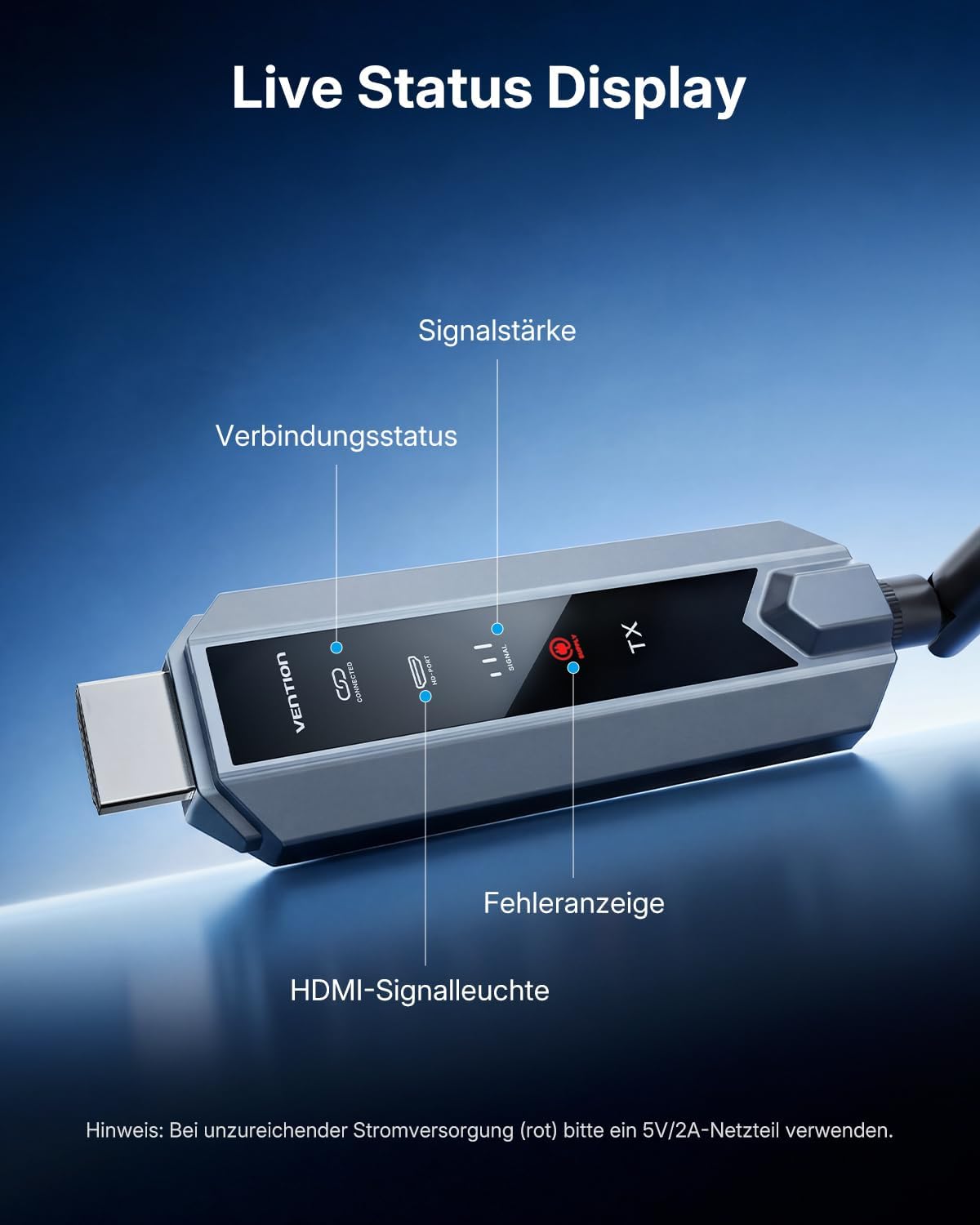
Image: Close-up of the Vention Wireless HDMI unit's OLED display showing signal strength, connection status, and error indicators. A note advises using a 5V/2A power supply if the error indicator is red.
5. Funtzionamendu-argibideak
Once the TX and RX units are properly connected and powered, the system will automatically transmit the HDMI signal. No further configuration is typically required for basic operation.
- Seinalearen transmisioa: The video and audio from your source device will be mirrored or extended to all connected display devices.
- Extension and Mirroring Modes: The system supports both extending your desktop across multiple screens and mirroring the same content on all displays. The specific mode is typically controlled by your source device's display settings.
- Jarraipen egoera: Refer to the OLED display on the TX and RX units to monitor connection status and signal strength. A stable connection is indicated by a consistent signal strength reading.

Image: Visual representation of 4K Ultra HD decoding to 1080p@60Hz crystal-clear output on a large screen from a laptop.

Image: Depiction of integrated MIMO & LDS 5G technology for strong signal reception and low latency, ensuring an instant picture.
6. Mantentzea
- Garbiketa: Erabili zapi leun eta lehor bat unitateak garbitzeko. Saihestu garbitzaile likidoak edo material urratzaileak.
- Aireztapena: Ensure the units are placed in a well-ventilated area to prevent overheating, especially during extended use. Do not cover the ventilation holes.
- Konexioaren Osotasuna: Periodically check all cable connections (HDMI, USB-C) to ensure they are secure.
- Biltegiratzea: When not in use for extended periods, disconnect the power and store the units in a cool, dry place.
7. Arazoak
| Arazoa | Kausa posiblea | Irtenbidea |
|---|---|---|
| No signal or black screen on display. |
|
|
| Flickering or unstable video. |
|
|
| Ez dago audiorik edo audioaren kalitate eskasa. |
|
|
| Noticeable input lag during gaming. |
|
|
| Red error indicator on OLED screen. |
|
|
8. Zehaztapenak
| Marka | Vention |
| Eredua | 1TX to 4RX (TZ-ADPH0-4-01) |
| Konektibitate Teknologia | Wi-Fi (2.4G + 5G Dual Band) |
| Konektore mota | HDMI |
| Bideo Ebazpena | 4K input decoding, 1080p@60Hz output |
| Haririk gabeko transmisio-eremua |
|
| Bideo-kodeka | H.264, H.265/HEVC |
| Potentzia Sarrera | USB-C (5V/2A recommended) |
| Ezaugarri bereziak | Wireless Multi-Screen Extension, Ultra-Long Distance, Plug and Play, Efficient Cooling, Universal Compatibility, Live Status Display, HDCP Support |
| Gailu bateragarriak | Laptops, PCs, Game Consoles (PS5, Xbox), Cameras, TVs, Monitors, Projectors |

Image: Diagram illustrating the maximum wireless transmission distances for different configurations: 1TX to 1RX (200m/656ft), 1TX to 2RX (120m/394ft), 1TX to 3RX (80m/263ft), and 1TX to 4RX (80m/263ft).

Image: Visual representation of the broad compatibility of the Vention Wireless HDMI Extender, showing various sender devices (camera, TV-Box, PC, laptop, game console) and receiver devices (projector, TV, monitor).
9. Bermea eta Laguntza
For warranty information and technical support, please refer to the documentation included with your product or visit the official Vention webgunea. Gorde erosketa-agiria berme-erreklamazioetarako.


