
1. Sarrera
Thank you for choosing the suevery Prebuilt Gaming Desktop Computer. This manual provides essential information for setting up, operating, maintaining, and troubleshooting your new computer. Please read this manual thoroughly before using the product to ensure proper operation and to maximize its lifespan.
This gaming desktop is equipped with an AMD Ryzen 5 6-core processor, an NVIDIA RTX 3050 6G graphics card, 16GB of DDR4 RAM, and a 512GB SSD, offering a powerful platform for gaming, business, and personal computing tasks.
2. Konfiguratzeko argibideak
2.1 Paketatzea
- Kontu handiz atera ordenagailua bere paketetik.
- Check for any visible damage during shipping. If damage is found, contact your retailer immediately.
- Ensure all accessories listed in the packing contents are present.
2.2 Periferikoak konektatzea
Konektatu monitore, teklatu, sagu eta beste periferiko batzuk ordenagailuaren atzealdeko eta aurreko portu egokietara.
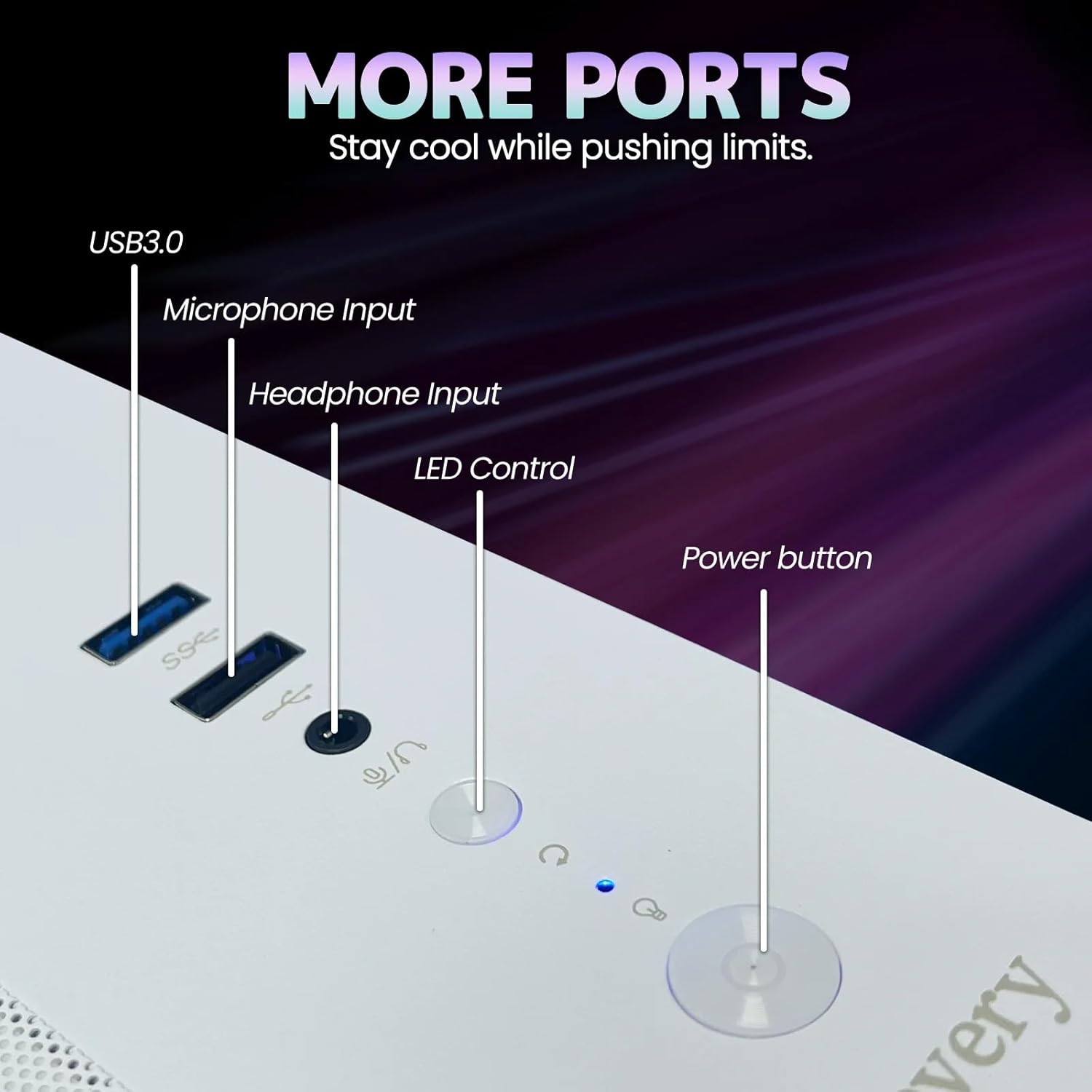
Image: Front Panel Ports. This image displays the front panel of the suevery gaming desktop, highlighting the USB 3.0 ports, microphone input, headphone input, LED control button, and the main power button for easy access.

Image: Rear Panel Ports. This image illustrates the rear panel of the suevery gaming desktop, detailing the available input/output ports such as USB ports, HDMI, DisplayPort, and audio connections for connecting external devices and displays.
- Monitorea: Connect your monitor to the graphics card's HDMI or DisplayPort output. Ensure the cable is securely fastened.
- Teklatua eta sagua: Connect to any available USB ports.
- Audioa: Konektatu bozgorailuak edo entzungailuak audio irteerako konektoreetara.
- Sarea: For wired internet, connect an Ethernet cable to the LAN port. For wireless, ensure the Wi-Fi antenna (if included) is attached.
2.3 Energia-konexioa
- Connect the power cable to the power supply unit (PSU) at the rear of the computer.
- Entxufatu kablearen beste muturra lurrera konektatutako entxufe elektriko batera.
2.4 Hasierako piztea
- Press the power button located on the front panel of the computer.
- The computer will boot up. Since the system comes with DOS, you will need to install your preferred operating system (e.g., Windows) to utilize its full functionality. Refer to your operating system's installation guide for detailed steps.
3. Funtzionamendu-argibideak
3.1 Installing an Operating System
Your suevery desktop computer is shipped with DOS. To use the computer for daily tasks, gaming, or productivity, you must install a compatible operating system such as Microsoft Windows or a Linux distribution. Follow the instructions provided with your chosen operating system for installation.
3.2 Oinarrizko erabilera
- Piztu/Itzali: Press the power button to turn on the computer. To shut down, use the operating system's shutdown function. Avoid direct power-off unless necessary to prevent data loss.
- Berrabiarazi: Use the operating system's restart function.
- Wi-Fira konektatzen: Once an operating system is installed, use its network settings to connect to available Wi-Fi networks. The system supports Wi-Fi 6 for fast wireless connectivity.
- USB gailuak: Connect USB devices such as external drives, game controllers, or webcams to the available USB ports.
3.3 Intended Use Scenarios
This computer is designed for a variety of demanding tasks:
- Jokoa: The AMD Ryzen 5 processor and RTX 3050 6G graphics card provide smooth performance for modern games.
- Graphic Design & Video Editing: The powerful CPU and ample RAM support resource-intensive creative applications.
- Business & Personal Computing: Efficient for everyday productivity, multitasking, and general home use.

Image: Usage Scenarios. This image illustrates various applications for the suevery gaming desktop, including competitive esports, professional graphic design, general business office tasks, and demanding video editing workflows.
4. Mantentzea
4.1 Garbiketa
- Kanpoaldea: Erabili biguna, damp kanpoko gainazalak garbitzeko zapi bat. Saihestu garbitzaile edo disolbatzaile urratzaileak.
- Hautsa: Regularly clean dust from the vents and fans using compressed air. Ensure the computer is powered off and unplugged before cleaning.
- Dust Cover Pad: The system includes a dust cover pad. Clean or replace it periodically to maintain optimal airflow and prevent dust buildup inside the chassis.
4.2 Software eguneraketak
- Eguneratu aldizka sistema eragilea, gidariak (batez ere grafikoen kontrolatzaileak) eta segurtasun softwarea errendimendu eta babes optimoa bermatzeko.
4.3 Ingurumen Baldintzak
- Operate the computer in a well-ventilated area to prevent overheating.
- Avoid exposing the computer to extreme temperatures, humidity, or direct sunlight.
5. Arazoak
Atal honek aurki ditzakezun arazo ohikoenak jorratzen ditu. Arazo konplexuagoetarako, jarri harremanetan laguntza teknikoarekin.
| Arazoa | Kausa posiblea | Irtenbidea |
|---|---|---|
| Ordenagailua ez da pizten. | Power cable loose, power outlet faulty, PSU switch off. | Check power cable connections. Try a different outlet. Ensure PSU switch (if present) is ON. |
| Ez da pantailarik ageri monitorearen gainean. | Monitor cable loose, monitor off, incorrect input selected on monitor. | Ensure monitor cable is securely connected to the graphics card. Turn monitor on. Select correct input source on monitor. |
| Sistema motela da edo ez du erantzuten. | Too many programs running, insufficient RAM, malware, outdated drivers. | Close unnecessary programs. Check for malware. Update drivers and operating system. Consider upgrading RAM if frequently maxed out. |
| Wi-Fi ez da konektatzen. | Wi-Fi disabled, incorrect password, router issue, driver issue. | Ensure Wi-Fi is enabled in OS settings. Verify password. Restart router. Update Wi-Fi drivers. |
6. Zehaztapenak
The following table outlines the key technical specifications of your suevery Prebuilt Gaming Desktop Computer:
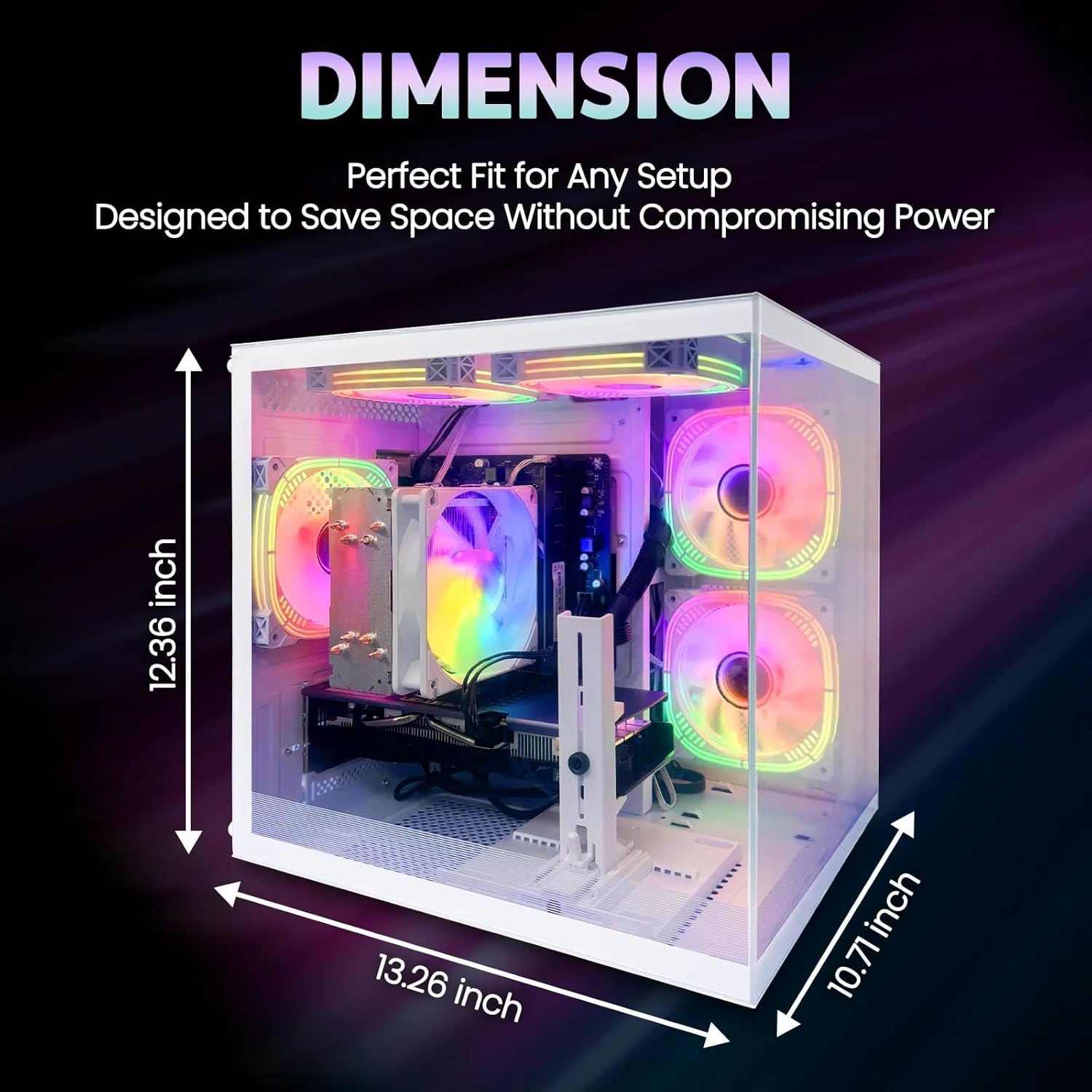
Irudia: Produktuaren neurriak. This diagram provides the physical dimensions of the suevery gaming desktop, indicating a width of 13.26 inches, a height of 12.36 inches, and a depth of 10.71 inches.
| Osagaia | Zehaztapena |
|---|---|
| Prozesadorea (CPU) | AMD Ryzen 5 6-core, 3.6 GHz (up to 4.1 GHz Boost), 32MB L3 Cache |
| Txartel grafikoa (GPU) | NVIDIA GeForce RTX 3050 6G (Dedicated) |
| Memoria (RAM) | 16GB DDR4 (3200 MHz), Max 32GB |
| Biltegiratzea | 512GB SSD (Serial ATA-600) |
| Sistema eragilea | DOS (User-installable OS required) |
| Haririk gabeko konexioa | Wi-Fi 6 |
| Kable bidezko konektibitatea | Ethernet (LAN) |
| Bideo Irteera | 1x HDMI, DisplayPort |
| USB atakak | Total 6 USB Ports (Type B - 3 pin North American power plug) |
| Audioa | Microphone Input, Headphone Input |
| Hozteko metodoa | Aire hoztea |
| Neurriak (L x W x H) | 41.61 x 37.8 x 33.5 cm (gutxi gorabehera 16.38 x 14.88 x 13.19 hazbete) |
| Pisua | 8.36 kg (18.43 lb inguru) |
| Kolorea | Zuria |
7. Bermearen informazioa
Your suevery Prebuilt Gaming Desktop Computer is covered by a manufacturer's warranty. Please refer to the warranty card included with your product or visit the official suevery website for detailed terms and conditions, warranty period, and claim procedures. Keep your proof of purchase for warranty service.
8. Bezeroarentzako arreta
If you encounter any issues not covered in this manual or require further assistance, please contact suevery customer support. Contact information can typically be found on the official suevery webgunean edo produktuaren ontzian.
- Lineako laguntza: Visit the suevery official webMaiz egiten diren galderen, gidarien deskargaren eta laguntza-baliabideen gunea.
- Posta elektronikoko laguntza: Kontsultatu zure produktuaren dokumentazioa bezeroarentzako arreta-zerbitzuko helbide elektronikoa lortzeko.