
Sarrera
Thank you for choosing the Yosoo Digital Alarm Clock. This device is designed to provide reliable timekeeping, dual alarm functions, a customizable timer, and versatile reminder options including vibration and music. Its compact design and backlight feature make it suitable for various uses, including as a travel alarm or for individuals with hearing impairments. Please read this manual carefully to ensure proper use and maintenance of your alarm clock.
Produktua amaituview
Familiarize yourself with the components and controls of your Yosoo Digital Alarm Clock.
Aurreko paneleko kontrolak eta pantaila

Irudia: Aurretik eta atzetik view of the Yosoo Digital Alarm Clock with labeled buttons and features. The front shows the digital display, SET, UP, and ST/SP buttons. The back shows TIMER, ALARM, CLOCK mode buttons, vibration/music option switch, lock button, horn, and battery compartment.
- Bistaratze digitala: Shows time, alarm status, and timer information.
- Argi adierazlea: A red light illuminates when an alarm is ringing.
- SET botoia: Used to enter setting modes for time, alarm, and timer.
- GORA botoia: Used to adjust values (increase numbers) during setting.
- ST/SP botoia: Used to start/stop the timer or confirm settings. Also activates backlight.
Atzeko paneleko kontrolak eta eginbideak
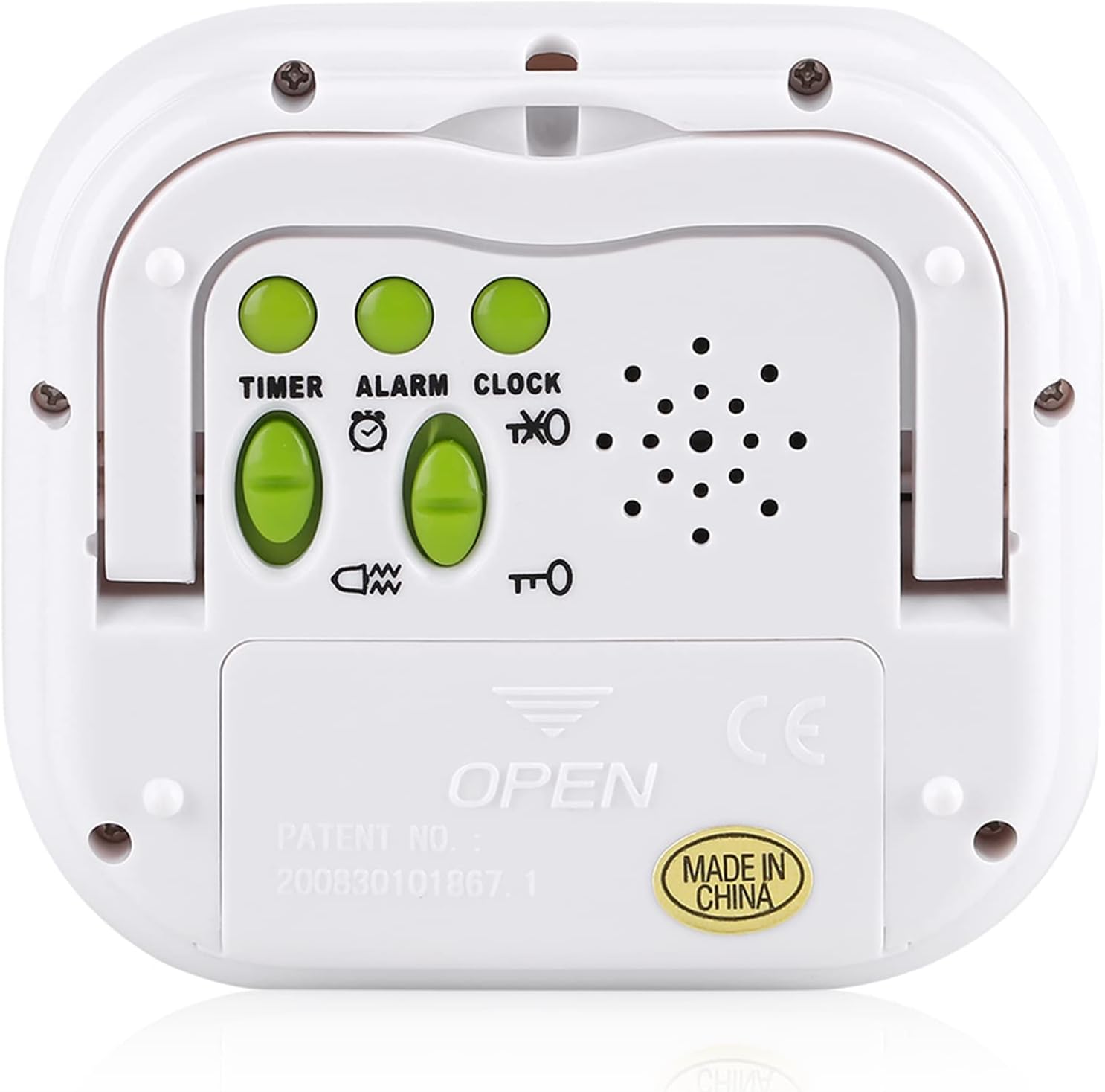
Irudia: Atzekoa view of the Yosoo Digital Alarm Clock showing the control switches and battery compartment. The switches are labeled TIMER, ALARM, and CLOCK, along with a vibration/music option switch and a lock button.
- Mode Switches (TIMER, ALARM, CLOCK): Slide switches to select the desired operating mode.
- Vibration/Music Option Switch: Selects between vibration or music for alarm/timer alerts.
- Blokeatzeko botoia: Disables all buttons to prevent accidental operation.
- Adarra: Speaker for music alerts.
- Folding Bracket: Allows the clock to stand upright.
- Bateriaren konpartimendua: Holds 2 x AAA batteries.
Konfigurazioa
Bateriaren instalazioa
- Locate the battery compartment on the rear of the alarm clock.
- Irristatu bateriaren konpartimentuaren estalkia beherantz irekitzeko.
- Insert 2 new AAA batteries, ensuring the correct polarity (+ and -) as indicated inside the compartment.
- Itxi bateriaren konpartimentuaren estalkia gorantz irristatuz, bere lekuan klik egin arte.
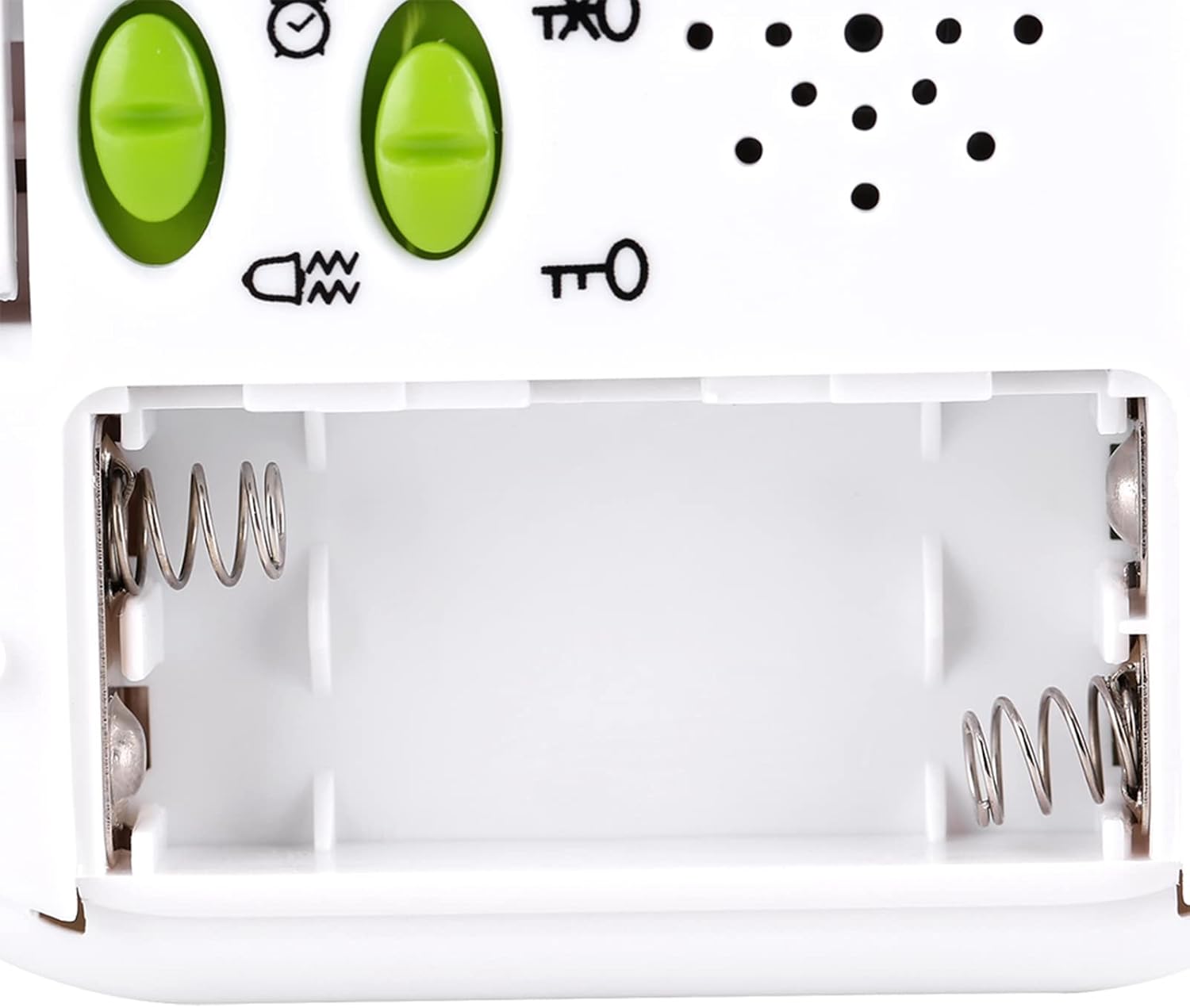
Irudia: Open battery compartment of the Yosoo Digital Alarm Clock, showing the two AAA battery slots with spring contacts.
The clock will power on automatically once batteries are installed. If the display is blank, check battery orientation or replace with fresh batteries.
Funtzionamendu-argibideak
Ordua ezartzea
- Slide the rear mode switch to the ERLOIA posizioa.
- Eduki sakatuta EZARTU button on the front panel until the hour digits begin to flash.
- Sakatu UP botoia ordua doitzeko.
- Sakatu EZARTU button again to move to the minute setting.
- Sakatu UP botoia minutuak doitzeko.
- Sakatu EZARTU button a third time to select 12-hour or 24-hour format. Use the UP button to toggle between formats.
- Sakatu EZARTU button one last time or wait a few seconds for the setting to be saved automatically.

Irudia: Close-up of the Yosoo Digital Alarm Clock's front buttons: SET, UP, and ST/SP. These buttons are used for setting time, alarms, and timer functions.
Setting Alarms (AL1 and AL2)
The clock features two independent alarms, AL1 and AL2.
- Slide the rear mode switch to the ALARMA posizioa.
- Sakatu EZARTU button once to set AL1. The AL1 icon and hour digits will flash.
- Erabili UP button to adjust the AL1 hour.
- Sakatu EZARTU again to adjust AL1 minutes using the UP botoia.
- Sakatu EZARTU a third time to enable/disable AL1. Use UP txandakatzeko.
- Sakatu EZARTU a fourth time to set AL2. The AL2 icon and hour digits will flash.
- Repeat steps 3-5 for AL2.
- Sakatu EZARTU one last time or wait for the settings to be saved.
To choose between vibration or music for the alarm, use the Vibration/Music Option Switch on the rear panel. The alarm will sound/vibrate for 60 seconds.
Tenporizadorearen funtzioa erabiliz
The timer can be set for up to 99 hours, 59 minutes, and 59 seconds.
- Slide the rear mode switch to the tenporizadorea posizioa.
- Eduki sakatuta EZARTU botoia orduko digituak keinuka hasi arte.
- Erabili UP button to set the desired hours.
- Sakatu EZARTU minutuetara mugitzeko, erabili UP minutuak ezartzeko.
- Sakatu EZARTU to move to seconds, then use UP segundoak ezartzeko.
- Sakatu EZARTU berriro tenporizadorearen ezarpena berresteko.
- Sakatu ST/SP botoia atzerako kontaketa hasteko.
- Sakatu ST/SP berriro atzerako kontaketa pausatzeko/berrabiarazteko.
- When the timer reaches zero, the alarm (vibration or music, depending on the rear switch) will activate for 60 seconds.
- To stop the alarm, press any button. To reset the timer, press EZARTU while the timer is paused or after it has finished.
Atzeko argiaren funtzioa
The clock features a built-in orange backlight for easy viewargi gutxiko baldintzetan aritzea.

Irudia: Yosoo Digital Alarm Clock with its orange backlight activated, showing the time 12:02 PM. The backlight illuminates the display for 1-2 seconds.
To activate the backlight, simply press any button on the front panel (SET, UP, or ST/SP). The backlight will illuminate for approximately 1-2 seconds and then turn off automatically to conserve battery life.
Blokeo funtzioa
To prevent accidental button presses, especially when carrying the clock or placing it under a pillow, slide the Blokeatzeko botoia on the rear panel to the locked position. This will disable all front panel buttons. Slide it back to the unlocked position to resume normal operation.
Mantentzea
- Garbiketa: Garbitu erlojua zapi leun eta lehor batekin. Ez erabili garbitzaile edo disolbatzaile urratzailerik.
- Bateria ordezkatzea: Replace batteries when the display becomes dim or functions become erratic. Always use 2 new AAA batteries.
- Biltegiratzea: If storing the clock for an extended period, remove the batteries to prevent leakage. Store in a cool, dry place.
- Uraren erresistentzia: Gailu hau ez da iragazgaitza. Saihestu uraren edo hezetasun handiaren eraginpean jartzea.
Arazoak konpontzea
| Arazoa | Kausa posiblea | Irtenbidea |
|---|---|---|
| Pantaila hutsik edo ilun dago. | Pilak agortuta daude edo gaizki instalatuta daude. | Ordeztu AAA pila berriekin, polaritate zuzena ziurtatuz. |
| Botoiek ez dute erantzuten. | Lock function is enabled. | Slide the Lock Button on the rear panel to the unlocked position. |
| Alarmak ez du jotzen/bibratzen. | Alarm is not set or enabled; volume/vibration switch is off. | Ensure alarm is set and enabled (AL1/AL2 icon visible). Check the Vibration/Music Option Switch on the rear. |
| Ordua ez da zuzena. | Time was not set correctly or batteries were removed. | Berrezarri ordua "Ordua ezartzea" argibideei jarraituz. |
Zehaztapenak
- Eredua: Yosoortil5pfa01
- Materiala: ABS
- Kolorea: Zuria
- Atzeko argiaren kolorea: Laranja
- Iratzargailua: Dual (AL1/AL2)
- Denbora bistaratzea: 12/24H formatua
- Tenporizadorearen funtzioa: Up to 99 hours, 59 minutes, 59 seconds
- Reminder Type: Vibration or Music (selectable)
- Alertaren iraupena: 60 segundo
- Energia iturria: 2 x AAA bateria (ez daude barne)
- Produktuaren neurriak: Gutxi gorabehera 85 x 78 x 22 mm (3.3 x 3.1 x 0.9 hazbete)
- Pisua: Gutxi gorabehera 101 g (bateriak kontuan hartu gabe)
- Bistaratzeko mota: LED

Irudia: Dimensions of the Yosoo Digital Alarm Clock: 8.5cm (3.3in) wide, 7.8cm (3.1in) high, and 2.2cm (0.9in) deep. This image provides a visual reference for the product's size.
Bermea eta Laguntza
Bermeari buruzko informazioa edo laguntza teknikoa lortzeko, kontsultatu produktuaren ontzia edo jarri harremanetan zure saltzailearekin. Gorde erosketa-agiria erosketaren frogagiri gisa.