
Sarrera
Thank you for choosing the MEETION C9990 Wireless Bluetooth Keyboard and Mouse combo. This product offers versatile connectivity options (2.4GHz USB and dual Bluetooth channels), an ergonomic design for comfort, and rechargeable batteries for extended use. This manual will guide you through the setup, operation, and maintenance of your new device.
Paketearen edukia
- MEETION C9990 Wireless Keyboard
- MEETION Wireless Mouse
- USB Receiver (stored in the mouse battery compartment)
- USB-C kargatzeko kablea
- Erabiltzailearen eskuliburua
Produktua amaituview
Teklatuaren Ezaugarriak
- Tamaina osoko diseinua: Includes a numeric pad for comprehensive data entry.
- Low-Noise Scissor-Switch Keys: Provides a quiet and comfortable typing experience.
- Multimedia teklak: Dedicated function keys for quick access to media controls and system functions.
- Fixed Anti-Slip Stand: Ensures stability and an ergonomic typing angle.
- Diseinu ultra-argala: Estetikoki atsegina.asing and space-efficient.

Image: Close-up of the keyboard keys, illustrating the low-noise scissor-switch design for quiet and comfortable typing.

Image: The keyboard features a fixed-angle anti-slip stand for enhanced stability and typing comfort.
Saguaren ezaugarriak
- Ergonomic Sculpted Design: Contoured shape supports natural wrist and hand posture.
- DPI erregulagarria: Four DPI settings (800-2400) for precise cursor control.
- Tilt-Scroll Wheel: Allows for horizontal and vertical scrolling.
- Modu aldaketa: Easily switch between 2.4GHz and Bluetooth modes.

Image: The mouse features an ergonomic sculpted design to provide comfort during extended use.

Image: Detailed diagram of the mouse highlighting its various components and functions, including buttons, scroll wheel, and switches.
Konfigurazio Argibideak
1. Gailuak kargatzea
Both the keyboard and mouse are equipped with built-in rechargeable batteries. Before first use, or when the battery indicator shows low power, charge both devices using the provided USB-C cable.
- Connect the USB-C end of the charging cable to the charging port on the keyboard and mouse.
- Konektatu kargatzeko kablearen USB-A muturra USB elikatze iturri batera (adibidez, ordenagailuko USB ataka, USB hormako egokitzailea).
- Kargatzeko adierazlearen argia piztuko da kargatzen ari den bitartean eta itzali egingo da guztiz kargatzen denean.
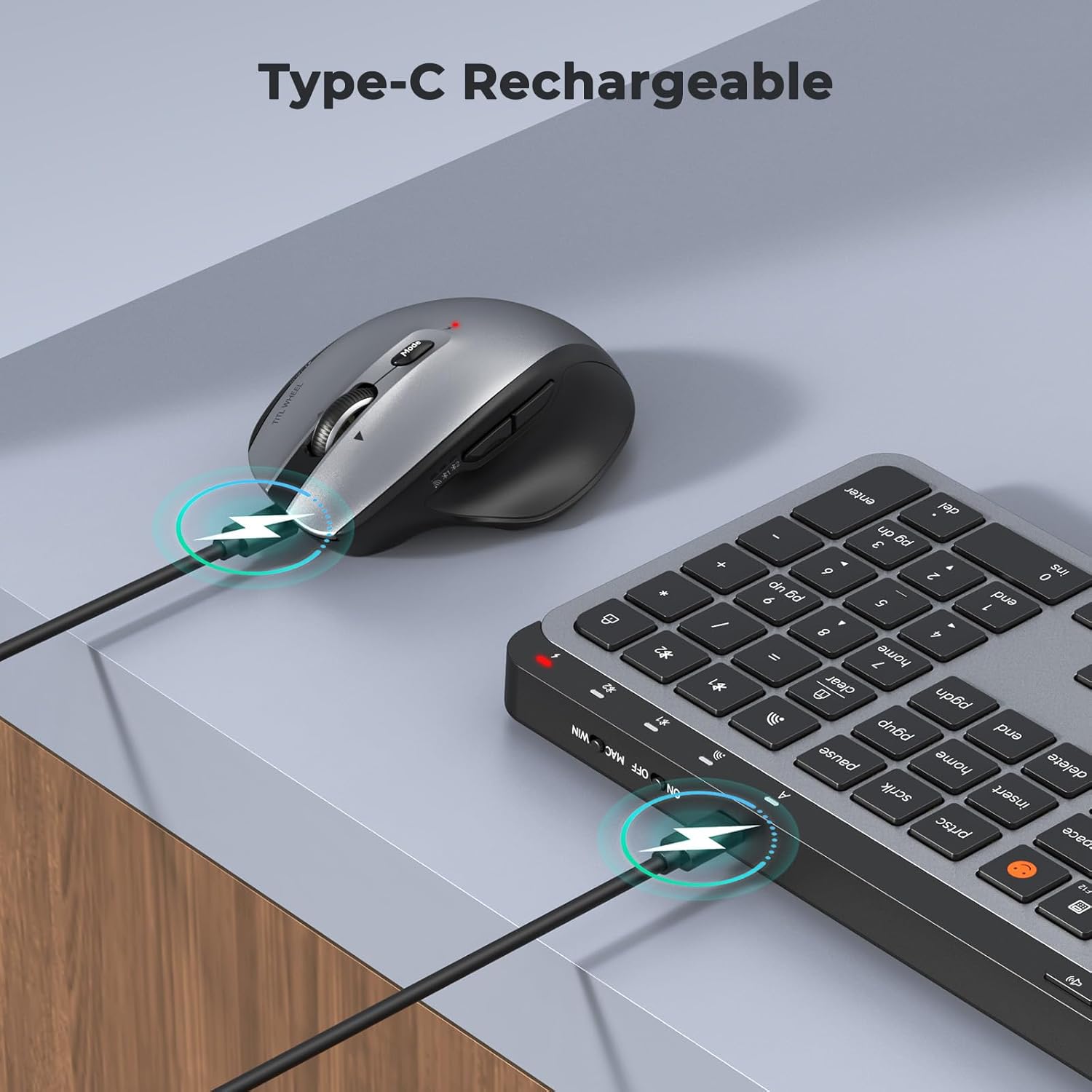
Image: Both the keyboard and mouse are rechargeable via USB-C, ensuring convenience and eliminating the need for disposable batteries.
2. Gailuetara konektatzea
The C9990 combo supports three connection modes: 2.4GHz wireless (via USB receiver) and two Bluetooth channels (BT1, BT2).
2.1. 2.4 GHz-ko haririk gabeko konexioa
- Locate the USB receiver, typically stored in the mouse's battery compartment.
- Konektatu USB hargailua zure ordenagailuko USB ataka erabilgarri batean.
- Piztu teklatua eta sagua dagokien pizteko etengailuak erabiliz.
- Teklatuarentzat, sakatu 2.4G button (usually indicated by a USB icon) to switch to 2.4GHz mode.
- For the mouse, switch the mode selector to the 2.4G posizioa.
- Gailuak automatikoki konektatu beharko lirateke.
2.2. Bluetooth konexioa (BT1 / BT2)
- Piztu teklatua eta sagua.
- Teklatuarentzat: Eduki sakatuta BT1 or BT2 button for 3-5 seconds until the indicator light flashes rapidly, indicating pairing mode.
- Saguarentzat: Switch the mode selector to the BT1 or BT2 position, then press and hold the Bluetooth pairing button (often located on the underside) until the indicator light flashes.
- On your device (laptop, tablet, smartphone), go to Bluetooth settings and search for new devices.
- Select "MEETION Keyboard" and "MEETION Mouse" from the list to pair.
- Repeat for the second Bluetooth channel (BT2) if connecting to another device.
3. Gailuen artean aldatzea
The C9990 allows seamless switching between up to three connected devices (one 2.4GHz and two Bluetooth).
- Teklatuarentzat: Sakatu dedikatua. 2.4G, BT1, edo BT2 button to switch to the desired connected device.
- Saguarentzat: Use the mode switch on the underside of the mouse to select 2.4G, BT1, edo BT2.

Image: The keyboard and mouse can switch between three devices (PC, tablet, phone) with a single click, indicated by the Bluetooth and 2.4G icons.
Funtzionamendu-argibideak
Teklatuaren funtzioak
- Multimedia Keys (F1-F12): These keys provide quick access to functions like brightness control, display window, home, dictation, sleep, app switcher, screen mirroring, screen capture, music player, email, and calculator. Functions may vary slightly depending on the operating system.
- Emoji gakoa: The dedicated emoji key supports Windows, macOS, iPad (iPadOS), and Android Samsung devices. It does not support iPhone (iOS).

Image: The keyboard features a row of multimedia keys (F1-F12) for quick access to various system functions.
Saguaren funtzioak
- DPI doikuntza: Press the DPI switch button (usually located near the scroll wheel) to cycle through the available DPI settings (800, 1200, 1600, 2400). Adjust to your preference for cursor speed and precision.
- Tilt-Scroll Wheel: In addition to vertical scrolling, tilt the scroll wheel left or right for horizontal scrolling in applications that support it (e.g., spreadsheets).
- Aurrera/Atzera botoiak: Erabili alboko botoiak nabigazio azkarra lortzeko web nabigatzaileak eta file esploratzaileak.
Mantentzea
- Garbiketa: Erabili zapi leun eta lehor bat teklatuaren eta saguaren gainazalak garbitzeko. Zikinkeria egoskorra bada, garbitu pixka bat.ampGarbitu zapi bat urarekin edo garbiketa-soluzio leun batekin. Saihestu produktu kimiko gogorrak edo material urratzaileak.
- Bateria zaintzea: To prolong battery life, avoid fully discharging the devices frequently. Charge them when the low battery indicator appears. If storing for an extended period, charge them to about 50% and recharge every few months.
- Biltegiratzea: Gorde gailuak leku fresko eta lehor batean, eguzki-argitik eta muturreko tenperaturetatik babestuta.
Arazoak konpontzea
Konexio-arazoak
- Gailua ez da konektatzen: Ensure both the keyboard and mouse are powered on and fully charged. Check that the correct connection mode (2.4G, BT1, or BT2) is selected on both devices. For Bluetooth, ensure your host device's Bluetooth is enabled and the devices are in pairing mode.
- Konexio etengabea: Move the devices closer to your computer. Avoid using them near strong electromagnetic interference sources (e.g., Wi-Fi routers, other wireless devices).
- 2.4GHz receiver not recognized: Try plugging the USB receiver into a different USB port. Ensure the receiver is fully inserted.
Funtzionaltasun-arazoak
- Keys or mouse unresponsive: Recharge the devices. Restart your computer or device. Re-pair the devices if using Bluetooth or re-insert the USB receiver for 2.4GHz.
- Saguaren kurtsorea irregularra: Clean the mouse sensor. Ensure you are using the mouse on a suitable surface (not highly reflective or transparent). Adjust DPI settings.
Zehaztapenak
| Modelo zenbakia | C9990 |
| Konektibitate Teknologia | Bluetooth, USB (2.4GHz Wireless) |
| Teklatuaren diseinua | QWERTY, Full Size |
| Saguaren Mugimenduaren Detekzioa | Optikoa |
| Saguaren DPI ezarpenak | 800, 1200, 1600, 2400 |
| Energia iturria | Bateriaz elikatua (USB-C bidez kargagarria) |
| Sistema eragile bateragarriak | Windows, macOS, Linux, Chrome OS, Android |
| Elementuaren pisua | 1.16 Kilograms (combined) |
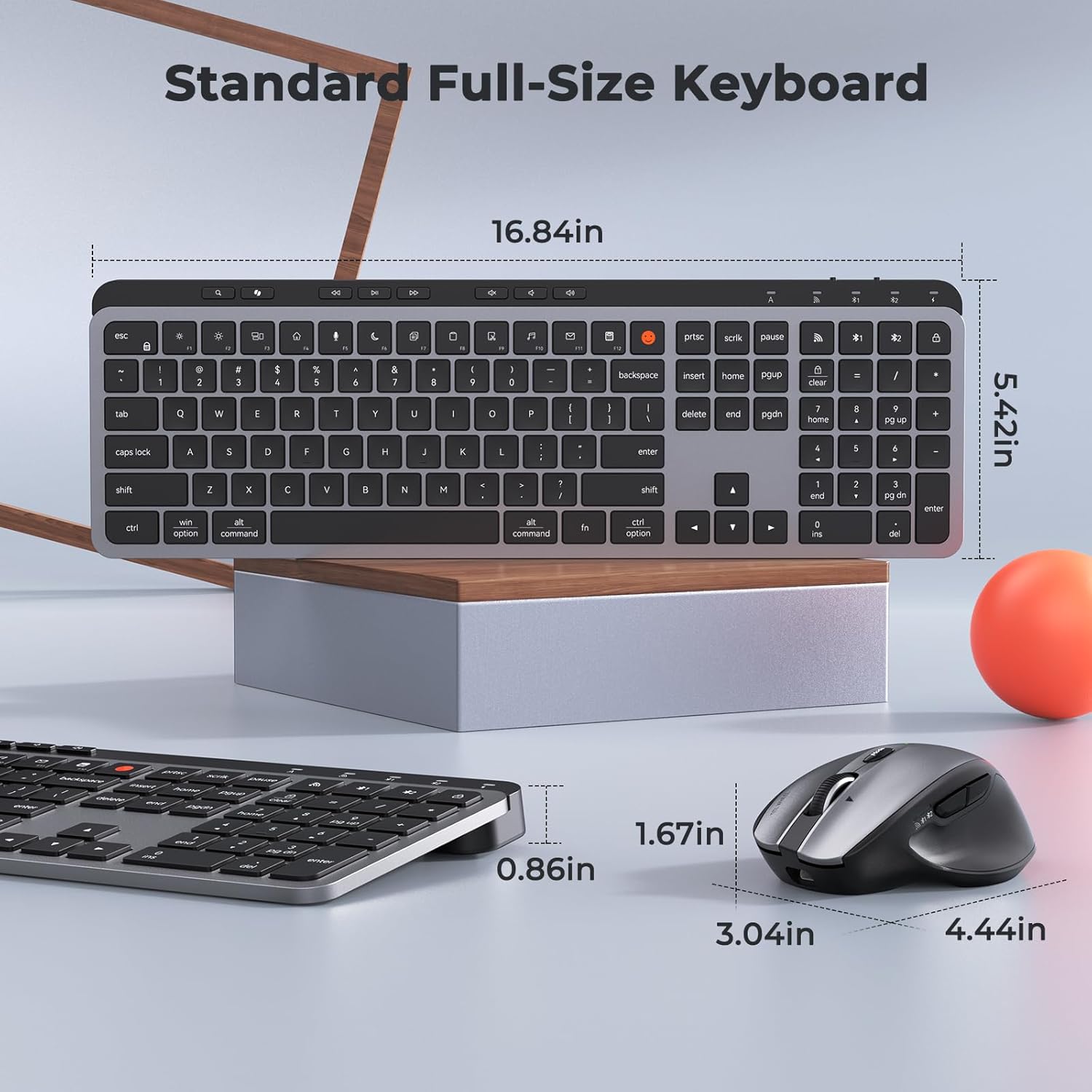
Image: Dimensions of the MEETION C9990 keyboard and mouse for reference.
Bermea eta Laguntza
The MEETION C9990 Wireless Bluetooth Keyboard and Mouse comes with a 1 urteko bermea erosketa-datatik aurrera. Berme honek erabilera normalaren ondoriozko fabrikazio-akatsak estaltzen ditu.
For technical support, troubleshooting assistance, or warranty claims, please contact MEETION customer service through the retailer where you purchased the product or visit the official MEETION webharremanetarako informazioa lortzeko gunea.
Segurtasun Informazioa
- Ez jarri gailuak uraren, hezetasunaren edo muturreko tenperaturen eraginpean.
- Saihestu gailuak erortzea edo kolpe gogorren eraginpean jartzea.
- Do not attempt to disassemble or repair the devices yourself. Refer to qualified service personnel.
- Mantendu haurren eskura.
- Tokiko araudien arabera bota bateriak eta osagai elektronikoak arduraz.