
1. Sarrera
Thank you for choosing the TOPTRO TP3 4K Google TV Portable Projector. This manual provides essential information for setting up, operating, and maintaining your projector. Please read it thoroughly before use to ensure optimal performance and safety.
The TOPTRO TP3 is designed to deliver a versatile and immersive viewing experience, featuring integrated Google TV, AI-powered image adjustments, and comprehensive connectivity options. Enjoy your content at home, outdoors, or on the go.
2. Produktua amaitu daview
2.1 Ezaugarri nagusiak
- Google TV integratua: Access over 10,000 official streaming applications, including Netflix, Prime Video, and YouTube, without additional devices.
- Google Voice Control: Use the remote control's voice assistant button to search for content, adjust settings, and control playback hands-free.
- AI-Powered Image Adjustment: Features automatic focus, automatic keystone correction, obstacle avoidance, and automatic screen adjustment for a perfectly aligned and clear image within seconds.
- Native 1080P Resolution with 4K Decoding: Delivers sharp, detailed images and natural colors, supporting 4K video decoding.
- Short Throw Ratio (0.8:1): Projects a 60-inch image from just one meter distance, ideal for small spaces.
- 90-Degree Rotating Stand: Allows for flexible projection angles, including ceiling projection.
- Konektibitate aurreratua: Equipped with dual-band WiFi 6, Bluetooth 5.3, HDMI ARC, USB, and a 3.5mm audio jack for wide device compatibility.
- Diseinu eramangarria: Weighing only 1.2 kg (2.6 lbs) with a hidden carry handle, making it easy to transport.
2.2 Paketearen edukia
Ziurtatu elementu guztiak paketean daudela:
- TOPTRO TP3 proiektorea
- Urruneko Kontrola
- HDMI kablea
- Elikatze-moldagailua
- Erabiltzailearen eskuliburua
3. Konfigurazioa
3.1 Hasierako kokapena
Place the projector on a stable, flat surface. The 90-degree rotating stand allows for various projection angles, including wall, ceiling, or tabletop. For optimal image quality, ensure the projection surface is smooth and light-colored.

Image: The TOPTRO TP3 projector can be used in diverse environments, from living rooms to outdoor camping, showcasing bere moldagarritasuna.
3.2 Energia-konexioa
- Connect the power adapter to the projector's power input.
- Plug the power adapter into a suitable electrical outlet (220V).
- Sakatu proiektorearen edo urrutiko agintearen pizteko botoia pizteko.
3.3 Sareko konexioa
Upon first startup, follow the on-screen prompts to connect to your Wi-Fi network. The projector supports dual-band WiFi 6 for a fast and stable connection.
3.4 Google TV konfigurazioa
After connecting to Wi-Fi, sign in with your Google account to access Google TV and download applications from the Google Play Store. This step is crucial for utilizing the integrated streaming services.

Image: The projector's interface showing integrated Google TV with direct access to popular streaming applications.
4. Funtzionamendu-argibideak
4.1 Oinarrizko funtzionamendua
- Piztu/Itzali: Sakatu urrutiko agintearen edo proiektorearen pizteko botoia.
- Nabigazioa: Use the directional buttons on the remote to navigate menus.
- Hautaketa: Sakatu 'Ados' botoia hautaketak berresteko.
- Bolumen kontrola: Erabili urrutiko agintearen bolumen-botoiak.
4.2 Irudiaren doikuntza
The TOPTRO TP3 features AI-powered automatic image adjustments:
- Fokatze automatikoa: Proiektoreak automatikoki doitzen du irudiaren argitasuna.
- Auto Keystone Zuzenketa: Automatically corrects distorted images to a rectangular shape.
- Oztopoak saihestea: Detects and adjusts the image to avoid objects on the projection surface.
- Auto Screen Adjustment: Irudia pantailaren eremura egokitzeko optimizatzen du.
These adjustments occur automatically within seconds of powering on or repositioning the projector. Manual digital zoom (80-100%) is also available for fine-tuning image size.

Image: Visual representation of the projector's AI-powered automatic image adjustment features, ensuring a clear and aligned picture.
4.3 Google Ahots Kontrola
Press the dedicated voice assistant button on your remote control and speak your command. For example, say "Open YouTube" or "Play music." The projector will respond to your voice commands for quick access to functions and content.
4.4 Screen Mirroring (Google Cast)
Utilize Google Cast technology to wirelessly mirror content from your smartphone or tablet to the projector. For iPhone users, download the "AirScreen" application from the Google Play Store on the projector for wireless screen mirroring.
4.5 Rotating Stand Usage
The integrated 90-degree rotating stand allows you to easily adjust the projection angle. Simply pivot the projector to direct the image onto a wall, screen, or ceiling. This feature is particularly useful for bedroom viewing or creative setups.
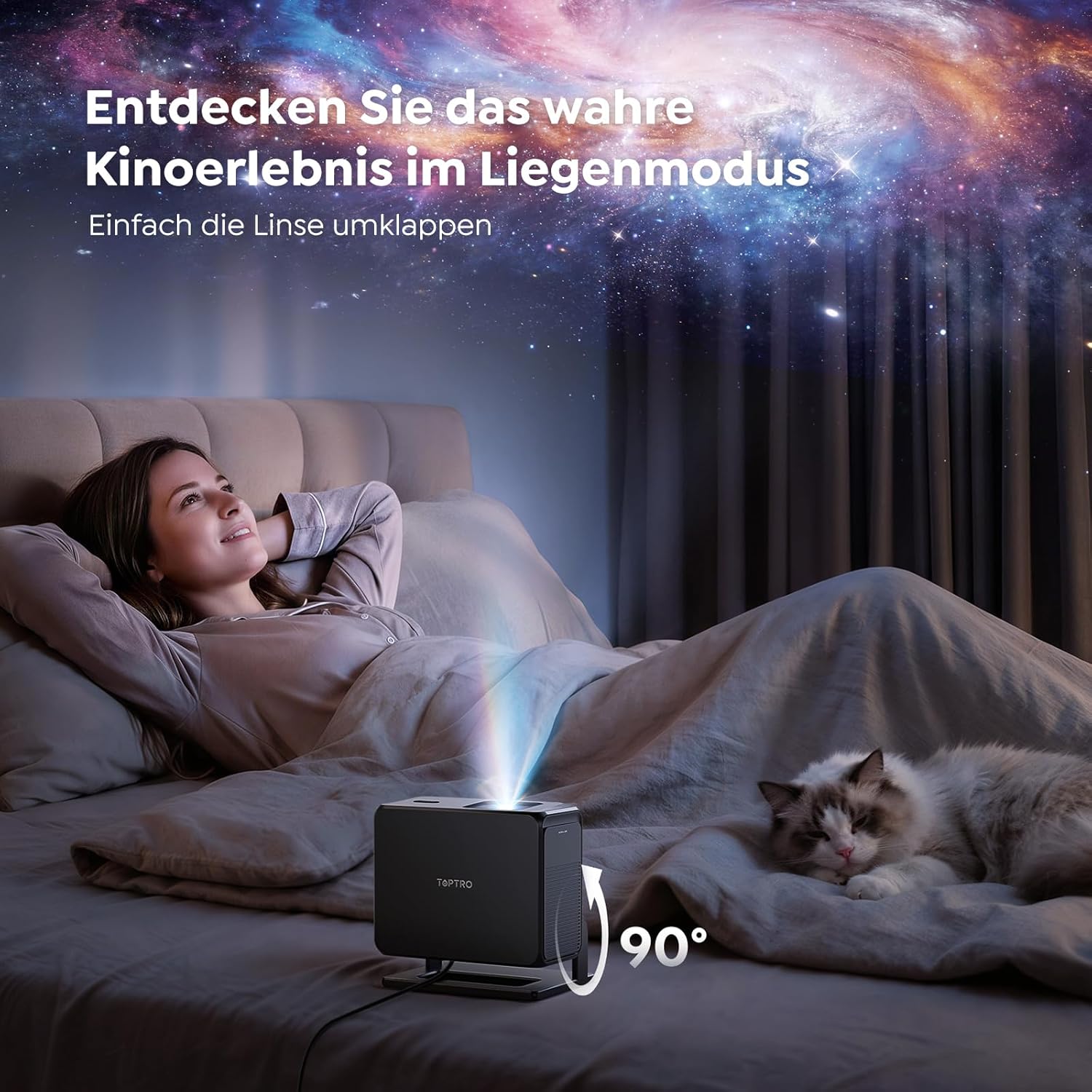
Image: The TOPTRO TP3 projector rotated 90 degrees to project content onto a bedroom ceiling, offering a unique viewesperientzia.
5. Konektibitatea
5.1 Kable bidezko konexioak
- HDMI ARC/CEC: Connect external devices like laptops, gaming consoles (Xbox/PlayStation 5), or Blu-ray players. The ARC feature allows audio to be sent back to a compatible sound system.
- USBa: Konektatu USB unitateak multimedia erreproduzitzeko.
- 3.5 mm-ko audio-konexioa: Connect external wired speakers or headphones.
5.2 Haririk gabeko konexioak
- Wi-Fi 6: Provides faster and more stable wireless connectivity for streaming and online content.
- Bluetooth 5.3: Connect Bluetooth headphones or speakers for an enhanced audio experience.
6. Mantentzea
6.1 Lentea garbitzea
Gently clean the projector lens with a soft, lint-free cloth designed for optical surfaces. Avoid using abrasive cleaners or excessive force, as this can scratch the lens.
6.2 Garbiketa orokorra
Garbitu proiektorearen kanpoaldea oihal leun eta lehor batekin. Ez erabili garbitzaile likidorik zuzenean gailuan.
6.3 Biltegiratzea
When not in use, store the projector in a cool, dry place, away from direct sunlight and extreme temperatures. Use the original packaging or a protective case to prevent dust accumulation and damage.
7. Arazoak
7.1 Ez da irudirik bistaratzen
- Ziurtatu proiektorea piztuta eta energia-iturri batera konektatuta dagoela.
- Check all cable connections (HDMI, USB) to external devices.
- Verify the input source selected on the projector matches the connected device.
- Ziurtatu lentearen tapa kendu dela.
7.2 Irudi lausoa
- Allow the auto-focus function to complete its adjustment.
- Ziurtatu proiekzio-gainazala laua dela eta proiektorea egonkorra dela.
- Garbitu proiektorearen lentea orbanak edo hautsa ikusten badira.
7.3 Soinurik ez
- Egiaztatu proiektorearen eta konektatutako iturburu-gailuaren bolumen-maila.
- Ensure external speakers or headphones are properly connected (wired or Bluetooth).
- If using HDMI ARC, verify your sound system is compatible and correctly configured.
7.4 Urrutiko agintea ez dabil
- Ordeztu bateriak urrutiko agintean.
- Ziurtatu ez dagoela oztoporik urrutiko agintearen eta proiektorearen IR hargailuaren artean.
For further assistance, refer to the detailed troubleshooting section in the full user manual or contact customer support.
8. Zehaztapenak
| Ezaugarri | Zehaztapena |
|---|---|
| Marka | TOPTRO |
| Ereduaren izena | TP3 |
| Berezko Ebazpena | 1920 x 1080 (1080p) |
| Video Decoding Support | 4K |
| Bistaratzeko mota | LED |
| Ezaugarri bereziak | Auto Focus, Auto Keystone Correction, Obstacle Avoidance, Auto Screen Adjustment, Google TV, Google Voice Control |
| Konektibitate Teknologia | HDMI, USB, Bluetooth 5.3, Wi-Fi 6 |
| Hardware interfazea | HDMI ARC/CEC, USB, 3.5mm Audio |
| Produktuaren neurriak (LxWxH) | 19.4 x 15.8 x 14.1 cm |
| Elementuaren pisua | 1.2 kg |
| Forma-faktorea | Eramangarria |
| Muntatze Mota | Ceiling Mount, Tabletop, Wall |
| Irudiaren gutxieneko tamaina | 40 hazbetekoa |
| Irudiaren Gehieneko Tamaina | 120 hazbetekoa |
| Gehieneko jaurtiketa distantzia | 2.13 metro |
| liburukiatage | 220 Volt |
| Dakarten osagaiak | HDMI kablea |
| Kolorea | Beltza |
| Kontrolagailu mota | Urruneko Kontrola |
| Gailu bateragarriak | Xbox/PlayStation 5, Smartphone, Tablet, Laptop, Speaker, Notebook |
| Gomendatutako Erabilerak | Gaming, Business, Home Cinema, Education |
9. Bermea eta Laguntza
9.1 Bermearen informazioa
Please refer to the warranty card included with your product for specific warranty terms and conditions. Keep your proof of purchase for warranty claims.
9.2 Bezeroarentzako laguntza
If you encounter any issues or have questions regarding your TOPTRO TP3 projector, please contact our customer service team. We provide prompt, professional, and effective support to ensure a smooth user experience.
Contact details can typically be found on our official webgunean edo berme-txartelean.