1. Sarrera
This manual provides detailed instructions for the LIGE FV21-F Smart Watch. Please read this guide thoroughly to ensure proper usage, optimal performance, and longevity of your device. This smartwatch is designed to enhance your daily life with health monitoring, fitness tracking, and smart communication features.
2. Zer dago kutxan
Upon unboxing your LIGE FV21-F Smart Watch, verify that all the following items are included:
- Smartwatch (LIGE FV21-F)
- Kargatzeko kablea
- Watch Strap (Black Mesh)
- Additional Watch Strap (Apricot Silicone)
- Watch Setting Tools
- Smartwatch Manuals (this document)
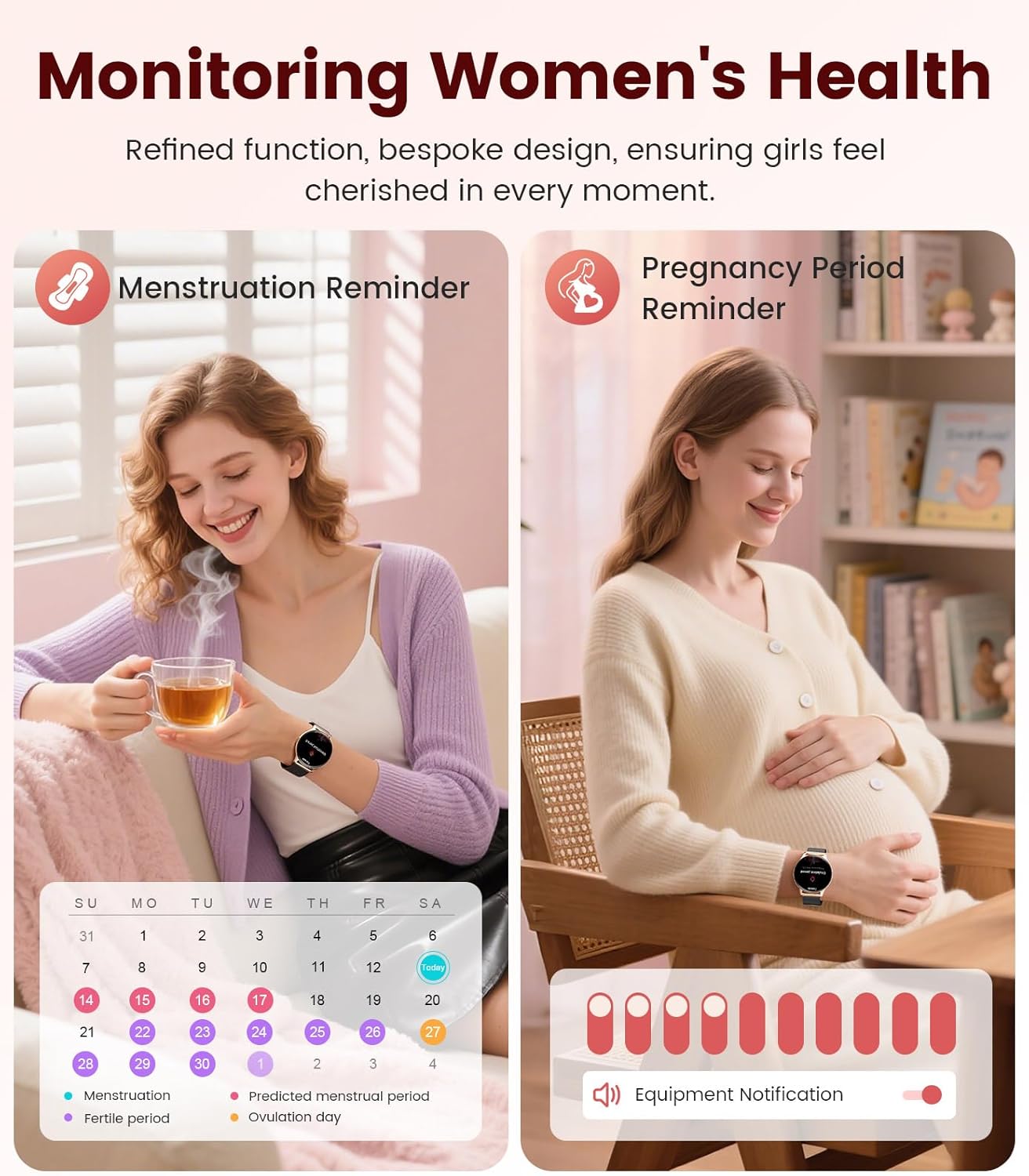
Image: Contents of the LIGE FV21-F Smart Watch package, showing the watch, charging cable, and two interchangeable bands.
3. Konfigurazio gida
3.1 Attaching the Watch Straps
Your LIGE FV21-F Smart Watch comes with two interchangeable straps: a black mesh band and an apricot silicone band. To attach a strap:
- Locate the spring bar on the back of the watch strap.
- Lerrokatu malguki-barraren mutur bat erloju-kaxaren zuloarekin.
- Push the spring bar inward and slide the strap into place between the lugs.
- Release the spring bar, ensuring both ends are securely seated in the lug holes.
- Gently pull the strap to confirm it is firmly attached.
Video: Demonstrates how to attach and change the watch straps, as well as initial setup and pairing with a smartphone.
3.2 Erloju adimenduna kargatzea
Lehenengo aldiz erabili aurretik, kargatu guztiz zure erloju adimenduna. Erabili emandako kargatzeko kable magnetikoa.
- Konektatu kargatzeko kablearen USB muturra korronte-egokitzaile batera (ez dago barne) edo ordenagailuaren USB ataka batera.
- Place the magnetic end of the charging cable onto the charging contacts on the back of the smartwatch. The magnets will align it correctly.
- The watch screen will display a charging indicator. A full charge typically takes approximately 2-3 hours.
Image: The LIGE FV21-F Smart Watch being charged using its magnetic charging cable.
3.3 Aplikazioaren deskarga eta parekatzea
To unlock the full functionality of your smartwatch, download the companion app, "FitCloudPro," and pair it with your smartphone.
- Deskargatu aplikazioa: Scan the QR code displayed on the watch screen (access via Settings > QR Code) or search for "FitCloudPro" in your smartphone's app store (App Store for iOS, Google Play Store for Android).
- Gaitu Bluetootha: Ziurtatu Bluetootha gaituta dagoela zure telefonoan.
- Open App and Pair: Open the FitCloudPro app, navigate to the "Device" section, and tap "Add Device" or "Search Now". Select "FV21" from the list of discovered devices.
- Berretsi parekatzea: Parekatze eskaera bat agertuko da telefonoan eta erlojuan. Berretsi parekatzea bi gailuetan.
- Baimendu jakinarazpenak: Grant necessary permissions for notifications (calls, messages, apps) when prompted by the app.

Image: The FitCloudPro app interface on a smartphone and the QR code on the smartwatch for easy app download and pairing.
4. Funtzionamendu-argibideak
4.1 Oinarrizko nabigazioa
- Ukipen-pantaila: Swipe left/right, up/down to navigate menus and screens. Tap to select.
- Alboko botoia: Sakatu pantaila esnatzeko, hasierako pantailara itzultzeko edo aplikazioen zerrendara sartzeko.
- Esnatzeko pantaila: Raise your wrist or press the side button to activate the display.
4.2 Erlojuaren aurpegiak pertsonalizatzea
The LIGE FV21-F offers over 200 customizable watch faces. You can also upload your own photos.
- On the watch, long-press the home screen to access watch face options, then swipe to select.
- In the FitCloudPro app, go to "Watch Face Store" to browse and sync new faces.
- To use a custom photo, select "Watch Face DIY" in the app, choose a photo, adjust its position, and sync to your watch.

Image: The smartwatch displaying a custom watch face, demonstrating the personalization options available through the app.
4.3 Komunikazio Ezaugarriak
- Deiak erantzun/egin: Once paired via Bluetooth, you can answer incoming calls directly from your watch or dial numbers using the watch's dial pad.
- Mezuen jakinarazpenak: Receive notifications for SMS, emails, and various social media apps (WhatsApp, Facebook, Instagram, etc.) directly on your wrist. Ensure app permissions are granted.
- Ahots laguntzailea: Utilize the integrated voice assistant for quick commands and information.

Image: The smartwatch displaying an incoming call and message notifications, highlighting its communication capabilities.
5. Osasunaren jarraipena
The LIGE FV21-F Smart Watch provides comprehensive health tracking features to help you monitor your well-being.
- Bihotz taupadaren jarraipena: Egun osoan zehar zure bihotz-maiztasuna etengabe kontrolatzen du.
- Loaren jarraipena: Zure loaren ereduak aztertzen ditu, lo sakona, lo arina eta esna egoteko orduak barne.
- Odol-oxigenoaren (SpO2) monitorizazioa: Zure odoleko oxigeno saturazio mailak neurtzen ditu.
- Women's Physiological Cycle Monitor: Provides reminders and tracking for menstrual and pregnancy periods.
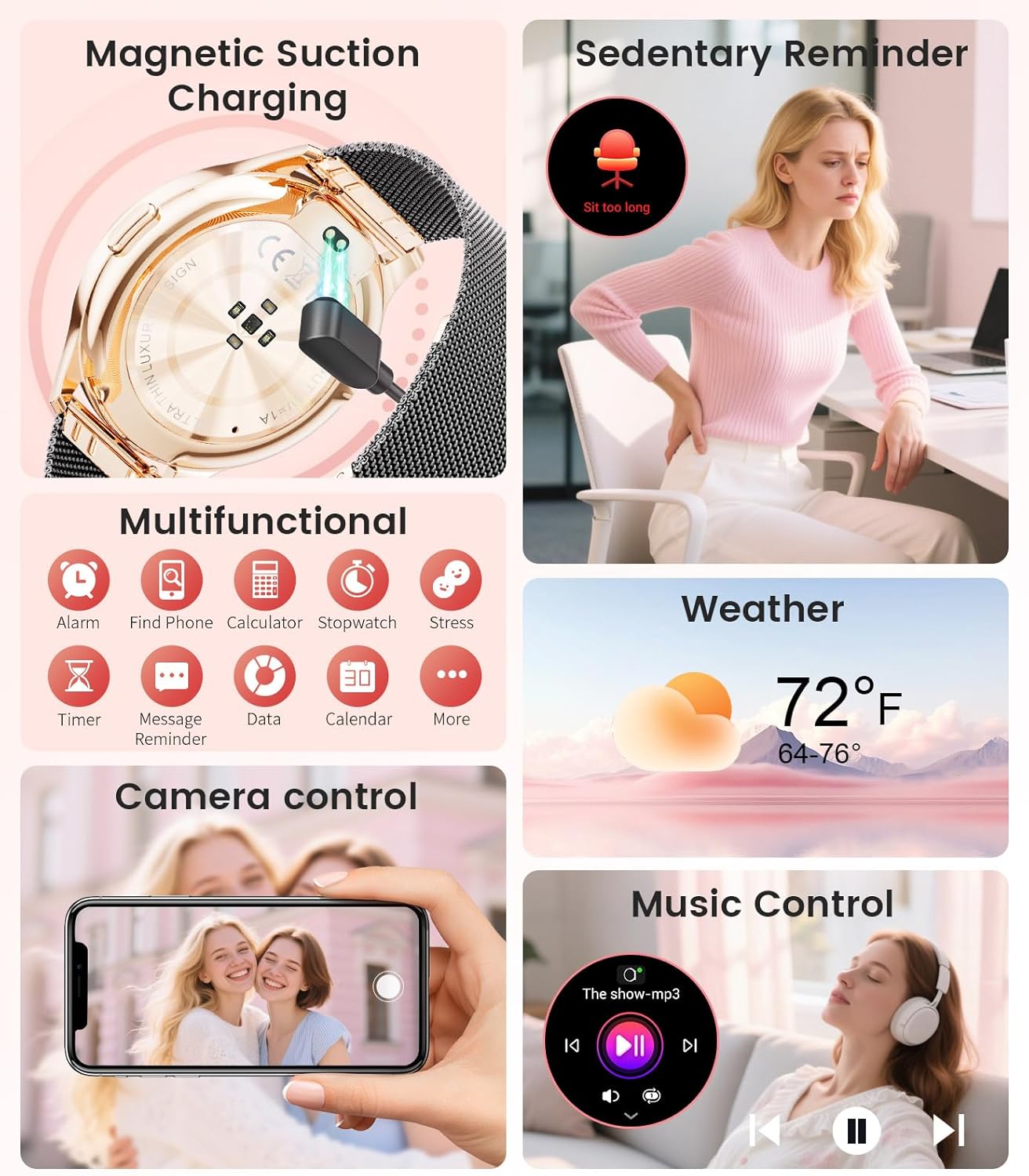
Image: The smartwatch interface showing women's health tracking features, including menstruation and pregnancy reminders.

Image: A user sleeping while wearing the smartwatch, with an inset showing the sleep tracking data on the watch face.
6. Fitness Tracking (120+ Sport Modes)
The LIGE FV21-F Smart Watch supports over 120 sport modes to track your activities, including walking, running, cycling, yoga, and more. It records steps, distance, calories burned, and heart rate during workouts.
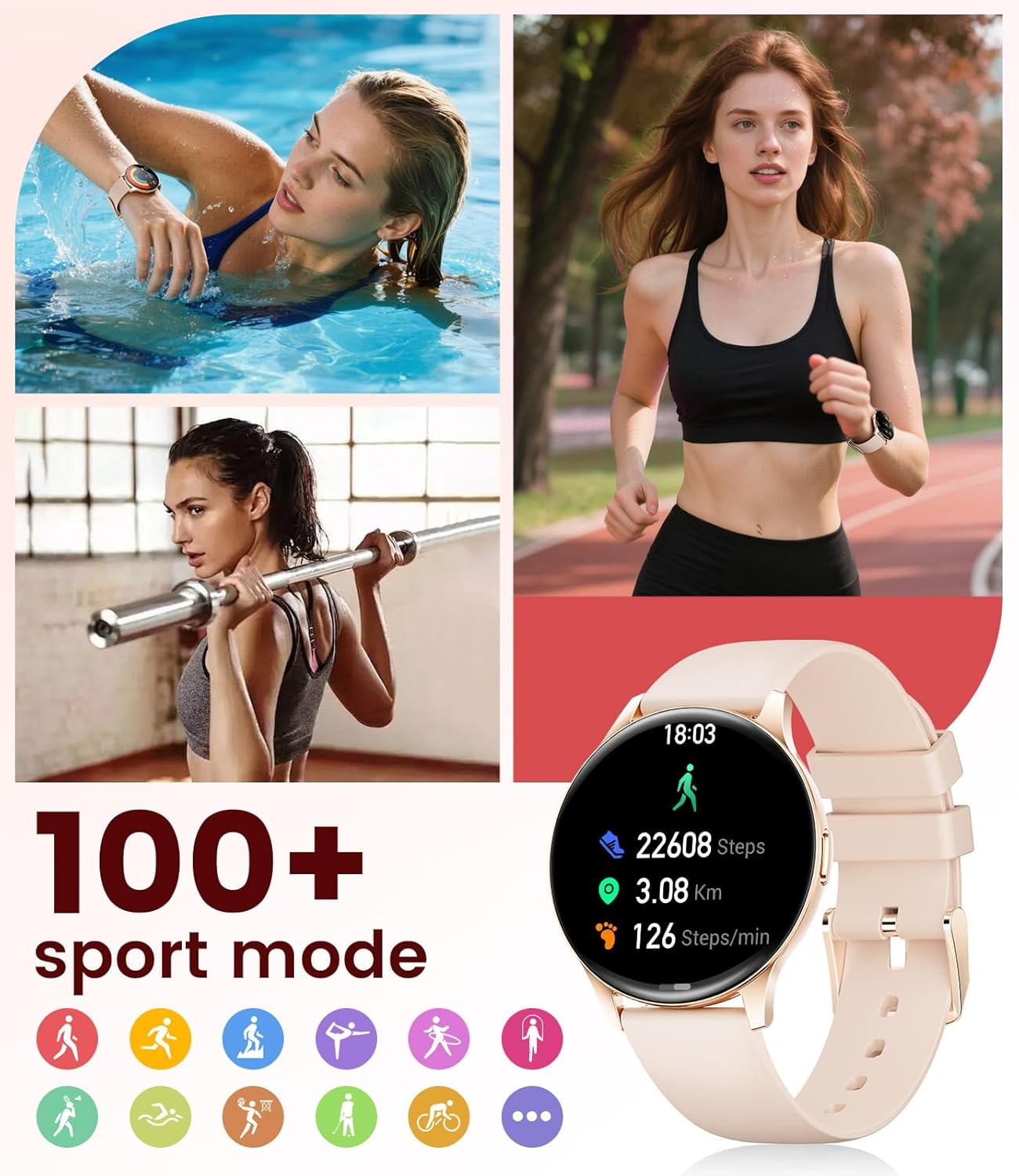
Image: The smartwatch showing different sport modes and real-time fitness data like steps, distance, and calories.
7. Beste Ezaugarri Adimendun Batzuk
Beyond health and fitness, your smartwatch offers several convenient smart features:
- Musika kontrola: Kontrolatu musika erreprodukzioa zure telefonoan zuzenean zure erlojutik.
- Kameraren kontrola: Erabili erlojua telefonoaren kamerarentzako urrutiko obturadore gisa.
- Eguraldiaren bistaratzea: Lortu eguraldiaren eguneraketak denbora errealean.
- Alarmak eta abisuak: Set alarms, sedentary reminders, and drink water reminders.
- Aurkitu telefonoa: Locate your misplaced phone by triggering an alarm from your watch.
- Calculator & Stopwatch: Basic utility tools available on your wrist.

Image: The smartwatch screen showing icons for music control, weather forecast, camera remote, and other utility features.
8. Zehaztapenak
Detailed technical specifications for the LIGE FV21-F Smart Watch:
| Ezaugarri | Xehetasuna |
|---|---|
| Ereduaren izena | FV21-F |
| Bistaratzea | 1.43" HD Curved AMOLED (466x466) |
| Sistema eragileen bateragarritasuna | Android 4.4+ eta iOS 9.0+ |
| Konektibitatea | Bluetootha |
| Bateria Edukiera | 1000 milioiamp Orduak (Litio Polimeroa) |
| Uraren Erresistentzia | IP68 Waterproof (up to 50 meters) |
| Memoria Biltegiratzeko Ahalmena | 256 MB |
| Banda Material Mota | Altzairu herdoilgaitza, silikona |
| Neurtutako metrikak | Heart Rate, Sleep Duration, Blood Oxygen |
| Giza Interfazearen Sarrera | Ukipen-pantaila |
| GPSa | Smartphone bidez |
9. Mantentzea
To ensure the longevity and optimal performance of your LIGE FV21-F Smart Watch, follow these maintenance guidelines:
- Garbiketa: Regularly wipe the watch screen and straps with a soft, dry cloth. For silicone straps, a mild soap and water solution can be used, ensuring to rinse thoroughly and dry completely.
- Saihestu produktu kimiko gogorrak: Do not use abrasive cleaners, solvents, or strong chemicals, as these can damage the watch's finish and internal components.
- Kargatzen: Use only the provided magnetic charging cable. Avoid exposing the charging contacts to moisture or corrosive substances.
- Biltegiratzea: Denbora luzez erabiltzen ez baduzu, gorde erlojua leku fresko eta lehor batean, eguzki-argitik eta muturreko tenperaturetatik babestuta.
- Uraren esposizioa: While IP68 waterproof, avoid prolonged submersion in hot water, steam, or high-pressure water jets. Dry the watch thoroughly after exposure to water.
Video: The smartwatch being rinsed under tap water, showcasing its IP68 water resistance. Ensure to dry the watch after such exposure.
10. Arazoak
If you encounter issues with your LIGE FV21-F Smart Watch, refer to the following common solutions:
- Erlojua ez da pizten: Ziurtatu erlojua guztiz kargatuta dagoela. Konektatu kargagailura gutxienez 30 minutuz.
- Ezin da telefonoarekin parekatu:
- Ziurtatu Bluetooth-a gaituta dagoela telefonoan eta erlojua irismen-eremuan dagoela.
- Berrabiarazi telefonoa eta erlojua.
- Clear the Bluetooth cache on your phone and try pairing again.
- Ensure the FitCloudPro app has all necessary permissions.
- Jaso ez diren jakinarazpenak:
- Check app permissions for notifications in your phone settings and within the FitCloudPro app.
- Ziurtatu erlojua behar bezala konektatuta dagoela Bluetooth bidez.
- Disable and re-enable notifications in the FitCloudPro app.
- Osasun-datu okerrak:
- Ziurtatu erlojua eskumuturrean ondo eramaten duzula, ez gehiegi estutzen ez gehiegi soltetzen.
- Garbitu erlojuaren atzealdeko sentsorea.
- Note that health data is for reference and not for medical diagnosis.
- Bateriaren iraupen laburra:
- Murriztu pantailaren distira eta pantaila piztuta dagoen denbora.
- Desgaitu bihotz-maiztasun jarraituaren monitorizazioa beharrezkoa ez bada.
- Mugatu erlojuari jakinarazpenak bidaltzen dizkioten aplikazioen kopurua.
Arazoak jarraitzen badu, jarri harremanetan bezeroarentzako arreta-zerbitzuarekin.
11. Bermea eta Laguntza
The LIGE FV21-F Smart Watch comes with a 2 urteko bermea erosketa-datatik aurrera, fabrikazio-akatsak estaliz. Berme honek ez ditu estaltzen erabilera okerrak, istripuek, baimenik gabeko aldaketek edo higadura normalak eragindako kalteak.
For technical support, warranty claims, or any other inquiries, please contact LIGE customer service through the retailer where you purchased the product or visit the official LIGE webharremanetarako informazioa lortzeko gunea.
We are committed to ensuring your satisfaction and providing a delightful experience with your LIGE Smart Watch.