
1. Sarrera
Eskerrik asko erosketagatik.asing the OXS Thunder Duo Speaker System. This manual provides essential information for the safe and efficient use of your new speaker system. Please read this manual thoroughly before operating the device and retain it for future reference.
The OXS Thunder Duo is a 3.1.2 channel bookshelf speaker system designed for an immersive audio experience, compatible with various devices including TVs, PCs, gaming consoles, and mobile devices.
2. Segurtasun informazioa
- Energia iturria: Erabili emandako korronte-egokitzailea soilik. Ziurtatu bolumenatage zure tokiko elikadura hornidura bat dator.
- Lekua: Place the speakers on a stable, flat surface. Avoid placing near heat sources, direct sunlight, or in areas with high humidity or dust.
- Aireztapena: Do not block any ventilation openings. Ensure adequate space around the speakers for proper airflow.
- Ura eta hezetasuna: Do not expose the device to water, rain, or moisture. This product is not waterproof.
- Garbiketa: Disconnect from power before cleaning. Use a soft, dry cloth. Do not use liquid cleaners or aerosols.
- Zerbitzua: Do not attempt to repair or disassemble the unit yourself. Refer all servicing to qualified personnel.
- Pilak: The remote control uses AAA batteries. Ensure correct polarity when inserting. Do not mix old and new batteries.
3. Paketearen edukia
Egiaztatu behean zerrendatutako elementu guztiak zure paketean sartuta daudela:
- OXS Thunder Duo Speakers (2 units)
- Urrutiko agintea (2 AAA bateria barne)
- HDMI kablea
- Kable Optikoa
- Elikatze-moldagailua
- Erabiltzailearen eskuliburua (dokumentu hau)
4. Produktua amaitu daview
The OXS Thunder Duo speaker system consists of two bookshelf speakers designed for tabletop placement. Below is a general representation of the product and its typical components.
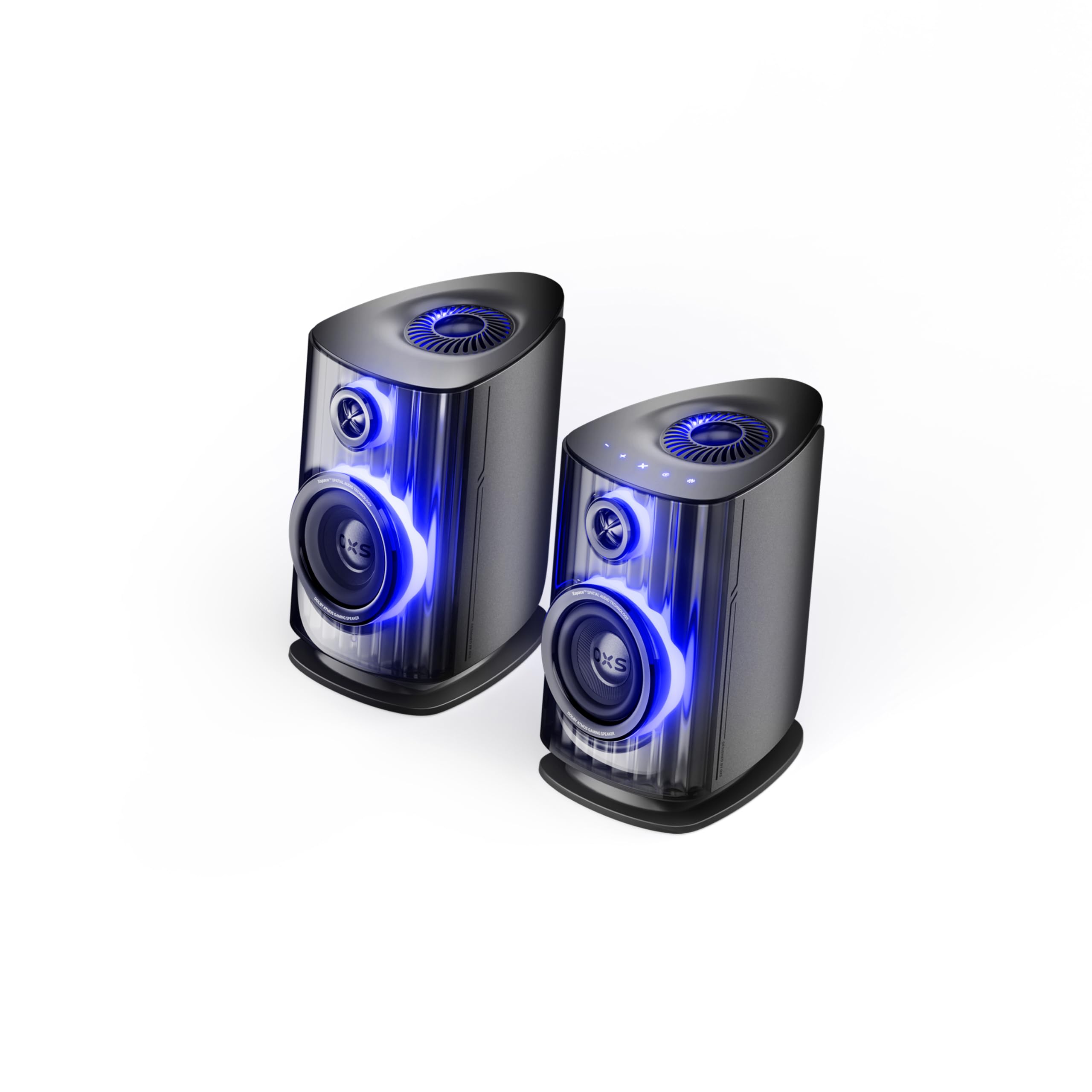
Image: OXS Thunder Duo Speaker System. This image shows the two main speaker units, typically placed on a tabletop. The design features a sleek, modern aesthetic with speaker grilles visible on the front.
4.1. Bozgorailuen osagaiak
- Main Speaker Unit: Houses the primary audio drivers and control circuitry.
- Satellite Speaker Unit: Connects to the main unit to provide a wider soundstage.
- Potentzia sarrera: Korronte-egokigailua konektatzeko.
- Audio Sarrerak: HDMI IN, USB-C, eARC, Optical for various source connections.
4.2. Urruneko kontrola
The included remote control allows for convenient operation of the speaker system from a distance. It typically includes buttons for:
- Piztu/Itzali
- Bolumena igo/behera
- Input Source Selection (HDMI, USB-C, eARC, Optical)
- Isildu
- Audio Mode Selection (e.g., Surround)
5. Konfigurazioa
5.1. Hizlaria jartzea
Place the OXS Thunder Duo speakers on a stable, flat tabletop surface. For optimal sound, position them equidistant from your listening position and at ear level. Ensure there are no obstructions between the speakers and your listening area.
5.2. Energia-konexioa
- Connect the power adapter to the power input port on the main speaker unit.
- Entxufatu korronte-egokigailua hormako entxufe batera.
- The power indicator on the speaker will illuminate, indicating it is in standby mode.
5.3. Audio iturriak konektatzea
The OXS Thunder Duo offers multiple connectivity options:
- HDMI (eARC): For connecting to TVs with an HDMI eARC/ARC port. Use the provided HDMI cable. This connection supports high-quality audio and allows TV remote control of speaker volume.
- HDMI SARRERA: For connecting other HDMI-enabled devices like gaming consoles or Blu-ray players.
- Optikoa: For connecting to TVs or other devices with an optical audio output. Use the provided optical cable.
- USB-C: For connecting to PCs, laptops, or compatible mobile devices.
Connect your desired audio source to the corresponding input port on the main speaker unit.
6. Funtzionamendu-argibideak
6.1. Piztu/Itzaltzea
Press the Power button on the remote control or the main speaker unit to turn the system on or off. The power indicator will change status accordingly.
6.2. Sarrera iturria hautatzea
Press the 'Input' or dedicated source buttons (e.g., HDMI, Optical, USB-C) on the remote control to switch between connected audio sources. The current input source will typically be indicated by an LED or display on the main speaker unit.
6.3. Bolumenaren kontrola
Use the 'Volume Up' (+) and 'Volume Down' (-) buttons on the remote control to adjust the audio level. Press the 'Mute' button to temporarily silence the audio.
6.4. Audio moduak
The OXS Thunder Duo supports surround sound audio output. Use the 'Mode' button on the remote control to cycle through available audio modes, if applicable, to optimize your listening experience for different content types.
7. Konektibitatea
The OXS Thunder Duo offers versatile connectivity for a wide range of devices:
- HDMI SARRERA: Connects to various HDMI-enabled devices.
- USB-C: Ideal for direct digital audio connection to computers (PC), laptops, and mobile devices running Windows, Android, or iOS.
- eARC (Hobetutako Audio Itzulera Kanala): Connects to compatible TVs for high-fidelity audio transmission and simplified control.
- Optikoa: Provides a digital audio connection for TVs, game consoles (PlayStation, XBOX, Switch), and other devices with an optical output.
8. Mantentzea
Proper maintenance ensures the longevity and performance of your OXS Thunder Duo speaker system.
- Garbiketa: Regularly wipe the speaker surfaces with a soft, dry, lint-free cloth. Do not use abrasive cleaners, waxes, or solvents.
- Hautsa: Keep the speaker grilles free from dust accumulation. Use a soft brush or a vacuum cleaner with a brush attachment on a low setting.
- Biltegiratzea: Bozgorailuak denbora luzez gordetzen badituzu, deskonektatu itzazu korrontetik eta gorde itzazu leku fresko eta lehor batean, hobe jatorrizko ontzian.
9. Arazoak
If you encounter issues with your OXS Thunder Duo, refer to the following common problems and solutions:
| Arazoa | Kausa posiblea | Irtenbidea |
|---|---|---|
| Botererik ez | Power cable not connected; Power outlet not active; Speaker is off. | Ensure power cable is securely connected. Test the outlet with another device. Press the Power button on the remote or speaker. |
| Soinurik ez | Incorrect input source selected; Volume too low or muted; Audio cable not connected properly; Source device not outputting audio. | Select the correct input source. Increase volume and check if muted. Reconnect audio cables. Check audio settings on your source device. |
| Urruneko kontrola ez dabil | Batteries are dead or incorrectly inserted; Obstruction between remote and speaker. | Replace batteries, ensuring correct polarity. Remove any obstructions. Ensure remote is pointed at the main speaker unit. |
| Soinu distortsionatua | Bolumena altuegia; Audio iturriaren kalitate eskasa; Kable konexioa soltea. | Lower the volume. Check the audio quality from the source. Ensure all cables are securely connected. |
If the problem persists after trying these solutions, please contact OXS customer support.
10. Zehaztapenak
| Ezaugarri | Zehaztapena |
|---|---|
| Marka | OXS |
| Modelo zenbakia | Thunder DUO |
| Speaker Max Output | 220 Watt |
| Maiztasun Erantzuna | 20 KHz |
| Konektibitate Teknologia | HDMI IN, USB-C, eARC, Optical |
| Audio irteera modua | Inguratu |
| Muntatze Mota | Mahai gaineko muntaia |
| Product Exterior Material | ABS & PVC |
| Hizlari mota | Liburu-apalategia |
| Gomendatutako Erabilerak | Computer, TV, Gaming Consoles |
| Kolorea | Titana |
| Iragazgaitza | Gezurra |
| Berme Mota | Berme mugatua |
| Bozgorailuaren tamaina | 1.5 hazbetekoa |
| Speaker Channel Configuration | 3.1.2 |
| S/N erlazioa | 96 dB |
| Pilak | 2 AAA bateria (urrutiko agintearentzat barne) |
| Elementuaren neurriak (L x W x H) | 17.8 x 21.5 x 27.6 cm |
| Elementuaren pisua | 11.02 kilo |
| Gailu bateragarriak | TV, PC, PlayStation, XBOX, Mobile devices (Windows, Android, iOS), Switch |
| UPC | 199284067936 |
| ASIN | B0GDFVBVB3 |
11. Bermea eta Laguntza
The OXS Thunder Duo Speaker System comes with a Limited Warranty. Please refer to the warranty card included in your package for specific terms and conditions, including the duration and coverage details.
For technical support, troubleshooting assistance, or warranty claims, please contact OXS customer service through the contact information provided on the official OXS website or your purchase documentation. Please have your model number (Thunder DUO) and proof of purchase ready when contacting support.