
Sarrera
This manual provides detailed instructions for the setup, operation, and maintenance of your AT&T DECT 6.0 Cordless Phone, model BL108-3. Please read this guide thoroughly to ensure proper use and to take full advantage of all features, including Smart Call Blocker, Bluetooth Connect to Cell, and the digital answering machine.
Paketearen edukia
Egiaztatu zure paketeak elementu hauek dituela:
- Oinarri Unitatea
- 3 Haririk gabeko telefonoak
- 3 korronte egokitzaile
- 2 kargagailu (telefono gehigarrietarako)
- Telefono Linearen Kablea
- 6 bateria-zelulak
- Hasierako gida azkarra
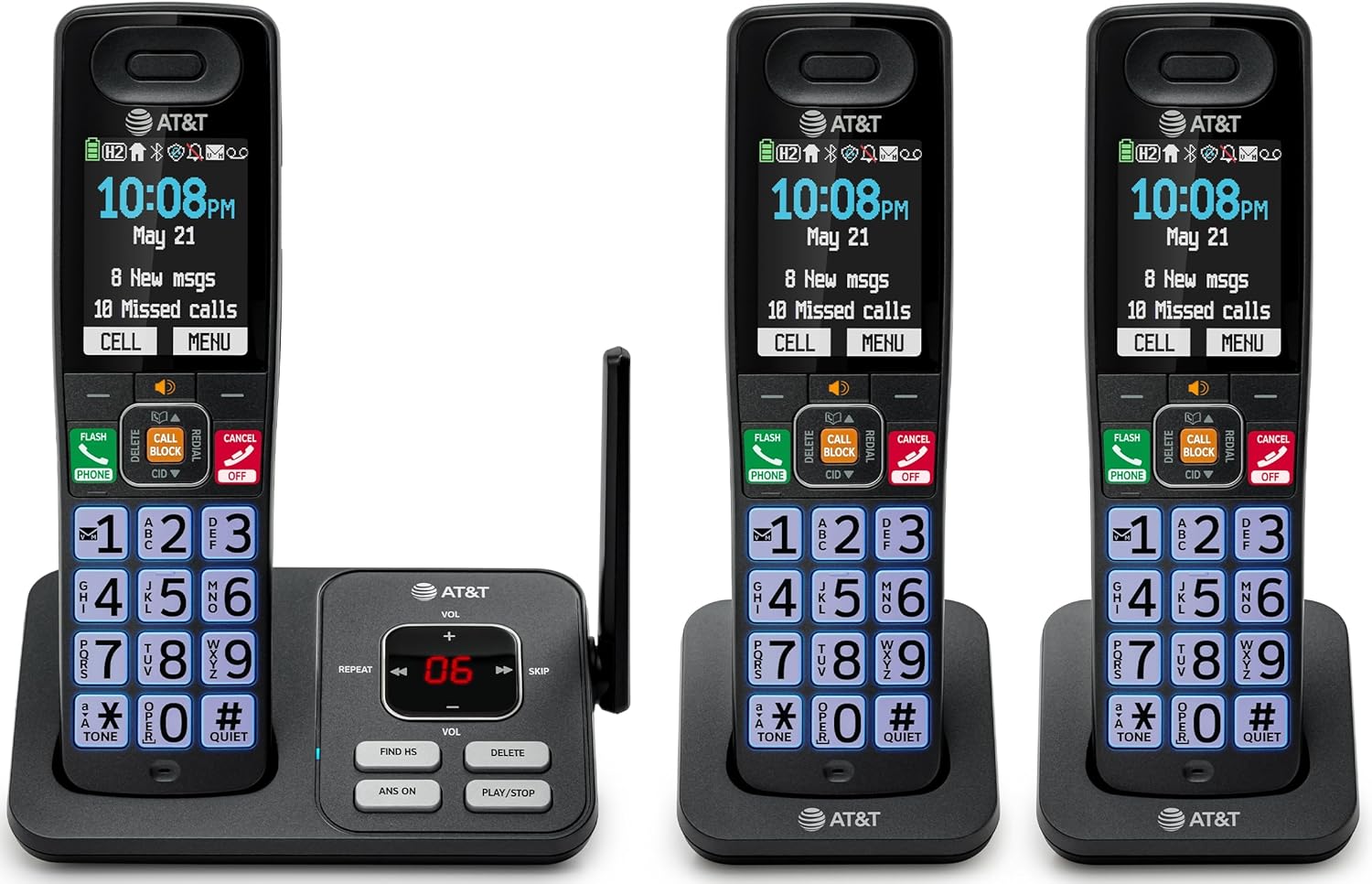
Image: The complete AT&T BL108-3 cordless phone system, showing the base unit and three handsets.
Konfigurazioa
1. Base Unit and Power Connection
- Jarri oinarrizko unitatea gainazal lau eta egonkor batean.
- Connect one end of the telephone line cord to the TEL LINE jack on the base unit.
- Konektatu telefono-kablearen beste muturra hormako telefono-hartune batera.
- Plug one power adapter into the POWER jack on the base unit.
- Plug the other end of the power adapter into an electrical outlet not controlled by a wall switch.
2. Telefonoaren bateriaren instalazioa eta kargatzea
- Ireki bateriaren konpartimentuaren estalkia telefono bakoitzaren atzealdean.
- Insert the provided battery cells, ensuring correct polarity (+ and -).
- Itxi bateriaren konpartimenduaren estalkia.
- Place each handset in its respective charger or the base unit cradle. The CHARGE light on the handset will illuminate.
- Allow the handsets to charge for at least 10 hours before initial use.
3. Additional Charger Setup
- Plug the power adapters for the additional chargers into electrical outlets not controlled by a wall switch.
- Place the additional handsets into these chargers to charge.
Funtzionamendu-argibideak
Deiak egitea eta jasotzea
- Dei bat egiteko: Sakatu TELEFONOA, eta ondoren markatu zenbakia.
- Dei bati erantzuteko: Sakatu TELEFONOA edo edozein markatzeko tekla.
- Dei bat amaitzeko: Sakatu AKTIBATU/EZEZTATU edo jarri telefonoa euskarrian.
Deien blokeatzaile adimenduna
The Smart Call Blocker feature automatically filters out robocalls. You can also manually block unwanted numbers.
- To block a number during a call: Press the dedicated DEI BLOKEA giltza.
- The block directory can store up to 1,000 entries.

Image: A close-up of the handset displaying the "Smart Call Block" screen, with the "CALL BLOCK" button highlighted on the base unit.
Bluetooth bidezko konexioa mugikorrera
Pair your smartphone with the BL108-3 system to make and receive mobile calls through any of the cordless handsets.
- Oinarrizko unitatean, sakatu MENUA, then navigate to "Bluetooth" and select "Pair Cell".
- Gaitu Bluetootha zure telefonoan eta bilatu eskuragarri dauden gailuak.
- Select the AT&T phone from the list on your smartphone to pair.
- Once paired, mobile calls can be made and received using the cordless handsets.

Image: A visual representation of the "Connect to Cell" feature, showing a handset on a nightstand wirelessly connected to a smartphone.
Video: Demonstrates the seamless Bluetooth connection to a cell phone, allowing calls to be made and received through the AT&T cordless handset.
Erantzungailu digitala
The integrated digital answering system records up to 22 minutes of messages.
- Mezuak erreproduzitzeko: Sakatu JOLASTU/GELDITU oinarrizko unitatean edo telefonoan.
- To skip messages: Press SALTATU.
- To delete messages: Press EZABATU.

Image: The phone's base unit and handset displaying an incoming message on the answering system, with a visual of a message being left.
Deitzailearen IDaren iragarpena
The handset speaks the caller's name aloud, allowing you to screen calls without picking up the phone.
- Ensure Caller ID service is subscribed through your telephone service provider.
- The feature is active by default.

Image: The handset and base unit showing a call coming in, with a speech bubble indicating "Call from Johnson" to illustrate the Caller ID Announce feature.
Interfonoa telefonoen artean
You can use the handsets to communicate with each other, or transfer calls.
- Interfono dei bat hasteko: Sakatu DEIA on a handset, then select the desired handset number.
- To transfer a call: During an external call, press DEIA, select the handset, and then hang up after the other handset answers.

Image: Two handsets, one on the base and one on a charger, with arrows indicating communication between them, illustrating the intercom feature.
Phonebook Directory
Gorde 1500 izen eta zenbaki gehienez telefono-aurkibidean, azkar markatzeko.
- To add an entry: Press MENUA, navigate to "Phonebook", then "Add New Entry".
- To dial from phonebook: Press TELEFONOA, orduan DIR, select the entry, and press TELEFONOA berriz.

Image: The handset screen showing a phonebook list with alphabetical navigation, demonstrating the phonebook directory feature.
Full-Duplex Handset Speakerphone
Allows both parties to speak and be heard simultaneously during a speakerphone call.
- To activate speakerphone during a call: Press HIZLARIA.
- To switch back to handset mode: Press TELEFONOA.

Image: A person using the handset in speakerphone mode while working on a laptop, with speech bubbles indicating a two-way conversation.
Modu lasaia
Temporarily silences all handset and base unit ringers for a set period.
- To activate: Press and hold #ISAILA telefonoan.
- Desaktibatzeko: Luze sakatu #ISAILA berriz.

Image: The handset screen showing "Quiet mode on" with a sleeping person in the background, illustrating the Quiet Mode feature.
ECO modua
Reduces power consumption for optimal battery performance.
- ECO mode is typically enabled by default to conserve energy.
- Refer to the full user manual for options to adjust or disable this feature if needed.

Image: The handset and base unit in a setting with wind turbines in the background, and the screen showing "ECO mode", symbolizing energy efficiency.
Linterna integratua
For safety at night or in emergencies, the handset includes a built-in flashlight.
- To activate the flashlight: Locate the flashlight button on the side of the handset and press it.

Image: A close-up of the handset's side, showing the flashlight beam and the "FLASHLIGHT" label, indicating its location and function.
Mantentzea
- Garbiketa: Garbitu telefonoa eta oinarrizko unitatea zapi leun eta lehor batekin.amp oihal. Ez erabili garbiketa-sprayrik edo produktu kimiko gogorrik.
- Bateria zaintzea: For optimal battery life, fully charge the handsets for 10 hours before first use. If the phone will be unused for an extended period, remove the batteries.
- Ingurumen-baldintzak: Saihestu telefonoa muturreko tenperaturen, eguzki-argiaren eraginpean edo hezetasunaren eraginpean jartzea.
Arazoak konpontzea
| Arazoa | Irtenbidea |
|---|---|
| Markatze-tonurik ez |
|
| Telefonoa ez da kargatzen |
|
| Deien kalitate eskasa edo estatikoa |
|
| Cannot make/receive Bluetooth calls |
|
Zehaztapenak
| Ezaugarri | Xehetasuna |
|---|---|
| Marka | AT&T |
| Modelo zenbakia | BL108-3 |
| Telefono Mota | Haririk gabekoa (DECT 6.0) |
| Kolorea | Beltza |
| Telefonoak barne | 3 |
| Bistaratzea | 2.4" Color Backlit Display |
| Erantzungailu mota | Digitala (22 minutu arteko grabazio-denbora) |
| Dei-blokeatzailea | Smart Call Blocker (up to 1,000 entries) |
| Bluetootha | Connect to Cell (smartphone pairing) |
| Telefonoaren zain egoteko denbora | 6 egun |
| Deitzailearen IDa | Yes, with Announce feature |
| Telefono-gidaren edukiera | Up to 1500 names and numbers |
| Bozgorailua | Full-Duplex Handset Speakerphone |
| Dimentsioak (Oinarrizko Unitatea) | 5.63 x 2.99 x 7.4 hazbete (L x W x H) |
| Energia iturria | Kable elektrikoa |
| Materiala | Plastikoa |
| UPC | 650530034121 |

Image: Diagram showing the dimensions of the AT&T BL108-3 base unit and a handset.
Bermearen informazioa
Your AT&T BL108-3 Cordless Phone comes with a 1 urteko berme mugatua. Please retain your purchase receipt as proof of purchase. For detailed warranty terms and conditions, refer to the full user manual or contact AT&T customer support.
Laguntza
For further assistance, technical support, or to order replacement parts, please visit the official AT&T support webwebgunera edo jarri harremanetan bezeroarentzako arreta-zerbitzura. Maiz aurki ditzakezu maiz egiten diren galderak eta baliabide gehigarriak sarean.
- Lineako laguntza: Bisitatu AT&T Wireless Support (or search for AT&T Landline Phone Support).
- Bezeroarentzako arreta: Refer to your Quick Start Guide for specific contact numbers.