Sarrera
This manual provides detailed instructions for the installation, operation, and maintenance of your Generic 11.26" Car HD On-Dash Camera System. This system is designed for Ford B-MAX Hatchback models from 2012-2017, offering advanced features such as 4K front recording, 1080P rear recording, wireless CarPlay, Android Auto, Bluetooth, and GPS functionality. Please read this manual thoroughly before using the device to ensure proper operation and safety.
Segurtasun Informazioa
- Instalazio profesionala: Professional installation is recommended for optimal performance and to avoid damage to your vehicle or the device.
- Gidatzeko segurtasuna: Always prioritize driving safety. Do not operate the device in a way that distracts you from the road.
- Energia iturria: Use only the provided power cable and connect to a compatible vehicle power outlet. Incorrect power sources may damage the device.
- Tenperatura: Saihestu gailua tenperatura altuetan, eguzki-argiaren eraginpean denbora luzez edo hezetasun handietan jartzea.
- Mantentzea: Ez saiatu gailua zeuk desmuntatzen edo konpontzen. Jarri harremanetan zerbitzu-langile kualifikatuekin.
Paketearen edukia
Egiaztatu elementu guztiak zure paketean daudela:
- 11.26" On-Dash Camera System Unit
- 4K Front Dash Camera
- 1080P Waterproof Rear Camera
- Mahaigaineko euskarria
- Suction Cup Mendia
- Elikatze-kablea
- 64GB TF txartela
- Erabiltzailearen eskuliburua
Konfigurazioa
1. Instalazioa
The system offers two primary installation methods: dashboard mounting or windshield mounting. Both methods utilize adjustable brackets to secure the device.
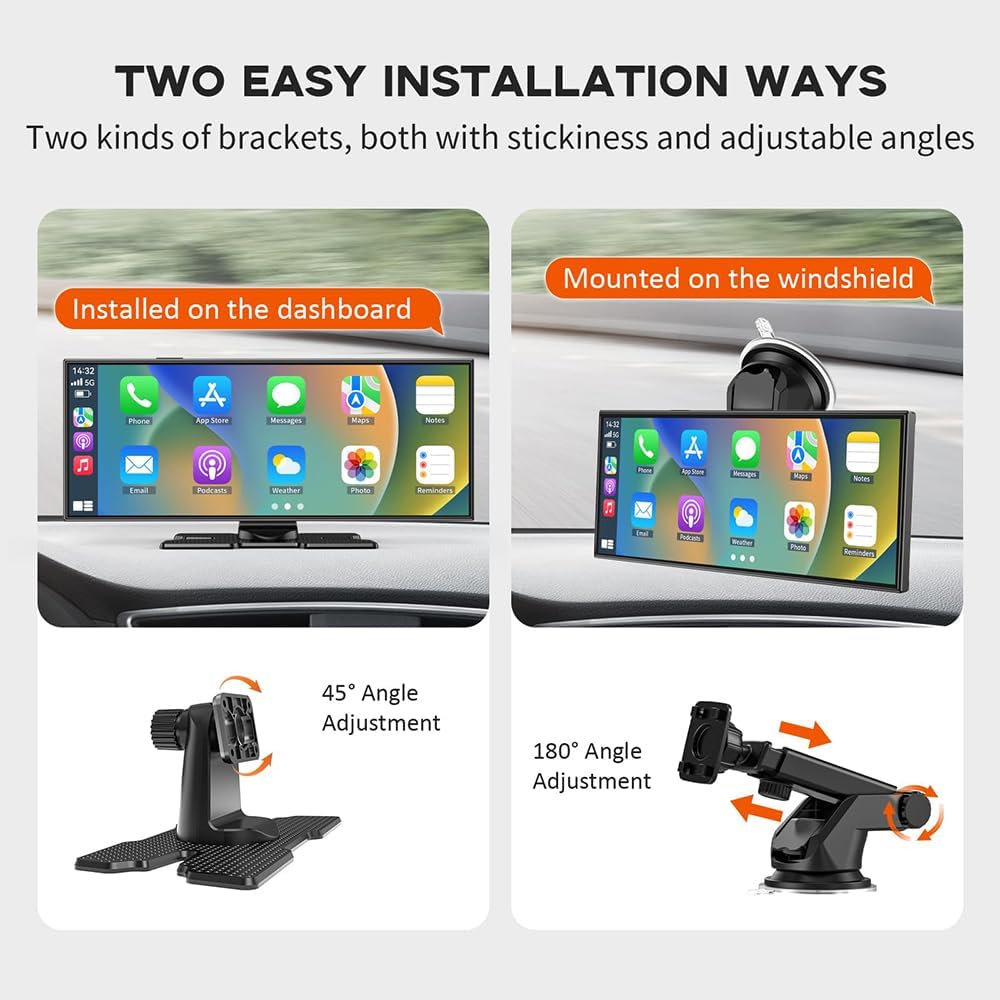
Image: Two easy installation ways. The left shows the device installed on the dashboard with a 45-degree angle adjustment. The right shows the device mounted on the windshield with a 180-degree angle adjustment.
- Arbelaren instalazioa: Use the desktop stand with its adhesive base to secure the unit to your dashboard. Adjust the angle for optimal viewing.
- Haizetako instalazioa: Attach the suction cup mount to the windshield. Secure the unit to the mount and adjust the angle as needed.
2. Energia-konexioa
Connect the provided power cable to the device and then to your vehicle's 12V power outlet (cigarette lighter socket). Ensure the connection is secure.
3. Kamera konexioa
- Aurrealdeko kamera: Aurreko kamera unitate nagusian integratuta dago.
- Atzeko kamera: Connect the rear camera cable to the designated port on the main unit. Route the cable carefully to the rear of your vehicle, ensuring it does not interfere with vehicle operations. Mount the rear camera in a suitable location, typically above the license plate or on the rear window, ensuring a clear view.
4. Sartu TF txartela
Insert the provided 64GB TF card into the designated slot on the main unit. Ensure it is inserted correctly until it clicks into place.
Funtzionamendu-argibideak
1. Initial Power-On and Touchscreen Interface
Once connected to power, the device will automatically power on with your vehicle. The 11.26-inch IPS touchscreen allows for intuitive navigation through menus and functions. Tap icons to select options and swipe to navigate.
2. CarPlay and Android Auto Connection
The system supports wireless CarPlay and Android Auto for seamless smartphone integration.
- Bluetooth bidezko lotura On the device, enable Bluetooth. On your smartphone, search for the device's Bluetooth name and pair them.
- Wi-Fi konexioa: After Bluetooth pairing, the device will prompt you to connect to its Wi-Fi network for CarPlay/Android Auto functionality. Follow the on-screen instructions.
- Once connected, your phone's compatible apps (navigation, music, calls) will appear on the dash camera screen.
3. Ahots kontrola
Utilize Siri or Google Voice Control for hands-free operation, enhancing driving safety.

Image: Safe Driving with Siri/Google Voice Control. The image displays various app icons (Phone, Google Map, Apple Map, Message, Music, WhatsApp, Calendar) and examples of voice commands such as 'Hey Siri, call Mom', 'Hi Google, Message to Lisa', 'Hey Siri, play some music', and 'Hi Google, Navigate Home'.
- Activate voice control by saying the wake word (e.g., "Hey Siri" or "Hey Google") or by tapping the voice assistant icon on the screen.
- Issue commands for navigation, making calls, sending messages, or playing music.
4. Grabaketa funtzioak
The system provides comprehensive recording capabilities for front and rear views.

Image: 4K High Definition Recording. This image illustrates the system's recording capabilities, including a 4K front camera view, a 1080P rear camera view, and a diagram highlighting the multi-angle adjustable and waterproof design of the dash cam. It also mentions reverse view and unlimited loop recording.
- Aurrealdeko kamera: Records in 4K resolution, capturing clear details of the road ahead.
- Atzeko kamera: Records in 1080P resolution, providing a wide-angle view of the rear. The waterproof design ensures reliable operation in all weather conditions.
- Loop grabaketa: The system supports unlimited loop recording. When the 64GB TF card is full, the oldest files automatikoki gainidazten dira grabazio berriekin.

Image: Unlimited Loop Recording. This image depicts the loop recording function, showing a circular flow of traffic and a central dash cam view, emphasizing continuous recording and data protection. Icons for '64G TF Card', 'HD Videos', and 'Loop Recording' are included.
5. Audio irteerako aukerak
The device offers multiple ways to output audio to your vehicle's sound system.

Image: Four Audio Output Options. This image illustrates the various audio output methods: built-in speaker, Bluetooth, FM Transmitter, and AUX connection, each with a corresponding screen interface example.
- Bozgorailu integratua: For direct audio output from the unit.
- Bluetootha: Connect wirelessly to your car's Bluetooth system for audio playback.
- FM igorlea: Transmit audio to your car's FM radio by tuning both devices to the same frequency.
- AUX konexioa: Use an AUX cable to connect the device to your car's AUX input for direct audio transfer.
6. GPS nabigazioa
When connected via CarPlay or Android Auto, utilize your smartphone's navigation applications directly on the dash camera screen for real-time directions.
Mantentzea
1. Garbiketa
- Pantaila: Erabili zapi leun eta pelunik gabeko bat ukipen-pantaila astiro-astiro garbitzeko. Saihestu garbitzaile edo disolbatzaile urratzaileak.
- Kamera lenteak: Keep the front and rear camera lenses clean for clear recordings. Use a lens cleaning cloth or a soft, dry cloth.
2. Storage Card Management
- Formateatzea: Periodically format the TF card through the device's settings menu to maintain optimal recording performance and prevent data corruption. Back up any important files formateatu aurretik.
- Ordezkoa: If the TF card shows signs of degradation or error, replace it with a new high-speed (Class 10 or higher) TF card.
Arazoak konpontzea
Ohiko arazoak eta irtenbideak:
- Gailua ez da pizten:
- Check the power cable connection to both the device and the vehicle's power outlet.
- Ziurtatu ibilgailuaren entxufea funtzionatzen duela.
- Recording Issues (e.g., blurry video, no recording):
- Garbitu kameraren lenteak.
- Ensure the TF card is inserted correctly and is not full. Format the TF card if necessary (back up data first).
- Check recording settings in the device menu.
- CarPlay/Android Auto ez da konektatzen:
- Ensure Bluetooth and Wi-Fi are enabled on both the device and your smartphone.
- Forget the device from your phone's Bluetooth/Wi-Fi settings and try pairing again.
- Restart both the device and your smartphone.
- Audio-irteerarik ez:
- Check the selected audio output mode (Built-in speaker, Bluetooth, FM, AUX).
- Adjust volume levels on both the device and your car stereo.
- If using FM, ensure the frequency is clear and matched. If using AUX, check the cable connection.
Zehaztapenak
| Ezaugarri | Zehaztapena |
|---|---|
| Produktuaren izena | Car on-dash cameras system |
| Modelo zenbakia | CzyBBD-9225367-FBN-02 |
| Bateragarritasuna | For Ford B-MAX Hatchback 2012-2017 |
| Pantailaren tamaina | 11.26 hazbetekoa |
| Bistaratzeko mota | IPS ukipen-pantaila |
| Aurrealdeko kameraren bereizmena | 4K (1920×720 video resolution) |
| Atzeko kameraren bereizmena | 1080p |
| Camera Megapixels | 5 megapixelekoa |
| Main Lens Aperture | F1.8 |
| Biltegiratze Txartela | 64GB TF card included |
| Sare mota | Wi-Fi |
| ren eremua View | 160° |
| Audio irteera moduak | Speaker, AUX, FM, Bluetooth |
| Produktuaren neurriak | 0.39 x 0.39 x 0.39 hazbete |
| Elementuaren pisua | 2.2 libra (1 kilogramo) |
| Fabrikatzailea | CzyBBD |
Bermea eta Laguntza
For any issues encountered after receiving your package, or for technical support, please contact the seller directly. They are committed to assisting you with product-related concerns.


