
1. Sarrera eta Overview
This manual provides essential instructions for setting up, operating, maintaining, and troubleshooting your iiyama SENSE INFINITY SENSE-15FH127-i7-UH1X-M laptop. This high-performance notebook features a 15.6-inch Full HD anti-glare display, an Intel Core i7-12650H processor, 16GB of DDR4 RAM, and a 1TB NVMe SSD, running on Windows 11 Home.
Please read this manual thoroughly before using your new laptop to ensure proper operation and to maximize its lifespan.

1.1. irudia: Aurrealdea view of the iiyama SENSE INFINITY laptop with the screen open.
2. Konfigurazioa
2.1 Kutxatik ateratzea eta hasierako ikuskapena
Kontu handiz atera osagai guztiak paketetik. Egiaztatu elementu hauek daudela:
- iiyama SENSE INFINITY Laptop
- Korronte alternoko egokitzaile multzoa (korronte alternoko egokitzailea eta elikatze-kablea)
- Various Manuals
- Berme Txartela
Inspect the laptop and accessories for any signs of damage. If any items are missing or damaged, contact your retailer immediately.
2.2 Energia-egokitzailea konektatzea
Before first use, ensure the laptop battery is fully charged. Connect the AC adapter to the power input port on the laptop and then plug the power cord into a wall outlet.

2.1. irudia: Aldea view illustrating the power input port and other external terminals.
2.3 Hasierako abiarazpena eta Windows konfigurazioa
Press the power button to turn on the laptop. Follow the on-screen instructions to complete the Windows 11 Home setup process. This includes selecting your region, language, connecting to a network, and creating a user account.

Figure 2.2: Laptop displaying the Windows 11 operating system interface.
3. Funtzionamendu-argibideak
3.1 Piztea/Itzaltzea eta lo modua
- Piztu: Sakatu teklatuaren plataforman dagoen pizteko botoia.
- Itzali: Egin klik Windows-eko Hasi botoian, eta ondoren hautatu Energia > Itzali.
- Lo egiteko modua: Itxi ordenagailu eramangarriaren tapa edo hautatu Energia > Lo Hasi menuan.
3.2 Teklatua eta ukipen-panela erabiltzea
The laptop features a Japanese keyboard layout and a multi-touch compatible touchpad. Refer to the Windows operating system documentation for specific gestures and keyboard shortcuts.
3.3 Kanpoko gailuak konektatzea
Zure ordenagailu eramangarriak kanpoko gailuak konektatzeko hainbat ataka ditu:
- USB atakak: 2x USB 3.1 (Type-C), 1x USB 3.0, 1x USB 2.0 for connecting peripherals like mice, keyboards, and external storage.
- Bistaratzeko irteerak: 1x HDMI, 1x Mini DisplayPort for connecting external monitors or projectors.
- Audio-konektoreak: 1x Headphone/Speaker Output, 1x Microphone Input for audio devices.
- Mikro SD txartelaren irakurgailua: Sartu mikro SD txartel bat gordetako datuetara sartzeko.
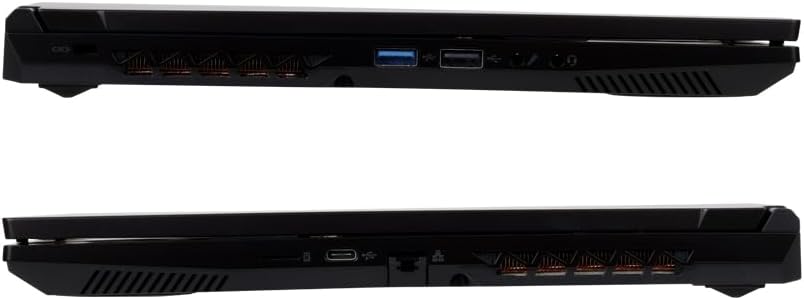
3.1. irudia: Xehetasuna view of the laptop's external ports on both sides.
3.4 Sarearen konexioa
- Wi-Fi: The laptop supports Wi-Fi 6E (IEEE802.11 ax/ac/n/g/b/a). To connect, click the network icon in the taskbar, select your desired Wi-Fi network, and enter the password if prompted.
- Kabledun LAN: Connect an Ethernet cable to the 1000BASE-T LAN port for a stable wired network connection.
- Bluetootha: The laptop includes Bluetooth 5 for connecting wireless peripherals such as headphones or speakers.
4. Mantentzea
4.1 Ordenagailu eramangarria garbitzea
- Pantaila: Erabili lipurrik gabeko zapi leun bat dampUrarekin edo pantaila-garbitzaile batekin garbitu. Ez ihinztatu likidoa zuzenean pantailan.
- Txasisa eta teklatua: Erabili zapi leun eta lehor bat. Zikinkeria egoskorra bada, ukitu apur batamp oihal bat erabil daiteke, likidorik ez sartzeko ataketan edo aireztapen-hodietan.
- Oihalak: Periodically use compressed air to clear dust from the cooling vents to maintain optimal airflow.
4.2 Bateria zaintzea
Bateriaren iraupena luzatzeko:
- Saihestu bateria maiz erabat deskargatzea.
- Ez jarri ordenagailu eramangarria tenperatura altuetan.
- If storing the laptop for an extended period, charge the battery to approximately 50-60% before turning it off.
4.3 Software eguneraketak
Regularly update your Windows operating system and drivers to ensure optimal performance, security, and compatibility. Windows Update can be accessed via the Settings menu.
5. Arazoak
This section addresses common issues you might encounter. For more complex problems, refer to the official iiyama support webwebgunean edo jarri harremanetan bezeroarentzako zerbitzuarekin.
5.1 Argindarrik ez / Ordenagailu eramangarria ez da pizten
- Ziurtatu korronte-egokitzailea ondo konektatuta dagoela ordenagailu eramangarrira eta funtzionatzen duen entxufe batera.
- Egiaztatu entxufea funtzionatzen duen beste gailu bat konektatuz.
- Bateria guztiz agortuta badago, minutu batzuk behar izan daitezke kargatzeko ordenagailu eramangarria piztu aurretik.
5.2 Bistaratzeko arazoak
- Pantaila hutsa: Try pressing the function key combination (e.g., Fn + F5 or F7, depending on the model) to toggle the display output.
- Kanpoko monitorerik ez da detektatu: Ensure the cable is securely connected. Try restarting the laptop.
5.3 Sarearen konexio arazoak
- Wi-Fi: Egiaztatu Wi-Fi gaituta dagoela Windows ezarpenetan. Berrabiarazi bideratzailea eta modema.
- Kabledun LAN: Check the Ethernet cable connection. Ensure your network adapter drivers are up to date.
5.4 Errendimendu motela
- Itxi atzeko planoan exekutatzen ari diren beharrezkoak ez diren aplikazioak.
- Ensure your operating system and drivers are updated.
- Birus edo malwarerik dagoen egiaztatu antibirus software fidagarria erabiliz.
- Ensure adequate free space on your 1TB SSD.
6. Zehaztapenak
The following table details the technical specifications of the iiyama SENSE INFINITY SENSE-15FH127-i7-UH1X-M laptop:
| Ezaugarri | Zehaztapena |
|---|---|
| Marka | iiyama |
| Modelo zenbakia | SENSE-15FH127-i7-UH1X-M |
| Sistema eragilea | Windows 11 Home |
| Pantailaren tamaina | 15.6 hazbetekoa |
| Berezko Ebazpena | Full HD (1920x1080 pixels) |
| Bistaratzeko mota | Anti-glare Color LCD |
| CPU eredua | Intel Core i7-12650H Processor |
| CPU Abiadura | Gehienez 4.70 GHz |
| Grafikoak | Intel UHD grafikoak (integratuak) |
| Installed RAM Memory | 16GB DDR4-3200 S.O.DIMM (8GBx2) |
| Memoria zirrikituak | 2 |
| Biltegiratzea | 1TB NVMe M.2 SSD (PCIe 4.0x4) |
| Unitate optikoa | Ez hornitua |
| Txartel irakurgailua | Mikro SD txartelaren irakurgailua |
| Audioa | High Definition Audio subsystem, Built-in Stereo Speakers, Built-in Microphone |
| Webkamara | 1 milioi pixel |
| Kable bidezko LANa | 1000BASE-T LAN Port |
| Haririk gabeko konexioa | Wi-Fi 6E (IEEE802.11 ax/ac/n/g/b/a), Bluetooth 5 |
| Teklatua | Japoniar teklatua |
| Seinalatzeko gailua | Multi-touch compatible Touchpad |
| Kanpo Portuak | Headphone/Speaker Output x1, Microphone Input x1, USB 3.1 (Type-C) x2, USB 3.0 x1, USB 2.0 x1, HDMI x1, Mini DisplayPort x1 |
| TPM | TPM2.0 compatible |
| Bateriaren iraupena (bideo erreprodukzioa) | Approx. 4.3 hours (JEITA3.0) |
| Bateriaren iraupena (inaktiboa) | Approx. 6.0 hours (JEITA3.0) |
| Pisua | Approx. 2.03 kg (including battery) |
| Neurriak (WxDxH) | Approx. 360mm x 240mm x 27.7mm (including rubber feet) |
7. Bermea eta Laguntza
7.1 Standard Warranty
This iiyama SENSE INFINITY laptop comes with a standard 1 urteko bermea from the date of purchase. Please retain your proof of purchase and the warranty card for any warranty claims.
The warranty covers manufacturing defects and hardware failures under normal use. It does not cover damage caused by misuse, accidents, unauthorized modifications, or natural disasters.
7.2 Laguntza Teknikoa
For technical assistance, driver downloads, or further troubleshooting, please refer to the official iiyama support website. You can also find contact information for customer service on your warranty card or the official product page.
When contacting support, please have your laptop's model number (SENSE-15FH127-i7-UH1X-M) and serial number ready.