
1. Sarrera
This manual provides essential information for setting up, operating, maintaining, and troubleshooting your Xiaomi Redmi Note 15 Pro 5G smartphone. Please read this manual carefully before using your device to ensure optimal performance and longevity.
The Xiaomi Redmi Note 15 Pro 5G features a 200MP main camera with optical stabilization, a 6580mAh battery, a 1.5K CrystalRes AMOLED display with 120Hz refresh rate, and is powered by the Mediatek Dimensity 7400-Ultra processor. It also boasts advanced water and dust resistance (IP66, IP68, IP69, and IP69K ratings).
2. Gailua amaitu daview
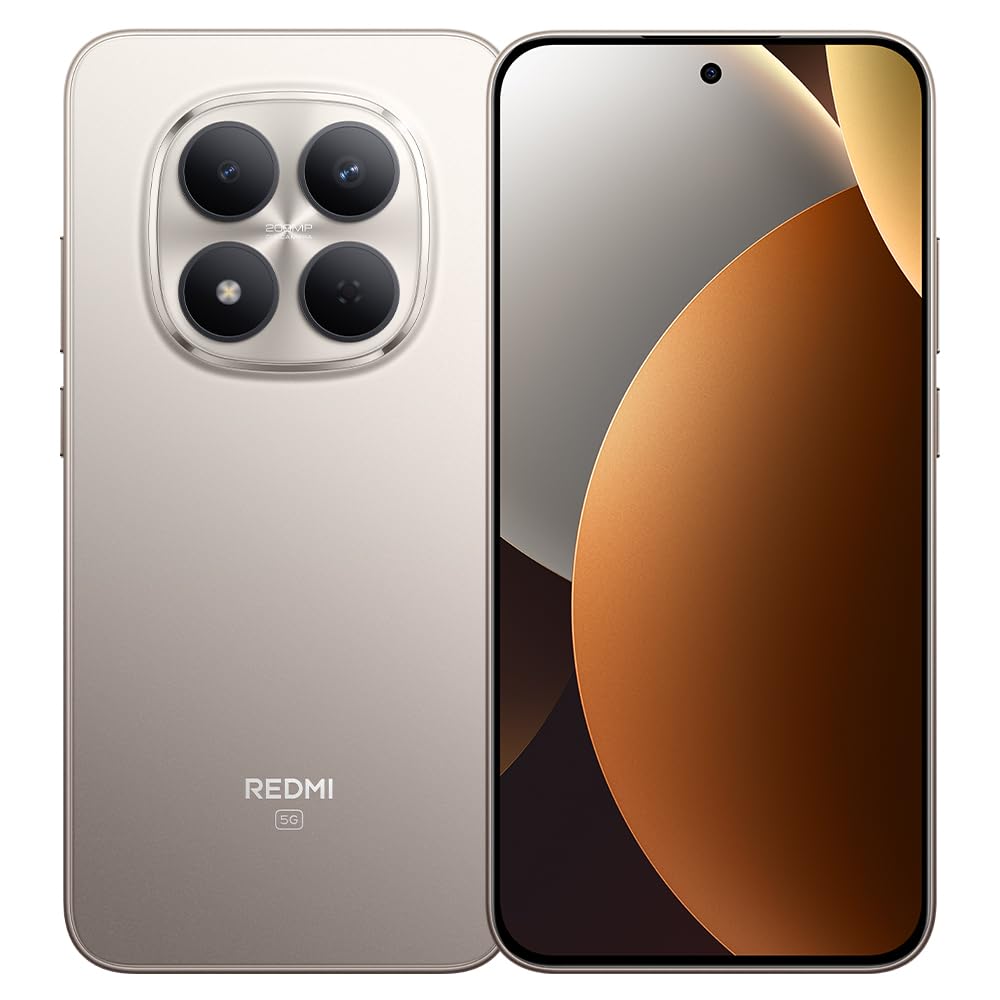
1. irudia: Xiaomi Redmi Note 15 Pro 5G Smartphone. This image displays the front and back of the device, highlighting its sleek design and camera module.
Paketearen edukia
- Xiaomi Redmi Note 15 Pro 5G Smartphone
- Elikatze-moldagailua
- USB motako kablea
- SIM txartela ateratzeko tresna (eskualdearen arabera alda daiteke)
- Hasierako gida azkarra (eskuliburu hau)
3. Konfigurazioa
3.1. SIM txartela sartzea
- Bilatu SIM txartelaren erretilua zure gailuaren alboan.
- Sartu SIM txartela ateratzeko tresna erretiluaren ondoko zulo txikian eta sakatu ondo erretilua atera arte.
- Place your Nano-SIM card(s) into the tray with the gold contacts facing down. Ensure proper orientation. This device supports Dual SIM functionality.
- Kontu handiz sartu berriro erretilua telefonoan.
3.2. Hasierako piztea eta konfigurazioa
- Sakatu eta eutsi pizteko botoia Xiaomi logotipoa agertu arte.
- Jarraitu pantailan agertzen diren argibideei zure hizkuntza eta eskualdea hautatzeko, Wi-Fi sarera konektatzeko eta zure Google kontua konfiguratzeko.
- Configure biometric security features such as facial recognition for enhanced security.
3.3. Gailua kargatzea
Connect the USB Type-C cable to the phone's charging port and the other end to the provided power adapter. Plug the adapter into a power outlet. The device supports fast charging. Ensure the power adapter is suitable for your region.
4. Funtzionamendu-argibideak
4.1. Pantaila eta nabigazioa
- The device features a 6.83-inch CrystalRes AMOLED display with a 120Hz refresh rate for smooth visuals.
- Navigate using gestures or on-screen navigation buttons (configurable in settings).
- Adjust display brightness and color settings in the 'Display' section of the Settings app.
4.2. Kameraren erabilera
Your Redmi Note 15 Pro 5G is equipped with a 200MP main rear camera with optical stabilization and a 20MP front camera.
- Ireki Kamera aplikazioa.
- Hautatu nahi duzun modua (Argazkia, Erretratua, Bideoa, Profesionala, etab.).
- Sakatu obturadorearen botoia argazkiak ateratzeko edo bideo grabaketa hasteko/gelditzeko.
- Utilize the 200MP mode for high-resolution images and 4K video recording for detailed videos.
4.3. Errendimendua eta Konektibitatea
- The Mediatek Dimensity 7400-Ultra processor and 8GB RAM ensure smooth multitasking and gaming.
- Connect to 5G networks for high-speed internet access.
- Manage Wi-Fi, Bluetooth, and mobile data connections through the Quick Settings panel or the 'Network & Internet' section in Settings.
5. Mantentzea
5.1. Bateria zaintzea
- The 6580mAh battery provides extended usage. For optimal battery life, avoid extreme temperatures.
- Use the provided charger for efficient and safe charging.
- Regularly check battery usage in Settings to identify and manage power-consuming apps.
5.2. Uraren eta hautsaren aurkako erresistentzia
Your device is rated IP66, IP68, IP69, and IP69K for water and dust resistance. This means it is protected against strong jets of water, immersion up to certain depths, and high-pressure/high-temperature water jets. However, resistance is not permanent and may decrease over time with normal wear. Avoid exposing the device to seawater, chlorinated water, or liquids other than fresh water. If the device gets wet, dry it thoroughly before charging or using the USB port.
5.3. Software eguneraketak
Regularly check for and install software updates to ensure your device has the latest features, security patches, and performance improvements. Go to 'Settings' > 'About phone' > 'MIUI version' to check for updates.
6. Arazoak
6.1. Arazo arruntak eta irtenbideak
- Gailua ez da pizten: Ziurtatu bateria kargatuta dagoela. Konektatu kargagailua gutxienez 15 minutuz, eta gero saiatu pizten.
- Bateriaren iraupen eskasa: Reduce screen brightness, disable unnecessary background apps, turn off GPS/Bluetooth when not in use. Check 'Battery' settings for detailed usage.
- Konexio arazoak (Wi-Fi/5G): Restart your device. Toggle Wi-Fi/Mobile Data off and on. Reset network settings if the issue persists.
- Aplikazioak huts egiten ari dira: Clear the cache of the problematic app (Settings > Apps > [App Name] > Storage > Clear cache). If the issue continues, reinstall the app.
- Gailuak ez du erantzuten: Berrabiarazteko, sakatu eta eutsi pizteko botoia 10-15 segundoz.
7. Zehaztapenak
| Ezaugarri | Zehaztapena |
|---|---|
| Marka | XIAOMI |
| Eredua | Redmi Note 15 Pro 5G |
| Sistema eragilea | Android |
| CPU eredua | Mediatek Dimensity 7400-Ultra |
| Biltegiratze Ahalmena | 256 GB |
| RAM | 8 GB |
| Pantailaren tamaina | 6.83 hazbete |
| Bistaratzeko mota | AMOLED |
| Gehienezko pantailaren bereizmena | 2772 x 1280 pixel |
| Freskatze tasa | 120 Hz |
| Atzeko kameraren bereizmena | 200 MP |
| Aurrealdeko kameraren bereizmena | 20 MP |
| Bideo Harrapaketa Ebazpena | 4K (4096 Pixels) |
| Bateria Edukiera | 6580 mAh |
| Bateriaren iraupena | 24 Hours (typical usage) |
| Konektibitate Teknologia | 5G, 2G |
| Haririk gabeko sarearen teknologia | GSM |
| Konektore mota | USB C motakoa |
| SIM txartela mota | Nano-SIM (Dual SIM) |
| Segurtasun biometrikoa | Aurpegi-ezagutza |
| Uraren Erresistentzia Maila | IP66, IP68, IP69, IP69K |
| Aurikularretarako Jack | Bat ere ez |
| Dakarten osagaiak | Elikatze-moldagailua |
| Kanpoko Proba Ziurtagiria | Anatel: 062732509185 / Model: 25080RABDG |
8. Bermea eta Laguntza
8.1. Bermearen informazioa
Produktu hau a 90 eguneko bermea against manufacturing defects. Please retain your proof of purchase for warranty claims. The warranty does not cover damage caused by misuse, accidents, unauthorized repairs, or normal wear and tear.
8.2. Bezeroarentzako arreta
For further assistance, technical support, or warranty inquiries, please refer to the official Xiaomi support website or contact their customer service. You can find contact details on the official Xiaomi webgunea edo gailuarekin batera emandako dokumentazioan.
For product homologation details, please visit: sistemas.anatel.gov.br/sch