
1. Konfigurazioa
1.1 Kutxatik ateratzea eta hasierako ikuskapena
Upon opening the package, ensure all components are present and in good condition. The box should contain:
- XIAOMI Redmi Note 15 Pro 5G AI Smartphone
- SIM erretiluaren kanporatzailea
- USB kablea
- Telefono-zorroa
1.2 SIM txartelaren instalazioa
The Redmi Note 15 Pro 5G AI supports Dual SIM functionality (nano SIM + nano SIM or nano SIM + eSIM). It does ez have a Micro SD slot.
- Bilatu SIM txartelaren erretilua gailuaren alboan.
- Sartu SIM txartelaren erretilua ateratzeko tresna erretiluaren ondoko zulo txikian eta sakatu astiro erretilua atera arte.
- Place your nano SIM card(s) into the designated slots on the tray. Ensure the gold contacts face downwards and the card is correctly oriented.
- Kontu handiz sartu berriro SIM txartelaren erretilua telefonoan, bere lekuan klik egin arte.
Oharra: For USA market, this phone is compatible with T-Mobile, Mint, Tello, or any network operating under the T-Mobile infrastructure. An already activated SIM card is required. Outside the USA, it works with any GSM carrier SIM.
1.3 Hasierako kargatzea eta piztea
Before first use, it is recommended to fully charge your device. The phone supports 45W turbo charging.
- Connect the USB cable to the phone's USB Type-C port and to a compatible power adapter.
- Entxufatu korronte-egokitzailea hormako entxufe batera. Kargatzeko adierazlea agertuko da pantailan.
- Once sufficiently charged, press and hold the power button on the side of the device until the XIAOMI logo appears.
- Jarraitu pantailan agertzen diren argibideei hasierako konfigurazioa osatzeko, hizkuntza hautatzea, Wi-Fi konexioa eta Google kontuaren konfigurazioa barne.
2. Funtzionamendu-argibideak
2.1 Bistaratzeko Ezaugarriak
The device features a 6.83-inch AMOLED display with a 1.5K resolution (2772 x 1280) and a refresh rate of up to 120Hz. It offers a peak brightness of 3200 nits and is protected by Corning Gorilla Glass Victus 2.
Wet Touch Technology 2.0: This feature intelligently detects water, oil, foam, or sweat, providing a smoother and more responsive touch experience even in challenging conditions.
2.2 Kameraren erabilera
The Redmi Note 15 Pro 5G AI is equipped with an advanced camera system:
- Atzeko kamera: 200MP main camera with Optical Image Stabilization (OIS) and an 8MP ultra-wide camera.
- Aurrealdeko kamera: 20MP.
To access the camera, tap the camera icon on your home screen or lock screen. Select modes such as Photo, Video, Portrait, or Pro mode. The 200MP AI Engine supports features like AI Film Camera for cinematic effects and various AI image editing tools.
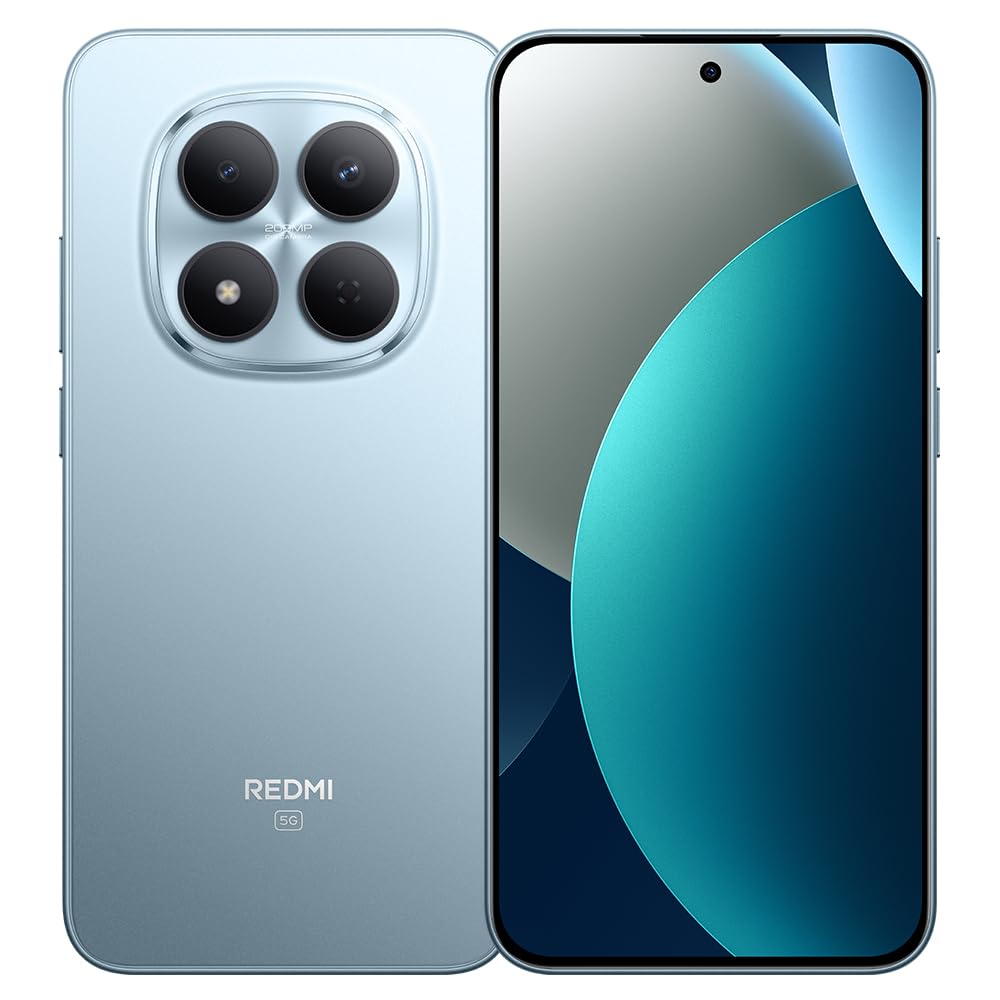
Image: XIAOMI Redmi Note 15 Pro 5G AI smartphone, black color, showing the front display and side profile.
2.3 Segurtasun biometrikoa
The device offers two primary biometric security methods:
- Pantailan dagoen hatz-marken sentsorea: Register your fingerprint(s) in the Security settings for quick and secure unlocking.
- AI aurpegiaren desblokeoa: Set up face recognition in the Security settings to unlock your device by looking at the front camera.
2.4 Navigation and AI Features
The phone supports multiple global navigation satellite systems including GPS, GLONASS, BDS, Galileo, and QZSS for accurate positioning.
Integrated AI features enhance user experience:
- Zirkulua egin Google-rekin bilatzeko: Quickly search for information by circling content on your screen.
- Google Gemini: AI assistant for various tasks.
- AI Image Editing: Includes AI Erase Pro, AI Remove Reflection, AI Image Expansion, AI Sky, AI Bokeh, AI Cutouts, AI Image Enhancement, and AI Beautify.
3. Mantentzea
3.1 Bateria zaintzea
The device is equipped with a 6580mAh silicon-carbon battery designed for longevity, boasting a 6-year battery life guarantee. To maximize battery life:
- Saihestu muturreko tenperaturak.
- Use the provided 45W turbo charger for optimal charging speed.
- The phone also supports up to 22.5W reverse charging to power other compatible devices.
3.2 Iraunkortasuna eta Babesa
The Redmi Note 15 Pro 5G AI is built for durability:
- Jaitsiera erresistentzia: Certified for 2.5-meter drop resistance.
- Pantailaren babesa: Features Corning Gorilla Glass Victus 2 for enhanced impact and scratch resistance.
- Uraren eta hautsaren erresistentzia: Rated P66/IP68/IP69/IP69K for dust and water resistance, ensuring protection against various environmental challenges.
3.3 Gailua garbitzea
Zure telefonoa garbitzeko:
- Erabili zapi leun eta lihorik gabeko bat pantaila eta gorputza garbitzeko.
- Orban egoskorretarako, apur bat dampGarbitu oihalak urarekin edo pantaila garbitzeko soluzio batekin.
- Saihestu produktu kimiko gogorrak, material urratzaileak edo gehiegizko hezetasuna erabiltzea.
4. Arazoak
4.1 Ohiko arazoak eta irtenbideak
- Gailua ez da pizten: Ensure the battery is charged. Connect the phone to its charger for at least 15 minutes, then try powering it on again. If it still doesn't turn on, perform a forced restart by holding the power button for 10-15 seconds.
- Sare seinale eskasa edo zerbitzurik ez: Check if your SIM card is properly inserted. Verify that airplane mode is off. Go to Settings > SIM cards & mobile networks and ensure your SIM is enabled. If issues persist, contact your mobile carrier.
- Ukipen-pantailak ez du erantzuten: Restart the device. If the issue continues, ensure the screen is clean and dry. If using a screen protector, ensure it is properly applied and not interfering with touch sensitivity.
- Bateria azkar agortzen da: Reduce screen brightness, close unused apps running in the background, disable unnecessary notifications, and limit location services. Check battery usage in Settings to identify power-hungry apps.
- Aplikazioak huts egiten edo blokeatzen: Clear the cache and data for the problematic app in Settings > Apps. If the issue persists, uninstall and reinstall the app. Ensure your device's software is up to date.
4.2 Fabrika berrezarri
Beste urrats batzuen bidez konpondu ezin diren software arazo iraunkorrak badituzu, fabrika berrezartzea beharrezkoa izan daiteke. Abisua: Fabrika berrezartzeak telefonoko datu guztiak ezabatuko ditu. Jarraitu aurretik, egin datu garrantzitsuen babeskopia.
- Go to Settings > About phone > Factory reset.
- Tap 'Erase all data' and follow the on-screen instructions.
5. Zehaztapenak
| Marka | XIAOMI |
| Ereduaren izena | Oharra 15 Pro 5G |
| Modelo zenbakia | 25080RABDG |
| Sistema eragilea | HyperOS 2 |
| CPU eredua | Mediatek Dimensity 7400-Ultra (Octa-core, up to 2.6GHz) |
| RAM | 8 GB |
| Biltegiratze Ahalmena | 256 GB |
| Pantailaren tamaina | 6.83 hazbeteko AMOLED |
| Ebazpena | 1.5K (2772 x 1280) |
| Freskatze tasa | 120Hz arte |
| Distira gailurra | 3200 nit |
| Atzeko kamera | 200 MP (Main, OIS) + 8 MP (Ultra-wide) |
| Aurrealdeko kamera | 20 MP |
| Bateria Edukiera | 6580 mAh |
| Kargatzen | 45W Turbo Charging, 22.5W Reverse Charging |
| SIM txartelaren zirrikitua | Dual SIM (Nano SIM + Nano SIM or Nano SIM + eSIM) |
| Konektibitatea | 5G, 4G LTE, Wi-Fi, Bluetooth, NFC, USB Type-C |
| Uraren Erresistentzia | IP66/IP68/IP69/IP69K |
| Segurtasun biometrikoa | In-screen Fingerprint, AI Face Unlock |
| Neurriak | Not specified in data |
6. Bermea eta Laguntza
6.1 Bermearen informazioa
The XIAOMI Redmi Note 15 Pro 5G AI comes with a 30-day Xiaomi Europe WarrantyGorde erosketaren egiaztagiria bermearen erreklamazioetarako.
Additionally, spare parts for this device are available for a duration of 6 urte within the EU.
6.2 Bezeroarentzako laguntza
For technical assistance, warranty claims, or further inquiries, please contact XIAOMI customer support through their official website or authorized service centers. Refer to the official XIAOMI webgunea kontaktu-informazio eta laguntza-baliabide eguneratuenak lortzeko.