
1. Sarrera
This manual provides detailed instructions for the installation, operation, and maintenance of your Blütezeit MJ-400 Sliding Gate Opener, including the integrated WiFi module and 433MHz push button. Please read this manual thoroughly before installation and use to ensure proper function and safety.
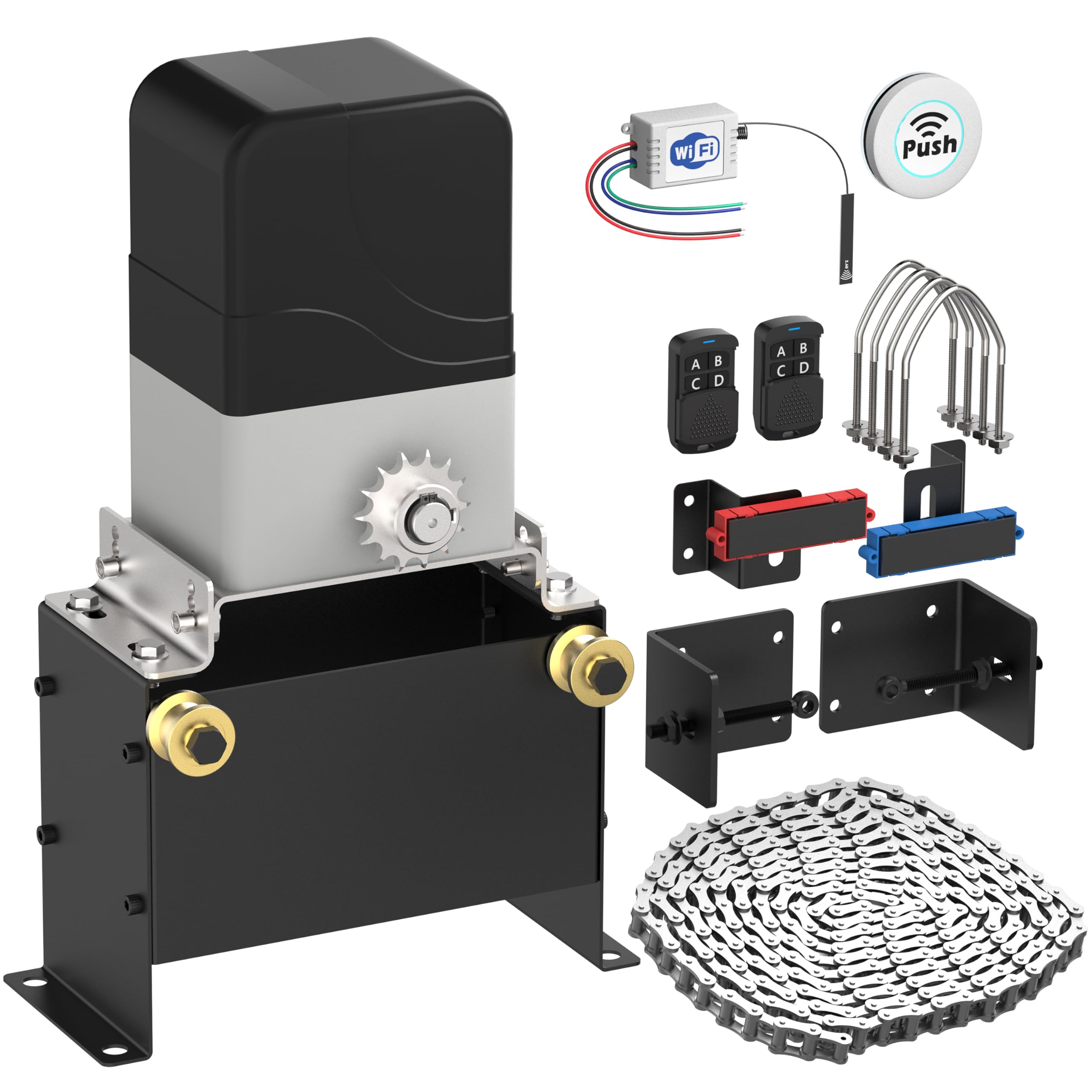
Image 1.1: Blütezeit MJ-400 Sliding Gate Opener with WiFi Module and Push Button components.
2. Segurtasun informazioa
OHARRA: Segurtasun-jarraibide hauek ez betetzeak lesio larriak edo heriotza eragin ditzake.
- Always keep the gate area clear of people, pets, and objects while the gate is in motion.
- Ez utzi haurrei atearen irekigailuaren kontrolak erabiltzen edo haiekin jolasten.
- Ziurtatu konexio elektriko guztiak elektrizista kualifikatu batek egiten dituela eta tokiko araudiak betetzen dituela.
- Install safety devices such as photo-electric sensors to prevent the gate from closing on obstructions.
- Aldian-aldian ikuskatu atea eta irekigailua higadura, kalte edo deslerrokatze zantzurik dagoen ikusteko.
- Deskonektatu elektrizitatea edozein mantentze edo konponketa egin aurretik.
3. Paketearen edukia
Egiaztatu behean zerrendatutako elementu guztiak zure paketean daudela:
- Blütezeit MJ-400 Sliding Gate Opener Motor Unit
- 16.4 ft (5 meters) Heavy-Duty Drive Chain
- MJ-series WiFi Module (MWF30)
- 433MHz Wireless Push Button Transmitter
- Muntatzeko hardwarea eta euskarriak
- Remote Controls (Quantity may vary, typically 2)
- Instalazio eskuliburua

3.1. irudia: Amaituview of the Blütezeit MJ-400 Sliding Gate Opener and included accessories.
4. Zehaztapenak
| Ezaugarri | Zehaztapena |
|---|---|
| Eredua | MJ-400 |
| Motor Mota | AC Chain-Drive |
| Elikatze Hornidura | AC110V/60Hz |
| Motor Potentzia | 130W (Copper Motor) |
| Atearen gehienezko pisua | 1100 libra (500 kg) |
| Gehienezko atearen luzera | 50 oin (15 metro) |
| Atearen abiadura | 0.7 ft/s (21 cm/s) |
| WiFi Module Input | DC 7-32V |
| WiFi maiztasuna | 2.4GHz (5GHz not supported) |
| Urruneko maiztasuna | 433.92MHz (Original MJ rolling-code) & 433MHz (Expanded accessory support) |
5. Konfigurazioa eta instalazioa
5.1 Gate Opener Installation
- Motor Unitatearen Muntaketa: Securely mount the MJ-400 motor unit on a stable, level concrete pad or equivalent foundation next to your sliding gate. Ensure proper alignment with the gate's path.
- Katearen instalazioa: Attach the provided 16.4 ft heavy-duty chain to the gate and route it through the motor unit's sprocket. Adjust chain tension to allow for smooth movement without excessive slack or tightness.
- Muga-etengailuaren doikuntza: Install and adjust the magnetic limit switches at the desired open and closed positions of your gate. These switches signal the motor to stop.
- Konexio elektrikoa: Connect the AC110V/60Hz power supply to the motor unit according to the wiring diagram in the main gate opener manual. Ensure all connections are secure and insulated.
5.2 WiFi Module (MWF30) Installation
The WiFi module integrates with the gate opener's control board for smart control.
- Sarbide Kontrol Kutxa: Open the control box of your MJ-400 gate opener.
- Kable bidezko konexioa: The WiFi module features pre-wired leads. Connect these leads to the corresponding terminals on the gate opener's control board. The module supports DC 7-32V input. Refer to the module's labels for correct wiring (e.g., N.C., Com, V+, GND).

Image 5.1: Blütezeit MWF30 WiFi Module showing pre-wired leads for easy connection.

Image 5.2: The compact Blütezeit MWF30 WiFi Module designed for seamless integration within the MJ-series gate opener.
- Antenen kokapena: Position the 5-inch external antenna for optimal signal reception.

Image 5.3: The 5-inch external antenna for the WiFi module, designed to enhance signal strength and connectivity.
5.3 433MHz Push Button Setup
The included 433MHz push button is pre-paired with the WiFi module and operates in a single-button loop mode (Open-Stop-Close).
- Muntaketa: The wireless push button can be mounted anywhere in your home for convenient access.
- Eragiketa: Pressing the button will cycle the gate through Open, Stop, and Close states.

Image 5.4: The wireless push button, offering one-touch control for the gate opener.
6. Funtzionamendu-argibideak
6.1 Standard Remote Control Operation
Use the original MJ 433.92MHz rolling-code remotes to operate the gate. Each button typically corresponds to Open, Stop, or Close functions, or a single button may cycle through these states depending on programming.
6.2 Smart App Control via eWeLink (WiFi Module)
The WiFi module enables remote control and smart features through the eWeLink app.
- Deskargatu eWeLink aplikazioa: Download and install the eWeLink app on your smartphone from your device's app store.
- Pairing the Module: Follow the in-app instructions to add and pair your Blütezeit WiFi module. Ensure your smartphone is connected to a 2.4GHz WiFi network during pairing (5GHz networks are not supported).
- Urruneko kontrola: Once paired, you can remotely Open, Stop, or Close your gate using the app. The app typically operates in a loop mode for gate control.
- Integrazio adimendunak: The eWeLink app supports integration with platforms like Amazon Alexa, Google Home, Siri Shortcuts, and IFTTT for voice control, automation, scheduling, and smart routines.

Image 6.1: The eWeLink app interface demonstrating smart control and compatibility with various smart home platforms.
6.3 433MHz Accessory Operation
The system supports additional 433MHz accessories (e.g., wireless keypads, remotes) which operate independently of the original MJ rolling-code remotes. These accessories will typically function in a single-button loop mode (Open-Stop-Close).
7. Mantentzea
Mantentze-lan erregularrak zure ate-irekigailuaren iraupena eta funtzionamendu fidagarria bermatzen ditu.
- Katearen ikuskapena: Periodically check the drive chain for proper tension, rust, or damage. Lubricate the chain as needed with appropriate chain lubricant.
- Zati mugigarriak: Inspect all moving parts for wear and tear. Ensure rollers and hinges on the gate are clean and lubricated.
- Segurtasun gailuak: Test photo-electric sensors and other safety devices regularly to ensure they are functioning correctly.
- Garbitasuna: Keep the motor unit and control box free from dirt, debris, and insects.
- Elikatze-iturria: Check electrical connections for corrosion or loose wiring.
8. Arazoak
| Arazoa | Kausa posiblea | Irtenbidea |
|---|---|---|
| Atea ez da mugitzen | No power; Remote battery low; Limit switch issue; Obstruction | Check power supply; Replace remote battery; Adjust limit switches; Remove obstruction. |
| Urruneko kontrola ez dabil | Battery dead; Remote not paired; Interference | Replace battery; Re-pair remote (refer to main manual); Check for signal interference. |
| WiFi app control not working | WiFi module not powered; Incorrect WiFi network (5GHz); App not paired; Router issues | Check module power; Ensure 2.4GHz WiFi; Re-pair module in app; Restart router. |
| Atea ustekabean gelditzen da | Obstruction detected; Safety sensor triggered; Limit switch fault | Clear obstruction; Check safety sensors for alignment/damage; Inspect limit switches. |
9. Bermea eta Laguntza
For warranty information and technical support, please refer to the documentation included with your original purchase or contact Blütezeit customer service through the retailer where the product was purchased. Keep your purchase receipt as proof of purchase.