
Sarrera
Thank you for choosing the Severin S-Power Olymp HV 7175 Cordless Vacuum Cleaner. This powerful and versatile appliance is designed to provide efficient cleaning for various surfaces in your home. With its 19,000 Pa suction power, 2-in-1 functionality, and convenient features like LED lighting and vertical parking, it offers a comprehensive cleaning solution. Please read this manual carefully before first use to ensure proper operation, maintenance, and safety.

Image: The Severin S-Power Olymp HV 7175 cordless vacuum cleaner, fully assembled with the floor nozzle, shown in its upright position.
Segurtasun-argibide garrantzitsuak
Always follow basic safety precautions when using electrical appliances to reduce the risk of fire, electric shock, or injury. Keep this manual for future reference.
- Tresna hau etxeko erabilerarako soilik da. Ez erabili kanpoan edo gainazal hezeetan.
- Ez utzi haurrei xurgagailua erabiltzen. Zaintza zorrotza beharrezkoa da haurren ondoan erabiltzen denean.
- Ez hartu likido sukoiak edo erregaiak, gasolina adibidez, eta ez erabili egon daitezkeen tokietan.
- Ez hartu erretzen edo erretzen ari den ezer, hala nola zigarroak, pospoloak edo errauts beroak.
- Ez erabili hauts-ontzia eta iragazkia lekurik gabe.
- Itzali tresna bateria-paketea konektatu edo deskonektatu aurretik, edo mantentze-lanak egin aurretik.
- Erabili fabrikatzaileak hornitutako kargagailua soilik kargatzeko.
- Gorde tresna barrualdean, leku lehor batean.
Paketearen edukia
Please check the package contents upon unpacking. If any parts are missing or damaged, contact customer support immediately.
- Severin S-Power Olymp HV 7175 Main Unit (Motor and Dustbin)
- Luzapen-hodia
- Motorized Floor Nozzle with LED Lights
- Wall Mount Docking Station
- Kargatzeko egokitzailea
- Zirrikitu tresna
- Tapizeriako eskuila
- Erabiltzailearen eskuliburua
Konfigurazioa eta hasierako kargatzea
Batzarra
- Sartu luzapen-hodia unitate nagusian, ondo lotu arte klik egin arte.
- Attach the motorized floor nozzle to the other end of the extension tube, ensuring it clicks firmly.
- For handheld use, attach desired accessories (crevice tool, upholstery brush) directly to the main unit.
Bateria kargatzen
Before first use, fully charge the vacuum cleaner. The battery indicator on the main unit will show the charging status.
- Mount the wall dock in a convenient location near a power outlet.
- Connect the charging adapter to the wall dock and plug it into a power outlet.
- Place the vacuum cleaner onto the wall dock. Ensure the charging contacts align.
- The LED display will indicate charging progress. A full charge takes approximately 4-5 hours.

Image: The Severin S-Power Olymp HV 7175 vacuum cleaner mounted on its wall charging dock, connected to a power outlet.
Funtzionamendu-argibideak
Pizteko/itzaltzeko eta xurgapen moduak
- To turn on the vacuum cleaner, press the BOTEREA kontrol paneleko botoia.
- The vacuum will start in Eco mode (Min suction).
- To switch to Max suction mode, press the MAX botoia. Sakatu MIN to return to Eco mode.
- To turn off the vacuum cleaner, press the BOTEREA botoia berriro.
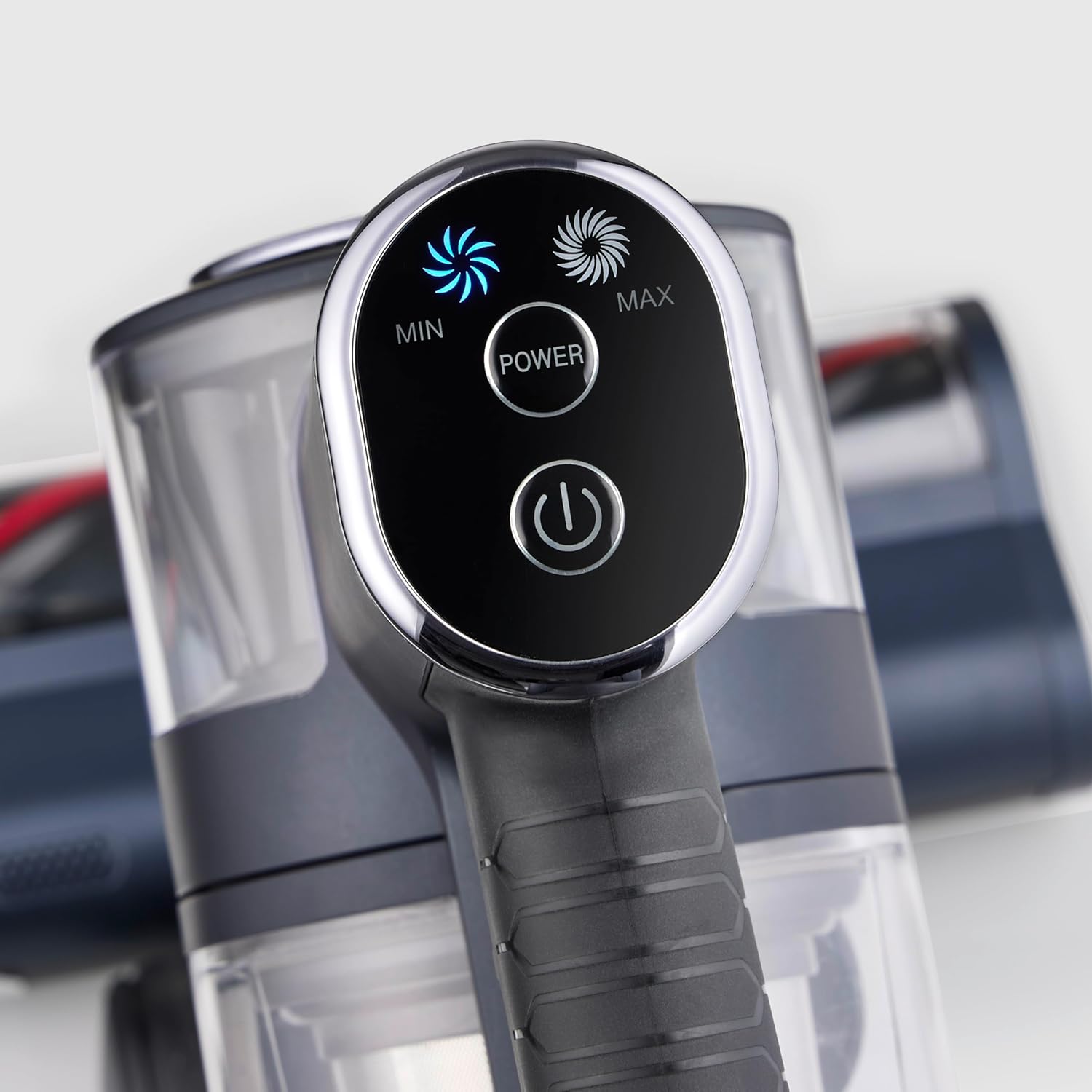
Irudia: Gertutik view of the vacuum cleaner's control panel, featuring illuminated buttons for Min, Max, and Power settings.
2-in-1 Functionality (Handheld Mode)
The S-Power Olymp can be easily converted into a handheld vacuum for versatile cleaning.
- Press the release button on the extension tube to detach it from the main unit.
- Attach the desired accessory (crevice tool or upholstery brush) directly to the main unit's suction opening.
- Use the handheld unit for cleaning car interiors, upholstery, stairs, or hard-to-reach areas.

Image: The Severin S-Power Olymp HV 7175 in handheld configuration, equipped with a crevice tool, being used to clean the interior of a car seat.
Ezaugarri ergonomikoak
- Adjustable Suction Tube: The height of the suction tube can be adjusted for comfortable use by users of different heights.
- LED argiztapena: The motorized floor nozzle features integrated LED lights to illuminate dark areas, ensuring no dust or debris is missed.
- Vertical Parking Function: The vacuum cleaner can stand upright independently when the handheld unit is removed, allowing for convenient temporary storage during cleaning breaks.
Mantentzea eta Garbiketa
Mantentze-lan erregularrak zure xurgagailuaren errendimendu optimoa bermatzen du eta bizitza luzatzen du.
Zaborrontzia hustea
Empty the dustbin regularly, ideally after each use, to maintain strong suction.
- Ziurtatu xurgagailua itzalita dagoela.
- Sakatu hautsontzia askatzeko botoia hautsontzia unitate nagusitik askatzeko.
- Hold the dustbin over a waste bin and press the bottom release latch to open the dustbin flap and empty its contents.
- Itxi tapa eta berriro lotu hauts-ontzia unitate nagusira klik egin arte.

Irudia: Xehetasun zehatza view of the Severin S-Power Olymp HV 7175's transparent dustbin and internal filter components, ready for emptying or cleaning.
Iragazkiak garbitzea
The HEPA filter and pre-filter should be cleaned periodically to prevent clogging and maintain suction power.
- Kendu hauts-ontzia goian azaldu bezala.
- Biratu eta atera iragazkiaren multzoa hauts-ontzitik.
- Separate the HEPA filter and the metal mesh pre-filter.
- Tap the filters gently over a waste bin to remove loose dust. For a more thorough clean, rinse them under cold running water.
- Allow all filter components to air dry completely for at least 24 hours before reassembling and placing them back into the vacuum cleaner. Do not use the vacuum with wet filters.
Eskuila-erroilua garbitzea
Hair and debris can get tangled in the brush roll. Clean it regularly for effective cleaning.
- Turn off the vacuum cleaner and detach the floor nozzle.
- Locate the brush roll access cover on the bottom of the nozzle. Open it using a coin or screwdriver if necessary.
- Kendu eskuila erroilua.
- Erabili guraizeak ile edo hari korapilatsuak mozteko.
- Garbitu eskuilaren erroilu-etxebizitzatik geratzen den edozein hondakin.
- Sartu berriro eskuila-arrabola eta itxi sarbide-estalkia ondo itxita.
Arazoak konpontzea
| Arazoa | Kausa posiblea | Irtenbidea |
|---|---|---|
| Hutsa ez da pizten | Bateria deskargatuta dago Pizteko botoia ez da behar bezala sakatu | Kargatu bateria guztiz Press the POWER button firmly |
| Xurgatze potentzia murriztua | Zaborrontzia beteta dago Iragazkiak beteta daude Tubera edo hodia blokeatuta dago Eskuila-arrabola korapilatuta dago | Hustu zakarrontzia Garbitu edo ordeztu iragazkiak Egiaztatu eta garbitu edozein blokeo Garbitu eskuila erroilua |
| Bateria ez da kargatzen | Kargagailua ez dago behar bezala konektatuta Kargagailua edo bateria akastuna | Ensure charger is securely plugged in Jarri harremanetan bezeroarentzako laguntzarekin |
| Eskuila erroilua ez da bira egiten | Eskuila-arrabola korapilatuta dago Oztopoa toberan | Garbitu eskuila erroilua Kendu oztopoak |
Zehaztapenak
- Eredua: HV 7175
- Marka: Severin
- Xurgatze potentzia: 19,000 Pa
- Potentzia: 200 Watt
- liburukiatage: 220 Volt
- Bateria mota: Litio-ioi
- Runtime (Eco Mode): Gehienez 35 minutu
- Kargatzeko denbora: 4-5 ordu
- Iragazki mota: HEPA iragazkia
- Zarata maila: 80 dezibelio
- Pisua: 2 kilogramo
- Neurriak (L x W x H): 105L x 12l x 15H cm
- Gomendatutako gainazalak: Zoru mota guztiak
- Ezaugarri bereziak: Cordless, High Power, Lightweight, Front Light, Spot Cleaning, 2-in-1 Handheld Function, Vertical Parking
Bermea eta Laguntza
Severin products are manufactured to high-quality standards and come with a manufacturer's warranty. Please refer to the warranty card included in your package for specific terms and conditions, including the warranty period and coverage details.
For technical support, spare parts, or warranty claims, please contact Severin customer service. You can find contact information on the official Severin webgunean edo zure bermearen dokumentazioan.
When contacting support, please have your model number (HV 7175) and proof of purchase readily available.


