
1. Sarrera
Thank you for choosing the AIYIMA S4000 Active Bookshelf Speakers. These speakers are designed to deliver high-fidelity audio with versatile connectivity options, suitable for various applications including home entertainment, PC audio, and professional studio monitoring. Please read this manual thoroughly before use to ensure proper setup and operation.
2. Segurtasun-argibideak
Suteak, deskarga elektrikoak edo produktuaren kalteak saihesteko, jarraitu segurtasun-jarraibide hauek:
- Ez jarri aparatu hau euri edo hezetasunera.
- Ez jarri likidoz betetako objekturik, hala nola loreontziak, gailuaren gainean.
- Ziurtatu aireztapen egokia dagoela. Ez blokeatu aireztapen-irekidurak.
- Ez instalatu bero-iturri inongo ondoan, esate baterako, erradiadoreak, bero-erregistroak, sukaldeak edo beste aparatu batzuk (barne ampberoa sortzen duten argitzaileak).
- Babestu korronte-kablea zapaldu edo estutu ez dadin, batez ere entxufeetan, erosotasun-hartuneetan eta aparailutik ateratzen diren puntuan.
- Erabili soilik fabrikatzaileak zehaztutako eranskinak/osagarriak.
- Deskonektatu tresna hau tximista-ekaitzetan edo denbora luzez erabiltzen ez duzunean.
- Bidali zerbitzu guztiak zerbitzu kualifikatuko langileengana. Aparatuak edozein modutan hondatu direnean mantenimendua egin behar da.
3. Paketearen edukia
Mesedez, egiaztatu elementu guztiak kutxan daudela:
- AIYIMA S4000 Studio Monitors (2 units)
- RCA Audio Kablea
- XLR audio kablea
- Erabiltzailearen eskuliburua (dokumentu hau)
- Magnetic Grilles (2 units)
- Rubber Feet (8 units)
- Elikatze-kablea
- Wireless IR Remote Control
4. Produktua amaitu daview
4.1 Aurreko panela
The front panel features the horn-loaded tweeter and the 4-inch woofer, along with a multi-function rotary control for volume and input selection.

Irudia: Aurrealdea eta atzealdea view of the AIYIMA S4000 speakers. The front shows the tweeter and woofer, while the rear displays all input/output ports and controls.
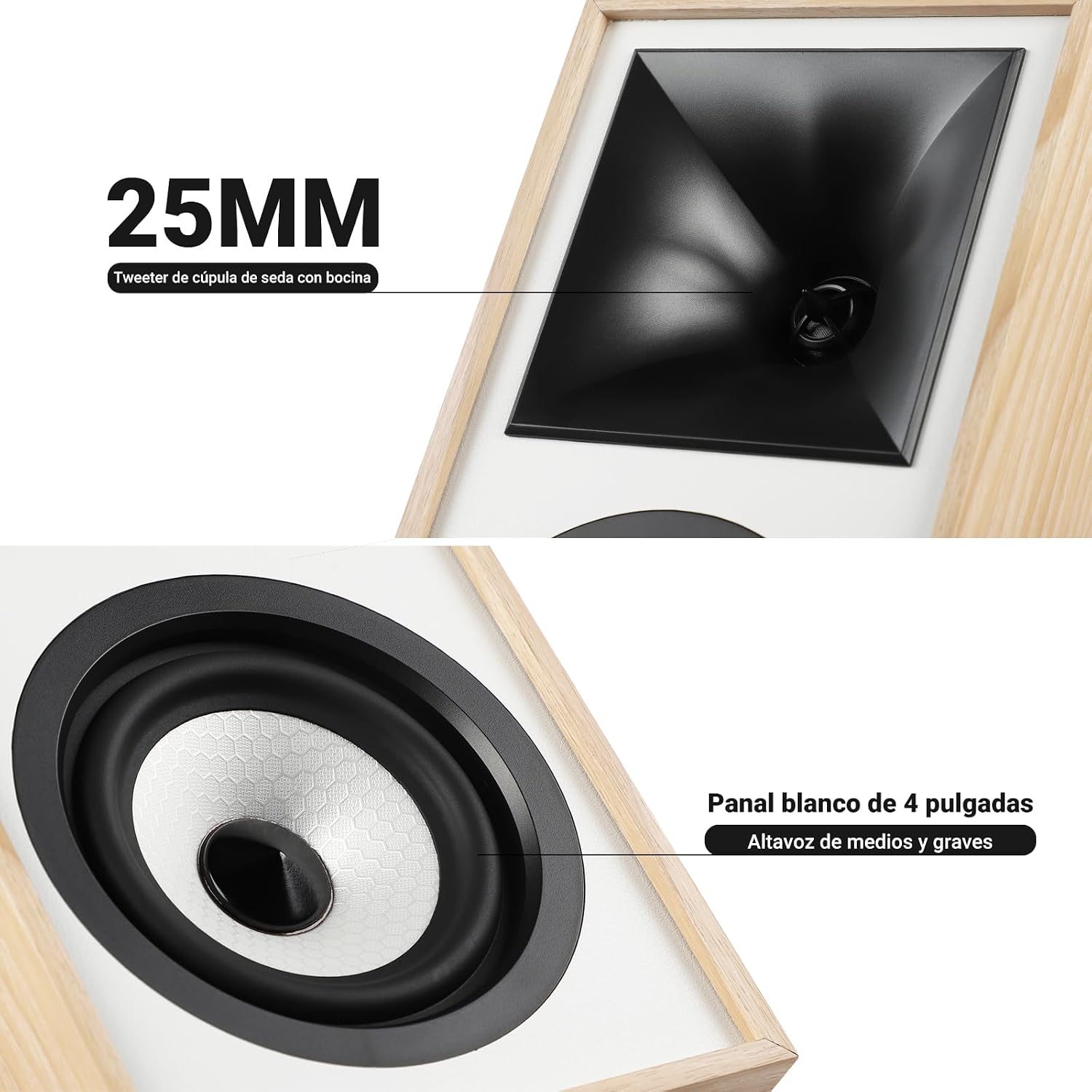
Irudia: Gertuko planoa view of the 25mm horn-loaded silk dome tweeter and the 4-inch white cone woofer on the AIYIMA S4000 speaker.
The S4000 incorporates a 1.25-inch horn-loaded tweeter for enhanced vocal clarity and a 4-inch woofer for deep bass. The cabinet is constructed from 15mm high-density MDF to reduce resonance and distortion.
4.2 Atzeko panela
The rear panel houses all connectivity ports and additional controls.
Irudia: Xehetasun handikoa view of the rear panel of the AIYIMA S4000 speaker, showing the volume, treble, and bass knobs, RCA and XLR inputs, SUB OUT, power switch, and power input.
- Volume/Input Selector: Rotary knob for volume adjustment and input source selection (Bluetooth, RCA, XLR).
- Treble Kontrola: Knob to adjust high frequencies.
- Baxuen kontrola: Knob to adjust low frequencies.
- RCA sarrera: For connecting devices via RCA cables.
- XLR sarrera: Professional balanced input for mixers, audio interfaces, etc.
- SUB OUT: Output for connecting an external active subwoofer.
- Switch potentziala: To turn the speakers on or off.
- CA potentzia sarrera: For connecting the power cable (AC 100V-240V).
- SPK-L OUT: Output to connect the passive left speaker.
5. Konfigurazioa
5.1 Hizlarien kokapena
For optimal sound quality, place the speakers on a stable surface, such as a bookshelf or speaker stands. Position them at ear level and equidistant from your listening position. Ensure there is adequate space behind the speakers for the L-shaped bass reflex port to function effectively.

Image: AIYIMA S4000 speakers positioned on a wooden cabinet, demonstrating a typical home setup with a turntable.
5.2 Audio iturriak konektatzea
The S4000 offers multiple input options:
- RCA sarrera: Connect your audio source (e.g., CD player, TV, PC) to the RCA ports on the rear panel using the provided RCA cable.
- XLR sarrera: For professional audio equipment like mixers or audio interfaces, use XLR cables to connect to the balanced XLR inputs. This input is resistant to interference.
- Bluetooth 5.0: For wireless connection, refer to section 6.4 for Bluetooth pairing instructions.

Image: AIYIMA S4000 speaker shown connected to a laptop and electronic keyboard, highlighting the professional balanced input capabilities.
5.3 Connecting an External Subwoofer (SUB OUT)
To enhance bass performance, you can connect an active subwoofer to the SUB OUT port on the rear panel. The system will automatically adjust the crossover frequency, converting your setup into a 2.1 audio system.

Image: AIYIMA S4000 speakers set up with a television and an external subwoofer, illustrating the SUB OUT functionality for a 2.1 home cinema experience.
5.4 Energia-konexioa
Connect the provided power cable to the AC Power Input on the rear panel of the active speaker, then plug it into a wall outlet (AC 100V-240V). Connect the active speaker to the passive speaker using the SPK-L OUT port.
6. Funtzionamendu-argibideak
6.1 Piztu/Itzali
Flip the Power Switch on the rear panel to the "ON" position to turn on the speakers. Flip it to "OFF" to power them down.
6.2 Volume Control and Input Selection
The multi-function rotary control on the front panel adjusts the volume. Press the knob to cycle through input sources: Bluetooth (BT), RCA, and XLR. The current input will be indicated by an LED.
6.3 Baxu eta Goi Doikuntza
Use the independent Bass and Treble knobs on the rear panel to fine-tune the sound according to your preference and audio source. Adjustments range from -6dB to +6dB.
6.4 Bluetooth parekatzea
- Turn on the speakers and select Bluetooth input using the front panel knob or remote control. The Bluetooth indicator light will flash.
- On your device (smartphone, tablet, computer), enable Bluetooth and search for "AIYIMA S4000".
- Select "AIYIMA S4000" to pair. Once connected, the Bluetooth indicator light will stop flashing and remain solid.
- Orain audioa haririk gabe erreproduzitu dezakezu zure gailutik.

Image: AIYIMA S4000 speaker in a room setting, illustrating its Bluetooth 5.0 connectivity for wireless audio streaming.
6.5 Urruneko kontrolaren erabilera
The included wireless IR remote control allows you to adjust volume, select input modes, and control playback (play/pause, next/previous track for Bluetooth) from up to 20 meters away without requiring line-of-sight.

Image: Composite image showing the AIYIMA S4000 speakers, a close-up of the 15mm MDF cabinet construction, an internal view of the L-shaped bass reflex port, and the wireless remote control.
7. Mantentzea
- Garbiketa: Use a soft, dry cloth to clean the speaker cabinets. Do not use liquid cleaners or abrasive materials.
- Biltegiratzea: Bozgorailuak denbora luzez gordetzen badituzu, deskonektatu itzazu korrontetik eta gorde itzazu leku fresko eta lehor batean, hobe jatorrizko ontzian.
- Parrillak: The magnetic grilles can be removed for cleaning or for a different aesthetic. Handle them gently to avoid damage.
8. Arazoak
| Arazoa | Kausa posiblea | Irtenbidea |
|---|---|---|
| Soinurik ez |
|
|
| Soinu distortsionatua |
|
|
| Bluetooth konexio arazoak |
|
|
| Urruneko kontrola ez dabil |
|
|
If the problem persists, please contact AIYIMA customer support.
9. Zehaztapenak

Image: Diagram showing the dimensions of the AIYIMA S4000 speakers: 280mm (11.02 inches) height, 185mm (7.28 inches) depth, and 145mm (5.70 inches) width.
| Ezaugarri | Zehaztapena |
|---|---|
| Ereduaren izena | S4000 |
| Marka | AIYIMA |
| Hizlari mota | Bookshelf, Active, 2-way, Surround Sound |
| Audio kanalak | 2.1 (with SUB OUT) |
| Irteerako potentzia maximoa | 80 Watts RMS (2x40W RMS: 2x25W Bass/Mid, 2x15W Treble) |
| Maiztasun Erantzuna | 45 Hz - 20 kHz |
| Wooferaren diametroa | 4 hazbetekoa |
| Tweeter mota | 1.25-inch Horn-loaded Silk Dome |
| Konektibitate Teknologia | Bluetooth 5.0, RCA, XLR |
| Bluetooth barrutia | Up to 20 meters (wireless remote also 20m) |
| Kontrol-metodoa | Touch (front knob), Remote Control |
| Armairuaren materiala | 15mm High-density MDF |
| Energia iturria | AC 100V-240V (Power Cable) |
| Produktuaren neurriak (L x W x H) | 18.5 x 14.5 x 28 cm (7.28 x 5.70 x 11.02 hazbete) |
| Produktuaren pisua | 6.9 kg (bikotea) |
| Kolorea | Brown (wood finish) |
| Gomendatutako Erabilerak | Home Entertainment, PC Audio, Recording Studios, Home Cinema |
10. Bermea eta Laguntza
AIYIMA products come with a standard manufacturer's warranty. For detailed warranty information, please refer to the warranty card included in your package or visit the official AIYIMA webgunea.
For technical support, troubleshooting assistance, or service inquiries, please contact AIYIMA customer support through their official channels. Please have your product model number (S4000) and purchase information ready when contacting support.
Fabrikatzailea: AIYIMA

