
Samsung Galaxy S26 Ultra
Samsung Galaxy S26 Ultra 5G erabiltzailearen eskuliburua
Model: Galaxy S26 Ultra
1. Produktua amaitu daview
The Samsung Galaxy S26 Ultra 5G is a high-performance smartphone designed for advanced users, featuring a built-in privacy display, advanced AI capabilities, a 200MP camera system, and a powerful Snapdragon 8 Elite Gen 5 processor. This manual provides essential information for setting up, operating, and maintaining your device.
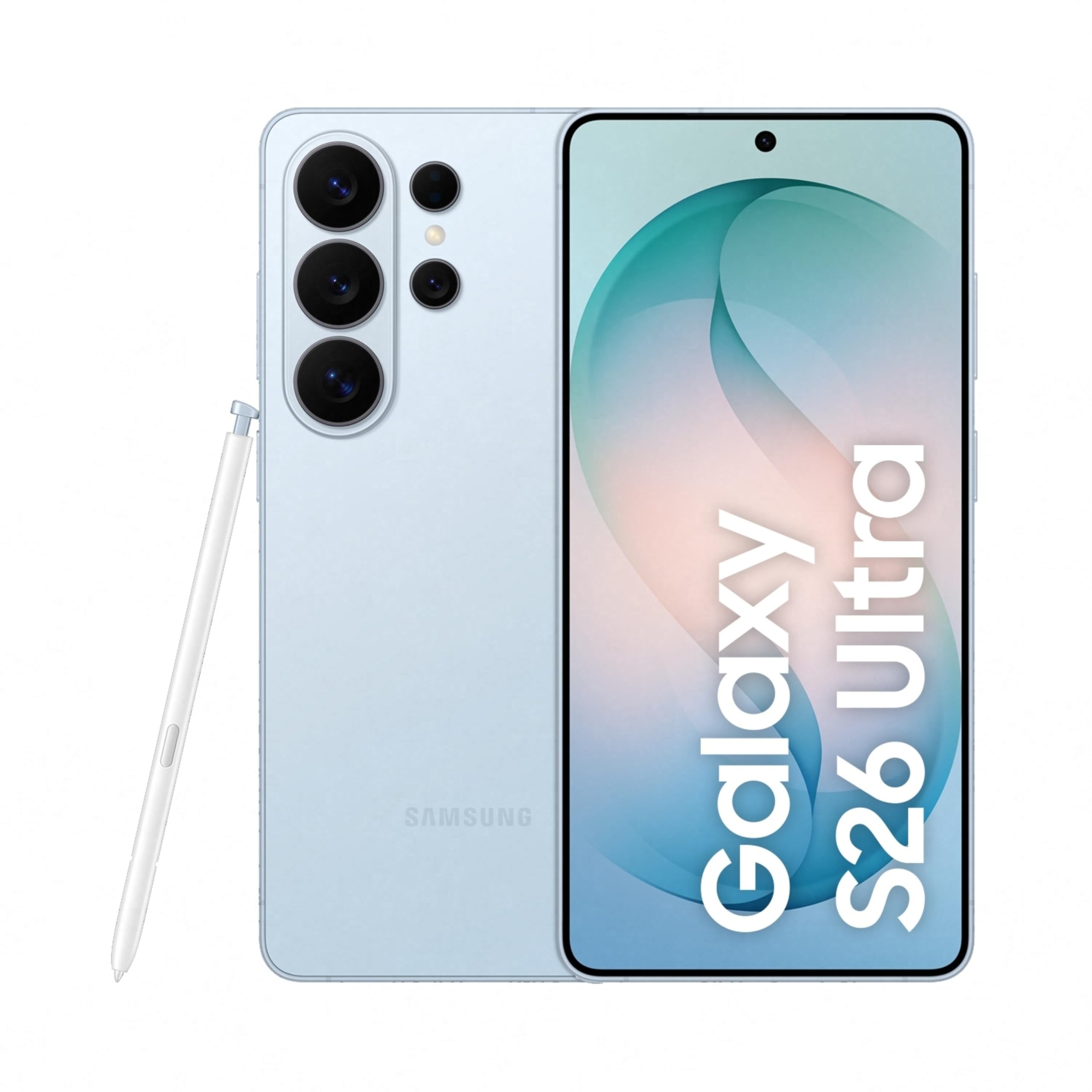
Image: Samsung Galaxy S26 Ultra 5G smartphone in Sky Blue, showcasinbere diseinu dotorea eta kamera modulua.
2. Hasierako konfigurazioa
2.1. Zer dago kutxan
Your Samsung Galaxy S26 Ultra 5G package includes the following items:
- Smartphone (Samsung Galaxy S26 Ultra 5G)
- Data Cable (Type C to C)
- SIM txartelaren kanporatze-pin
- Hasierako gida azkarra
- S Pen
2.2. SIM txartela sartzea
- Bilatu SIM txartelaren erretilua zure gailuaren alboan.
- Sartu SIM txartelaren kanporatzeko pina erretiluaren ondoko zulo txikian irekitzeko.
- Place your Nano SIM card(s) into the tray with the gold contacts facing down. The device supports Dual SIM.
- Sartu erretilua astiro-astiro zirrikituan klik egin arte.
2.3. Hasierako piztea eta konfigurazioa
- Sakatu eta eutsi pizteko botoiari Samsung logotipoa agertu arte.
- Jarraitu pantailan agertzen diren argibideei hizkuntza hautatzeko, Wi-Fi sarera konektatzeko eta Google kontua konfiguratzeko.
- Configure biometric security features such as fingerprint recognition.
3. Zure gailua funtzionatzea
3.1. Oinarrizko nabigazioa
The Galaxy S26 Ultra operates on Android 16 with One UI 8.5. Use the touchscreen with stylus support for navigation. Swipe gestures and on-screen buttons are standard for Android devices.

Image: Screenshot of the One UI 8.5 interface, showing various app icons and widgets.
3.2. Privacy Display
The Galaxy S26 Ultra features a built-in Privacy Display. When activated, the screen's pixels dynamically adjust to keep the display visible when viewed straight on, but appear dimmed when seen from the side. This feature helps protect your personal information in public places.
- To activate: Navigate to Ezarpenak and locate the Privacy Display options.
- Pertsonalizatu viewability settings to suit your preferences.
- You can choose to hide the full screen from side view or activate it only for notifications or specific applications.

Image: A demonstration of the Privacy Display, showing how content is visible from the front but obscured from the side.
3.3. Kameraren ezaugarriak
Gailuak kamera sistema polifazetiko batekin hornituta dago:
- Atzeko kamerak: 200 MP Wide, 50 MP Ultra Wide, 50 MP Telephoto (5x Optical Zoom), 10 MP Telephoto (3x Optical Zoom).
- Aurrealdeko kamera: 12 MP.
- Filmatzeko moduak: Dual Recording, Food, Hyperlapse, Night, Panorama, Photo, Portrait, Portrait Video, Pro, Pro Video, Single Take, Slow Motion, Video.
- Gaueko grafia: Capture clear and detailed videos even in low-light environments.
- Horizontal Lock: Maintain a steady frame during video recording, even when moving.
- Space Zoom: Utilize 100x AI-powered Space Zoom for enhanced clarity at a distance.

Image: Diagram illustrating the camera specifications and lens capabilities of the Galaxy S26 Ultra.

Irudia: Adibample photos demonstrating the clarity and detail captured using the Nightography feature in low-light conditions.
3.4. IAren ezaugarriak
The Galaxy S26 Ultra integrates advanced AI features to enhance user experience:
- Argazki Laguntza: Edit photos using simple prompts.
- Creative Studio: Generate personalized stickers from photos with ease.
- Now Nudge: Receive intelligent, real-time suggestions and reduce steps in daily tasks.
- Bilatzailea: Quickly search for information on your home screen without opening specific apps.

Image: A phone screen displaying the Photo Assist feature, showing options to edit an image of a dog.

Image: A phone screen demonstrating the sticker generation feature, creating various stickers from a single photo of a dog.
4. Errendimendua eta bateria
4.1. Processor and Cooling
The Galaxy S26 Ultra is powered by the Snapdragon 8 Elite Gen 5 processor, customized for Galaxy devices. It features an improved NPU, GPU, and CPU for smoother graphics and faster AI performance. A newly designed Vapor Chamber efficiently dissipates heat, ensuring sustained performance during demanding tasks like gaming.

Image: Diagram showing the NPU, GPU, and CPU components of the customized Snapdragon processor, highlighting performance improvements.
4.2. Bateriaren iraupena eta kargatzea
The device is equipped with a 5000 mAh battery, optimized for all-day use. It supports Super Fast Charging 3.0 (up to 60W) and Super Fast Wireless Charging (up to 25W). You can achieve up to 75% charge in approximately 30 minutes with Super Fast Charging 3.0.

Image: Graphic indicating that the device can charge up to 75% in approximately 30 minutes.
5. Mantentzea eta Zainketa
To ensure the longevity and optimal performance of your Galaxy S26 Ultra, follow these maintenance guidelines:
- Garbiketa: Erabili zapi leun eta lihorik gabeko bat pantaila eta gorputza garbitzeko. Saihestu material urratzaileak edo produktu kimiko gogorrak.
- Uraren erresistentzia: The device is water-resistant. However, avoid intentional submersion in water or exposure to high-pressure water jets. Dry thoroughly if it gets wet.
- Software eguneraketak: Egiaztatu eta instalatu aldizka software eguneraketak azken funtzioez, segurtasun adabakiez eta errendimendu hobekuntzez baliatzeko.
- Bateria zaintzea: Saihestu muturreko tenperaturak. Bateriaren osasun optimoa lortzeko, saiatu karga % 20 eta % 80 artean mantentzen ahal den guztietan.
- Biltegiratzea: Aldian-aldian garbitu beharrezkoak ez direnak files eta aplikazioak biltegiratze eta errendimendu optimoa mantentzeko.
6. Ohiko arazoak konpontzea
Gailuarekin arazoak badituzu, saiatu honako irtenbide hauekin:
- Gailuak ez du erantzuten: Gailua berrabiarazteko, sakatu eta eutsi pizteko botoia eta bolumena jaisteko botoia aldi berean 7-10 segundoz.
- Bateria azkar husten:
- Bateriaren erabilera egiaztatu Ezarpenetan energia asko kontsumitzen duten aplikazioak identifikatzeko.
- Murriztu pantailaren distira edo gaitu energia aurrezteko modua.
- Itxi atzeko planoan exekutatzen ez diren aplikazioak.
- Sarearen konexio arazoak:
- Hegazkin modua piztu eta itzali.
- Berrabiarazi gailua.
- Check your SIM card is properly inserted.
- Berrezarri sareko ezarpenak hemen: Ezarpenak > Kudeaketa orokorra > Berrezarri > Sarearen ezarpenak berrezarri.
- App Crashing or Freezing:
- Garbitu aplikazioaren cachea eta datuak Ezarpenak > Aplikazioak > [Aplikazioaren izena] > Biltegiratzea.
- Desinstalatu eta berriro instalatu aplikazioa.
- Ziurtatu aplikazioa azken bertsiora eguneratuta dagoela.
- Hatz-marken sentsorea ez dabil:
- Ziurtatu hatza eta sentsorea garbi eta lehor daudela.
- Erregistratu berriro zure hatz-markak hemen: Ezarpenak > Biometria eta segurtasuna > Hatz-markak.
For more detailed troubleshooting or persistent issues, refer to the official Samsung support webwebgunean edo jarri harremanetan bezeroarentzako zerbitzuarekin.
7. Zehaztapen Teknikoak
| Ezaugarri | Zehaztapena |
|---|---|
| Marka | Samsung |
| Eredua | Galaxy S26 Ultra |
| Sistema eragilea | Android 16 |
| Prozesadorea | Snapdragon 8 Elite Gen 5 (4.74 GHz) |
| RAM | 12 GB |
| Biltegiratze Ahalmena | 256 GB |
| Bistaratzea | 6.9 Inches AMOLED, 3120 x 1440 Resolution, 120Hz Refresh Rate, 499 PPI |
| Atzeko kameraren bereizmena | 200 MP, 50 MP, 50 MP, 10 MP |
| Aurrealdeko kameraren bereizmena | 12 MP |
| Bateria Edukiera | 5000 milioiamp Orduak |
| Kargatzen | Super Fast Charging 3.0 (up to 60W), Super Fast Wireless Charging (up to 25W) |
| SIM txartela mota | Nano SIM bikoitza |
| Konektibitatea | 5G, Bluetooth, NFC, USB Type C, Wi-Fi |
| Segurtasun biometrikoa | Hatz-markak hautematea |
| Uraren Erresistentzia | Urarekiko erresistentea |
| Neurriak | 8 x 78 x 164 milimetro |
| Pisua | 214 gramo |
| Kutxaren edukia | Smartphone, Data Cable (Type C to C), SIM Ejection Pin, Quick Start Guide, S Pen |
8. Bermea eta Laguntza
8.1. Bermearen informazioa
Your Samsung Galaxy S26 Ultra 5G comes with a 1-year manufacturer warranty for the device and 6 months for in-box accessories from the date of purchase. Please retain your proof of purchase for warranty claims.
8.2. Bezeroarentzako arreta
For technical assistance, service, or warranty inquiries, please contact Samsung Customer Support:
- Fabrikatzailea: Samsung India Electronics Pvt ltd
- Helbidea: 6th Floor, DLF Centre, Sansad Marg, New Delhi - 110001, India
- Posta elektronikoa: laguntza.india@samsung.com
- Bisitatu Samsung-en laguntza ofiziala webmaiz egiten diren galderen eta baliabide gehigarrien gunea.

Image: Samsung Knox Vault logo, representing the device's robust security features.
Erlazionatutako dokumentuak - Galaxy S26 Ultra
 |
Samsung Galaxy S26 Series Pre-Order Offer Terms and Conditions Detailed terms and conditions for the Samsung Galaxy S26 Ultra, S26 Plus, and S26 pre-order offer, including pricing, discounts, and Samsung Care+ benefits for purchases from the Samsung Online Store. |
 |
Samsung Galaxy S26 Series Cashback Promotion Terms and Conditions Terms and conditions for the Samsung Galaxy S26 Series cashback promotion in Switzerland and Liechtenstein, valid from May 11, 2026, to June 7, 2026. |
 |
Termini e Condizioni Promozione SAMSUNG +Valore - Samsung Galaxy S26 Series Documento ufficiale con i termini e le condizioni per la promozione SAMSUNG +Valore, valida per l'acquisto di Samsung Galaxy S26 Series, che include la valutazione di dispositivi usati. Scopri i requisiti, il periodo promozionale e i valori di valutazione. |
 |
Regulamin Promocji: Odkup smartfonów Samsung Galaxy S26, S26+, S26 Ultra Oficjalny regulamin promocji Samsung dotyczącej odkupu starych smartfonów przy zakupie modeli Galaxy S26, S26+ oraz S26 Ultra. Sprawdź zasady, terminy i korzyści. |
 |
Samsung Galaxy Book Go erabiltzailearen eskuliburua Comprehensive user manual for the Samsung Galaxy Book Go, detailing setup, features, operations, settings, and safety guidelines for this Windows 10 laptop. Includes information on keyboard, touchpad, connectivity, applications, and system maintenance. |
 |
Guía de Usuario Samsung Galaxy S26, S26+, S26 Ultra: Funciones y Configuración Explore la Guía de Usuario completa para Samsung Galaxy S26, S26+, y S26 Ultra. Aprenda sobre configuración, funciones, aplicaciones, ajustes y más para su dispositivo. |
Ask a question about this manual
Ask about setup, troubleshooting, compatibility, parts, safety, or missing instructions. Manuals+ will review the question and use this page’s manual context to help answer it.