
1. Sarrera
This manual provides detailed instructions for the setup, operation, maintenance, and troubleshooting of your Aigo AG98 Wireless Mechanical Keyboard. Please read this manual thoroughly before using the product to ensure optimal performance and longevity.
2. Segurtasun informazioa
- Ez jarri teklatua likidoetara edo gehiegizko hezetasunetara.
- Saihestu muturreko tenperaturak.
- Do not attempt to disassemble or repair the keyboard yourself. This may void the warranty and cause damage.
- Erabili emandako USB C motako kablea soilik kargatzeko.
- Mantendu haurren eskura.
3. Paketearen edukia
Egiaztatu elementu guztiak zure paketean daudela:
- Aigo AG98 Wireless Mechanical Keyboard
- USB motako kablea
- Erabiltzailearen eskuliburua
4. Produktua amaitu daview
The Aigo AG98 is a versatile 98-key mechanical keyboard featuring triple-mode connectivity (Bluetooth, 2.4G Wireless, USB Type-C Wired), RGB backlighting, and hot-swappable switches. Its compact design and durable ABS construction make it suitable for both gaming and daily use across various devices.

Figure 1: Aigo AG98 keyboard demonstrating its triple-mode connectivity with various devices.
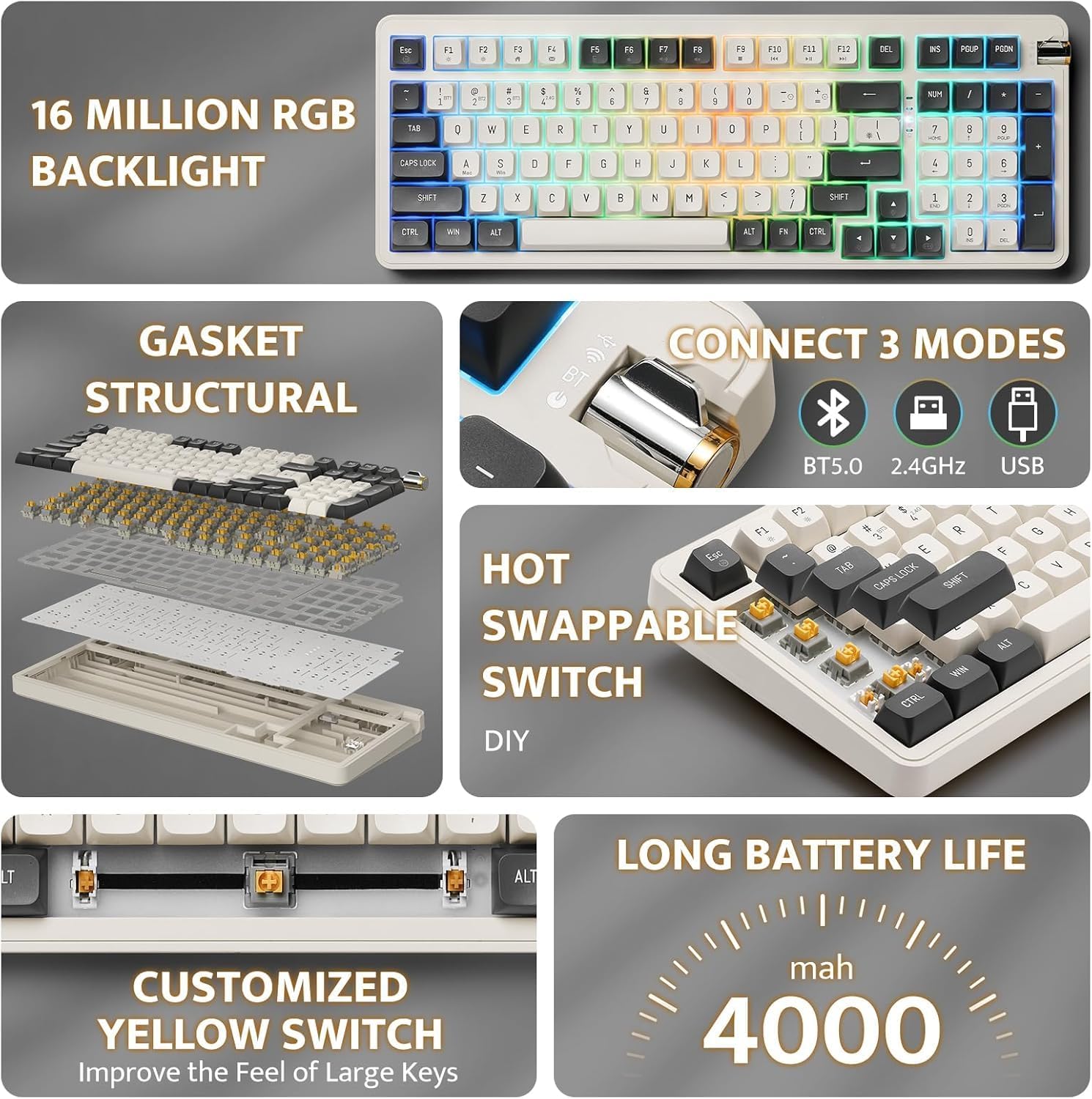
Figure 2: Key features of the Aigo AG98, including structural design, connectivity options, and battery capacity.
5. Konfigurazioa
5.1. Teklatua kargatzea
Before initial use, fully charge the keyboard using the provided USB Type-C cable. Connect the cable to the keyboard's USB-C port and the other end to a powered USB port (e.g., computer, wall adapter).

Figure 3: USB-C port and mode switch location.
5.2. Konexio moduak
The Aigo AG98 supports three connection modes: Bluetooth, 2.4G Wireless, and USB Type-C Wired. Use the switch on the side of the keyboard to select your desired mode.
5.2.1. USB Type-C Wired Connection
- Ensure the mode switch on the keyboard is set to the wired (USB) position.
- Connect the USB Type-C cable to the keyboard and your computer.
- Teklatua automatikoki ezagutuko du zure sistema eragileak.
5.2.2. 2.4G Haririk gabeko konexioa
- Ensure the mode switch on the keyboard is set to the 2.4G wireless position.
- Plug the 2.4G USB receiver into an available USB port on your device.
- The keyboard should connect automatically. If not, press and hold the Fn + 4 key combination to initiate pairing.
5.2.3. Bluetooth konexioa
- Ensure the mode switch on the keyboard is set to the Bluetooth (BT) position.
- Zure gailuan (ordenagailua, tableta, telefonoa), gaitu Bluetooth-a eta bilatu gailu berriak.
- On the keyboard, press and hold Fn + 1, Fn + 2, or Fn + 3 to enter pairing mode for BT1, BT2, or BT3 respectively. The indicator light will flash.
- Select "Aigo AG98" from the list of available devices on your screen.
- Behin parekatuta, adierazle-argiak keinu egiteari utziko dio.
6. Funtzionamendu-argibideak
6.1. RGB atzeko argiaren kontrola
The Aigo AG98 features customizable RGB backlighting. Use the following key combinations to control the lighting effects:
- Fn + \|: Change backlight mode.
- Fn + ↑: Atzeko argiaren distira handitu.
- Fn + ↓: Atzeko argiaren distira txikitu.
- Fn + ←: Slow down backlight effect speed.
- Fn + →: Speed up backlight effect speed.

Figure 4: Aigo AG98 with RGB backlighting activated.
6.2. Beroan alda daitezkeen etengailuak
The Aigo AG98 keyboard features hot-swappable switches, allowing you to change mechanical switches without soldering. This enables customization of typing feel and sound.

Figure 5: Hot-swappable yellow switches with details on pre-lubrication and stable shaft design.
Etengailu bat ordezkatzeko:
- Itzali teklatua edo deskonektatu gailutik.
- Use a switch puller tool (not included) to carefully grip the switch and pull it straight up.
- Align the pins of the new switch with the holes on the PCB and press it gently until it clicks into place. Ensure the pins are not bent.
7. Mantentzea
7.1. Garbiketa
- Deskonektatu teklatua garbitu aurretik.
- Erabili zapi leun eta lehor bat teklatuaren gainazala garbitzeko.
- For deeper cleaning, use a keycap puller (not included) to remove keycaps and clean dust or debris with compressed air or a small brush.
- Ez erabili produktu kimiko gogorrak edo material urratzaileak.
7.2. Bateria zaintzea
- Saihestu bateria maiz erabat deskargatzea.
- Charge the keyboard regularly, even if not in use, to maintain battery health.
- Denbora luzez erabiltzen ez baduzu, gorde teklatua leku fresko eta lehor batean.
8. Arazoak
| Arazoa | Kausa posiblea | Irtenbidea |
|---|---|---|
| Teklatuak ez du erantzuten (Haririk gabekoa) | Low battery, incorrect mode, pairing issue, receiver not connected. | Charge the keyboard. Ensure correct mode is selected. Re-pair the keyboard (Fn + 1/2/3 for BT, Fn + 4 for 2.4G). Check USB receiver connection. |
| Teklatuak ez du erantzuten (kable bidez) | Cable issue, incorrect mode. | Ensure cable is securely connected. Try a different USB port or cable. Ensure wired mode is selected. |
| RGB atzeko argia ez dabil | Backlight turned off, brightness set to minimum. | Press Fn + \| to cycle modes. Increase brightness with Fn + ↑. |
| Specific key not working | Etengailu akastuna, hondakinak teklaren azpian. | Remove keycap and clean. If issue persists, replace the hot-swappable switch. |
| End key not working (Windows) | Mouse Keys enabled in OS accessibility settings. | Disable "Mouse Keys" in your operating system's accessibility settings. |
9. Zehaztapenak
- Eredua: AG98
- Marka: Aigo
- Konektibitatea: Bluetooth 5.0, 2.4G Wireless, USB Type-C Wired
- Gako kopurua: 98
- Diseinua: QWERTY (English)
- Etengailu mota: Mechanical (Linear Yellow Switches)
- Ezaugarri bereziak: Hot-swappable switches, RGB Backlighting, Ergonomic Design
- Materiala: Akrilonitrilo Butadieno Estirenoa (ABS)
- Bateria: 1200 mAh litiozko bateria kargagarria
- OS bateragarria: Windows 10+, Android, iOS, Mac, Linux
- Gailu bateragarriak: PC, ordenagailu eramangarria, tableta, telefono adimenduna
- Elementuaren pisua: 425 gramo
10. Bermearen informazioa
The Aigo AG98 keyboard comes with a 14-day warranty from the date of purchase. This warranty covers manufacturing defects. It does not cover damage caused by misuse, accidents, unauthorized modifications, or normal wear and tear. Please retain your proof of purchase for warranty claims.
11. Laguntza
For further assistance or technical support, please refer to the contact information provided with your purchase or visit the official Aigo webgunea.


