
Sarrera
The ANYCUBIC ACE 2 Pro is a filament dryer box designed to optimize 3D printing performance by actively drying filament and facilitating multicolor printing. This device is compatible with Anycubic Kobra S1 and Kobra X 3D printers, offering advanced features such as active drying at 65°C, four independent brushless motors for smooth filament handling, and intelligent filament management. This manual provides essential information for proper setup, operation, and maintenance to ensure optimal use of your ACE 2 Pro.
Ezaugarri nagusiak
- Intelligent Adaptive Multicolor Hub: Manages up to 4 filaments per unit, enabling expanded color printing capabilities. For Anycubic Kobra S1, one ACE 2 Pro supports 4-color printing, and multiple units can expand to 8 or 16 colors. For Anycubic Kobra X, one ACE 2 Pro supports 7-color printing, expandable to 11 or 19 colors with additional units.
- 65°C Active Drying While Printing: Features a powerful active heater that thoroughly dehumidifies filaments like PLA, PETG, and TPU during printing, preventing bubbles and ensuring a smooth surface finish.
- Ultra Durable 4 Independent Brushless Motors: Engineered for quiet operation (≤48dB) and extended durability (≥5000h lifespan), providing smoother filament feeding and retraction, and reducing jams.
- 100% Faster Filament Change Efficiency: Optimized feeding mechanism doubles filament loading speed, saving significant time during multi-color prints.
- Sealed Storage & Active Moisture Control: Provides enhanced humidity isolation, featuring filament runout detection and auto-resume functions to protect long prints and minimize material waste.
- High-Wear Resistant Alumina Ceramic Feeding Port: Offers superior abrasion resistance for extended lifespan and reduced maintenance.
- On-Board Intelligent Printing Assistant: Includes real-time remaining filament estimation, intelligent identification of Anycubic proprietary filaments for automatic parameter setup, and auto-filament refill for uninterrupted printing.

Irudia: Gainetikview of the ANYCUBIC ACE 2 Pro highlighting its new-gen filament feed, 4 brushless motors, 65°C active drying, and upgraded moisture control.
Konfigurazioa
1. Deskargatzea
Carefully remove the ACE 2 Pro from its packaging. Inspect all components for any signs of damage. Ensure all accessories listed in the packing list are present.
2. Potentzia konektatzea
Connect the provided power adapter to the ACE 2 Pro and then plug it into a suitable power outlet. The device will power on automatically or can be turned on using the power button.
3. Harizpia kargatzea
- Open the lid of the ACE 2 Pro.
- Place up to four filament spools into the designated slots. Ensure the filament unwinds smoothly.
- Thread each filament through its respective alumina ceramic feeding port and into the external feeding channel.
- Itxi estalkia ongi.

Image: The external feeding channel and buffer mechanism of the ACE 2 Pro, designed for quick disassembly and jam clearance.
4. Connecting to 3D Printer
Connect the filament output from the ACE 2 Pro to your compatible 3D printer (e.g., Anycubic Kobra S1, Kobra X). Refer to your 3D printer's manual for specific connection instructions. Ensure the filament path is clear and free of obstructions.
Note: The ACE Pro and ACE 2 Pro units cannot be used simultaneously with the same printer.
Funtzionamendu-argibideak
1. Piztu/Itzali
Press the power button to turn the device on or off. The display will illuminate upon power-on.
2. Setting Drying Temperature
The ACE 2 Pro features active drying at 65°C. This temperature is optimized for common filaments like PLA, PETG, and TPU. The drying process can occur simultaneously with printing. Consult the device's interface for temperature monitoring and adjustment options, if available.

Image: The ACE 2 Pro actively drying filament at 65°C, demonstrating its ability to dry and print simultaneously.
3. Monitoring Humidity
The device includes an active humidity control system with real-time dehumidification and monitoring. The display will show current humidity levels. The 360° active moisture lock helps maintain a dry environment for your filaments.
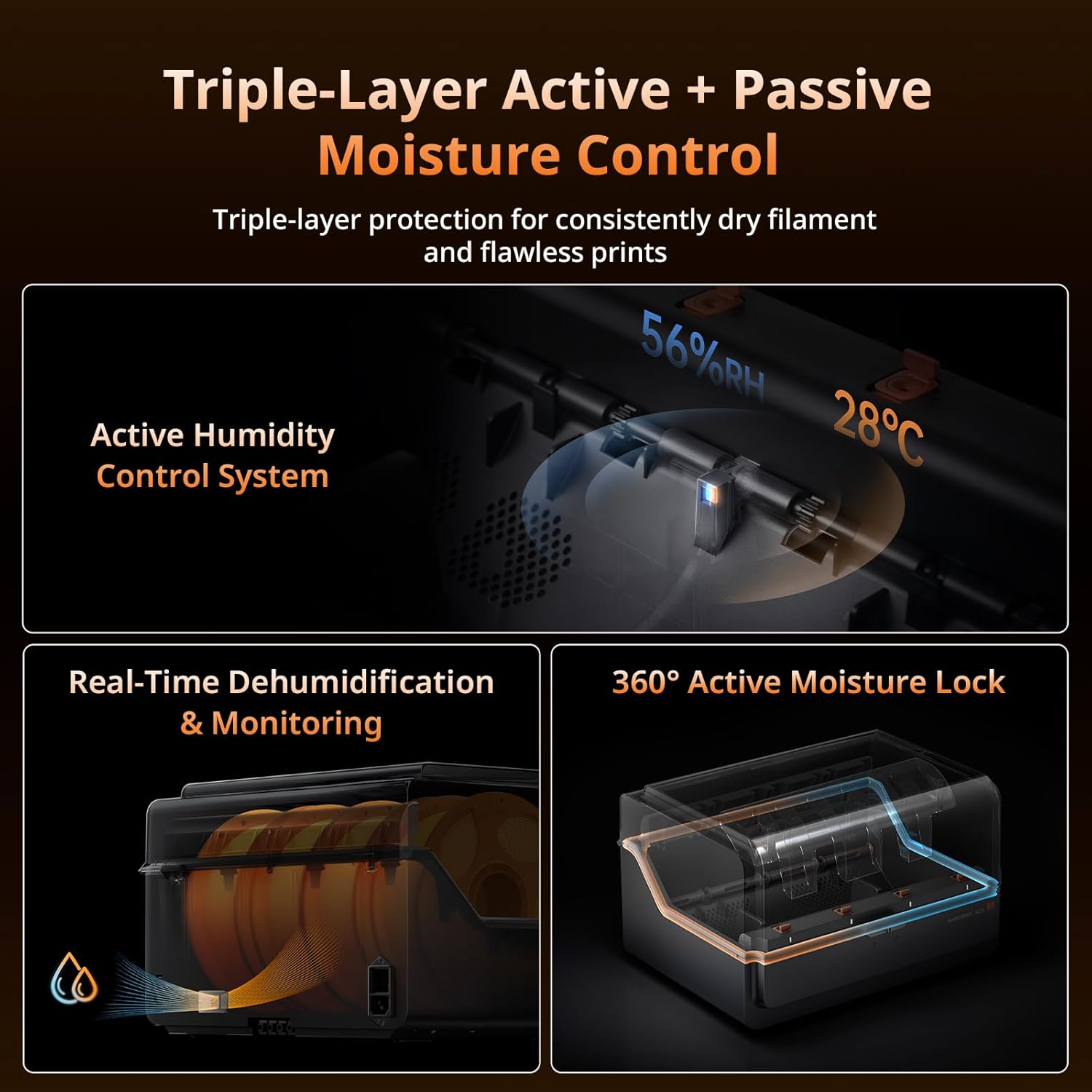
Image: Diagram illustrating the triple-layer active and passive moisture control system for consistent filament dryness.
4. Multicolor Printing Configuration
The ACE 2 Pro acts as an intelligent adaptive multicolor hub. A single unit provides 4-color printing. To achieve more colors, additional ACE 2 Pro units or an 8-Color Filament Hub may be required, depending on your 3D printer model. For example:
- Anycubic Kobra S1: 1 ACE 2 Pro = 4-color printing; 2 ACE 2 Pro + 1 8-Color Filament Hub = 8-color printing; 4 ACE 2 Pro + 2 8-Color Filament Hub = 16-color printing.
- Anycubic Kobra X: 1 ACE 2 Pro = 7-color printing; 2 ACE 2 Pro = 11-color printing; 4 ACE 2 Pro = 19-color printing.
Ensure your 3D printer firmware and slicer software are configured to support multicolor printing with the ACE 2 Pro. Refer to your 3D printer's manual for specific instructions on multi-material printing setup.

Irudia: Ohiaample setup demonstrating how multiple ACE 2 Pro units can be combined with a 3D printer to achieve up to 19 colors.
5. Filament Runout Detection and Auto-Resume
The ACE 2 Pro is equipped with filament runout detection. If a filament spool runs out during a print, the device will pause the print and allow for new filament to be loaded, then automatically resume printing from where it left off. This feature helps prevent failed prints and material waste.
6. Intelligent Filament Identification and Auto-Refill
For Anycubic proprietary filaments, the ACE 2 Pro can intelligently identify filament parameters, eliminating the need for manual setup. It also provides real-time estimation of remaining filament. Pre-set color/material profiles enable seamless, uninterrupted filament replacement when auto-refill is activated.

Image: The ACE 2 Pro's intelligent printing assistant features, including remaining filament estimation and automatic filament identification.
Mantentzea
1. Unitatea garbitzea
Regularly wipe the exterior of the ACE 2 Pro with a soft, dry cloth. Avoid using abrasive cleaners or solvents. Ensure the internal filament compartments are free of dust and debris.
2. Inspecting Feeding Ports
Periodically check the alumina ceramic feeding ports for any wear or damage. These ports are designed for high durability, but regular inspection ensures smooth filament passage and prevents abrasion to the filament.
3. Zaintza orokorra
Keep the ACE 2 Pro in a clean, dry environment. Avoid exposing it to direct sunlight or extreme temperatures. Ensure the lid is properly closed when not in use to maintain the sealed storage environment.
Arazoak konpontzea
| Arazoa | Kausa posiblea | Irtenbidea |
|---|---|---|
| Harizpia ez da ondo lehortzen | Lid not sealed, high ambient humidity, insufficient drying time. | Ensure lid is closed. Allow sufficient drying time. Check ambient humidity. |
| Filament jams in feeding channel | Filament tangled, debris in channel, worn feeding port. | Check filament spool for tangles. Disassemble external feeding channel for inspection and cleaning. Inspect ceramic feeding ports for wear. |
| Funtzionamenduan zehar ustekabeko zarata | Filament rubbing, internal component issue. | Ensure filament is feeding smoothly without rubbing against the casing. If noise persists, contact support. |
| Multicolor printing issues (e.g., fewer colors than expected) | Incorrect setup, incompatible printer firmware, insufficient ACE 2 Pro units. | Verify your 3D printer's compatibility and required setup for multicolor printing. Ensure the correct number of ACE 2 Pro units or 8-Color Filament Hubs are connected for your desired color count. Remember, ACE Pro and ACE 2 Pro cannot be used simultaneously. |
| Filament not identified (for intelligent identification) | Not an Anycubic proprietary filament, no internet connection. | Ensure you are using Anycubic proprietary filaments. Verify the device has an active internet connection for intelligent identification features. |
Zehaztapenak
- Marka: ANYCUBIC
- Eredua: ACE 2 Pro
- Materiala: Metala
- Kolorea: Beltza
- Elementuaren pisua: 4.8 kilogramo
- Elementu kopurua: 1
- Lehortzeko tenperatura: 65°C arte
- Motor mota: 4 Independent Brushless Motors
- Zarata maila: ≤48 dB (closed-door)
- Motor Lifespan: ≥5000 ordu
Bermea eta Laguntza
The ANYCUBIC ACE 2 Pro comes with a 1 urteko bermea eta bizitza osorako laguntza teknikoa. For any issues, questions, or technical assistance, please refer to the official ANYCUBIC support channels or website. Ensure you have your product model and purchase information ready when contacting support.