
1. Sarrera
Thank you for choosing the Sharp 40HF2265E Full HD Google TV. This manual provides essential information for setting up, operating, and maintaining your television. Featuring integrated Google TV, HDR10 support, Dolby Digital audio, and Bluetooth connectivity, your new TV offers a rich entertainment experience. Please read this manual thoroughly before use to ensure proper operation and to maximize your viewplazerra.

1.1. irudia: Aurrealdea view of the Sharp 40HF2265E Full HD Google TV.
2. Zer dago kutxan
Kontu handiz deskonprimitu telebista eta egiaztatu elementu guztiak sartuta daudela:
- Sharp 40HF2265E Television
- Elikatze-kablea
- Urrutiko agintea (2 AAA bateria behar ditu, ez dira beti barne hartzen)
- Erabiltzailearen eskuliburua (dokumentu hau)
- Berme Txartela
If any items are missing or damaged, please contact your retailer or Sharp customer support immediately.
3. Konfigurazioa
3.1 Standaren instalazioa
To install the TV stand, place the TV screen-down on a soft, flat surface to prevent scratches. Align the stand feet with the corresponding slots on the bottom of the TV and secure them with the provided screws. Ensure the stand is firmly attached before placing the TV upright.

3.1. irudia: Aurrealdea view of the TV with stand feet attached.
3.2 Horman muntatzea
If you prefer to wall-mount your TV, you will need a VESA-compatible wall mount (not included). The Sharp 40HF2265E supports a VESA mounting standard of 200 x 200 mm. Refer to the wall mount's instructions for installation. Always ensure the wall can support the weight of the TV and the mount.

3.2. irudia: Atzekoa view of the TV, highlighting VESA mounting points and ports.
3.3 Periferikoak konektatzea
Connect your external devices to the appropriate ports on the back and side of the TV. The TV features multiple HDMI, USB, and other connectivity options.
- HDMI atakak: Blu-ray erreproduzitzaileak, joko kontsolak, set-top boxeak eta abar konektatzeko.
- USB atakak: USB biltegiratze gailuak konektatzeko, multimedia erreproduzitzeko edo softwarea eguneratzeko.
- Ethernet ataka: Interneteko kable bidezko konexio baterako.
- Antena/kable sarrera: Antena edo kable bidezko telebista seinalea konektatzeko.
- Audio irteera: Kanpoko audio sistemak konektatzeko.
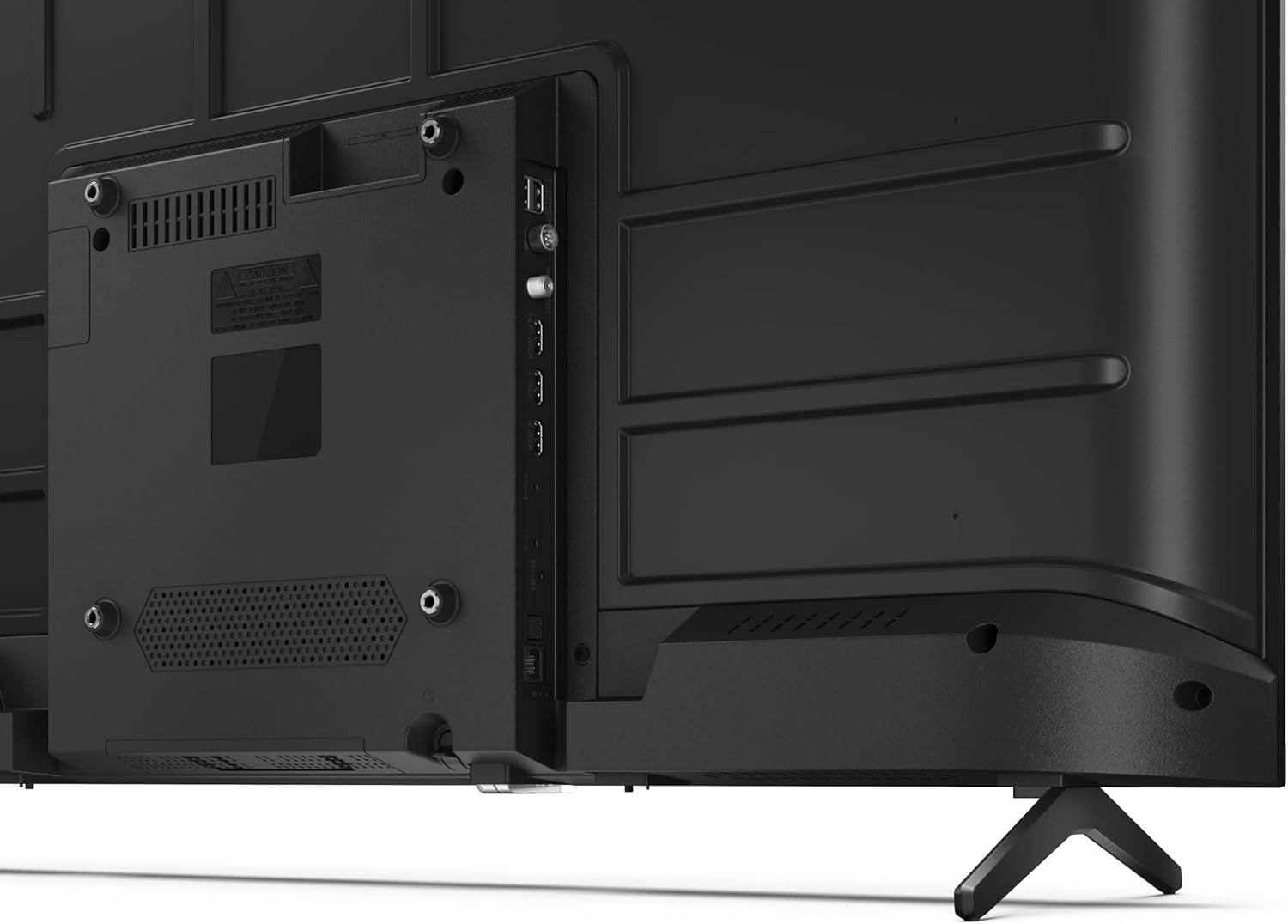
3.3 irudia: Xehetasun zehatza view telebistaren konexio-ataken artean.
3.4 Hasierako piztea eta Google TV konfigurazioa
After connecting all necessary cables, plug the power cable into an electrical outlet. Press the power button on the remote control or on the TV. Follow the on-screen instructions to complete the initial setup, including network connection, Google account login, and channel scanning.
4. Funtzionamendua
4.1 Urruneko kontrolaren funtzioak
The remote control allows you to navigate the TV's features. Common buttons include Power, Volume Up/Down, Channel Up/Down, Input Source, Home (Google TV), Navigation (directional arrows, OK), Back, and Google Assistant.
4.2 Google TV interfazea
Your Sharp TV runs on Google TV, providing a personalized home screen with content recommendations from your subscriptions. Use the remote's navigation buttons to browse movies, shows, apps, and your library.

Image 4.1: The Google TV home screen on the Sharp 40HF2265E.
4.3 Sarrera hautatzea
To switch between connected devices (e.g., HDMI 1, HDMI 2, TV tuner), press the 'Input' or 'Source' button on your remote control and select the desired input from the on-screen menu.
4.4 Irudi eta soinu ezarpenak
Access the TV's settings menu to adjust picture modes (Standard, Vivid, Cinema, Game), brightness, contrast, color, and sound modes (Standard, Music, Movie, Speech). The TV supports HDR10 for enhanced contrast and color, and Dolby Digital for rich audio.

Image 4.2: Visual representation of HDR (High Dynamic Range) technology.
4.5 Google Assistant and Chromecast
Use the built-in Google Assistant for voice control. Press the Google Assistant button on your remote and speak your commands, such as searching for content, controlling smart home devices, or getting information. Chromecast allows you to cast content directly from compatible devices like smartphones or tablets to your TV.

Image 4.3: Google Assistant integration for voice commands.
4.6 Bluetooth konexioa
Pair Bluetooth-enabled devices such as headphones or soundbars with your TV for a wireless audio experience. Navigate to the TV's settings menu, select 'Remotes & Accessories', and then 'Pair new device' to connect.
5. Mantentzea
5.1 Telebista garbitzea
Always unplug the TV before cleaning. Use a soft, dry cloth to wipe the screen and TV body. For stubborn marks, lightly dampGarbitu zapia urarekin edo pantaila-garbitzaile espezializatu batekin. Ez erabili inoiz garbitzaile urratzaile, argizari edo disolbatzailerik.
5.2 Software eguneraketak
Your Google TV may receive automatic software updates. Ensure your TV is connected to the internet to receive these updates, which can improve performance and add new features. You can also manually check for updates in the settings menu.
6. Arazoak
Telebistarekin arazoak badituzu, jo ezazu ohiko irtenbide hauetara:
- Potentziarik gabe: Check if the power cable is securely plugged into both the TV and the wall outlet. Ensure the outlet is functional.
- Irudi/soinurik ez: Verify that the correct input source is selected. Check all cable connections (HDMI, antenna). Try restarting the TV.
- Urruneko kontrola ez dabil: Ordeztu pilak (2 AAA). Ziurtatu ez dagoela oztoporik urrutiko agintearen eta telebistaren IR sentsorearen artean.
- Sareko konexio arazoak: For Wi-Fi, check your router and ensure the TV is within range. For wired connections, check the Ethernet cable. Try restarting your router and the TV.
- Irudiaren kalitate arazoak: Doitu irudiaren ezarpenak (distira, kontrastea, zorroztasuna). Ziurtatu sarrerako iturriak kalitate handiko seinalea ematen duela.
For more complex issues, consult the comprehensive troubleshooting section in the full digital manual or contact Sharp customer support.
7. Zehaztapenak
Below are the technical specifications for the Sharp 40HF2265E Full HD Google TV:

Image 7.1: Dimensions of the Sharp 40HF2265E TV.
| Ezaugarri | Zehaztapena |
|---|---|
| Marka | Zorrotza |
| Modelo zenbakia | 40HF2265E |
| Ereduaren izena | HF seriea |
| Eredu Urtea | 2025 |
| Pantailaren tamaina | 40 hazbete (81 zentimetro) |
| Bistaratzeko Teknologia | LED |
| Ebazpena | 1080p (HD osoa) |
| Freskatze tasa | 60 Hz |
| Aspektu-erlazioa | 16:9 |
| Kontraste-erlazioa | 100000:1 |
| Screen Finish | Matea |
| Erantzun Denbora | 8 milisegundo |
| Atzeko argiaren teknologia | LED |
| Supported HDR Format | HDR10, HLG |
| Irudiaren kalitatea hobetzea | Dynamic Contrast, HDR10, HLG |
| Motion Enhancement Technology | Motion Interpolation |
| Sistema eragilea | Google TV |
| Internet Applications | Apple TV, Google TV, Hulu, Prime Video, YouTube |
| Ezaugarri bereziak | Bluetooth, Chromecast, Dolby Digital, HD Tuner |
| Konektibitate Teknologia | Ethernet, USB, Wi-Fi |
| Haririk gabeko Teknologia | Bluetootha |
| Bluetooth bertsioa | 5.0 |
| Screen Mirroring Technology | Chromecast, Google Cast |
| HDMI portuak guztira | 3 |
| Total USB 2.0 Ports | 2 |
| Number of Composite Video Inputs | 1 |
| Audio Sarrera | Mini composite/CVBS + audio input |
| Total Audio Output Ports | 2 |
| Audio irteera modua | Estereoa |
| Audio-kodeketa | DD |
| Integrated Surround Sound Format | Dolby AC-4, Dolby Digital, Dolby Digital Plus |
| Bozgorailuen irteerako potentzia maximoa | 16 Watts (2x8W) |
| Audio-kanal kopurua | 2.0 |
| Emisio Sistema | DVB-T2/C/S/S2 |
| Bideo-kodeketa | MKV |
| Produktuaren neurriak (LxWxH) | 8.4P x 89.2L x 50.9A cm |
| Elementuaren pisua | 5.4 kilogramo |
| Pisua Zutik gabe | 5.4 kilogramo |
| Oinarriaren Zabalera | 765 milimetro |
| VESA muntaketa estandarra | 200 x 200 mm |
| Energia-kontsumoa | 37 Watt |
| liburukiatage | 230 Volt |
| Remote Control Battery Size | AAA |
| Remote Control Battery Quantity | 2 |
| Gurasoen Kontrol Teknologia | Kindersicherung Über Google Tv |
| EBko ordezko piezen erabilgarritasuna | 7 Urte |
8. Bermea eta Laguntza
8.1 Produktuaren bermea
The Sharp 40HF2265E television comes with a 2-year manufacturer's warranty. Please refer to the included Warranty Card for detailed terms and conditions regarding coverage and service. Keep your proof of purchase for warranty claims.
8.2 Bezeroarentzako laguntza
If you require further assistance, have questions not covered in this manual, or need technical support, please contact Sharp customer service. Contact information can typically be found on the Warranty Card or the official Sharp webgunea.