
1. Sarrera
This manual provides comprehensive instructions for the setup, operation, and maintenance of your GOBOULT Mustang Racer Smart Watch. Please read this manual thoroughly before using the device to ensure proper functionality and to maximize your user experience. Keep this manual for future reference.
2. Zer dago kutxan
Egiaztatu elementu guztiak paketean daudela:
- GOBOULT Mustang Racer Smart Watch
- Kargatzeko kablea
- Erabiltzailearen eskuliburua (dokumentu hau)
- Berme Txartela
3. Produktua amaitu daview
Familiarize yourself with the key components of your GOBOULT Mustang Racer Smart Watch.
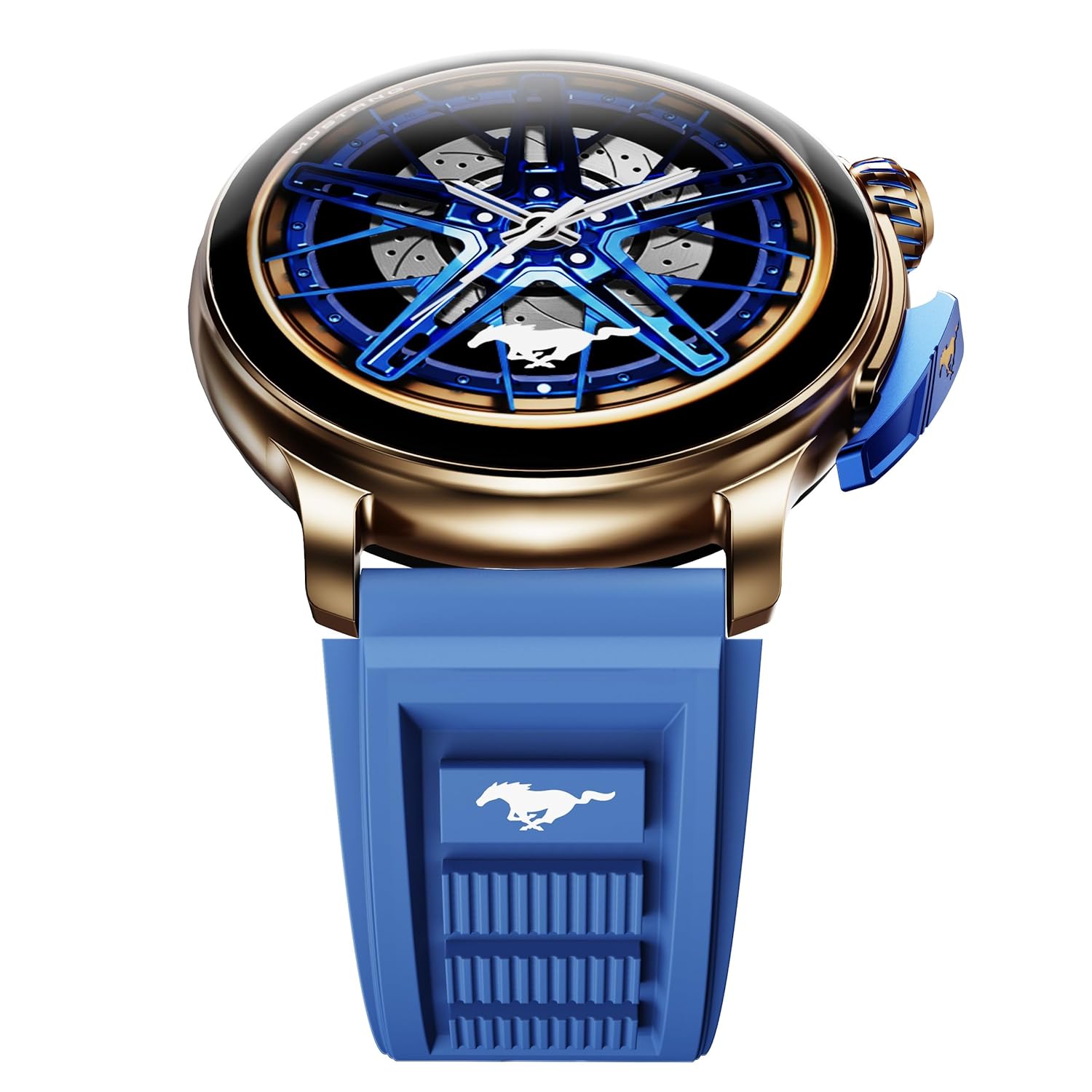
Image: The GOBOULT Mustang Racer Smart Watch, showcasing its 1.43-inch AMOLED display and overall design.
Display and Bezel
The watch features a 1.43-inch AMOLED display with 500 Nits brightness for clear visibility. The functional rotating bezel allows for intuitive navigation through menus and features.

Irudia: Xehetasun zehatza view of the smartwatch's 1.43-inch AMOLED display and the rotating bezel, highlighting its design and brightness.
Buttons and Crown
The watch includes a rotating tyre-tread crown for navigation and selection, along with a functional paddle shifter button for quick access to features.

Image: The smartwatch featuring its functional paddle shifter and rotating crown, designed for enhanced control.
4. Konfigurazioa
4.1. Erloju adimenduna kargatzea
Before initial use, fully charge your smartwatch. Connect the magnetic charging cable to the charging pins on the back of the watch and plug the USB end into a compatible power adapter (not included) or a computer's USB port. The watch will display a charging indicator. A full charge takes approximately 120 minutes.
4.2. Piztu/Itzaltzea
- Piztu: Press and hold the main power button (crown) for a few seconds until the GOBOULT logo appears.
- Itzali: From the watch face, swipe down to access quick settings, or navigate to the settings menu. Select "Power Off" and confirm. Alternatively, press and hold the main power button until the power-off option appears.
4.3. Zure telefonoarekin parekatzea
To unlock all features, pair your GOBOULT Mustang Racer Smart Watch with the companion app on your smartphone via Bluetooth.
- Download the official GOBOULT app from your smartphone's app store (iOS App Store or Google Play Store).
- Ziurtatu Bluetootha gaituta dagoela zure telefonoan.
- Open the GOBOULT app and follow the on-screen instructions to create an account or log in.
- In the app, select "Add Device" or similar option.
- Select "GOBOULT Mustang Racer" from the list of available devices.
- Berretsi parekatze eskaera zure telefonoan eta erloju adimendunean.
Once paired, the watch will synchronize data with your phone, and you can customize settings through the app.

Image: The smartwatch highlighting its Bluetooth V5.3 connectivity for quick syncing and IP67 water resistance.
5. Funtzionamendu-argibideak
5.1. Nabigazioa
- Irristatu gora/behera/ezkerrera/eskuinera: Navigate through menus, notifications, and quick access panels.
- Sakatu: Hautatu elementu bat edo berretsi ekintza bat.
- Rotating Bezel/Crown: Rotate to scroll through lists or adjust settings. Press to select or return to the home screen.
- Paddle Shifter Button: Customizable shortcut for frequently used functions (e.g., sports modes).
5.2. Bluetooth bidezko deiak
With integrated speaker and microphone, you can make and receive calls directly from your wrist after pairing with your smartphone.
- Ziurtatu erlojua telefonora konektatuta dagoela Bluetooth bidez.
- Dei bat egiteko: Sartu erlojuaren markagailura edo kontaktuen zerrendara.
- Dei bat jasotzeko: Sarrerako dei baten jakinarazpena agertuko da zure erlojuan. Sakatu erantzuteko edo ukatzeko.
5.3. Erloju-aurpegiak
Customize your watch's appearance with over 150 watch faces, including exclusive Mustang designs. Long-press the watch face to change it, or use the companion app for more options.

Irudia: Erloju adimendunen erakusketaasing multiple watch face options, including exclusive Mustang designs.
5.4. Kirol Moduak
The watch supports over 120 sports modes to track your physical activities. Access sports modes from the main menu or via the paddle shifter shortcut (if configured).
- Select your desired sport.
- Start the activity. The watch will record metrics such as duration, calories burned, and heart rate.
- End the activity to save data. Review your performance in the app.

Image: The smartwatch displaying a sports tracking interface, indicating its capability to monitor various physical activities.
5.5. Osasunaren jarraipena
The GOBOULT Mustang Racer Smart Watch provides comprehensive health tracking features:
- 24x7 Heart Rate Monitor: Zure bihotz-maiztasuna etengabe kontrolatzen du.
- SpO2 Blood Oxygen Saturation Monitor: Odoleko oxigeno mailak neurtzen ditu.
- Loaren jarraipena: Analyzes sleep patterns (deep sleep, light sleep, awake time).
- Estresaren monitore: Zure estres mailaren inguruko informazioa ematen du.
- Odol-presioa: (Note: Smartwatch blood pressure measurements are for reference only and should not be used for medical diagnosis.)
Access these features from the watch's health menu or view txosten zehatzak aplikazio osagarrian.

Irudia: Barneko bat view of the smartwatch highlighting its health tracking sensors, with text indicating features like heart rate, SpO2, sleep, and stress monitoring.
5.6. IA Ahots Laguntzailea
Activate the AI Voice Assistant on your watch to perform tasks, set reminders, or get information using voice commands. Ensure your watch is connected to your phone for this feature to function.
5.7. Jakinarazpen adimendunak
Receive notifications for calls, messages, and app alerts directly on your watch. Manage notification settings through the GOBOULT app.
5.8. Always On Display
The Always On Display feature allows the time and essential information to remain visible on the screen without needing to raise your wrist or press a button. This feature can be enabled or disabled in the watch settings to manage battery consumption.

Image: The smartwatch displaying the time and a car image, illustrating the Always On Display functionality.
6. Ezaugarriak eta zehaztapenak
Ezaugarri nagusiak:
- 1.43" AMOLED Display with 500 Nits Brightness
- Bluetooth Calling (BT V5.3)
- Rotating Bezel for intuitive control
- 150+ Watch Faces, including exclusive Mustang designs
- AI Ahots Laguntzailea
- Health Monitoring: SpO2, Heart Rate, Sleep, Stress, Blood Pressure
- 120 kirol modu baino gehiago
- IP67 urarekiko erresistentea
- Up to 7-day battery runtime with fast charging
Zehaztapen teknikoak:
| Marka | GOBOULT |
| Modelo zenbakia | GOBOULT Mustang Racer |
| Bistaratzeko tamaina | 1.43 hazbete |
| Haririk gabeko mota | Bluetooth V5.3 |
| Bateria kargatzeko denbora | 120 minutu |
| Bateriaren energia-edukia | 1.11 watt ordu |
| Uraren Erresistentzia | IP67 |
| Elementuaren pisua | 55 g |
| Jatorrizko Herrialdea | Txina |
7. Mantentzea
7.1. Zure erloju adimenduna garbitzea
Garbiketa erregularrak erlojuaren itxura eta funtzionaltasuna mantentzen laguntzen du:
- Garbitu pantaila eta gorputza zapi leun eta lihorik gabeko batekin.
- Orban egoskorretarako, apur bat dampGarbitu oihalak urarekin. Saihestu produktu kimiko gogorrak edo material urratzaileak erabiltzea.
- Clean the charging contacts periodically with a dry cloth to ensure proper charging.
7.2. Urarekiko erresistentzia (IP67)
The GOBOULT Mustang Racer Smart Watch is IP67 water resistant, meaning it can withstand immersion in up to 1 meter of fresh water for up to 30 minutes. It is suitable for daily use and light splashes. However, it is not recommended for swimming, showering with hot water, or diving. Avoid exposure to saltwater or chemicals, as this may damage the device.
7.3. Bateria zaintzea
- Saihestu bateria maiz erabat deskargatzea.
- Gorde erlojua leku fresko eta lehor batean denbora luzez erabiltzen ez duzunean.
- Erabili emandako kargatzeko kablea soilik.
8. Arazoak
| Arazoa | Irtenbide posiblea |
|---|---|
| Erlojua ez da pizten. | Ziurtatu erlojua guztiz kargatuta dagoela. Konektatu kargagailura gutxienez 30 minutuz. |
| Ezin da telefonoarekin parekatu. |
|
| Osasun datu zehaztugabeak. |
|
| Bateriaren iraupen laburra. |
|
9. Bermea eta Laguntza
Your GOBOULT Mustang Racer Smart Watch comes with a warranty as specified on the included Warranty Card. Please refer to the card for details regarding warranty period, coverage, and terms and conditions.
For technical support, product inquiries, or warranty claims, please contact GOBOULT customer service through the contact information provided on your Warranty Card or visit the official GOBOULT webgunea.
Dakarten osagaiak: Charging Cable, Mustang Racer Apex Blue Smart watch, User Manual, Warranty Card