
Sarrera
This manual provides detailed instructions for the Boytond Wireless Earpiece with Mic, Model YYK-520-2-C. Please read this manual carefully before using the product to ensure proper operation and to maximize its performance. Keep this manual for future reference.
Paketearen edukia
Egiaztatu elementu guztiak zure paketean daudela:
- Boytond Wireless Earpiece
- Charging Case (500 mAh)
- USB-C kargatzeko kablea
- Replaceable Ear Tips (S, M, L)
- Erabiltzailearen eskuliburua

The image displays the Boytond Wireless Earpiece, its charging case, a USB-C charging cable, and various sizes of ear tips, illustrating all items included in the product package.
Produktua amaituview
The Boytond Wireless Earpiece is designed for clear communication and comfortable wear, featuring CVC8.0 noise cancellation and Bluetooth 6.1 technology. It includes a portable charging case for extended use.

Xehetasun bat view of the Boytond Wireless Earpiece, showcasing its ergonomic design and integrated microphone.
Konfigurazioa
1. Charging the Earpiece and Case
Before first use, fully charge the earpiece and its charging case.
- Konektatu USB-C kargatzeko kaxako kargatzeko atakara eta energia-iturri batera.
- The LED display on the charging case will indicate the battery level.
- Place the earpiece into the charging case. The earpiece will begin charging automatically.
- A full charge provides approximately 10-12 hours of talk time for the single headset, and up to 100 hours with the fully charged case.

The earpiece and its charging case are shown, with the case's LED display indicating a 100% charge, demonstrating the charging process and battery status.
2. Gailu batekin parekatzea
- Ensure the earpiece is charged.
- Turn on the earpiece. It will automatically enter pairing mode (indicated by a flashing LED).
- Zure telefonoan edo Bluetooth gaitutako gailuan, joan Bluetooth ezarpenetara eta gaitu Bluetooth.
- Bilatu available devices and select "Boytond YYK-520-2-C" (or similar name) from the list.
- Once connected, the earpiece LED will stop flashing.
The earpiece is shown next to a smartphone, demonstrating its operating range and compatibility with mobile devices for calls and media.
3. Gailu bikoitzen konexioa
The earpiece supports connecting to two devices simultaneously.
- Pair the earpiece with the first device as described above.
- Disconnect the earpiece from the first device (e.g., turn off Bluetooth on the first device or manually disconnect).
- Pair the earpiece with the second device.
- Reconnect the earpiece to the first device. The earpiece should now be connected to both devices.

A visual guide illustrating the steps to connect the earpiece to two separate devices, enabling dual-device functionality.
Funtzionamendu-argibideak
Botoiaren funtzioak

This diagram labels the buttons on the earpiece and explains their functions for call management, volume control, and music playback.
| Ekintza | Botoia Sakatu |
|---|---|
| Piztu/Itzali | Press and hold the Multi-function Button |
| Erantzun/Amaitu deia | Single press the Multi-function Button |
| Deia baztertu | Press and hold the Multi-function Button |
| Berriz markatu azken zenbakia | Sakatu birritan funtzio anitzeko botoia |
| Erreproduzitu/Pausatu musika | Single press the Multi-function Button |
| Bolumena igo | Sakatu labur '+' botoia |
| Bolumena jaitsi | Sakatu labur '-' botoia |
| Hurrengo Pista | Sakatu luze '+' botoia |
| Aurreko Pista | Sakatu luze '-' botoia |
| Mikrofonoa desaktibatu/desaktibatu | Single press the Mute Button during a call |
| Aktibatu Ahots Laguntzailea | Triple press the Multi-function Button |
Mutu funtzioa
During a call, you can mute your microphone to ensure privacy. Simply press the dedicated mute button on the earpiece. Press it again to unmute.

A user is shown pressing the mute button on the earpiece during a call, with an icon indicating the microphone is muted, highlighting the privacy feature.
Aurikularra jantzita
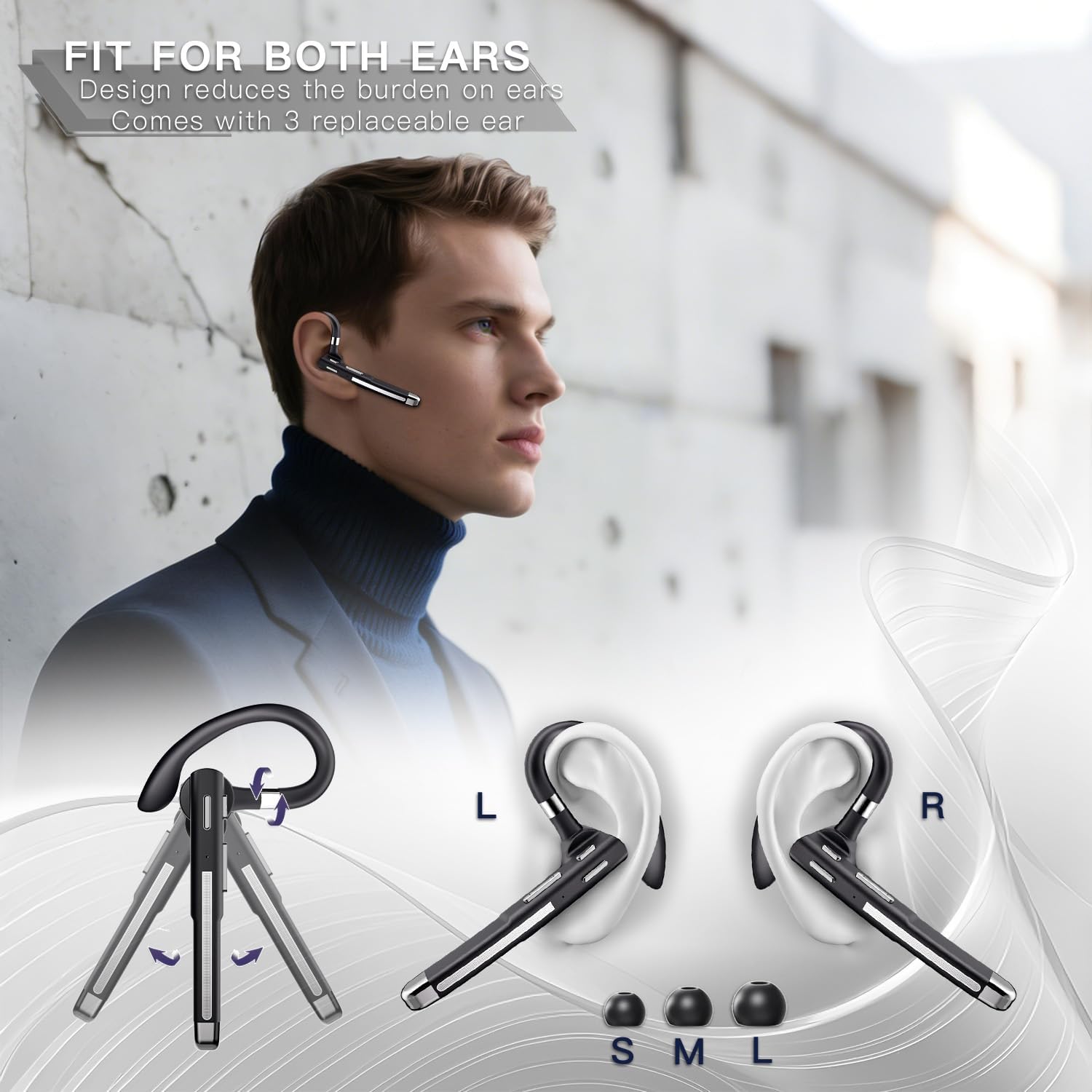
The earpiece features an ergonomic design with a rotatable ear hook and comes with three sizes of ear tips (S, M, L) to ensure a secure and comfortable fit for either ear.
- Choose the ear tip size that best fits your ear canal for optimal sound quality and comfort.
- Adjust the ear hook to fit over your ear. The hook can be rotated 180 degrees to switch between left and right ear use, and the earpiece itself can rotate 270 degrees for fine-tuning the angle.
- Gently insert the earpiece into your ear, ensuring a snug fit.

This image demonstrates the earpiece's 180-degree rotatable ear hook and 270-degree earpiece rotation, allowing for comfortable and secure wear on either the left or right ear.
Zehaztapenak
| Ezaugarri | Xehetasuna |
|---|---|
| Modelo zenbakia | YYK-520-2-C |
| Marka | Boytond |
| Konektibitate Teknologia | Haririk gabekoa (Bluetooth 6.1) |
| Bluetooth barrutia | 10 metro (33 oin) arte oztoporik gabe |
| Zarata Deuseztatzea | CVC8.0 Noise Cancelling |
| Battery Life (Earpiece) | 10-12 hours talk time |
| Bateriaren iraupena (kargatzeko zorroarekin) | Gehienez 100 orduko hitz egiteko denbora |
| Kargatzeko kasuaren edukiera | 500 mAh |
| Kargatzeko ataka | USB-C |
| Maiztasun barrutia | 20 Hz - 20,000 Hz |
| Audio kontrolatzaile mota | Gidari dinamikoa |
| Kolorea | Beltza |
Arazoak konpontzea
- Earpiece not turning on: Ensure the earpiece is fully charged. Place it in the charging case to confirm charging.
- Ezin da gailuarekin parekatu:
- Ensure the earpiece is in pairing mode (flashing LED).
- Itzali eta piztu Bluetooth-a zure gailuan.
- Ezabatu aurreko parekatzeak zure gailuaren Bluetooth zerrendatik eta saiatu berriro parekatzen.
- Ensure the earpiece is within 10 meters of your device.
- Soinurik ez edo bolumen baxua:
- Adjust the volume on both the earpiece and your connected device.
- Ensure the earpiece is properly connected to your device.
- Check if the earpiece battery is low.
- Call quality issues (e.g., static, drops):
- Hurbildu konektatutako gailura interferentziak murrizteko.
- Ensure there are no major obstacles between the earpiece and your device.
- Check for other active Bluetooth devices that might be causing interference.
- Mikrofonoa ez dabil:
- Ziurtatu mikrofonoa ez dagoela isilduta.
- Egiaztatu mikrofonoaren ezarpenak konektatutako gailuan.
Mantentzea
- Garbiketa: Use a soft, dry cloth to clean the earpiece and charging case. Do not use harsh chemicals or abrasive materials.
- Biltegiratzea: Store the earpiece in its charging case when not in use to protect it from dust and damage. Store in a cool, dry place.
- Bateria zaintzea: Bateriaren iraupena luzatzeko, saihestu bateria maiz erabat deskargatzea. Kargatu gailua aldizka, erabiltzen ez baduzu ere.
- Saihestu muturreko baldintzak: Do not expose the earpiece to extreme temperatures, humidity, or direct sunlight.
Bermea eta Laguntza
Boytond offers comprehensive customer support for its products.
24-Hour Online Customer Service
For any product-related inquiries, issues, or suggestions, please contact the Boytond After-sales Service Team directly. This includes problems with delivery, product satisfaction, usage issues, or if Amazon Customer Service cannot resolve your issue.

An icon representing 24-hour online customer service, emphasizing continuous support.
365-Day Positive Service
If you encounter missing parts, product malfunction, damage, or other problems within 365 days of purchase, Boytond guarantees a 100% satisfactory solution. If the product has quality defects, it will be replaced or a full refund will be offered.

An icon representing 365-day service, highlighting the extended warranty and support period.