
1. Sarrera
This manual provides essential information for the safe and efficient operation of your PowMr 4000W Hybrid Solar Inverter. This device is designed to convert 24VDC battery power into 110/120VAC pure sine wave electricity, integrating a 140A MPPT charge controller for optimal solar energy utilization. It supports various battery types and off-grid system configurations. Please read this manual thoroughly before installation and use, and retain it for future reference.
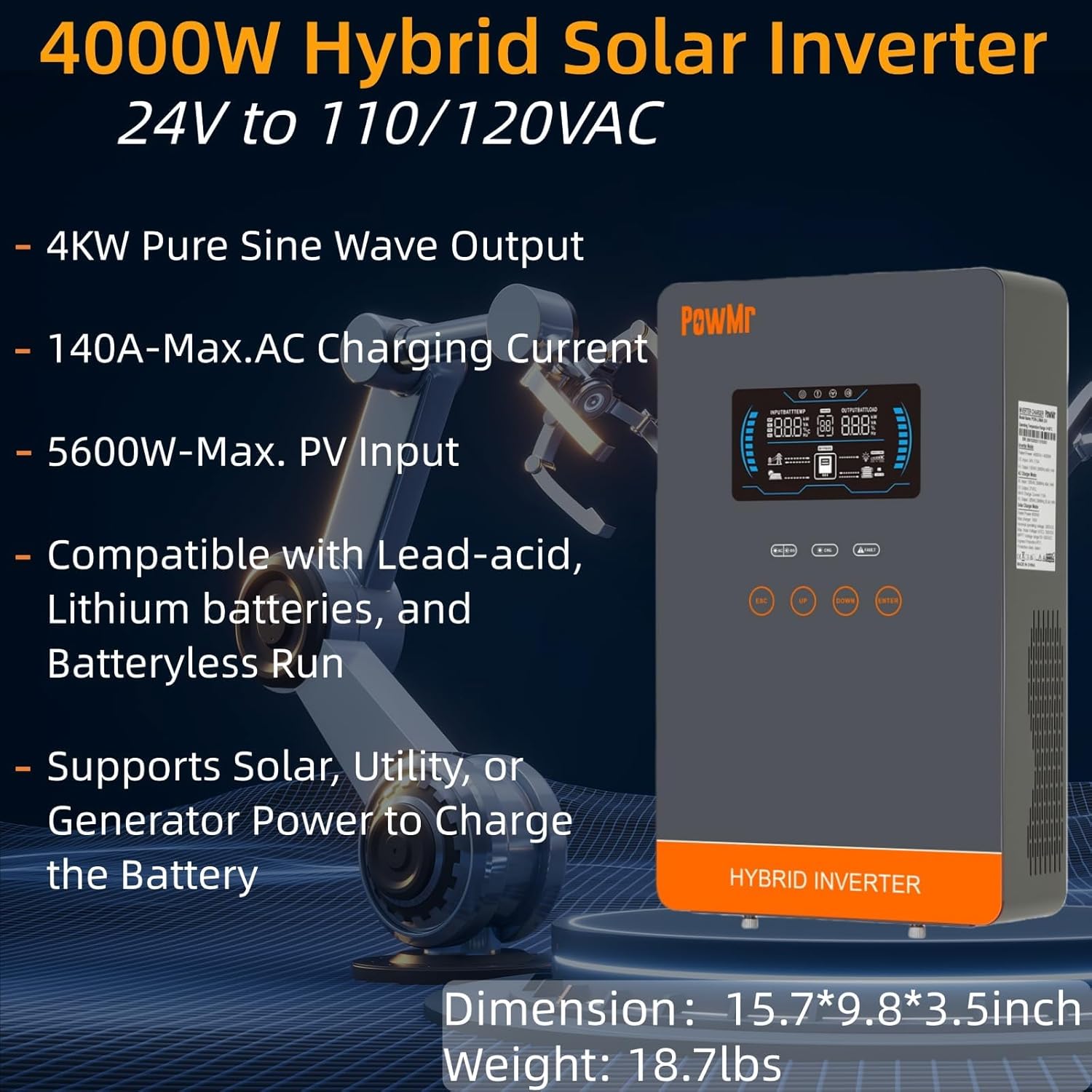
Image: The PowMr 4000W Hybrid Solar Inverter, highlighting its 4KW pure sine wave output, 140A max AC charging current, 5600W max PV input, compatibility with various batteries, and support for solar, utility, or generator power to charge the battery. Dimensions are 15.7"L x 9.8"W x 3.5"H and weight is 18.7lbs.
2. Segurtasun-argibideak
Beti jarraitu segurtasun neurri hauek deskarga elektriko, sute edo lesio arriskua murrizteko:
- Instalazioa langile kualifikatuek egin behar dute.
- Ziurtatu kableatu guztiak behar bezala neurtuta daudela eta behar bezala isolatuta daudela.
- Ez desmuntatu inbertsore-makina. Barruan ez dago erabiltzaileak konpondu dezakeen piezarik.
- Mantendu inbertsorea material sukoietatik, hezetasunetik eta eguzki-argitik urrun.
- Berotu gehiegi berotzea saihesteko, ziurtatu aireztapen egokia dagoela inbertsorearen inguruan.
- Deskonektatu beti energia-iturri guztiak (PV, bateria, korronte alternoko sarrera) mantentze-lanak edo kableatuak egin aurretik.
- Erabili babes pertsonaleko ekipamendu (BPE) egokia instalazioan eta mantentze-lanetan zehar.
3. Produktua amaitu daview
3.1. Ezaugarriak
- Uhin sinusoidal hutsaren irteera: Energia egonkorra eta garbia ematen du, elektronika sentikorrerako egokia.
- Integrated MPPT Charge Controller: 140A MPPT for efficient solar charging.
- Bateriaren bateragarritasun zabala: Supports AGM, Gel, Lead-acid, Lithium-ion, and LiFePO4 batteries.
- Batteryless Mode: Can power loads directly from PV/AC grid without a connected battery.
- Hainbat kargatzeko modua: Solar Only, Mains Only, Mains & Solar Hybrid.
- Multiple Load Output Modes: Utility Priority, Solar Priority, Solar and SBU Priority.
- Babes aurreratua: Zirkuitu laburra, voltage, vol. azpiantage, overload, reverse polarity, over-temperature, and backfill protection.
- Erabiltzaileentzako interfazea: 6.25-inch LCD screen with touch controls for real-time data display.
- Komunikazio Portuak: RS485 and RS232 for monitoring and control.
3.2. Osagaien identifikazioa

Image: A detailed diagram of the PowMr Hybrid Solar Inverter, showing its front panel and connection ports. Key components labeled include: 1. LCD display, 2. Status indicator, 3. Charging indicator, 4. Fault indicator, 5. Function touch buttons, 6. On/off switch, 7. AC input, 8. AC output, 9. PV input, 10. Battery input, 11. RS485/RS232 communication port.
3.3. Babes-ezaugarriak

Image: An illustration detailing the comprehensive protection features of the inverter, including Short Circuit Protection, Over-Load Protection, Over Current Protection, Backfill Protection, Over Voltage Protection, Over-Temperature Protection, Under Voltage Protection, and Over Charge Protection.
4. Paketearen edukia
Despaketatzean, egiaztatu elementu guztiak bertan daudela eta kalterik gabe daudela:
- PowMr 4000W Hybrid Solar Inverter
- Argibide eskuliburua (dokumentu hau)
- Communication Cables (if applicable, check packaging)
- Muntatzeko hardwarea (hala badagokio, egiaztatu ontzia)
5. Instalazioa eta konfigurazioa
5.1. Inbertsorearen muntaketa
Select a suitable location for mounting the inverter. It should be:
- Indoors, protected from direct sunlight, rain, and dust.
- Ondo aireztatuta beroa xahutzeko aukera emateko.
- Close to the battery bank to minimize cable length and voltage tanta.
- On a solid, non-flammable surface.
5.2. Kableatuen Diagrama
Follow the wiring diagram carefully. Incorrect wiring can cause damage to the inverter, batteries, or connected loads, and may pose a safety hazard.

Image: A comprehensive wiring diagram illustrating connections for PV input, Mains/Generator input, AC output, and Battery input. It specifies voltage ranges, current ratings, and recommended wire gauges for each connection point.
5.3. Bateria konexioa
The inverter is compatible with various 24V battery types. Ensure your battery bank matches the inverter's voltage eskakizunak.

Image: An illustration showing the inverter's compatibility with various battery types including AGM, GEL, FLD (Flooded), LI (Lithium-ion), SLD (Sealed Lead-Acid), and USER-defined settings. It also indicates a maximum battery charging current of 140A (utility charging + solar charging).
- Connect the battery cables to the inverter's battery terminals, ensuring correct polarity (positive to positive, negative to negative).
- Estutu konexio guztiak seguru.
5.4. PV Multzoaren Konexioa
- Connect the solar panel array to the PV input terminals, observing correct polarity.
- Ensure the PV array's open circuit voltage and power are within the inverter's specifications.
5.5. AC Input/Output Connection
- Connect the AC utility grid or generator to the AC input terminals.
- Konektatu zure korronte alternoko kargak korronte alternoko irteerako terminaletara.
- Ensure all AC connections are properly grounded.
6. Funtzionamendu-argibideak
6.1. Piztu/Itzaltzea
- Pizteko: Ensure all connections are secure. First, connect the battery, then the PV array, and finally the AC input. Press the On/Off switch.
- Itzaltzeko: Disconnect the AC input, then the PV array, and finally the battery. Press the On/Off switch.
6.2. LCD pantaila eta kontrolak
The LCD screen displays real-time system data. Use the touch buttons to navigate menus and adjust settings.
6.3. Setting Charging and Output Modes
The inverter offers flexible charging and output modes to suit various energy management needs.

Image: An illustration detailing the three charging modes (1. Only Solar, 2. Only Utility, 3. Solar+Utility) and three output modes (1. Utility First, 2. Solar First (default), 3. SBU priority). Steps to set programs are also provided: 1. Long press and hold ENTER button for 3s, 2. Press UP and DOWN to select setting programs, 3. Press ENTER to confirm or ESC to exit.
6.3.1. Kargatzeko moduak
- Eguzkia bakarrik: Bateriak eguzki-panelen bidez soilik kargatzen ditu.
- Hornidura nagusiak bakarrik: Charges batteries exclusively from the AC utility grid or generator.
- Sare elektrikoa eta eguzki-energia hibridoa: Prioritizes solar charging, supplementing with AC utility/generator if solar power is insufficient.
6.3.2. Load Output Modes
- Erabilgarritasun Lehentasuna: Loads are primarily powered by the AC utility grid. Inverter switches to battery/solar if utility fails.
- Eguzki-lehentasuna: Loads are primarily powered by solar and battery. Inverter switches to utility if solar/battery power is insufficient.
- SBU Lehentasuna (Eguzki-Bateria-Erabilgarritasuna): Loads are primarily powered by solar, then battery, and finally by utility as a last resort.
7. Mantentzea
Mantentze-lan erregularrak zure inbertsorearen errendimendu optimoa eta iraupena bermatzen ditu.
- Garbiketa: Periodically clean the inverter's exterior with a dry cloth. Do not use liquid cleaners.
- Aireztapena: Ensure cooling fan vents are clear of dust and obstructions. The triple cooling fan design helps dissipate heat efficiently.
- Konexioak: Urtero egiaztatu konexio elektriko guztiak estutasuna eta korrosio zantzurik dagoen egiaztatzeko.
- Ingurumena: Maintain a clean, dry, and well-ventilated environment around the inverter. The dust-proof design helps prevent dust ingress.
8. Arazoak
If you encounter issues, refer to the following common problems and solutions. For persistent issues, contact customer support.
| Arazoa | Kausa posiblea | Irtenbidea |
|---|---|---|
| Inbertsoreak ez du pizten | Bateriarik ez dago konexiorik; bateriaren bolumen baxuatage; On/Off switch off | Check battery connections; Charge battery; Turn on switch |
| AC irteerarik ez | Overload; Short circuit; Inverter fault | Reduce load; Check for short circuits; Restart inverter |
| PV charging not working | PV array disconnected; Insufficient sunlight; PV voltagbaxuegia/altuegia | Check PV connections; Ensure adequate sunlight; Verify PV array specifications |
| Gainkargaren abisua | Connected loads exceed inverter capacity | Disconnect some loads; Ensure total load is within 4000W |
| Tenperatura altuko abisua | Poor ventilation; Ambient temperature too high | Clear vents; Improve airflow; Relocate inverter if necessary |
9. Zehaztapenak
Technical specifications for the PowMr 4000W Hybrid Solar Inverter:
| Parametroa | Balioa |
|---|---|
| Modelo zenbakia | POW-LVM4K-24V-FBA2 |
| Irteerako potentzia | 4000W |
| Sarrera boltage (DC) | 24VDC |
| Irteera boltage (AC) | 110/120 VAC |
| Irteerako uhin forma | Sine Wave Pure |
| Max. PV Zirkuitu Irekia Voltage | 350VDC |
| PV Array MPPT Voltage Barrutia | 55-350 VDC |
| Max. PV sarrerako potentzia | 5600W |
| Rated Grid Input Voltage | 110/120 VAC |
| Max. Hybrid Charging Current (AC+PV) | 140A |
| Komunikazioa | RS485, RS232 |
| Bistaratzeko mota | LCDa |
| Neurriak (L x W x H) | 15.7"L x 9.8"Z x 3.5"A |
| Pisua | 18.7 lbs (approximate, derived from image) |
10. Bermea eta Laguntza
10.1. Bermearen informazioa
The PowMr 4000W Hybrid Solar Inverter comes with an 18 hilabeteko bermea from the date of purchase. This warranty covers defects in materials and workmanship under normal use. It does not cover damage caused by improper installation, misuse, accidents, unauthorized modifications, or natural disasters.
10.2. Bezeroarentzako arreta
For technical assistance, warranty claims, or any questions regarding your PowMr inverter, please contact PowMr customer support through the retailer's platform or the official PowMr website. Please have your model number (POW-LVM4K-24V-FBA2) and purchase date available when contacting support.