
1. Produktua amaitu daview
The Edifier CC300 is a professional Bluetooth 6.0 communicator headset designed for reliable and high-quality audio communication in various professional environments. It features AI-enhanced dual-microphone noise filtering, a 30mm dynamic driver for clear sound, and multiple connectivity options for versatile use.
2. Paketearen edukia
- Edifier CC300 Headset
- USB-C Dongle
- USB-A USB-C kargatzeko kablea
- Erabiltzailearen eskuliburua
3. Produktuaren ezaugarriak
The Edifier CC300 headset is engineered for comfort and performance, featuring a lightweight design and a flexible microphone arm.

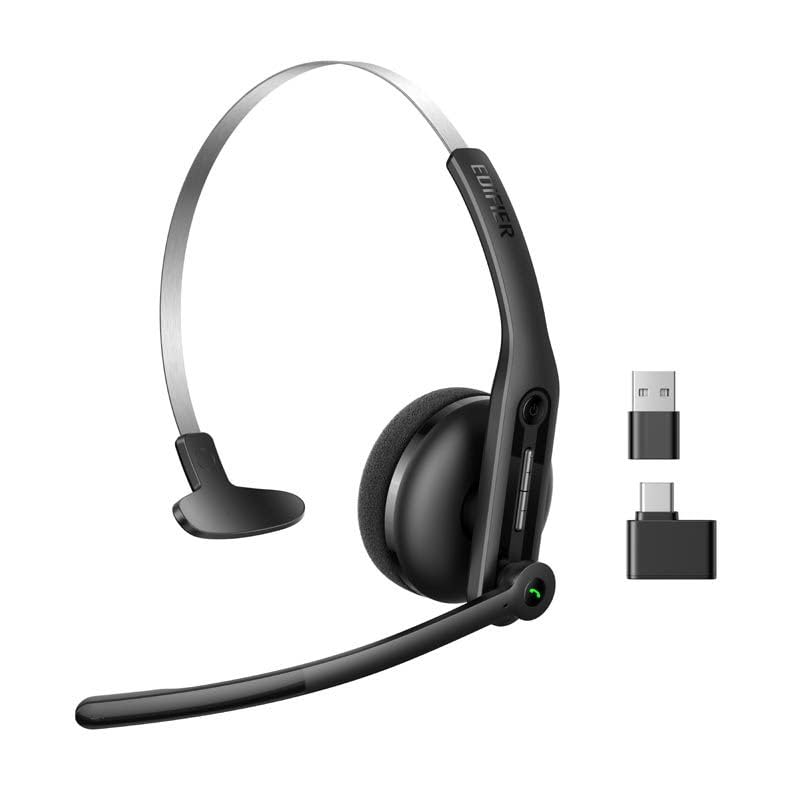
3.1. irudia: Edifier CC300 Headset with included USB-C dongle and charging cable.

3.2. irudia: Aldea view of the Edifier CC300 Headset with the microphone arm extended.

3.3. irudia: The microphone arm can rotate 240 degrees for flexible positioning on either the left or right side.
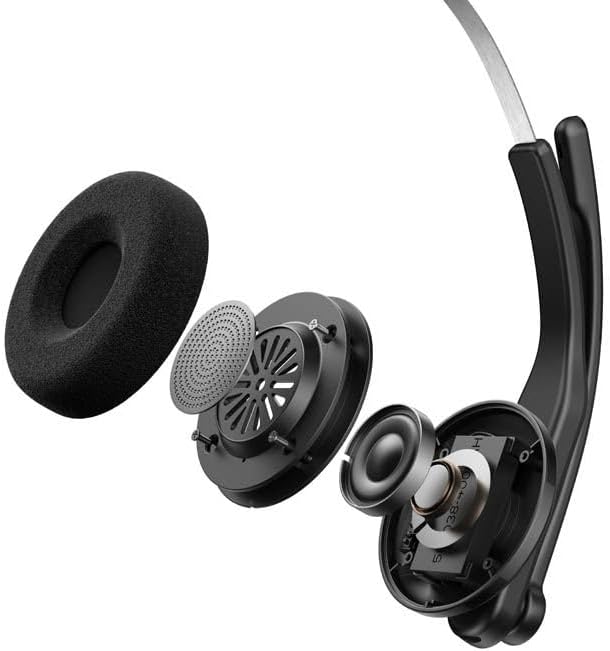
3.4. irudia: Lehertuta view showing the internal components of the earcup, including the 30mm dynamic driver.
4. Konfigurazioa
4.1 Hasierako karga
Before first use, fully charge the headset using the provided USB-A to USB-C cable. Connect the USB-C end to the headset and the USB-A end to a power source (e.g., computer USB port or wall adapter). The charging indicator light will show the charging status.
4.2 Piztu/Itzaltzea
- Pizteko: Sakatu eta eutsi pizteko botoia adierazle-argia piztu arte.
- Itzaltzeko: Sakatu eta eutsi pizteko botoia adierazle-argia itzali arte.
4.3 Entzungailuak janztea
Adjust the headband for a comfortable fit. The microphone arm can be rotated 240 degrees to be positioned on either the left or right side of your face. Position the microphone approximately 2-3 cm from your mouth for optimal voice pickup.
5. Funtzionamendu-argibideak
The Edifier CC300 features intuitive controls for managing calls and audio playback.

5.1. irudia: Diagram illustrating the control buttons and their functions on the Edifier CC300 Headset.
5.1 Botoien funtzioak
| Ekintza | Funtzioa |
|---|---|
| Press and hold (Power Button) | Piztu/Itzali |
| Press 1x (Mute Button) | Activate/Deactivate Mute (during calls) |
| Press 1x (Volume Up) | Bolumena handitu |
| Press and hold (Volume Up) | Hurrengo Pista |
| Press and hold (Volume Down) | Bolumena gutxitu |
| Press 1x (Volume Down) | Aurreko Pista |
| Press 1x (Call Button) | Play/Pause Audio; Answer/End Call |
| Press and hold (Call Button) | Deia baztertu |
| Press 2x (Call Button) | Berriz markatu azken zenbakia |
6. Konektibitate-aukerak
The Edifier CC300 offers three versatile connection methods:
6.1. irudia: Visual representation of the three connectivity options: Bluetooth, USB-C dongle, and wired USB-A.
6.1 Bluetooth konexioa
- Ziurtatu entzungailuak piztuta eta parekatze moduan daudela (adierazle-argia keinuka).
- On your device (smartphone, laptop), enable Bluetooth and search for "EDIFIER CC300".
- Select the headset to pair. Once connected, the indicator light will turn solid blue.
6.2 USB-C Dongle Connection
- Plug the provided USB-C dongle into an available USB-C port on your computer.
- Power on the headset. It will automatically connect to the dongle for a stable, low-latency connection.
6.3 Wired USB-A Connection
- Connect the headset to your computer using the provided USB-A to USB-C cable.
- The headset will function as a wired audio device, providing zero interference.
7. Bateria eta kargatzea
The CC300 headset is designed for extended use with a long-lasting battery.
- Bateriaren iraupena: Up to 72 hours for audio playback, or 36 hours for talk time.
- Kargatzeko denbora: Gutxi gorabehera 1.5 ordu karga osoa lortzeko.
- Kargatzeko adierazlea: Refer to the LED indicator on the headset for charging status.
To charge, connect the headset to a power source using the USB-A to USB-C cable.
8. Mantentzea
- Garbiketa: Erabili zapi leun eta lehor bat entzungailuak garbitzeko. Ez erabili garbitzaile likidorik edo aerosolik.
- Biltegiratzea: Gorde entzungailuak leku fresko eta lehor batean, eguzki-argitik eta muturreko tenperaturetatik babestuta.
- Saihestu hezetasuna: Keep the headset away from water and high humidity to prevent damage.
- Kontuz maneiatu: Saihestu entzungailuak erortzea edo kolpe gogorren eraginpean jartzea.
9. Arazoak
9.1 Soinurik ez edo audio kalitate eskasa
- Ensure the headset is powered on and properly connected (Bluetooth, dongle, or wired).
- Egiaztatu entzungailuen eta konektatutako gailuaren bolumen mailak.
- If using Bluetooth, ensure the headset is within range of your device.
- Try restarting both the headset and your connected device.
9.2 Mikrofonoak ez du funtzionatzen
- Ensure the microphone is not muted (check the mute button).
- Verify that the headset is selected as the input device in your computer's or device's sound settings.
- Ensure the microphone arm is positioned correctly near your mouth.
9.3 Headset Not Pairing via Bluetooth
- Ensure the headset is in pairing mode (indicator light flashing).
- Desaktibatu Bluetooth-a inguruko beste gailuetan interferentziak saihesteko.
- Ahaztu gailua zure gailuaren Bluetooth zerrendatik eta saiatu berriro parekatzen.
10. Zehaztapenak
| Ezaugarri | Xehetasuna |
|---|---|
| Marka | Edifikatzailea |
| Ereduaren izena | CC300 |
| Kolorea | Beltza |
| Konektibitate Teknologia | Wireless (Bluetooth), Wired (USB-A), USB-C Dongle |
| Bluetooth bertsioa | 6.0 |
| Bluetooth protokoloak | A2DP, AVRCP, HFP |
| Audio-kodeka | SBC |
| Gidari mota | 30 mm-ko gidari dinamikoa |
| Maiztasun Erantzuna | 20Hz - 20KHz |
| Soinu Presio Maila | 94 ± 3 dB(A) |
| Bateria Edukiera | 400mAh |
| Musika erreproduzitzeko denbora | Gutxi gorabehera. 72 ordu |
| Hitzaldi Denbora | Gutxi gorabehera. 36 ordu |
| Kargatzeko Denbora | Gutxi gorabehera. 1.5 ordu |
| Potentzia Sarrera | 5V/500mAh |
| Pisua | 70 gramo |
| Ezaugarri bereziak | AI-enhanced Dual-Mic Noise Cancellation |
| Gailu bateragarriak | Mobile Phones, Desktops, Laptops |
11. Bermea eta Laguntza
11.1 Bermearen informazioa
The Edifier CC300 Headset comes with a 1 urteko bermea from the date of purchase, covering manufacturing defects. Please retain your proof of purchase for warranty claims. The warranty does not cover damage caused by misuse, accidents, unauthorized modifications, or normal wear and tear.
11.2 Bezeroarentzako laguntza
For technical assistance, troubleshooting, or warranty inquiries, please contact Edifier customer support through their official website or the contact information provided with your product packaging. You may also visit the Edifier denda Amazonen informazio gehiagorako.