
Sarrera
This manual provides essential information for the proper use and maintenance of your OPPO K14 5G Smartphone. Please read this guide thoroughly before operating your device to ensure optimal performance and longevity. The OPPO K14 5G features 5G connectivity, 6GB RAM, 128GB storage, and a 7000 mAh battery.
Hasteko
1. Unboxing eta Hasierako Ikuskapena
Carefully unpack your OPPO K14 5G smartphone and check for all included accessories. Ensure no components are missing or damaged.
2. SIM txartelaren eta MicroSD txartelaren instalazioa
Locate the SIM card tray on the side of your device. Use the provided SIM ejector tool to open the tray. Insert your Nano-SIM card(s) and an optional microSD card into the designated slots. Ensure the cards are correctly oriented as indicated on the tray. Gently push the tray back into the device until it clicks into place.
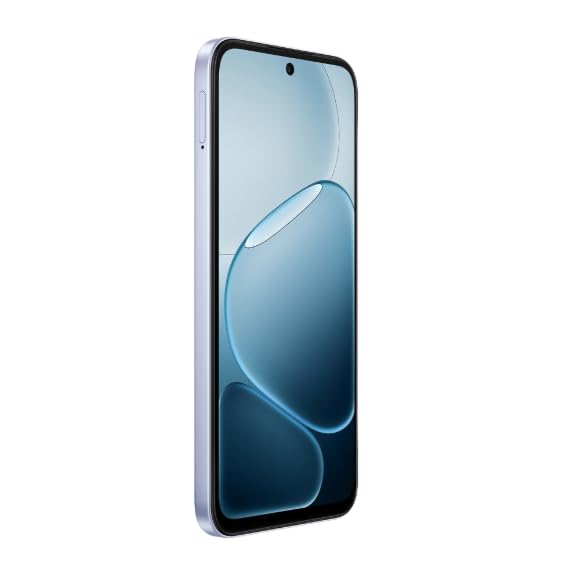
Irudia: Albokoa view of the OPPO K14 5G Smartphone, illustrating the location of the SIM card tray.
3. Gailua kargatzea
Before first use, fully charge your OPPO K14 5G. Connect the USB cable to the charging port on the bottom of the phone and the other end to a compatible power adapter. The device supports 45W fast charging. A full charge ensures the battery is calibrated for optimal performance.
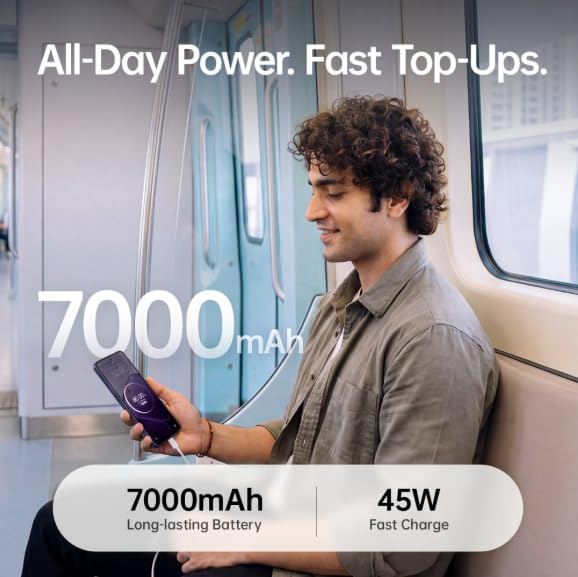
Image: A user charging the OPPO K14 5G Smartphone, emphasizing its 7000mAh long-lasting battery and 45W fast charge capability.
4. Hasierako pizte eta konfigurazio morroia
Press and hold the Power button until the OPPO logo appears. Follow the on-screen instructions to complete the initial setup, including language selection, Wi-Fi connection, Google account setup, and security settings.
Oinarrizko Funtzionamendua
1. Piztu/Itzali eta Berrabiarazi
- Piztu: Press and hold the Power button until the device vibrates and the OPPO logo appears.
- Itzali: Press and hold the Power button, then select 'Power Off' from the options.
- Berrabiarazi: Sakatu eta eutsi pizteko botoiari, eta ondoren hautatu 'Berrabiarazi' aukeren artean.
2. Pantailako nabigazioa
The OPPO K14 5G features a large immersive display. Use touch gestures for navigation:
- Sakatu: Hautatu elementu bat.
- Pasatu hatza: Pantailetan edo zerrendetan zehar joan.
- Pixka bat: Irudiak handitu edo txikitu eta web orrialdeak.
3. Deiak eta mezuak
To make a call, open the Phone app and dial the number or select a contact. To send a message, open the Messages app, tap 'Start chat', and enter the recipient and your message.
4. Internet eta Konexioa
The device supports 5G connectivity for fast mobile data. To enable or disable 5G, navigate to Settings > Mobile Network. For Wi-Fi, go to Settings > Wi-Fi and select your desired network.
5. Kameraren ezaugarriak
The OPPO K14 5G is equipped with a dual rear camera setup with AI capabilities. Open the Camera app to access various modes such as Photo, Video, Portrait, and Night. Tap the shutter button to capture images or start/stop video recording.
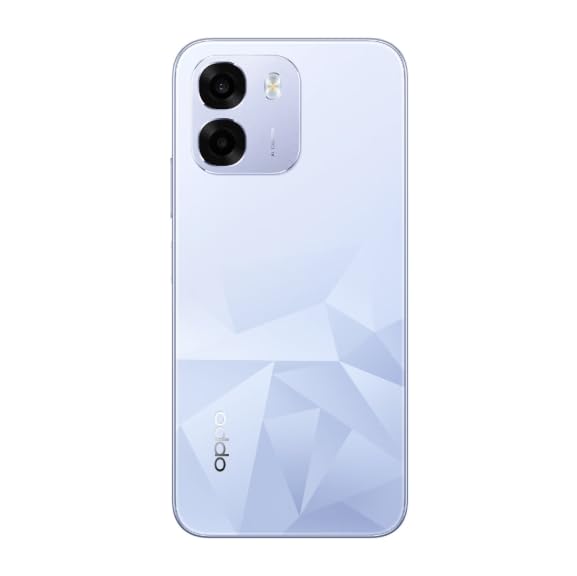
Irudia: Atzealdea view of the OPPO K14 5G Smartphone, showcasing its dual camera system and distinctive diamond-pattern back design.
6. Baterien kudeaketa
The 7000 mAh battery provides extended usage. To optimize battery life, reduce screen brightness, close unused apps, and enable power-saving modes in Settings > Battery.
7. Biltegiratze kudeaketa
With 6GB RAM and 128GB internal storage, your device offers ample space. Regularly clear cache, uninstall unused apps, and transfer large files to cloud storage or a computer to maintain optimal performance. You can check storage usage in Settings > Storage.
Ezaugarri aurreratuak
1. ColorOS
The OPPO K14 5G runs on ColorOS, offering a customized Android experience with various features and optimizations for smooth performance.
2. Segurtasun Ezaugarriak
Enhance your device security by setting up a screen lock (PIN, pattern, password), fingerprint unlock, or face unlock. These options can be configured in Settings > Password & Biometrics.
3. IP69 sailkapena
The device features an IP69 rating, indicating a high level of protection against dust and water ingress. While designed to withstand certain conditions, avoid intentional submersion or exposure to high-pressure water jets.
Mantentzea
1. Software eguneraketak
Regularly check for and install software updates to ensure your device has the latest features, security patches, and performance improvements. Go to Settings > About device > Up to date to check for updates.
2. Zure gailua garbitzea
Erabili oihal leun eta pelusik gabeko bat telefonoaren pantaila eta gorputza garbitzeko. Saihestu produktu kimiko gogorrak edo material urratzaileak erabiltzea. Orban egoskorrak lortzeko, garbitu apur batampGarbitu oihal bat urarekin edo elektronikarako diseinatutako pantaila-garbitzaile batekin.
3. Storage and Performance Optimization
To maintain optimal performance, periodically clear app caches (Settings > Apps > [App Name] > Storage usage > Clear cache) and remove unnecessary files. Consider using the built-in phone manager or optimizer tools if available.
Arazoak konpontzea
1. Arazo arruntak
- Gailua ez da pizten: Ensure the battery is charged. If not, connect to a charger for at least 15 minutes before attempting to power on.
- Network connectivity issues (5G/Wi-Fi): Check if Airplane Mode is off. Restart the device. For SIM card issues, ensure the SIM card is correctly inserted and active. If a specific SIM slot is not working, try swapping SIM cards between slots or testing with a different SIM card.
- Calling features not working: Restarting the phone often resolves temporary software glitches affecting call functionality. Check network signal strength.
- Kamera ez dabil: Close and reopen the Camera app. Restart the device. Check app permissions for the camera.
- Hizlarien arazoak: Ensure volume is not muted or set too low. Test with headphones. Restart the device.
2. Gailua berrabiarazi
A simple restart can resolve many minor software issues. Press and hold the Power button, then tap 'Restart'.
3. Fabrika berrezarri
If persistent issues occur, a factory reset may be necessary. This will erase all data on your phone, so back up important information first. Go to Settings > System settings > Back up and reset > Reset phone > Erase all data.
Zehaztapenak
| Ezaugarri | Zehaztapena |
|---|---|
| Marka | OPPO |
| Ereduaren izena | OPPO K14 5G |
| RAM memoria instalatuaren tamaina | 6 GB |
| Memoria Biltegiratzeko Ahalmena | 128 GB |
| Teknologia Zelularra | 5G |
| Kolorea | Icy Blue |
| Bateria Edukiera | 7000 milioiamp Orduak |
| Number of Rear Facing Cameras | 2 |
| Number of Front Cameras | 1 |
| Gehienezko pantailaren bereizmena | 1920 x 1080 |
| Produkturako erabilera espezifikoak | Entertainment, Mobile Photography, Professional Work, Outdoor Adventures |
Bermea eta Laguntza
1. Produktuen bermea
Your OPPO K14 5G Smartphone comes with a standard manufacturer's warranty. For detailed information regarding warranty terms, conditions, and duration, please refer to the warranty card included in your product packaging or visit the official OPPO website. Extended warranty and protection plans may be available for purchase separately.
2. Bezeroarentzako arreta
For technical assistance, service, or further inquiries, please contact OPPO customer support. You can find contact details on the official OPPO webgunearen bidez edo zure gailuaren ezarpenetako laguntza atalaren bidez.