
1. Sarrera
The Senwa Vacuum V100 is an advanced robotic vacuum cleaner designed to provide efficient and effortless cleaning for your home. With powerful suction and intelligent navigation, it effectively cleans various surfaces, from hard floors to carpets, ensuring a spotless environment. Its compact design and user-friendly features make daily cleaning simple and convenient. The V100's effective filtration system captures dust and fine particles, contributing to improved air quality in your living space. This manual provides essential information for the safe and optimal use, maintenance, and troubleshooting of your Senwa Vacuum V100.
Ezaugarri nagusiak:
- Powerful and Efficient Suction: Optimized motor ensures deep cleaning on floors, carpets, and difficult corners, removing dust and dirt in a single pass.
- Lightweight and Maneuverable Design: Easy to transport and use in any space, ideal for quick, effortless cleaning or frequent use.
- Multi-Surface Versatility: Works perfectly on different types of surfaces, adapting to the needs of homes or offices.
- Effective Filtration System: Captures fine particles and helps maintain a cleaner environment, ideal for improving hygiene.
- Easy Maintenance and Durability: Accessible components for quick cleaning and long lifespan, designed for continuous and reliable use.
2. Segurtasun informazioa
Please read all safety instructions carefully before using your Senwa Vacuum V100. Keep this manual for future reference.
- Tresna hau 8 urtetik gorako haurrek eta gaitasun fisiko, sentsorial edo mental murriztua duten pertsonek edo esperientzia eta ezagutzarik ez duten pertsonek erabil dezakete, baldin eta aparatua modu seguruan erabiltzeko gainbegiratze edo argibideak eman badituzte eta dakartzan arriskuak ulertzen badituzte. .
- Haurrak gainbegiratu behar dira aparatuarekin jolasten ez dutela ziurtatzeko.
- Garbiketa eta erabiltzailearen mantentze-lanak ez dituzte haurrek gainbegiratu gabe egingo.
- Do not use the vacuum cleaner in wet environments or on wet surfaces.
- Do not allow the vacuum cleaner to pick up large objects, liquids, burning or smoking objects (e.g., hot ashes, cigarettes).
- Use only the original charging adapter and charging dock provided by the manufacturer.
- Ensure the charging dock is placed against a wall on a level surface, free from obstacles.
- Garbitu aurretik, kendu lurretik kable solteak, objektu txikiak edo elementu hauskorrak korapilatu edo kaltetu ez daitezen.
- Do not operate the vacuum cleaner if it is damaged. Contact customer support for assistance.
- Turn off the vacuum cleaner and unplug it from the charging dock before performing any maintenance or cleaning.
3. Paketearen edukia
Carefully unpack your Senwa Vacuum V100 and check that all items are present and in good condition. If any items are missing or damaged, please contact customer support.
- Senwa Vacuum V100 Robot Vacuum Cleaner (Main Unit)
- Kargatzeko kaia
- Elikatze-moldagailua
- Alboko eskuilak (2 bikote)
- Eskuila nagusia (aurrez instalatuta)
- Dustbin (pre-installed)
- High-Efficiency Filter (pre-installed)
- Garbiketa tresna
- Erabiltzailearen eskuliburua
4. Produktua amaitu daview
Familiarize yourself with the components of your Senwa Vacuum V100.
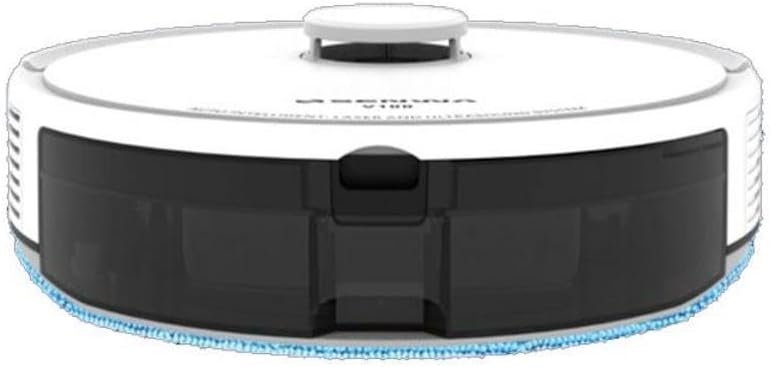
Figure 4.1: Top-Front View of Senwa Vacuum V100
This image shows the top and front of the robot vacuum, highlighting the main body, control button, and dustbin access panel.

4.2. irudia: Aldea View of Senwa Vacuum V100
This image displays a side profile of the robot vacuum, showing a driving wheel, a side brush, and a ventilation grille.

4.3. irudia: Aldea View of Senwa Vacuum V100 with Dustbin Area
This image illustrates another side view, focusing on the area where the dustbin is typically accessed or removed.
Osagai nagusiak:
- Goiko azala: Barne osagaiak babesten ditu.
- Kontrol-botoia: Initiates or pauses cleaning, returns to charging dock.
- zakarrontzi: Collects dirt and debris.
- Alboko eskuilak: Sweep debris from edges and corners into the vacuum's path.
- Eskuila nagusia: Agitates and lifts dirt from floors.
- Gurpil eragileak: Allow the robot to move across various surfaces.
- Kontaktuak kargatzeko: Connect with the charging dock for power.
- Sentsoreak: Detect obstacles, cliffs, and walls for navigation.
- Kargatzeko kaia: Provides power to recharge the robot.
5. Konfigurazioa
5.1 Desontziratzea eta prestatzea
- Remove the robot vacuum and all accessories from the packaging.
- Remove any protective films or stickers from the robot and charging dock.
- Attach the side brushes by pressing them onto the square posts on the bottom of the robot until they click into place.
5.2 Placing the Charging Dock
- Jarri kargatzeko oinarria hormaren kontra, gainazal gogor eta mailakatu batean.
- Ziurtatu kaiaren bi aldeetan gutxienez 0.5 metro (1.6 oin) libre dagoela eta aurrean 1.5 metro (4.9 oin).
- Connect the power adapter to the charging dock and plug it into a wall outlet. Ensure the power indicator on the dock lights up.
5.3 Hasierako karga
- Place the robot vacuum onto the charging dock, ensuring the charging contacts on the robot align with those on the dock.
- The robot will begin charging. Allow it to fully charge before its first use (approximately 4-6 hours). The indicator light on the robot will change to indicate a full charge.
6. Funtzionamendu-argibideak
6.1 Garbiketa-ziklo bat abiaraztea
- Ensure the robot is fully charged and clear any large obstacles from the cleaning area.
- Press the main control button on the top of the robot once to start an automatic cleaning cycle.
- The robot will automatically navigate and clean your floors.
6.2 Pausing/Resuming Cleaning
- To pause cleaning, press the main control button once during operation.
- To resume cleaning, press the main control button again.
6.3 Kargatzeko kaira itzultzea
- To send the robot back to its charging dock, press and hold the main control button for a few seconds until the robot indicates it is returning.
- The robot will automatically return to the charging dock when its battery is low or when a cleaning cycle is complete.
6.4 Cleaning Modes (if applicable)
Your Senwa Vacuum V100 may feature different cleaning modes for various needs:
- Garbiketa automatikoa: The robot intelligently plans a cleaning path for comprehensive coverage.
- Leku garbiketa: Concentrates cleaning on a specific dirty area.
- Ertz garbiketa: Hormak eta altzarien ertzak garbitzen ditu.
Refer to the specific instructions for your model on how to activate these modes, typically via a mobile app or remote control (if included).
7. Mantentzea
Regular maintenance ensures optimal performance and extends the lifespan of your Senwa Vacuum V100.
7.1 Zaborrontzia hustea
Empty the dustbin after each cleaning cycle or when it is full.
- Sakatu hautsontzia askatzeko botoia eta atera hautsontzia.
- Ireki zaborrontziaren tapa eta hustu edukia zaborrontzi batera.
7.2 Iragazkia garbitzea
Clean the filter weekly or as needed. Replace every 3-6 months.
- Kendu iragazkia hautsontzitik.
- Tap the filter gently to remove dust. Do not wash the high-efficiency filter with water.
- Rinse the primary filter (if applicable) with water and let it air dry completely before reinserting.
7.3 Eskuila nagusia garbitzea
Clean the main brush weekly.
- Kendu eskuila nagusiaren estalkia eta altxa eskuila nagusia.
- Use the cleaning tool to remove hair and debris tangled around the brush.
- Jarri berriro eskuila nagusia eta estalkia.
7.4 Alboko eskuilak garbitzea
Check side brushes regularly for wear and tear. Replace if damaged.
- Pull the side brushes off their posts.
- Kendu ilea edo hondakinak.
- Reattach the brushes, ensuring they click into place.
7.5 Sentsoreak eta kargatzeko kontaktuak garbitzea
Wipe sensors and charging contacts monthly with a dry cloth.
- Gently wipe the cliff sensors (located on the bottom of the robot) and wall sensors (on the front bumper).
- Clean the charging contacts on both the robot and the charging dock.
8. Arazoak
If you encounter issues with your Senwa Vacuum V100, refer to the following common problems and solutions.
| Arazoa | Kausa posiblea | Irtenbidea |
|---|---|---|
| Robota ez da pizten edo kargatzen. | Battery is completely depleted; charging contacts are dirty; power adapter not connected. | Ensure the charging dock is powered. Clean charging contacts on both robot and dock. Place robot directly on dock. |
| Robota maiz trabatuta geratzen da. | Too many obstacles; cliff sensors are dirty. | Clear loose cables, rugs, and small objects. Clean cliff sensors. |
| Xurgatze-errendimendu eskasa. | Dustbin is full; filter is clogged; main brush is tangled. | Hustu hautsontzia. Garbitu edo ordezkatu iragazkia. Garbitu eskuila nagusia. |
| Ezohiko zarata funtzionamenduan. | Main brush or side brushes are tangled; foreign object inside. | Clean main brush and side brushes. Check for and remove any foreign objects. |
| Robota ez da kargatzeko kaira itzultzen. | Charging dock is blocked or out of range; charging contacts are dirty. | Ensure charging dock has clear space. Clean charging contacts. Manually place robot on dock. |
If the problem persists after trying these solutions, please contact Senwa customer support.
9. Zehaztapenak
| Ezaugarri | Xehetasuna |
|---|---|
| Marka | Senwa |
| Eredua | V100 |
| Forma-faktorea | Robotikoa |
| Kolorea | Zuria |
| ASIN | B0GTY5J56M |
| Energia iturria | Bateria kargagarria |
| Kargatzeko Denbora | Gutxi gorabehera. 4-6 ordu |
| Iragazte-sistema | Eraginkortasun handiko iragazkia |
| Garbiketa moduak | Auto, Spot, Edge (may vary by specific model features) |
10. Bermea eta Laguntza
The Senwa Vacuum V100 comes with a standard manufacturer's warranty. Please refer to the warranty card included in your package for specific terms and conditions, including the warranty period and coverage details.
For technical support, service, or any questions regarding your product, please contact Senwa customer service through the contact information provided on your warranty card or the official Senwa website. When contacting support, please have your product model (V100) and ASIN (B0GTY5J56M) ready.