
1. Ohar garrantzitsua
Please carefully check the store name and ensure you are purchasing products sold by "LUZHAN." We have received customer feedback stating that products received did not match the description and were of poor quality. Upon investigation, we found that these customers did not purchase the products from us. To prevent such incidents from happening again in the future and to avoid unnecessary misunderstandings, please carefully verify the store name LUZHAN.

Image: Important notice to verify seller name LUZHAN for authentic products.
2. Bukatu daview
The XIAOMI POCO X8 Pro Max 5G is a high-performance smartphone designed for advanced users. It features a powerful Mediatek Dimensity 9500s processor, a vibrant 1.5K 120Hz AMOLED display, a large 8500mAh battery with 100W HyperCharge, and a 50 MP Light Fusion 600 camera system with OIS. This manual provides essential information for setting up and operating your device.

Irudia: Aurrealdea eta atzealdea view of the POCO X8 Pro Max 5G smartphone.
Bideoa: Amaiera batview of the POCO X8 Pro Series, highlighting key features and design.
3. Konfigurazioa
3.1 Zer dago kutxan
- XIAOMI POCO X8 Pro Max 5G Smartphone
- Kargagailua
- Pantaila-babeslea (aurrez jarrita edo barne)
3.2 Hasierako gailuaren konfigurazioa
- Piztu: Press and hold the power button located on the side of the device until the XIAOMI logo appears.
- Hizkuntza eta Eskualdea: Jarraitu pantailan agertzen diren argibideei nahiago duzun hizkuntza eta eskualdea hautatzeko.
- Konektatu wifira: Select your Wi-Fi network and enter the password to connect to the internet. This is necessary for initial setup and software updates.
- Google kontua: Hasi saioa zure Google kontuarekin edo sortu berri bat. Hau ezinbestekoa da Google Play Store eta beste Google zerbitzu batzuk atzitzeko.
- Datuen transferentzia: If you are upgrading from another device, you may have the option to transfer your data (apps, photos, contacts) during this stage.
- Segurtasun konfigurazioa: Set up your preferred security method, such as a PIN, pattern, password, or fingerprint. The device supports an ultrasonic fingerprint sensor.
- Konfigurazio osoa: Follow any remaining prompts to finalize the setup process.
3.3 SIM Card and eSIM Setup
The POCO X8 Pro Max 5G supports physical SIM cards and eSIM functionality.
- Physical SIM: Use the provided SIM ejector tool to open the SIM tray. Insert your Nano-SIM card(s) into the tray, ensuring proper orientation. Close the tray securely.
- eSIM: eSIM aktibatzeko, joan honera: Ezarpenak > Sarea eta internet > SIM txartelak and follow the instructions to add an eSIM profile provided by your carrier.
4. Funtzionamendu-argibideak
4.1 Bistaratzeko Ezaugarriak
Your device features a 6.83-inch 1.5K ultra-bright AMOLED display with a 120Hz refresh rate for smooth visuals and a 24x super resolution touch for enhanced responsiveness. It also includes eye protection features and Corning Gorilla Glass 7i for durability.
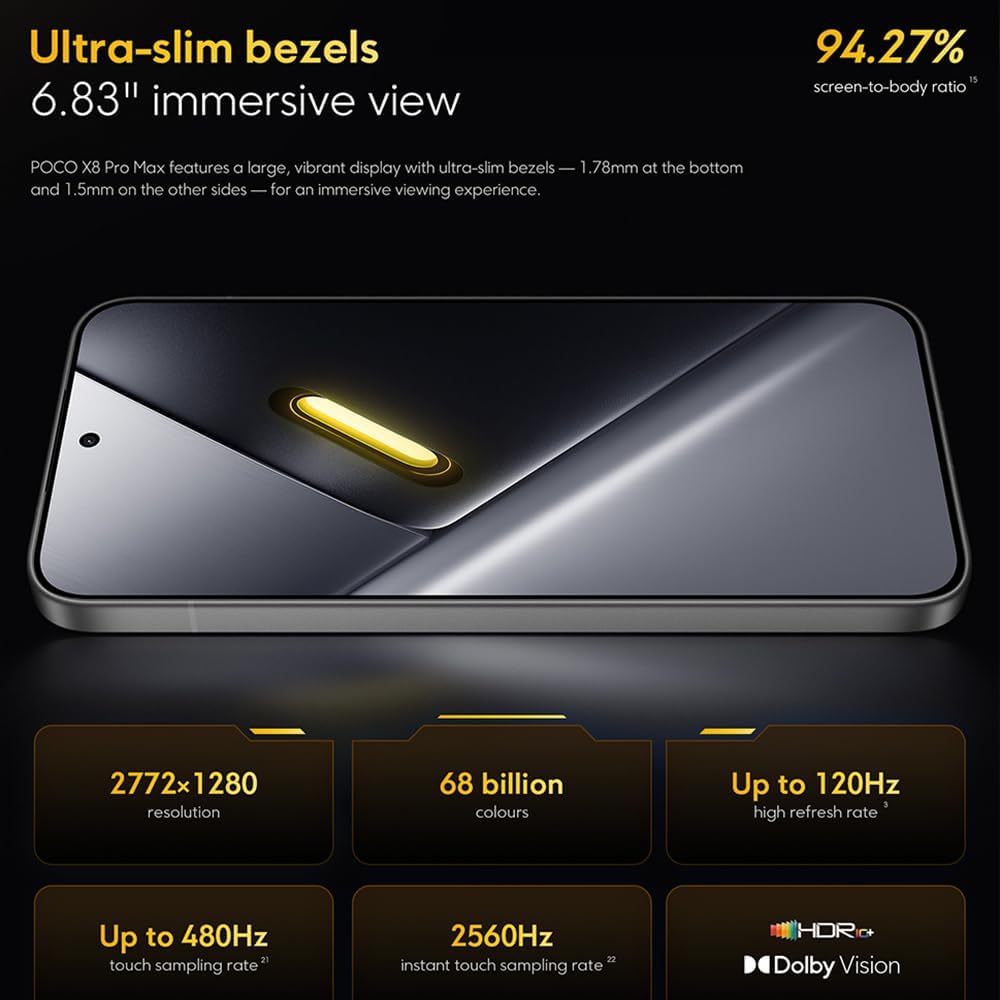
Image: The 6.83-inch 1.5K ultra-bright AMOLED display with minimal bezels.
4.2 Errendimendua
Powered by the Mediatek Dimensity 9500s chipset (3nm, 4+4 All Big Core architecture, NPU890 AI processor), the POCO X8 Pro Max 5G delivers high performance. The POCO 3D IceLoop cooling system ensures efficient heat dissipation, maintaining optimal performance during intensive tasks like gaming.

Image: Diagram illustrating the Mediatek Dimensity 9500s flagship platform.

Image: Illustration of the 5800mm² ultra-large LHP area for cooling.
4.3 Kamera Sistema
The device features a 50 MP Light Fusion 600 main camera with OIS (Optical Image Stabilization) and an 8 MP ultra-wide camera. It supports portrait mode with bokeh + HDR and dynamic video-to-still conversion.

Image: Close-up of the 50 MP main camera and 8 MP ultra-wide camera system.
4.4 Bateria eta karga
Equipped with a massive 8500 mAh (typical) battery, the POCO X8 Pro Max 5G offers extended usage. It supports 100W HyperCharge, allowing for rapid recharging. A 16% ultra-high carbon-silicon content contributes to its high energy density.

Image: Illustration highlighting the massive 8500mAh battery capacity.

Image: Visual representation of the 100W HyperCharge technology.
4.5 Audioa
The device features symmetrical dual stereo speakers (1115F) for a balanced and immersive audio experience.
4.6 softwarea
The POCO X8 Pro Max 5G comes with Xiaomi HyperOS 3 installed, offering an optimized and user-friendly interface based on Android 16.
5. Mantentzea
5.1 Gailua garbitzea
- Erabili zapi leun eta lihorik gabeko bat pantaila eta atzeko panela garbitzeko.
- Saihestu produktu kimiko gogorrak, material urratzaileak edo aerosolak erabiltzea.
- Orban egoskorretarako, apur bat dampGarbitu oihal bat urarekin edo elektronikarako diseinatutako pantaila-garbitzaile batekin.
5.2 Dust and Water Resistance
The device is certified for IP68 dust and water resistance. This means it can withstand immersion in up to 2 meters of water for 30 minutes under specific laboratory conditions. However, water and dust resistance may deteriorate over time with normal wear and tear. The warranty does not cover liquid damage. Avoid exposing the device to hot water, saltwater, or other liquids.

Image: Visual representation of the IP68 dust and water resistance.
5.3 Software eguneraketak
Egiaztatu eta instalatu software eguneraketak aldizka, zure gailuak azken funtzioak, segurtasun adabakiak eta errendimendu hobekuntzak dituela ziurtatzeko. Aukera hau normalean hemen aurki dezakezu: Ezarpenak > Telefonoari buruz > Sistemaren eguneraketa.
6. Arazoak
6.1 Ohiko arazoak eta irtenbideak
- Gailua ez da pizten: Ensure the battery is charged. Connect the device to the charger and wait a few minutes before attempting to power it on again.
- Pantailak ez du erantzuten: Saiatu gailua berrabiarazten pizteko botoia denbora luzez sakatuta edukiz (adibidez, 10-15 segundo), berrabiarazi arte.
- Aplikazioak huts egiten ari dira: Garbitu arazoa sortzen duen aplikazioaren cachea (Ezarpenak > Aplikazioak > [Aplikazioaren izena] > Biltegiratzea > Garbitu cachea) or reinstall the app. Ensure your device software is up to date.
- Bateriaren iraupen eskasa: Check background app usage, reduce screen brightness, disable unnecessary features like GPS or Bluetooth when not in use, and ensure your software is updated.
- Sareko konexio arazoak: Restart your device. Check if your SIM card is properly inserted. Toggle Airplane Mode on and off. Reset network settings (Ezarpenak > Sistema > Berrezarri aukerak > Berrezarri Wi-Fia, mugikorra eta Bluetooth).
6.2 Fabrika berrezarri
If you encounter persistent issues, a factory reset may be necessary. Abisua: Honek zure gailuko datu guztiak ezabatuko ditu. Jarraitu aurretik, egin datu garrantzitsuen babeskopia. Joan honera Ezarpenak > Sistema > Berrezarri aukerak > Ezabatu datu guztiak (fabrika berrezarri) eta jarraitu pantailako argibideei.
7. Zehaztapenak
| Ezaugarri | Zehaztapena |
|---|---|
| Marka | XIAOMI |
| Ereduaren izena | POCO X8 Pro Max 5G |
| Sistema eragilea | Android 16 (with Xiaomi HyperOS 3) |
| Memoria Biltegiratzeko Ahalmena | 512 GB |
| Pantailaren tamaina | 6.83 hazbete |
| Bistaratzeko mota | AMOLED, 1.5K, 120Hz refresh rate |
| Teknologia Zelularra | 5G |
| Kolorea | Noir (Beltza) |
| Konektore mota | USB C mota |
| Segurtasun biometrikoa | Fingerprint Recognition (Ultrasonic) |
| Bateria Edukiera | 8500 mAh (litio-polimeroa) |
| Kargatzen | 100W-ko hiperkarga |
| Kamera Nagusia | 50 MP Light Fusion 600 with OIS |
| Kamera ultra-zabala | 8 MP |
| Prozesadorea | Mediatek Dimensity 9500s |
| Hautsaren eta Uraren Erresistentzia | IP68 |
| Eredu urtea | 2025 |
| Jatorrizko Herrialdea | Txina |
8. Bermea eta Laguntza
For detailed warranty information and customer support, please refer to the warranty card included with your product or visit the official XIAOMI webgunea. Gorde erosketaren egiaztagiria bermearen erreklamazioetarako.
Online resources and FAQs may also be available on the XIAOMI support portal.