
1. Sarrera
This manual provides essential information for setting up, operating, and maintaining your TCL 50-inch Q51K QLED 4K UHD HDR+ Google TV. Please read this manual thoroughly before using your television to ensure proper and safe operation. Keep this manual for future reference.
The TCL Q51K series offers an enhanced viewing experience with Quantum Dot technology for vibrant colors, 4K UHD resolution, HDR PRO+ with Dolby Vision, and the intelligent AIPQ Processor. Enjoy seamless entertainment with Google TV, Dolby Atmos, and DTS Virtual:X audio.
2. Segurtasun informazioa
Jarraitu beti oinarrizko segurtasun neurriak telebista hau erabiltzean sute, deskarga elektriko eta lesio arriskua murrizteko.
- Energia iturria: Connect the TV to an AC 110V 60Hz power supply. Do not overload power outlets.
- Aireztapena: Ziurtatu telebistaren inguruan aireztapen egokia dagoela. Ez blokeatu aireztapen-irekidurak.
- Ura eta hezetasuna: Ez jarri telebista euripean edo hezetasunean. Ez jarri likidoz betetako objekturik, hala nola loreontziak, telebistaren gainean.
- Garbiketa: Deskonektatu telebista garbitu aurretik. Erabili zapi leun eta lehor bat. Ez erabili garbitzaile likido edo aerosolik.
- Muntaketa: If wall-mounting, ensure the wall mount is securely installed and can support the TV's weight. Follow the wall mount instructions carefully.
- Haurrak: Ez utzi haurrei telebistara edo euskarrira igotzen.
- Tximista: Deskonektatu telebista tximista-ekaitzetan edo denbora luzez erabili gabe dagoenean.
3. Zer dago kutxan
Kontu handiz deskonprimitu kutxa eta ziurtatu elementu guztiak bertan daudela eta kalterik gabe daudela.
- TCL 50-inch Q51K QLED 4K UHD HDR+ Google TV
- Urruneko Kontrola
- Elikatze-kablea
- Hormako euskarria
- Hasiera Azkarreko Gida (ez dago eskuliburu honetan sartuta)

Figure 3.1: Included components and TV dimensions.
4. Konfigurazioa
4.1 Instalazio fisikoa
Your TCL Q51K TV comes with a wall bracket for mounting. Alternatively, you can use a compatible TV stand (sold separately if not included in your specific package).
Horman muntatzea (gomendatua)
The included wall bracket allows for flexible placement. Ensure the wall can support the TV's weight (19.8 lbs without stand). The VESA mount standard for this TV is 300 x 200 mm. Follow the specific instructions provided with the wall bracket for safe and secure installation.
Stand Installation (Optional)
If using a stand, carefully attach the stand legs to the designated slots at the bottom of the TV, securing them with the provided screws. Place the TV on a stable, level surface.

4.1. irudia: Aurrealdea view of the TCL 50Q51K TV.

4.2. irudia: Aldea view of the TCL 50Q51K TV.
4.2 Gailuak konektatzea
The TV features multiple ports for connecting external devices.
- HDMI atakak (x3): Konektatu Blu-ray erreproduzitzaileak, joko kontsolak, kable-kutxak eta abar.
- USB ataka (x1): Konektatu USB unitateak multimedia erreproduzitzeko.
- Audio Irteera Optikoa: Soinu-barretara edo etxeko zinema-sistemetara konektatzeko.
- Antena/kable sarrera: Antena edo kable bidezko telebista konektatzeko.

4.3. Irudia: Atzealdea view konexio-portuekin.
4.3 Energia-konexioa
Beharrezko gailu guztiak konektatu ondoren, konektatu elikadura-kablea telebistaren elikadura-sarrerara eta gero hormako entxufe batera.
4.4 Hasierako konfigurazioa (Google TV)
Upon first power-on, the TV will guide you through the Google TV setup process. This includes:
- Hizkuntza hautatzea.
- Wi-Fi sare batera konektatzen.
- Zure Google kontuarekin saioa hasten.
- Installing essential apps.
5. Zure telebista funtzionatzea
5.1 Urruneko kontrola
The included Bluetooth remote control allows for easy navigation and control of your TV. Ensure batteries are inserted correctly.
- Pizteko botoia: Telebista pizten edo itzaltzen du.
- Google Laguntzailearen botoia: Ahots-komandoak aktibatzen ditu.
- Nabigazio Pad: Menu nabigaziorako.
- Bolumena igo/behera: Audio maila doitzen du.
- Kanal gora/behera: Kanalak aldatzen ditu.
- Hasierako botoia: Google TV-ren hasierako pantailara itzultzen da.
- Aplikazioaren lasterbideen botoiak: Streaming zerbitzu ezagunetarako sarbide azkarra.
5.2 Google TV interfazea
Google TV organizes your favorite content from various streaming services into one personalized home screen. You can browse recommendations, access your apps, and manage your watch list.

Figure 5.1: Google TV home screen.

Figure 5.2: Google TV applications.
6. Konektibitatea
6.1 Haririk gabeko konexioa
- Wi-Fi: Konektatu etxeko haririk gabeko sarera interneterako sarbidea eta streaming-a lortzeko.
- Bluetooth 5.1: Pair wireless headphones, soundbars, or other Bluetooth-enabled devices.
6.2 Pantaila islatzea
The TV supports various screen mirroring technologies:
- Google Cast: Cast content from compatible apps on your smartphone or tablet.
- 2 AirPlay: Apple gailuetatik edukia erreproduzitu.
- SmartShare: Share content from other compatible devices.
7. Irudi eta soinu ezarpenak
7.1 Irudiaren kalitatearen ezaugarriak
- QLED puntu kuantikoen kolorea: Experience over a billion vibrant shades for richer, more realistic colors.
- High Brightness LED Backlighting: Produces brighter images for an enhanced viewing experience, even in well-lit rooms.
- HDR PRO+ with Dolby Vision, HDR10+, and HLG: Enjoy enhanced contrast, accurate colors, and sharp details with support for leading HDR formats.
- TCL AIPQ Processor: Optimizes every scene in real-time for brightness, contrast, color, clarity, motion, and upscaling.
- 240ko mugimendu-abiadura MEMC marko-txertatzearekin: Provides exceptional motion clarity for fast-paced content.

Figure 7.1: QLED Quantum Dot Color enhancement.

Figure 7.2: High Brightness LED Backlight in action.

Figure 7.3: The AiPQ Processor.

Figure 7.4: HDR PRO+ with Dolby Vision, HDR10+, and HLG.
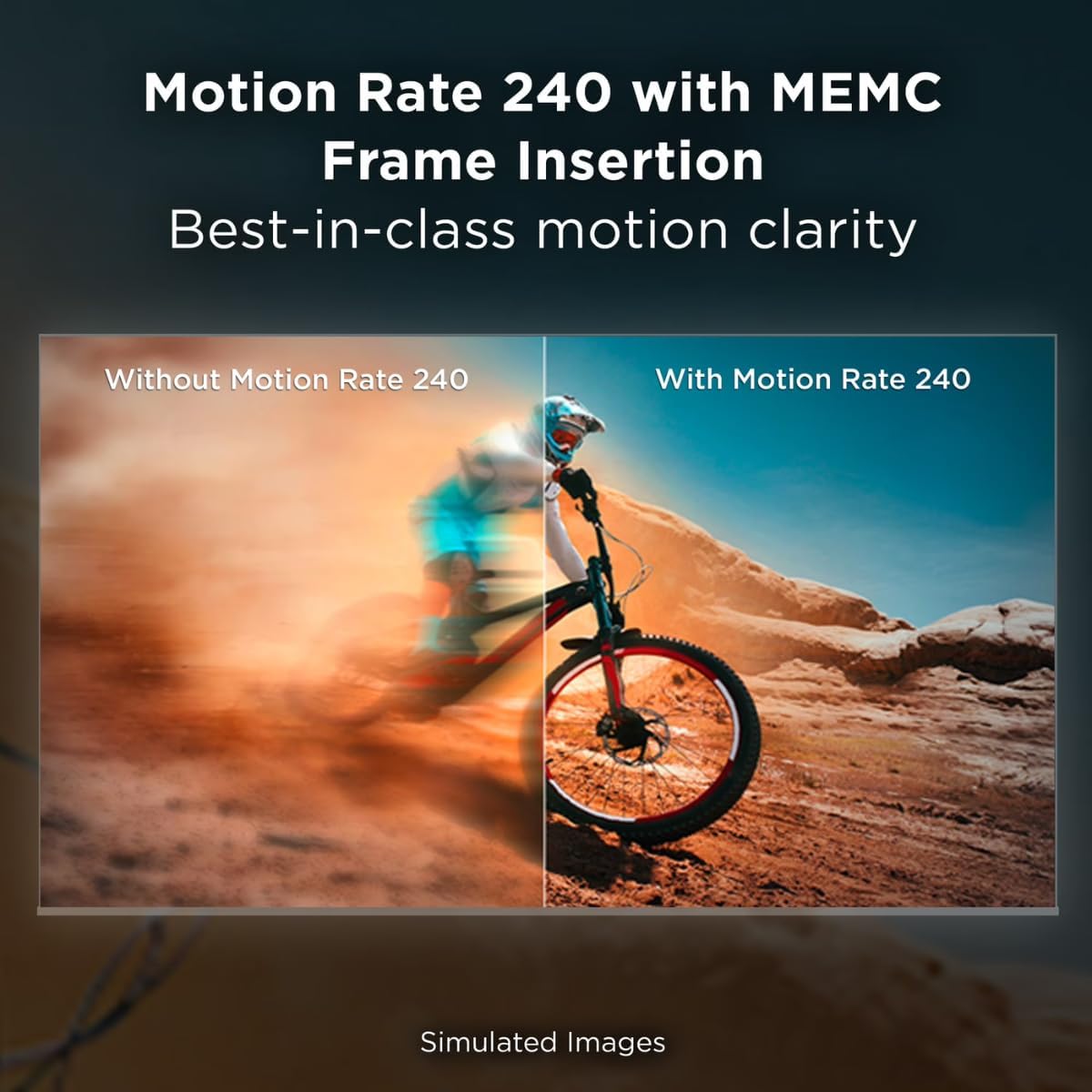
Figure 7.5: Motion Rate 240 with MEMC Frame Insertion.
7.2 Audio Ezaugarriak
- Dolby Atmos: Delivers immersive, multi-dimensional sound that moves around you.
- DTS Virtual:X: Provides an immersive audio experience without the need for additional speakers.
8. Mantentzea
8.1 Cleaning the TV Screen
Garbitu pantaila astiro-astiro zapi leun eta pelusik gabeko batekin. Orba egoskorrak izanez gero, garbitu apur batampGarbitu zapi bat urarekin edo pantaila-garbitzaile espezializatu batekin. Ez bota inoiz likidorik zuzenean pantailan.
8.2 Telebistaren gorputza garbitzea
Use a soft, dry cloth to wipe the TV's frame and back. Avoid abrasive materials or harsh chemicals.
8.3 Arreta orokorra
- Saihestu objektu astunak telebistan jartzea.
- Mantendu telebista eguzki-argitik eta bero-iturrietatik urrun.
- Ziurtatu aireztapen egokia gehiegi berotzea saihesteko.
9. Arazoak
Telebistarekin arazoak badituzu, jo ezazu ohiko irtenbide hauetara:
- Potentziarik gabe: Egiaztatu kablea telebistara eta hormako entxufera ondo konektatuta dagoen. Saiatu beste entxufe batekin.
- Irudi/soinurik ez: Ziurtatu sarrera-iturri zuzena hautatuta dagoela. Egiaztatu kable-konexio guztiak (HDMI, antena).
- Urrunekoa ez dabil: Replace the batteries in the remote control. Ensure there are no obstructions between the remote and the TV. Re-pair the Bluetooth remote if necessary.
- Irudiaren kalitate eskasa: Check the signal source. Adjust picture settings (brightness, contrast, color). For streaming, check your internet connection speed.
- Ez dago Interneteko konexiorik: Verify your Wi-Fi network is active and other devices can connect. Restart your router and modem. Reconnect the TV to the Wi-Fi network in the settings.
- Aplikazioak ez dira kargatzen: Ensure the TV is connected to the internet. Try restarting the TV. Clear the cache of the problematic app in the TV settings.
If the problem persists after trying these steps, please contact TCL customer support.
10. Zehaztapenak
| Ereduaren izena | 50Q51K |
| Pantailaren tamaina | 50 inches (49.5" diagonal) |
| Bistaratzeko Teknologia | QLED |
| Ebazpena | 4K UHD (3840 x 2160) |
| Freskatze tasa | 60 Hz (240ko mugimendu-abiadura MEMC-rekin) |
| Prozesadorea | AIPQ Processor |
| HDR euskarria | HDR PRO+ (Dolby Vision, HDR10+, HLG) |
| Audio Teknologia | Dolby Atmos, DTS Virtual:X |
| Sistema eragilea | Google TV |
| Konektibitatea | 3 x HDMI, 1 x USB, Wi-Fi, Bluetooth 5.1, Optical Audio Out |
| Pantaila islatzea | AirPlay 2, Google Cast, SmartShare |
| Product Dimensions (WxDxH, without stand) | 43.7" x 3.2" x 25.4" |
| Pisua (euskarririk gabe) | 19.8 kilo |
| VESA muntaketa estandarra | 300 x 200 mm |
| Elikatze Hornidura | 110 VAC 60 Hz |
| Dakarten osagaiak | Power Cable, Remote Control, Wall Bracket |
11. Bermea eta Laguntza
11.1 Bermearen informazioa
This TCL 50Q51K television, being a renewed product, comes with a 90 eguneko berme mugatua. Please refer to the warranty card included with your product for specific terms and conditions. This warranty covers manufacturing defects and does not cover damage caused by misuse, accidents, or unauthorized modifications.
11.2 Bezeroarentzako laguntza
For technical assistance, troubleshooting beyond this manual, or warranty claims, please contact TCL Customer Support. You can typically find contact information (phone number, website) on the manufacturer's official website or in the quick start guide provided with your TV.
When contacting support, please have your TV's model number (50Q51K) and serial number ready. The serial number is usually located on a sticker on the back of the TV.