
1. Bukatu daview
The Philips TAZ2200 is a versatile portable sound machine designed for enjoying various audio formats. It features a top-loading CD player, a front-loading cassette player, FM radio, Bluetooth 6.0 connectivity, USB playback, and a 3.5mm audio input. Equipped with dynamic bass boost and 6W stereo speakers, it delivers rich sound. The unit can be powered by AC mains or batteries and includes a carrying handle for portability.
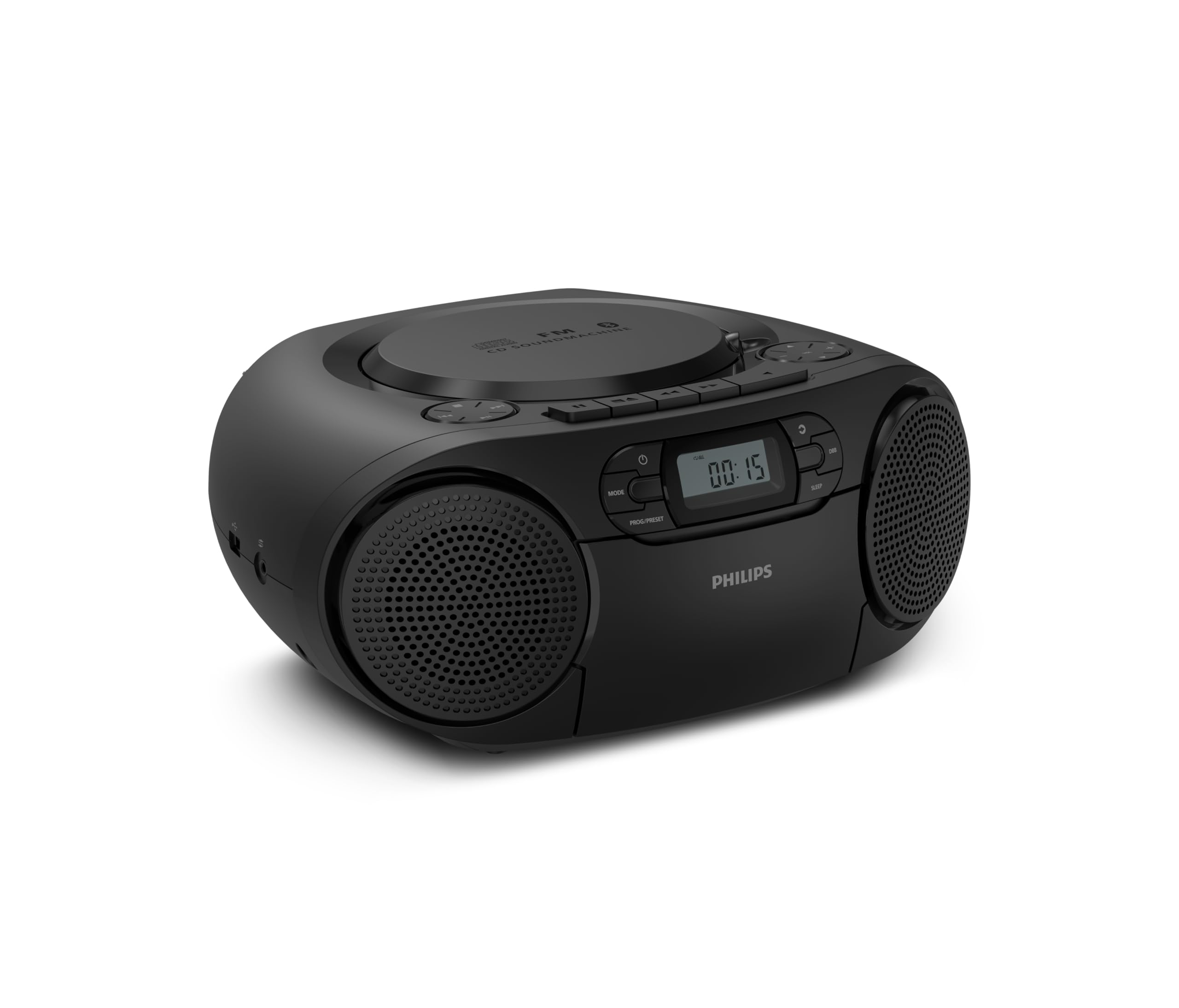
Aurrealdea view of the Philips TAZ2200 CD Soundmachine, showing the main display and control buttons.
2. Segurtasun informazioa
Please read these safety instructions carefully before using your device and keep them for future reference. Incorrect use may result in hazards.
- Energia iturria: Erabili zehaztutako korronte-egokitzailea edo bateriak soilik. Ziurtatu bolumenatage unitatearen eskakizunekin bat dator.
- Ura eta hezetasuna: Ez jarri unitatea euripean, hezetasunean, tantaka edo zipriztinetan. Ez jarri likidoz betetako objekturik, hala nola loreontziak, unitatearen gainean.
- Aireztapena: Ensure adequate ventilation. Do not block any ventilation openings. Maintain a minimum distance around the unit for sufficient ventilation.
- Beroa: Ez jarri unitatea bero-iturrien ondoan, hala nola erradiadoreen, bero-erregistroen, sukaldeen edo beste aparatuen ondoan (adibidez, ampberoa sortzen duten argitzaileak).
- Pilak: Follow correct polarity when inserting batteries. Do not mix old and new batteries, or different types of batteries. Remove batteries if the unit is not used for a long period.
- Garbiketa: Deskonektatu unitatea entxufetik garbitu aurretik. Erabili zapi leun eta lehor bat. Ez erabili garbitzaile likidorik edo aerosolik.
- Zerbitzua: Ez saiatu produktu hau zuk zeuk ematen. Bidali zerbitzu guztiak zerbitzu kualifikatuko langileengana.
3. Zer dago kutxan
Despaketatzean, ziurtatu behean zerrendatutako elementu guztiak daudela:
- Philips TAZ2200 CD Soundmachine
- Elikatze kablea
- Hasierako gida azkarra
- Berme liburuxka
- Segurtasun fitxa
4. Kontrolak eta konexioak
Aurrealdeko paneleko kontrolak
The front panel features the main display, power button, mode selection, program/preset buttons, and dynamic bass boost (DBB) control. Playback controls for CD and USB are also located here.

Aurrealde zehatza view showing the display, power, mode, program/preset, and DBB buttons.
Side and Rear Connections
The side of the unit provides a USB port for digital audio playback and a 3.5mm audio input jack for connecting external devices.

Aldea view illustrating the USB port and Audio Input jack.
The top of the unit houses the CD compartment and additional playback controls, while the rear features the AC power input and the FM antenna.

Goiena view showing the CD compartment and associated controls.

Atzekoa view displaying the AC power input and the telescopic FM antenna.
5. Konfigurazioa
5.1 Elikatze iturria
AC potentzia
- Ziurtatu unitatea itzalita dagoela.
- Connect the supplied power cable to the AC IN socket on the rear of the sound machine.
- Plug the other end of the power cable into a wall power outlet.
Bateria Potentzia
For portable use, the unit can operate on 6 x C-type batteries (not included).
- Ireki bateriaren konpartimentuaren estalkia unitatearen behealdean.
- Insert 6 C-type batteries, ensuring correct polarity (+/-) as indicated inside the compartment.
- Itxi bateriaren konpartimenduaren estalkia ondo.
5.2 Antenaren doikuntza
For optimal FM radio reception, fully extend the telescopic antenna located at the rear of the unit. Adjust its position and angle to achieve the clearest signal.
6. Funtzionamendu-argibideak
6.1 Funtzionamendu Orokorra
- Piztu/Itzali: Sakatu BOTEREA botoia unitatea pizteko edo itzaltzeko.
- Bolumen kontrola: Erabili VOL+ or BOLUMENA - bolumen-maila doitzeko botoiak.
- Dynamic Bass Boost (DBB): Sakatu DBB button to activate or deactivate the dynamic bass boost feature for enhanced bass sound.
- Modu aukeraketa: Sakatu MODUA button repeatedly to switch between CD, Cassette, FM Radio, Bluetooth, USB, and Audio Input modes.
6.2 CD erreprodukzioa
- Ireki unitatearen goiko aldean dagoen CD konpartimentuaren estalkia.
- Place a CD (CD, CD-R, or CD-RW) with the label side facing up onto the spindle.
- Itxi CD konpartimentuaren estalkia.
- Sakatu MODUA botoia CD modua hautatzeko.
- Sakatu JOLASTU/PAUSTU botoia erreproduzitzen hasteko.
- Erabili SALTATU botoiak (|< or >> |) pistak saltatzeko.
- Luze sakatu |< or >> | to search within a track.
- Sakatu GELDITU erreprodukzioa gelditzeko botoia.
6.3 Kasete erreprodukzioa
- Open the cassette compartment door on the front of the unit.
- Sartu kasete-zinta bat, ertz irekia gora begira duela.
- Itxi kasetearen konpartimentuko atea.
- Sakatu MODUA button to select Cassette mode.
- Sakatu JOLASTU botoia erreproduzitzen hasteko.
- Erabili AURRERA AZKAR or ATZERATU buttons to quickly advance or rewind the tape.
- Sakatu GELDITU erreprodukzioa gelditzeko botoia.
6.4 FM Irratia
- Sakatu MODUA botoia FM irrati modua hautatzeko.
- Bilaketa automatikoa: Eduki sakatuta PROG/PRESET button to automatically scan and store available FM stations.
- Eskuzko sintonizazioa: Sakatu TUNING botoiak (|< or >> |) to manually tune to a desired frequency.
- Aurrez aurreko ezarpenak gordetzea: After tuning to a station, press PROG/PRESET once, then use |< or >> | aurrezarritako zenbaki bat hautatzeko, eta sakatu PROG/PRESET berriro baieztatzeko.
- Aurrezarpenak gogoratzen: FM moduan, sakatu PROG/PRESET repeatedly to cycle through saved preset stations.
6.5 Bluetooth erreprodukzioa
- Sakatu MODUA botoia Bluetooth modua hautatzeko. Pantailak 'BT' erakutsiko du eta keinuka hasiko da, parekatze moduan dagoela adieraziz.
- Bluetooth gaitutako gailuan (smartphone-a, tableta), gaitu Bluetooth eta bilatu eskuragarri dauden gailuak.
- Select "Philips TAZ2200" from the list of devices.
- Once paired, the unit will emit a confirmation sound, and 'BT' will stop flashing.
- Start playing audio on your connected device. The sound will be streamed to the sound machine.
6.6 USB erreprodukzioa
- Sartu USB flash unitate bat unitatearen alboko USB atakan.
- Sakatu MODUA botoia USB modua hautatzeko.
- Unitateak automatikoki detektatuko du eta audio bateragarria erreproduzitzen hasiko da files (MP3, WAV, WMA).
- Erabili erreprodukzio-kontrolak (JOLASTU/PAUSTU, SALTATU, GELDITU) as you would for CD playback.
6.7 Audio Input (AUX)
- Connect one end of a 3.5mm audio cable (not included) to the AUDIO IN jack on the side of the sound machine.
- Connect the other end of the audio cable to the headphone jack or audio output of your external device (e.g., MP3 player, turntable).
- Sakatu MODUA button to select Audio Input mode.
- Start playing audio on your external device. The sound will be played through the sound machine.
7. Mantentzea
- Unitatea garbitzea: Garbitu unitatearen kanpoaldea oihal leun eta apur batekinamp oihal. Ez erabili garbitzaile edo disolbatzaile urratzailerik.
- CD erreproduzitzailearen zaintza: Keep the CD compartment clean. If the lens is dirty, use a specialized CD lens cleaner. Avoid touching the lens.
- Kasete erreproduzitzailea zaintzea: Aldian-aldian garbitu zinta-buruak eta pintza-arrabolak kotoi-zapi batekin, arinki garbituz.ampisopropil alkoholarekin egina.
- Bateria ordezkatzea: If using batteries, replace all 6 C-type batteries when the unit's performance diminishes or if the unit will not be used for an extended period.
- Biltegiratzea: Erabiltzen ez duzunean, gorde unitatea leku garbi eta lehor batean, eguzki-argitik eta tenperatura altuetatik babestuta.
8. Arazoak
If you encounter any issues with your Philips TAZ2200, please refer to the table below for common problems and solutions.
| Arazoa | Kausa posiblea | Irtenbidea |
|---|---|---|
| Botererik ez | Kable elektrikoa ez dago konektatuta; bateriak agortuta edo gaizki sartuta. | Egiaztatu korronte alternoaren konexioa; Ordeztu bateriak edo ziurtatu polaritate zuzena dagoela. |
| Soinurik ez | Bolumena baxuegia; Modu okerra hautatuta; Entzungailuak konektatuta. | Increase volume; Select the correct source mode (CD, FM, BT, etc.); Disconnect headphones. |
| CDa ez da erreproduzitzen | CD inserted incorrectly; CD is dirty or scratched; CD format not supported. | Insert CD with label side up; Clean or replace CD; Ensure CD is CD-R/RW compatible. |
| Cassette not playing | Cassette inserted incorrectly; Tape is damaged. | Insert cassette correctly; Try a different cassette. |
| FM harrera eskasa | Antena ez dago luzatuta edo behar bezala kokatuta; Seinale ahula. | Luzatu eta doitu antena teleskopikoa guztiz; Saiatu unitatea beste leku batera mugitzen. |
| Bluetootha ez da konektatzen | Unit not in pairing mode; Bluetooth device too far; Device already paired with another unit. | Ensure unit is in Bluetooth mode and flashing; Move device closer; Disconnect from other devices. |
| USB erreprodukzio arazoak | USB unitatea ez da behar bezala sartu; Bateraezina file formatua; USB unitatea hondatuta. | Sartu berriro USB unitatea; Ziurtatu files are MP3, WAV, or WMA; Try a different USB drive. |
9. Zehaztapenak
| Ezaugarri | Zehaztapena |
|---|---|
| Marka | PHILIPS |
| Modelo zenbakia | TAZ2200/10 |
| Konektibitate Teknologia | Bluetooth 6.0, USB, Audio Input (3.5mm) |
| Hizlari mota | Stereo (2 speakers) |
| Irteera Potentzia | 6 watt (gehienez) |
| Onartutako komunikabideak | CD, CD-R, CD-RW, Cassette, USB (MP3, WAV, WMA) |
| Irrati Sintonizatzailea | Digital FM with 20 presets |
| Energia iturria | AC (wired), 6 x C-type batteries (not included) |
| Neurriak (LxWxH) | 24.5 x 28.5 x 12.5 cm |
| Pisua | 1.35 kilogramo |
| Kolorea | Zilarrezkoa |
10. Bermea eta Laguntza
10.1 Produktuaren bermea
This Philips TAZ2200 CD Soundmachine comes with a 2 urteko bermea erosketa-datatik aurrera. Gorde erosketaren egiaztagiria berme-erreklamazioetarako. Bermeak fabrikazio-akatsak eta matxurak estaltzen ditu erabilera-baldintza normaletan.
10.2 Bezeroarentzako laguntza
For technical assistance, troubleshooting beyond this manual, or warranty service, please refer to the contact information provided in the warranty booklet included with your product. You can also visit the official Philips support website for your region for further assistance and FAQs.