
Sarrera
This manual provides detailed instructions for the Generic B85 M-ATX Motherboard (Model LDHHNLEBS). It covers installation, configuration, and troubleshooting for Intel LGA1150 processors, DDR3 memory, M.2 NVME, SATA 3.0, and various expansion slots and ports. This motherboard is designed for reliable performance in gaming, audio/video, and office applications.
Segurtasun Informazioa
Always observe the following safety precautions when installing or handling the motherboard:
- Deskonektatu korronte-kablea hormako entxufetik edozein osagai ukitu aurretik.
- Wear an anti-static wrist strap or frequently touch a grounded object to discharge static electricity.
- Osagai sentikorrak ez ukitzeko, heldu plaka nagusiari ertzetik.
- Mantendu plaka nagusia hezetasunetik eta muturreko tenperaturetatik urrun.
- Ziurtatu ordenagailuaren kaxaren barruko aireztapen egokia dagoela.
Paketearen edukia
Egiaztatu elementu guztiak paketean daudela:
- Generic B85 M-ATX Motherboard (LDHHNLEBS)
- Elikatze-moldagailua
- I/O Shield (typically included)
- SATA Cables (typically included)
- Erabiltzailearen eskuliburua (dokumentu hau)
Note: Actual contents may vary. Please refer to the product packaging for an exact list.
Plaka nagusiaren diseinua
Bat baino gehiagoview of the motherboard components and their locations.
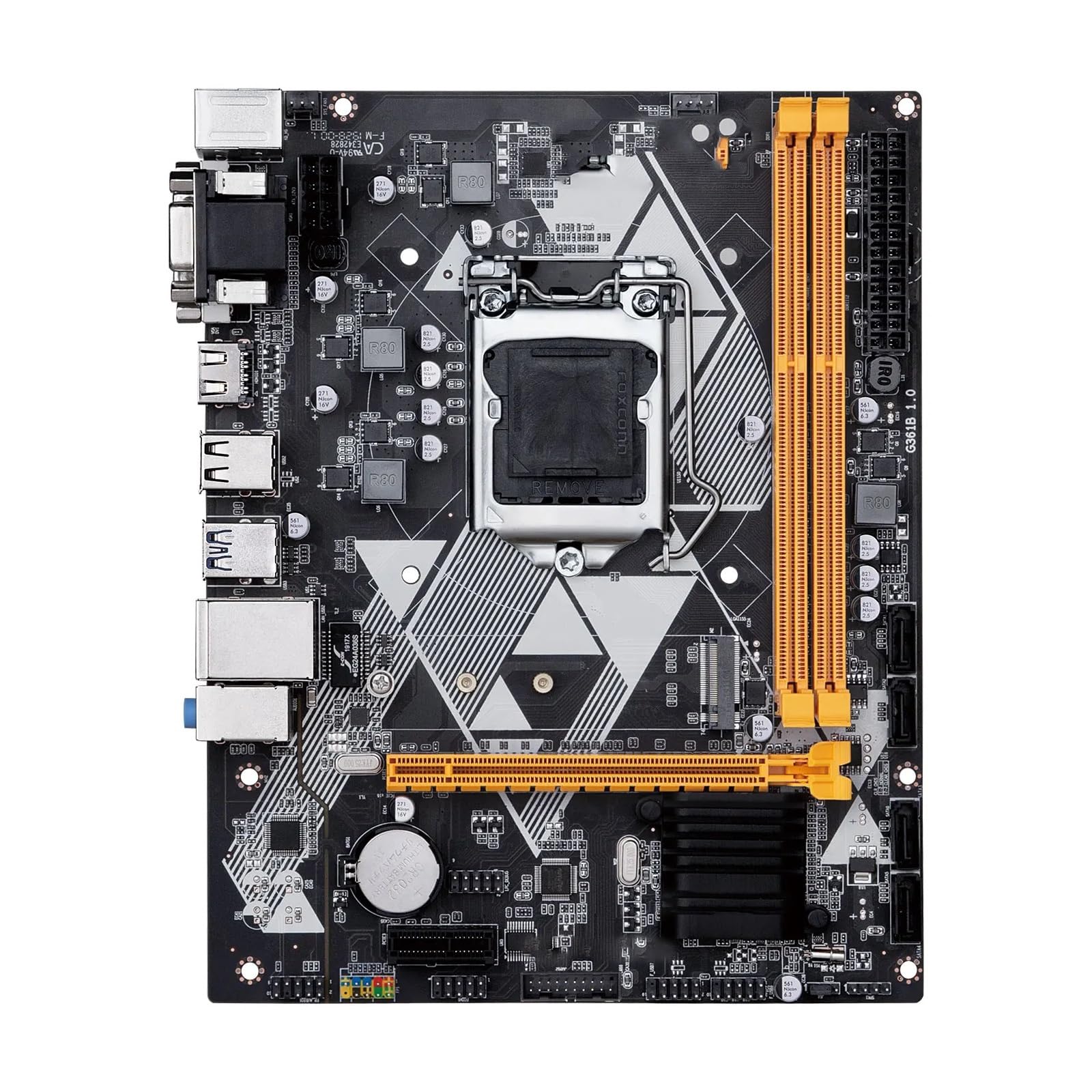
1. irudia: Goitik behera view of the Generic B85 M-ATX Motherboard. This image shows the CPU socket (LGA1150), DDR3 memory slots, PCI Express slots, SATA ports, and various headers for power and peripherals.
Konfigurazioa eta Instalazioa
1. CPU Installation (LGA1150)
- Aurkitu LGA1150 socket-a plaka basean.
- Ireki CPUaren socket-aren palanka eta altxa karga-plaka.
- Kontu handiz lerrokatu CPUa socket-arekin, ziurtatuz CPUko triangelu formako marka socket-eko markarekin bat datorrela. Ez sartu CPUa socket-ean indarrez.
- Jaitsi karga-plaka eta finkatu palankarekin.
- Apply thermal paste to the CPU and install the CPU cooler according to its instructions.
2. Memory (RAM) Installation (DDR3)
This motherboard supports 2 x DDR3 memory slots, with a maximum capacity of 16GB, supporting dual-channel DDR3 1600/1333 MHz.
- Ireki DIMM zirrikituaren bi muturretan dauden klipak.
- Lerrokatu DDR3 memoria-moduluko koska DIMM zirrikituan dagoen giltzarekin.
- Sakatu gogor memoria-moduluaren bi muturretan, klipak bere lekuan sartu arte.
3. Storage Device Installation (SATA & M.2 NVME)
The motherboard features 4 x SATA 3.0 interfaces and 1 x M.2 NVME slot.
- SATA unitateak: Connect one end of a SATA data cable to a SATA port on the motherboard and the other end to your SATA hard drive or SSD. Connect a SATA power cable from your power supply to the drive.
- M.2 NVME SSD: Insert the M.2 NVME SSD into the M.2 slot at an angle, then gently push it down and secure it with the provided screw.
4. Expansion Card Installation (PCI Express)
The motherboard includes 1 x PCI Express 3.0 x16 slot and 1 x PCI Express x1 slot.
- Align your expansion card (e.g., graphics card) with the appropriate PCI Express slot.
- Sakatu gogor txartela zirrikituan guztiz sartu arte.
- Txartela xasisari torloju batekin lotu.
5. Konexio elektrikoak
Connect the 24-pin ATX power connector and the 8-pin CPU power connector from your power supply to the corresponding ports on the motherboard.
6. Aurrealdeko panela eta periferikoen konexioak
Connect the front panel headers (power button, reset button, HDD LED, power LED, USB ports, audio jacks) to their respective pins on the motherboard. Refer to the motherboard diagram for exact pin locations.
7. Atzeko S/I panela
Atzeko S/I panelak kanpoko gailuak konektatzeko hainbat ataka eskaintzen ditu.

2. irudia: Rear I/O panel of the Generic B85 M-ATX Motherboard. Ports include PS/2 for keyboard/mouse, VGA, DVI, HDMI, USB 2.0, USB 3.0, RJ45 LAN, and audio jacks.
- PS/2 atakak: Teklatu eta sagu zaharrentzat.
- Bideo irteerak: VGA, DVI, HDMI for display connections.
- USB atakak: USB gailuak konektatzeko.
- RJ45 LAN Port: Sareko konexiorako.
- Audio-konektoreak: Bozgorailu, entzungailu eta mikrofonoetarako.
Plaka basea erabiltzea
Lehenengo abiarazpena eta BIOS konfigurazioa
- Osagai guztiak muntatu ondoren, konektatu monitoreari, teklatuari eta saguari.
- Piztu zure sistema.
- Sakatu dagokion tekla (normalean DEL or F2) abiaraztean BIOS/UEFI konfigurazio utilitatea sartzeko.
- Konfiguratu abio-ordena, sistemaren ordua eta beharrezko beste ezarpen batzuk. Gorde aldaketak eta irten.
- Proceed with operating system installation.
Mantentzea
- Garbiketa: Garbitu aldizka hautsa plaka nagusitik eta osagaietatik aire konprimatua erabiliz. Ziurtatu sistema itzalita eta deskonektatuta dagoela garbitu aurretik.
- BIOS eguneraketak: Egiaztatu fabrikatzailearena website for BIOS/UEFI updates. Follow their instructions carefully to avoid system instability.
- Gidarien eguneraketak: Keep your device drivers (chipset, graphics, audio, LAN) updated for optimal performance and stability.
Arazoak konpontzea
Arazoak badituzu, jarraitu arazoak konpontzeko ohiko urrats hauek:
- Potentziarik gabe:
- Egiaztatu elikatze-konexio guztiak (24 pineko ATX, 8 pineko CPU, GPU elikadura).
- Ziurtatu elikadura iturria piztuta dagoela.
- Ahal bada, probatu elikatze-iturria beste sistema batekin.
- Ez dago pantailarik:
- Verify monitor cable connections.
- Ensure the graphics card (if dedicated) is properly seated and powered.
- Try using integrated graphics (VGA, DVI, HDMI ports on the motherboard) if available and your CPU supports it.
- Berriro jarri RAM moduluak.
- Sistemaren ezegonkortasuna/matxurak:
- Egiaztatu CPU eta GPU tenperaturak.
- Ensure RAM is compatible and properly installed.
- Exekutatu memoria diagnostiko tresnak.
- Update drivers and BIOS.
- Periferikoa ez da detektatu:
- Try a different port.
- Install/update drivers for the peripheral.
- Check BIOS settings for port enablement.
Zehaztapenak
| Ezaugarri | Xehetasuna |
|---|---|
| Ereduaren izena | LDHHNLEBS |
| Chipset | Intel B85 |
| CPU Socketa | LGA1150 |
| Onartutako CPUak | Intel LGA1150 pin series (i3, i5, i7, E3) |
| Memoria zirrikituak | 2 x DDR3 DIMM |
| Gehienezko memoria-ahalmena | 16 GB |
| Memoria estandarra | Dual Channel DDR3 1600/1333 MHz |
| SATA interfazeak | 4 x SATA 3.0 |
| Zabaltzeko Slots | 1 x PCI Express 3.0 x16, 1 x PCI Express x1, 1 x M.2 NVME |
| Energia interfazea | 24-pin + 8-pin |
| Fan Interfazea | 1 |
| PCB geruzak | 4 layers, 3-phase power supply |
| Forma-faktorea | M-ATX (210 x 168 mm) |
| LAN integratua | 1 x RJ45 (1 Gigabit per second data transfer rate) |
| Atzeko I/O atakak | VGA, DVI, HDMI, USB 2.0, USB 3.0, RJ45, Audio Jacks, PS/2 |
| RAID euskarria | Ez |
| Aplikazioa | Desktop (Gaming, Audio/Video, Office) |
Bermea eta Laguntza
This product is typically covered by a standard return policy. For specific warranty details, please refer to your purchase documentation or contact the seller directly. The Amazon return policy indicates a 30-day refund/replacement period.
For technical support or troubleshooting assistance beyond this manual, please contact the seller or manufacturer through your purchase platform. When contacting support, provide your product model (LDHHNLEBS) and a detailed description of the issue.
Note: The product description mentions a friendly customer service and a promise to resolve issues within 24 hours if contacted via order information or email. This suggests direct seller support.