Sarrera
This manual provides instructions for the setup, operation, and maintenance of your Logitech Wingman Force Joystick, model 963155-0403. This device is designed to enhance your PC gaming experience with force feedback technology and programmable controls.
Paketearen edukia
Egiaztatu zure paketeak elementu hauek dituela:
- Logitech Wingman Force Joystick
- Elikatze-moldagailua
- USB Cable (integrated or separate)
- Software CD (if applicable, for WingMan Software)
- Erabiltzailearen eskuliburua (dokumentu hau)
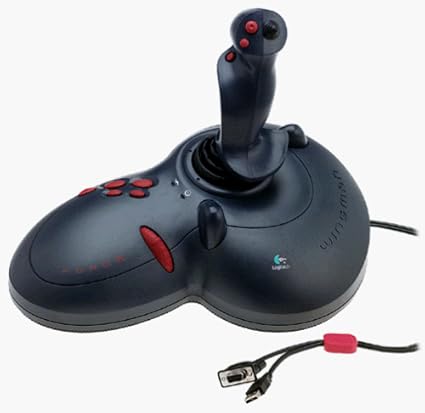
Figure 1: The Logitech Wingman Force Joystick packaging, showing the joystick and its features.
Konfigurazioa
- Konektatu energia: Plug the power adapter into the joystick and then into a standard electrical outlet.
- Konektatu ordenagailura: Connect the joystick's USB cable to an available USB port on your computer. The joystick also supports serial interfaces.
- Instalatu softwarea: Insert the WingMan Software CD (if provided) into your computer's CD-ROM drive and follow the on-screen instructions to install the drivers and WingMan Software. If no CD is provided, drivers may be automatically installed by your operating system or available for download from the Logitech support webgunea.
- Sistemaren eskakizunak: Ensure your computer runs a compatible Windows operating system.
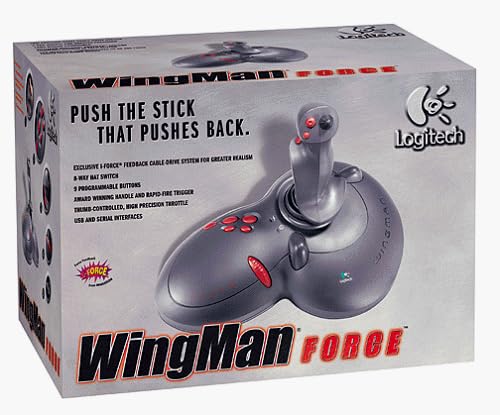
Figure 2: The Logitech Wingman Force Joystick, illustrating its ergonomic design and button layout.
Funtzionamendu-argibideak
Kontrolak amaitu diraview
- Joystick Handle: Provides precise control for in-game movement.
- 9 botoi programagarriak: Customize these buttons using the WingMan Software for various in-game actions.
- 8-Way Hat Switch: Located on top of the joystick, this switch allows for quick camera views or directional commands.
- Thumb-Controlled Throttle: Adjust speed or thrust with the integrated throttle control.
Indar-atzeraelikaduraren teknologia
The Wingman Force Joystick utilizes Logitech's exclusive I-Force force feedback technology with a cable-drive system. This system provides realistic tactile feedback, such as vibrations from impacts, recoil from weapons, and resistance during maneuvers, enhancing immersion in compatible games.
Using WingMan Software
The WingMan Software allows you to:
- Program the 9 buttons for specific game functions.
- Sortu eta gorde hainbat profesionalfiles joko ezberdinetarako.
- Adjust force feedback intensity settings.
- Calibrate the joystick for optimal performance.
Refer to the WingMan Software's help documentation for detailed instructions on customization and profile kudeaketa.
Mantentzea
To ensure the longevity and optimal performance of your joystick:
- Garbiketa: Use a soft, dry cloth to wipe the surface of the joystick. Avoid using abrasive cleaners or solvents.
- Biltegiratzea: Store the joystick in a clean, dry environment away from extreme temperatures and direct sunlight.
- Kableen zainketa: Avoid bending or crimping the cables excessively.
Arazoak konpontzea
- Problem: Joystick not recognized by computer.
- Irtenbidea:
- Ensure the USB cable is securely connected to both the joystick and the computer.
- Saiatu beste USB ataka batera konektatzen.
- Verify that the power adapter is properly connected and the joystick is receiving power.
- Reinstall the WingMan Software drivers.
- Problem: Inconsistent or absent force feedback.
- Irtenbidea:
- Check the force feedback settings within the WingMan Software and ensure they are set to an appropriate level.
- Ensure the game you are playing supports force feedback and that it is enabled in the game's settings.
- Restart your computer and the game.
- Egiaztatu konexio guztiak seguruak direla.
- Problem: Buttons or controls are unresponsive.
- Irtenbidea:
- Calibrate the joystick using the WingMan Software.
- Ensure the joystick drivers are up to date.
- Test the joystick in a different game or application to determine if the issue is game-specific.
Zehaztapenak
| Ezaugarri | Xehetasuna |
|---|---|
| Modelo zenbakia | 963155-0403 |
| Marka | Logitech |
| Kontrolagailu mota | Joystick |
| Konektibitate Teknologia | USB, seriea |
| Gailu bateragarriak | Windows ordenagailuak |
| Produktuaren neurriak | 13.5 x 9.63 x 9.25 hazbete |
| Elementuaren pisua | 4.14 kilo |
| Force Feedback | I-Force feedback cable-drive system |
| Botoiak | 9 botoi programagarri |
| Txapela etengailua | 8 norabideko txanoaren etengailua |
| Gasa | Thumb-controlled, high precision throttle |
Bermea eta Laguntza
Bermeari buruzko informazioa eta laguntza teknikoa lortzeko, kontsultatu zure produktuarekin batera datorren dokumentazioa edo bisitatu Logitech-en laguntza ofiziala. webgunea. Normalean gidariak, maiz egiten diren galderak eta bezeroarentzako arreta-zerbitzuko harremanetarako informazioa aurki ditzakezu bertan.
Logitech laguntza Webgunea: www.logitech.com/support