Sarrera
This manual provides detailed instructions for the setup, operation, and maintenance of your Audiovox CE-122 Personal CD Player with Car Kit. Please read this manual thoroughly before using your device to ensure proper functionality and to maximize your listening experience.
The Audiovox CE-122 is a portable CD player designed for versatile use, featuring a Digital Anti-Shock System (DASS) for uninterrupted playback during movement, a 22-track programmable memory, and a bass boost function. It includes a complete car kit for in-vehicle use.
Paketearen edukia
Egiaztatu behean zerrendatutako elementu guztiak zure paketean sartuta daudela:
- Audiovox CE-122 Portable CD Player
- Entzungailuak
- AC egokigailua
- Autorako egokigailua
- Kasete egokitzailea
- Erabiltzailearen eskuliburua (dokumentu hau)
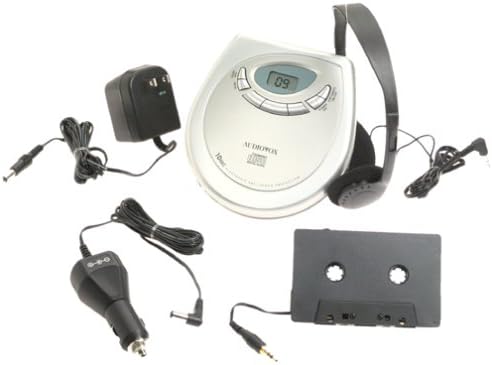
Irudia: The Audiovox CE-122 portable CD player shown with all its accessories, including headphones, AC adapter, car adapter, and cassette adapter.
Produktuaren Ezaugarriak
- Plays audio CD and CD-R/RW discs.
- AC/DC operation for home and portable use.
- Complete car kit included for in-vehicle audio.
- Digital Anti-Shock System (DASS) provides up to 20 seconds of skip protection.
- 22-track programmable memory for custom playback sequences.
- Bass boost feature for enhanced audio.
- Forward and reverse search functions.
- Repeat and pause functions.
- Key hold switch to prevent accidental button presses.
- Line out jack for connecting to external audio systems.
- Auto power off function to conserve battery life.
- Dual stereo headphone jack for shared listening.
- Built-in charger for rechargeable batteries (rechargeable batteries not included).
Konfigurazioa
1. Pilak sartzea
The CD player operates on 4 AA batteries (included). For rechargeable batteries (not included), ensure they are inserted correctly for charging.
- Ireki bateriaren konpartimentuaren estalkia unitatearen behealdean.
- Sartu 4 AA pilak, konpartimentuaren barruan adierazten den polaritate zuzena (+/-) errespetatuz.
- Itxi bateriaren konpartimenduaren estalkia ondo.
2. Connecting Power (AC Adapter)
For home use or to charge rechargeable batteries:
- Plug the small end of the AC adapter into the DC IN 4.5V jack on the CD player.
- Entxufatu AC egokigailuaren beste muturra hormako entxufe estandar batera.
- If using rechargeable batteries, select the 'charge' function (if available on your model) to begin charging.
3. Entzungailuak konektatzea
Plug the headphones into one of the two headphone jacks on the side of the CD player.

Irudia: Gertu bat view of the headphones included with the Audiovox CE-122 CD player.
4. Car Kit Setup
To use the CD player in your vehicle:
- Plug the car adapter into your vehicle's cigarette lighter or 12V power outlet.
- Connect the small end of the car adapter to the DC IN 4.5V jack on the CD player.
- Insert the cassette adapter into your vehicle's cassette player.
- Connect the audio cable from the cassette adapter to the LINE OUT jack on the CD player.
- Ensure your car stereo is set to the cassette function to hear the CD player's audio.
Funtzionamendu-argibideak
1. CD bat sartzea
- Press the OPEN button to open the CD compartment lid.
- Place a CD (audio CD or CD-R/RW) onto the center spindle with the label side facing up.
- Sakatu CDa astiro behera, bere lekuan klik egin arte.
- Itxi ondo CDaren konpartimentuaren tapa, sartu arte.

Irudia: The Audiovox CE-122 portable CD player with its lid open, revealing the disc compartment where a CD is placed.
2. Oinarrizko erreprodukzioa
- Jolastu: Sakatu JOLASTU/PAUSTU button to start playback. The track number will appear on the display.
- Etenaldia: Sakatu JOLASTU/PAUSTU button during playback to pause. Press again to resume.
- Gelditu: Sakatu GELDITU erreprodukzioa gelditzeko botoia.
3. Pistaren nabigazioa
- Saltatu pista: Sakatu AURRERA SALTU (►►) edo ATZERA EGIN (◄◄) buttons to move to the next or previous track.
- Bilatu: Eduki sakatuta AURRERA SALTU (►►) edo ATZERA EGIN (◄◄) buttons during playback to fast forward or rewind within a track.
4. Errepikatu funtzioa
Sakatu ERREPIKATU button to cycle through repeat modes:
- Errepikatu 1: Uneko pista errepikatzen du.
- Errepikatu guztiak: Diskoko pista guztiak errepikatzen ditu.
- Errepikatu off: Disables repeat function.
5. Programmable Memory
You can program up to 22 tracks to play in a specific order:
- With the CD stopped, press the PROGRAMA botoia.
- Erabili AURRERA SALTU (►►) edo ATZERA EGIN (◄◄) buttons to select the desired track.
- Sakatu PROGRAMA again to add the track to the memory.
- Errepikatu 2. eta 3. urratsak gehienez 22 pistatarako.
- Sakatu JOLASTU/PAUSTU to start playback of the programmed sequence.
6. Baxuaren igoera
Sakatu BASS BOST botoia baxuak hobetzeko funtzioa aktibatzeko edo desaktibatzeko.
7. Key Hold Switch
Irristatu EUTSI switch to the ON position to disable all buttons, preventing accidental operation during transport.
8. Digital Anti-Shock System (DASS)
The DASS provides up to 20 seconds of skip protection. This feature is automatically active during playback to ensure smooth audio even during movement.
9. Itzalketa automatikoa
The unit will automatically power off after a period of inactivity or when a CD finishes playing to conserve battery life.

Irudia: The Audiovox CE-122 portable CD player, a silver-colored device with a digital display and control buttons, shown alongside its black over-ear headphones.
Mantentzea
1. Cleaning the CD Player
- Garbitu unitatearen kanpoaldea oihal leun eta lehor batekin. Ez erabili garbitzaile edo disolbatzaile urratzailerik.
- Lentea garbitzeko, erabili CD lenteak garbitzeko disko espezializatu bat. Ez ukitu lentea zuzenean.
2. Bateria zaintzea
- Kendu bateriak unitatea denbora luzez erabiliko ez bada, isuriak saihesteko.
- Replace all batteries at the same time; do not mix old and new batteries or different types of batteries.
3. Biltegiratzea
Store the CD player in a cool, dry place away from direct sunlight and extreme temperatures.
Arazoak konpontzea
If you encounter issues with your Audiovox CE-122, please refer to the following common problems and solutions:
- Potentziarik gabe:
• Check if batteries are inserted correctly and are not depleted. Replace if necessary.
• Ensure the AC adapter or car adapter is securely connected and the power source is active. - CD Not Playing / Disc Error:
• Ensure the CD is inserted correctly with the label side up.
• Check if the CD is scratched or dirty. Clean the CD with a soft, lint-free cloth.
• Make sure the CD compartment lid is fully closed.
• The disc format may not be supported (e.g., data CD instead of audio CD or CD-R/RW). - Skipping During Playback:
• While the DASS provides protection, severe shocks or vibrations can still cause skipping. Try to keep the player stable.
• Ensure the CD is clean and free of scratches.
• Low battery power can sometimes affect anti-shock performance. Replace or recharge batteries. - Soinurik ez:
• Check headphone connection and ensure they are fully plugged in.
• Doitu bolumen maila.
• If using the car kit, ensure the car stereo is set to the correct input (cassette function) and volume is up. - Erantzuten ez duten botoiak:
• Egiaztatu EUTSI switch is in the ON position. Slide it to OFF to enable buttons.
Zehaztapenak
| Modelo zenbakia | CE-122 |
| Onartutako disko formatuak | Audio CD, CD-R/RW (MP3 compatible) |
| Shock-en aurkako babesa | 20 seconds (Digital Anti-Shock System) |
| Memoria programagarria | 22 pista |
| Energia iturria | 4 x AA batteries, AC adapter (4.5V DC), Car adapter (12V DC) |
| Konektibitatea | Auxiliary (Line Out), Dual Headphone Jacks |
| Neurriak (gutxi gorabehera) | 11.1 x 7.8 x 3.2 hazbete (Paketea) |
| Pisua (gutxi gorabehera) | 1.5 kilo |
Bermea eta Laguntza
For warranty information and customer support, please refer to the documentation provided at the time of purchase or contact Audiovox customer service. Keep your proof of purchase for warranty claims.


