Sarrera
Eskerrik asko erosketagatik.asing the GPX C3960 Personal CD/MP3 Player. This manual provides detailed instructions for the proper setup, operation, and maintenance of your device. Please read this manual thoroughly before use and retain it for future reference.
Paketearen edukia
Ziurtatu elementu guztiak paketean daudela:
- GPX C3960 Personal CD/MP3 Player
- Aurikular estereoak
- Erabiltzailearen eskuliburua (dokumentu hau)
Produktua amaituview
Familiarize yourself with the components and features of your GPX C3960 player.
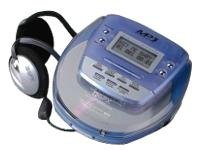
Image: The GPX C3960 Personal CD/MP3 Player, shown in a translucent blue casing, with a pair of silver over-ear headphones connected. The player features a small LCD screen and control buttons on its top surface.
Ezaugarri nagusiak:
- CD-R/RW and MP3 disc playback compatibility
- Anti-skip protection: 45 seconds for audio CDs, 120 seconds for MP3 CDs
- Dynamic Bass Boost (DBB) for enhanced audio output
- 24-track programmable memory
- Low battery alert indicator
- 2 AA pilekin funtzionatzen du
Konfigurazioa
1. Bateriaren instalazioa
- Locate the battery compartment on the bottom of the player.
- Lerratu bateriaren konpartimenduaren estalkia ireki.
- Sartu bi (2) AA pila, konpartimentuaren barruan adierazten den polaritate zuzena (+ eta -) ziurtatuz.
- Itxi bateriaren konpartimenduaren estalkia ondo.
- Oharra: Replace batteries when the low battery indicator appears on the display or when playback performance degrades.
2. Entzungailuak konektatzea
- Plug the stereo earbuds or your preferred headphones into the TELEFONOAK jack located on the side of the player.
Funtzionamendu-argibideak
1. Piztu/Itzaltzea
- Pizteko, sakatu PLAY/PAUSE (►/‖‖) botoia.
- Itzatzeko, sakatu GELDITU (■) button twice, or wait for the auto-power off feature to activate after a period of inactivity.
2. Loading a CD/MP3 Disc
- Sakatu IREKI button to open the disc compartment lid.
- Carefully place a CD or MP3 disc onto the center spindle with the label side facing up.
- Gently press the disc down until it clicks into place.
- Close the disc compartment lid firmly until it latches.
3. Oinarrizko erreprodukzioa
- Erreproduzitu/Pausatu: Sakatu PLAY/PAUSE (►/‖‖) erreprodukzioa hasteko edo pausatzeko.
- Gelditu: Sakatu GELDITU (■) erreprodukzioa gelditzeko.
- Saltatu pistak: Sakatu AURRERA SALTATU (►►) or ATZERA SALTATU (◄◄) to move to the next or previous track.
- Bilatu: Luze sakatu AURRERA SALTATU (►►) or ATZERA SALTATU (◄◄) during playback to fast-forward or rewind within a track.
4. Bolumenaren kontrola
- Egokitu BOLUMENA dial located on the side of the player to increase or decrease the audio output level.
5. Dynamic Bass Boost (DBB)
- Sakatu DBB button to activate or deactivate the dynamic bass boost feature, which enhances low-frequency sounds.
6. Anti-Skip Protection
The GPX C3960 features electronic anti-skip protection to prevent audio interruptions during movement. This provides approximately 45 seconds of protection for standard audio CDs and 120 seconds for MP3 CDs.
7. Programazio Pistak
- With the player stopped, press the PROG button. The program indicator will flash.
- Erabili AURRERA SALTATU (►►) or ATZERA SALTATU (◄◄) botoiak nahi duzun pista hautatzeko.
- Sakatu PROG again to add the selected track to the program memory.
- Errepikatu 2. eta 3. urratsak gehienez 24 pistatarako.
- Sakatu PLAY/PAUSE (►/‖‖) to start playback of the programmed sequence.
- To clear the program, open the disc compartment or press GELDITU (■) birritan.
Mantentzea
Unitatea garbitzea
- Wipe the exterior of the player with a soft, slightly damp oihal. Ez erabili garbitzaile edo disolbatzaile urratzailerik.
- Never open the disc compartment while the player is operating.
- Keep the lens clean. If the lens becomes dirty, use a soft camera lens brush to gently remove dust.
Bateria zaintzea
- Kendu bateriak unitatea denbora luzez erabiliko ez bada, isuriak saihesteko.
- Ez nahastu bateria zaharrak eta berriak, edo bateria mota desberdinak.
Diskoen maneiua
- Diskoak ertzetik heldu hatz-markak eta marradurak saihesteko.
- Gorde diskoak beren kaxetan erabiltzen ez direnean.
- Garbitu diskoak oihal leun eta lihorik gabeko batekin, erdialdetik kanporantz garbituz.
Arazoak konpontzea
| Arazoa | Kausa posiblea | Irtenbidea |
|---|---|---|
| Botererik ez | Bateriak agortuta daude edo gaizki sartuta daude. | Ordeztu bateriak beste batzuekin, polaritate zuzena ziurtatuz. |
| Disc not playing / "NO DISC" error | Diskoa zikinduta, urratuta edo gaizki sartuta dago. | Clean the disc. Reinsert the disc with the label side up. Try a different disc. |
| Sound skipping or distorted | Disc is dirty, scratched, or player is subjected to excessive vibration. | Clean the disc. Ensure the player is on a stable surface or reduce movement. |
| Entzungailuen soinurik ez | Headphones not properly connected or volume too low. | Ziurtatu entzungailuak ondo konektatuta daudela. Igo bolumena. Probatu entzungailu desberdinekin. |
Zehaztapenak
- Marka: GPX
- Eredua: C3960
- Onartutako euskarriak: CD, CD-R, CD-RW, MP3-CD
- Saltoen aurkako babesa: 45 seconds (CD), 120 seconds (MP3-CD)
- Energia iturria: 2 x AA bateria
- Ezaugarri berezia: Eramangarria
- Elementuaren pisua: Gutxi gorabehera 726 g
- Neurriak: Gutxi gorabehera 40.64 x 38.1 x 30.48 cm (Paketearen neurriak)
Bermea eta Laguntza
For warranty information or technical support, please refer to the documentation included with your purchase or visit the official GPX webgunea. Gorde erosketaren egiaztagiria bermearen erreklamazioetarako.


