Sarrera
This manual provides essential instructions for the safe and efficient operation of your Sharper Image SO226 Compact CD Stereo with AM/FM Digital Tuner. Please read this manual thoroughly before using the unit and retain it for future reference.
Segurtasun-argibide garrantzitsuak
- Irakurri argibide guztiak aparatua martxan jarri aurretik.
- Gorde eskuliburu hau etorkizunean erreferentzia izateko.
- Ez erabili aparatu hau uraren ondoan.
- Garbitu zapi lehor batekin bakarrik.
- Ez blokeatu aireztapen-irekidurak. Instalatu fabrikatzailearen argibideen arabera.
- Ez instalatu bero-iturri inongo ondoan, esate baterako, erradiadoreak, bero-erregistroak, sukaldeak edo beste aparatu batzuk (barne ampberoa sortzen duten argitzaileak).
- Babestu korronte-kablea oinez ibiltzetik edo atxilotzetik, batez ere entxufeetan, erosotasun-harguneetan eta aparatutik irteten diren puntuetan.
- Erabili soilik fabrikatzaileak zehaztutako eranskinak/osagarriak.
- Bidali zerbitzu guztiak zerbitzu kualifikatuko langileengana. Aparatuak edozein modutan hondatu direnean mantenimendua egin behar da.
Paketearen edukia
Egiaztatu elementu guztiak bertan daudela paketea desegiten duzunean:
- Sharper Image SO226 Compact CD Stereo Unit
- AC Power Adapter (if applicable, check packaging)
- Erabiltzailearen eskuliburua (dokumentu hau)
Produktua amaituview
Familiarize yourself with the components and controls of your SO226 unit.
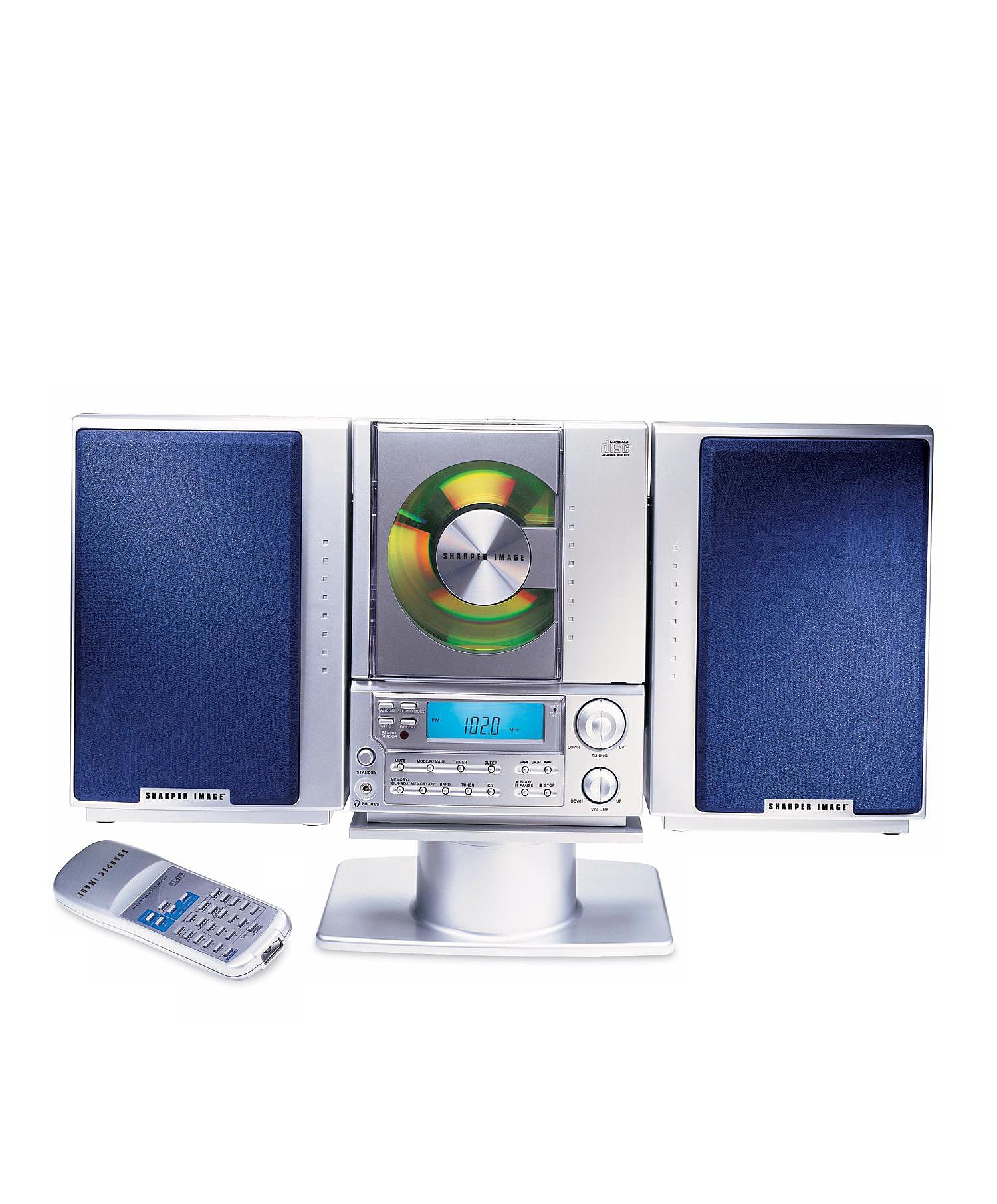
This image displays the front panel of the Sharper Image SO226 Compact CD Stereo. Visible features include the top-loading CD compartment, the digital display for radio frequencies and CD track information, and various control buttons for power, volume, CD playback, and radio tuning.
Control Panel (Typical Layout)
- POWER botoia: Unitatea pizten edo itzaltzen du.
- FUNTZIOA/MODUA botoia: Switches between CD, AM, and FM modes.
- BOLUMENA +/- botoiak: Audio irteera-maila doitzen du.
- PLAY/PAUSE botoia: CDaren erreprodukzioa abiarazten edo pausatzen du.
- STOP botoia: CDaren erreprodukzioa geldiarazten du.
- SALTATU/BILATU botoiak (◀◀ / ▶▶): Skips tracks on CD or tunes radio frequencies.
- PROGRAMAZIOA botoia: CD pistak programatzeko erabiltzen da.
- LO botoia: Lo egiteko tenporizadorearen funtzioa aktibatzen du.
- DOINU +/- botoiak: Fine-tunes radio frequencies.
- PRESET Buttons: Gogoko irrati-kateak gordetzen eta berreskuratzen ditu.
- LCD pantaila: Shows current mode, track number, frequency, and time.
Konfigurazioa
Potentzia-konexioa
- Ziurtatu unitatea gainazal egonkor eta lau batean jartzen dela.
- If using batteries (not included), open the battery compartment on the bottom or back of the unit and insert the required batteries, observing correct polarity.
- Alternatively, connect the AC power adapter (if supplied) to the DC IN jack on the unit and then plug the adapter into a standard wall outlet.
Antena konfiguratzea
- For FM reception, extend the telescopic antenna fully. Adjust its position for optimal reception.
- For AM reception, the unit has a built-in ferrite bar antenna. Rotate the entire unit for best AM reception.
Funtzionamendu-argibideak
CD erreproduzigailuaren funtzionamendua
- Sakatu BOTEREA unitatea pizteko botoia.
- Sakatu FUNTZIOA/MODUA botoia behin eta berriz sakatu pantailan 'CD' agertu arte.
- Ireki CDaren konpartimentuaren estalkia.
- Place a CD with the label side facing up into the compartment.
- Close the CD compartment cover. The unit will read the CD, and the total number of tracks will be displayed.
- Sakatu JOLASTU/PAUSTU botoia erreproduzitzen hasteko.
- Pausatzeko, sakatu JOLASTU/PAUSTU berriro. Sakatu berriro jarraitzeko.
- Erreprodukzioa gelditzeko, sakatu GELDITU botoia.
- Hurrengo pistara joateko, sakatu SKIP/SEARCH ▶▶ botoia.
- Uneko abestiaren hasierara edo aurreko abestira itzultzeko, sakatu tekla SKIP/SEARCH ◀◀ botoia.
- Abesti batean aurrera edo atzera egiteko, sakatu eta eutsi botoiari SKIP/SEARCH ▶▶ or ◀◀ botoia erreproduzitzean.
AM/FM irratiaren funtzionamendua
- Sakatu BOTEREA unitatea pizteko botoia.
- Sakatu FUNTZIOA/MODUA botoia behin eta berriz sakatu pantailan 'AM' edo 'FM' agertu arte.
- Eskuzko sintonizazioa: Sakatu TUNING +/- buttons to adjust the frequency step by step.
- Eskaneatu automatikoa: Eduki sakatuta TUNING +/- buttons for a few seconds. The tuner will scan and stop at the next strong station.
- Aurrezarpenak gordetzea: Sintonizatu nahi duzun irratia. Sakatu botoia PROGRAMA botoia. Aurrezarritako zenbakia keinuka hasiko da. Erabili SALTU / BILATU botoiak aurrezarritako zenbaki bat hautatzeko, eta ondoren sakatu PROGRAMA berriro baieztatzeko.
- Aurrezarpenak gogoratzen: Irrati moduan, sakatu PRESET buttons to cycle through your stored stations.
Sleep Timer Funtzio
The unit features a convenient sleep timer that automatically turns off the sound after a set period.
- Unitatea erreproduzitzen ari den bitartean (CDa edo irratia), sakatu botoia LO botoia.
- Sakatu bakoitzak LO button will cycle through available sleep times (e.g., 10, 20, 30, 60, 90 minutes, or OFF).
- Select your desired sleep duration. The unit will automatically power off after the selected time has elapsed.
Mantentzea
- Unitatea garbitzea: Garbitu unitatearen kanpoaldea oihal leun eta lehor batekin. Ez erabili garbitzaile edo disolbatzaile urratzailerik.
- CDaren zainketa: Handle CDs by their edges. Keep them clean and free of scratches. If a CD is dirty, wipe it gently with a soft, lint-free cloth from the center outwards.
- Biltegiratzea: When not in use for extended periods, disconnect the power adapter and remove batteries. Store the unit in a cool, dry place.
Arazoak konpontzea
Arazoak badituzu, jo ezazu honako arazo eta irtenbide ohikoenei:
- Potentziarik gabe:
- Ensure the AC power adapter is securely plugged into both the unit and a working wall outlet.
- If using batteries, check if they are inserted correctly and are not depleted. - Soinurik ez:
- Check the volume level and increase it if necessary.
- Ensure the correct function mode (CD/AM/FM) is selected. - CD Not Playing / Skipping:
- Ensure the CD is inserted correctly with the label side up.
- Clean the CD for any dirt or scratches.
- Try a different CD to rule out a faulty disc.
- Ensure the CD compartment cover is fully closed. - Irrati-harrera eskasa:
- For FM, fully extend and adjust the telescopic antenna.
- For AM, rotate the entire unit for better signal.
- Move the unit away from other electronic devices that may cause interference. - Erantzuten ez duten botoiak:
- Try turning the unit off and on again.
- Disconnect power for a few minutes, then reconnect.
Zehaztapenak
| Modelo zenbakia | SO226 |
| Produktuaren neurriak (L x W x H) | 1.3 x 19 x 5.5 hazbete (3.3 x 48.3 x 14 cm) |
| Elementuaren pisua | 5 libra (2.27 kg) |
| Hizlari mota | Estereoa |
| Energia iturria | Battery Powered (AC adapter typically included or sold separately) |
| Color (as per specific variant) | Urdina |
Bermea eta Laguntza
Bermeari buruzko informazioa eta bezeroarentzako laguntza lortzeko, kontsultatu erosketarekin batera datorren dokumentazioa edo bisitatu Sharper Image webgune ofiziala. webgunea. Gorde erosketaren egiaztagiria bermearen erreklamazioetarako.