1. Sarrera
Eskerrik asko erosketagatik.asing the SANYO DC-M1 Stereo System. This manual provides essential information for the safe and efficient operation of your new audio system. Please read it thoroughly before use and retain it for future reference.
The SANYO DC-M1 is a full logic micro component stereo system featuring a high-quality 2-way speaker design, delivering 15W total output. It supports CD-R/RW playback and MP3 files, and includes full remote control functionality.
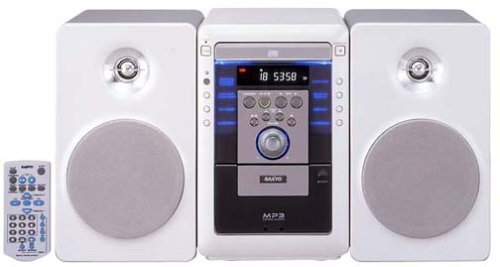
Image of the SANYO DC-M1 stereo system, showcasing its compact design and two-way speakers.
2. Konfigurazioa
2.1 Paketatzea
Kontu handiz atera osagai guztiak paketetik. Ziurtatu behean zerrendatutako elementu guztiak daudela:
- Main Unit (DC-M1)
- Bi bozgorailu unitate
- Urruneko Kontrola
- Elikatze kablea
- Bozgorailu kableak
- Erabiltzailearen eskuliburua (dokumentu hau)
2.2 Bozgorailuen konexioa
- Connect the speaker cables to the speaker terminals on the rear of the main unit. Ensure correct polarity (red to red, black to black) for each speaker.
- Position the speakers on a stable, flat surface, ensuring they are equidistant from the listening position for optimal sound.
2.3 Energia-konexioa
- Insert the power cord into the AC IN socket on the rear of the main unit.
- Entxufatu kablearen beste muturra korronte alternoko hormako entxufe estandar batera.
2.4 Hasierako piztea
Sakatu BOTEREA button on the front panel or the remote control to turn on the system. The display will illuminate.
3. Funtzionamendu-argibideak
3.1 Oinarrizko kontrolak
- POWER botoia: Sistema pizten edo itzaltzen du.
- VOLUME Knob/Buttons: Adjusts the sound output level. Turn clockwise to increase, counter-clockwise to decrease.
- FUNCTION/SOURCE Button: Selects the input source (CD, AUX).
3.2 CD erreprodukzioa
- Sakatu IREKI/ITXI CDaren erretilua irekitzeko botoia.
- Place a CD (audio CD, CD-R/RW with audio or MP3 files) with the label side up into the tray.
- Sakatu IREKI/ITXI berriro erretilua ixteko.
- Sakatu JOLASTU/PAUSTU botoia erreproduzitzen hasteko.
- Erabili SALTATU botoiak (|< / >> |) pisten artean nabigatzeko.
- Sakatu GELDITU erreprodukzioa amaitzeko.
3.3 Sarrera lagungarria (AUX)
To connect an external audio device (e.g., smartphone, MP3 player):
- Connect an audio cable (not supplied) from the headphone jack or line-out of your external device to the AUX jack on the SANYO DC-M1.
- Sakatu FUNCTION/SOURCE botoia sakatu pantailan "AUX" agertu arte.
- Start playback on your external device. Adjust the volume on both the external device and the DC-M1 for optimal sound.
3.4 Urruneko kontrolaren erabilera
The included remote control provides full functionality for the stereo system. Ensure batteries are correctly inserted. Point the remote control towards the main unit's front panel sensor.
4. Mantentzea
4.1 Garbiketa
- Deskonektatu korronte-kablea garbitu aurretik.
- Garbitu unitatearen kanpoaldea zapi leun eta lehor batekin. Zikinkeria egoskorra bada, erabili zapi leun bat.ampurarekin garbitu, eta gero lehortu.
- Do not use abrasive cleaners, benzene, alcohol, or other chemical solvents, as these may damage the finish.
4.2 CDen zaintza
- CDak ertzetik heldu erreproduzitzeko gainazalean hatz-markak ez uzteko.
- Store CDs in their cases to protect them from dust and scratches.
- If a CD is dirty, wipe it gently from the center outwards with a soft, lint-free cloth.
4.3 Biltegiratzea
Unitatea denbora luzez erabiliko ez bada, deskonektatu kablea hormako entxufetik eta gorde leku fresko eta lehor batean, eguzki-argitik eta muturreko tenperaturetatik babestuta.
5. Arazoak
Before seeking service, please check the following points:
- Potentziarik gabe:
- Ensure the power cord is securely plugged into both the unit and the wall outlet.
- Check if the wall outlet is functioning by plugging in another device. - Soinurik ez:
- Check that the volume is not set to minimum or muted.
- Ensure speaker cables are correctly connected to both the main unit and speakers, with correct polarity.
- If using AUX input, verify the external device's volume and connection. - CD Not Playing / Disc Error:
- Ensure the CD is inserted correctly with the label side up.
- Clean the CD if it appears dirty or scratched.
- Try a different CD to rule out a disc-specific issue.
- Ensure the disc type is compatible (audio CD, CD-R/RW with audio or MP3). - Urruneko kontrola ez dabil:
- Check and replace the batteries if necessary.
- Ensure there are no obstructions between the remote control and the unit's sensor.
- Make sure you are pointing the remote directly at the unit.
6. Zehaztapenak
- Modelo zenbakia: DC-M1
- Produktuaren neurriak (L x W x H): 18.82 x 9.65 x 10.31 hazbete
- Elementuaren pisua: 16.28 kilo
- Konektibitate Teknologia: Laguntzailea
- Hizlari mota: Components (2-way)
- Irteera potentzia: 15 W (guztira)
- Onartutako disko formatuak: Audio CD, CD-R/RW (Audio, MP3)
7. Bermea eta Laguntza
SANYO products are manufactured to high-quality standards. For warranty information, please refer to the warranty card included with your purchase or visit the official SANYO webzure eskualdeko xehetasun espezifikoak lortzeko webgunea.
For technical support or service inquiries, please contact your local SANYO authorized service center or refer to the contact information provided on the official SANYO webgunea.


