1. Sarrera
Eskerrik asko erosketagatik.asing the SANYO DC-M1(S) Set Stereo. This compact audio system is designed to provide high-quality sound with versatile playback options, including CD-R/RW and MP3 support, and features a powerful deep bass output. This manual provides essential information for the safe and efficient operation of your stereo system. Please read it thoroughly before use and retain it for future reference.
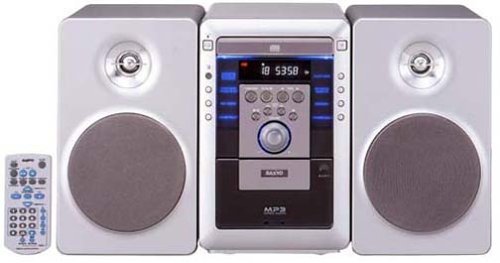
Figure 1: SANYO DC-M1(S) Set Stereo (Silver) front view. This image shows the SANYO DC-M1(S) Set Stereo in silver, featuring its main unit with a CD tray, display, and control buttons, along with two matching speakers.
3. Konfigurazioa
3.1 Paketatzea
Carefully remove all components from the packaging. Retain the packaging materials for future transport or storage. Ensure all items listed below are present:
- Main Unit (CD Player/Amplifier/Tuner)
- Speaker Units (2)
- Urruneko Kontrola
- Elikatze kablea
- Erabiltzailearen eskuliburua (dokumentu hau)
3.2 Bozgorailu konexioak
Connect the speaker wires to the corresponding terminals on the main unit and the speakers. Ensure correct polarity (+ to + and - to -) for optimal sound quality. Incorrect polarity can result in poor bass response.
- Locate the speaker terminals on the rear of the main unit and on each speaker.
- Strip approximately 1 cm of insulation from the ends of the speaker wires.
- Connect the red wire to the red (+) terminal and the black wire to the black (-) terminal on both the main unit and the speakers.
- Ensure the wires are securely fastened and no stray strands are touching other terminals.
3.3 Energia-konexioa
After all other connections are made, plug the power cord into the AC IN socket on the rear of the main unit, then plug the other end into a suitable wall outlet.
3.4 Hasierako piztea
Sakatu BOTEREA button on the front panel or the remote control to turn on the unit. The display will illuminate, indicating the system is ready for use.
4. Funtzionamendu-argibideak
4.1 Oinarrizko kontrolak
- Potentzia: Sakatu BOTEREA botoia unitatea pizteko edo itzaltzeko.
- Bolumena: Erabili BOLUMENA +/- unitateko edo urrutiko aginteko botoiak soinu-maila doitzeko.
- Funtzioa/Iturria: Sakatu FUNTZIOA or ITURRIA button to switch between CD, Tuner, and other available inputs.
4.2 CD erreproduzitzailearen funtzionamendua
The SANYO DC-M1(S) supports playback of standard audio CDs, CD-R/RW discs, and MP3 files stored on CD-R/RW discs.
- Sakatu FUNTZIOA botoia CD iturria hautatzeko.
- Sakatu IREKI/ITXI CDaren erretilua irekitzeko botoia.
- Jarri CD bat erretiluan, etiketa gora begira duela.
- Sakatu IREKI/ITXI botoia berriro erretilua ixteko.
- Erreprodukzioa normalean automatikoki hasiko da. Bestela, sakatu botoia JOLASTU/PAUSTU botoia.
- Erabili SALTATU botoiak (<< / >>) pisten artean nabigatzeko.
- For MP3 discs, the system will display folder and track information. Use navigation buttons to browse.
4.3 Irrati-sintonizatzailearen funtzionamendua
The unit includes an FM/AM tuner for radio reception.
- Sakatu FUNTZIOA button to select the TUNER source.
- Erabili TUNE +/- botoiak irrati bat eskuz sintonizatzeko.
- Luze sakatu TUNE +/- for automatic scanning to the next strong station.
- Aurrez konfiguratzeko irratiak, nahi duzun irratia sintonizatu eta sakatu MEMORIA eta ondoren aurrez ezarritako zenbaki-botoi bat.
4.4 Urruneko kontrolaren erabilera
The included remote control provides full logic control over all functions of the stereo system. Ensure batteries are correctly inserted (not included). Point the remote control directly at the main unit's remote sensor for optimal response.
4.5 Deep Bass Output
The SANYO DC-M1(S) features a deep bass output function for enhanced low-frequency sound. This feature is automatically engaged or can be toggled using a dedicated button on the remote control or front panel (refer to specific button labels on your unit for "BASS" or "DBASS").
5. Mantentzea
5.1 Garbiketa
To maintain the appearance and performance of your stereo system:
- Garbitu aurretik, deskonektatu beti kablea.
- Erabili zapi leun eta lehor bat kanpoko gainazalak garbitzeko.
- Orban egoskorretarako, arin dampen the cloth with water or a mild, non-abrasive cleaner, then wipe dry immediately.
- Ez erabili urratzailerik, garbitzeko hautsik edo alkohola edo bentzenoa bezalako disolbatzailerik, hauek akabera kaltetu baitezakete.
- Clean the CD lens periodically with a commercially available CD lens cleaner disc.
5.2 Biltegiratzea
If you plan to store the unit for an extended period, disconnect the power cord and store it in a cool, dry place, away from direct sunlight and extreme temperatures. It is recommended to use the original packaging for protection.
8. Bermea eta Laguntza
SANYO products are manufactured to the highest quality standards. For warranty information, please refer to the warranty card included with your product or visit the official SANYO website for details specific to your region. For technical support or service inquiries, please contact your local SANYO authorized service center.
You can find contact information and further support resources on the official SANYO webgunea: www.sanyo.com (Oharra: Hau leku-markatzailea da) URL, mesedez, kontsultatu zure produktuaren dokumentazioa eskualdeko kokapen zuzena lortzeko webgunea).


