1. Sarrera
The Buffalo DriveStation HD-HB250U2 is an external hard drive designed for reliable data storage and backup. It offers a 250 GB capacity, allowing users to store large files, digital images, and documents without consuming space on a computer's main drive. This device features a fanless design for quiet operation and a heat sink chassis to maintain optimal internal temperatures. Its versatile design supports both vertical and horizontal placement.
This manual provides instructions for setting up, operating, and maintaining your DriveStation HD-HB250U2.
2. Zer dago kutxan
Egiaztatu elementu guztiak paketean daudela:
- Buffalo DriveStation HD-HB250U2 External Hard Drive
- Elikatze kablea
- USB kablea
- Ezarpen azkarrerako gida
- Berme Adierazpena
3. Konfigurazioa
The DriveStation HD-HB250U2 is designed for easy installation and is pre-formatted for immediate use.
-
Lekua: Position the DriveStation vertically or horizontally on a stable surface. The unique chassis design allows for flexible placement to conserve desktop space.
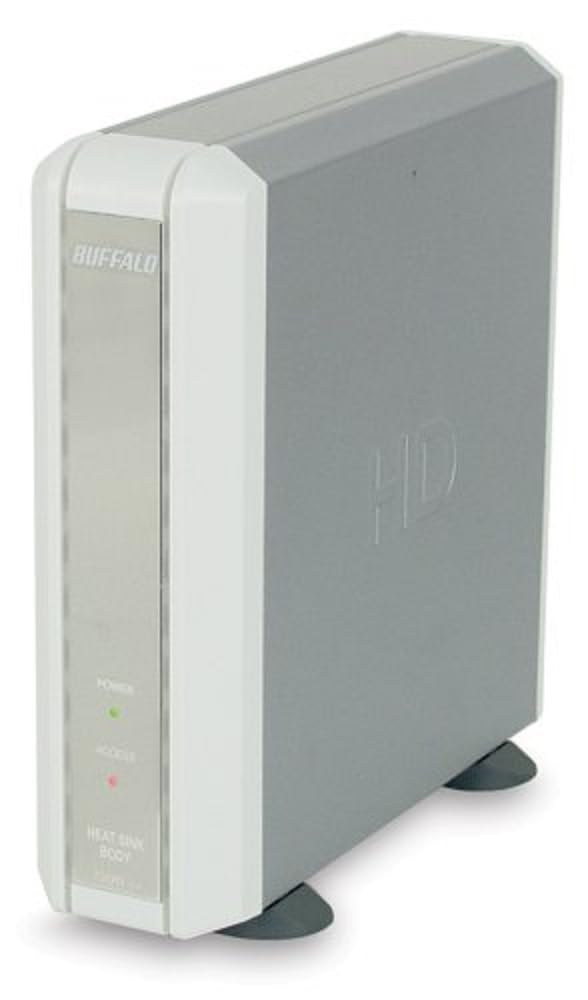
Image 1: Buffalo DriveStation HD-HB250U2. This image displays the Buffalo DriveStation HD-HB250U2 external hard drive in a vertical orientation. The front panel features the 'BUFFALO' logo, a green 'POWER' indicator light, and a red 'ACCESS' indicator light. The device has a sleek, grey and white design, with small black feet for stability.
- Konektatu energia: Connect the power cord to the DriveStation and then plug it into an electrical outlet.
- Konektatu ordenagailura: Use the provided USB cable to connect the DriveStation to an available USB port on your computer. The DriveStation supports both USB 2.0 and USB 1.1 interfaces.
- Konfigurazio automatikoa: For most operating systems (Windows 2000/XP/Vista/7/8/10, macOS), the DriveStation will be automatically detected and configured. No driver installation is typically required, except for older operating systems like Windows 98/98SE.
4. Operating the DriveStation
Once connected, the DriveStation is ready for use as an external storage device.
- Auto Power-On: The DriveStation features an auto power-on function. It will automatically power on or off in conjunction with your attached computer's power state.
- Datuen transferentzia: Arrastatu eta jaregin dezakezu files to and from the DriveStation, or use it as a target for backup software.
- Babeskopia softwarea: The included backup utility allows you to customize backup scheduling for data protection. Refer to the Quick Setup Guide for instructions on using the backup software.
- Power-Saving Shutdown: Utilize the power-saving shutdown feature to schedule when the DriveStation powers off, helping to conserve energy.
5. Mantentzea
The DriveStation HD-HB250U2 is designed for minimal maintenance.
- Hoztea: The fanless design ensures silent operation, while the integrated heat sink chassis effectively cools internal components, preventing overheating. Ensure adequate airflow around the device.
- Garbiketa: Erabili zapi leun eta lehor bat gailuaren kanpoaldea garbitzeko. Ez erabili garbitzaile likidorik edo disolbatzailerik.
- Firmware eguneraketak: Periodically check the official Buffalo website for any available firmware updates for your model to ensure optimal performance and compatibility.
6. Arazoak
If you encounter issues with your DriveStation, consider the following:
-
Gailua ez da detektatu:
- Ensure the power cord is securely connected and the device is powered on.
- Verify the USB cable is firmly connected to both the DriveStation and your computer.
- Saiatu ordenagailuko beste USB ataka batera konektatzen.
- Berrabiarazi ordenagailua.
-
Errendimendu motela:
- Ziurtatu USB 2.0 ataka bat erabiltzen ari zarela transferentzia-abiadura optimoak lortzeko.
- Itxi zure ordenagailuan exekutatzen ari diren beharrezkoak ez diren aplikazio guztiak.
-
Power Indicator Not On:
- Check the power cord connection and the electrical outlet.
- Ensure your computer is powered on if using the auto power-on feature.
Laguntza gehiago lortzeko, jo 8. ataleko laguntza-informaziora.
7. Zehaztapenak
| Ezaugarri | Xehetasuna |
|---|---|
| Modelo zenbakia | HD-HB250U2 |
| Marka | BUFALO |
| Biltegiratze Digitalaren Ahalmena | 250 GB |
| Disko gogorraren biraketa-abiadura | 7200 RPM |
| Hardware interfazea | USB 2.0, USB 1.1 |
| Gailu bateragarriak | Mahaigaineko Ordenagailuak |
| Ezaugarri bereziak | Compact, Fanless Design, Heat Sink Chassis, Auto Power-On, Power-Saving Shutdown |
| Kolorea | Black (Note: Product image shows grey/white casing, but specification lists black) |
| Neurriak (gutxi gorabehera) | 34.04 x 22.35 x 12.19 cm (Paketearen neurriak) |
| Pisua (gutxi gorabehera) | 2.06 kg (Parcel Weight) |
8. Bermea eta Laguntza
Your Buffalo DriveStation HD-HB250U2 is backed by a limited 1-year warranty.
For technical assistance, Buffalo offers toll-free 24/7 technical support. Please refer to the warranty statement included in your product package for detailed terms and contact information.
You can also visit the official Buffalo website for product registration, driver downloads, and frequently asked questions.


