Sarrera
This manual provides essential instructions for the setup, operation, and maintenance of your Oregon Scientific DS6628 ThinCam 1.3MP Digital Flash Camera. Please read this manual thoroughly before using your camera to ensure proper function and longevity.
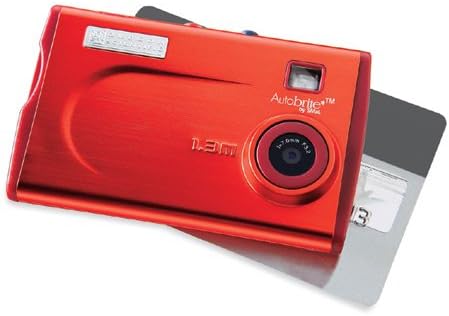
1. irudia: The Oregon Scientific DS6628 ThinCam 1.3MP Digital Flash Camera, showcasing its compact red design with the lens, flash, and "Autobrite" branding visible. A memory card is partially inserted on the right side.
Paketearen edukia
Egiaztatu elementu guztiak zure paketean daudela:
- DS6628 Digital Camera
- Flash Attachment
- Software CD (for driver installation and image management)
- USB kablea
- Eramateko zorroa
The camera features a built-in Li-polymer battery.
Konfigurazioa
1. Bateria kargatzea
The DS6628 ThinCam features a built-in Li-polymer battery. To charge the camera, connect it to your computer using the provided USB cable. The camera will charge automatically when connected to a powered USB port. A full charge provides power for up to 500 images.
2. Softwarea eta kontrolatzaileak instalatzea
Before connecting the camera to your computer for the first time, install the included software and drivers from the provided CD. This ensures proper recognition and functionality on both PC and Mac operating systems. Follow the on-screen instructions during installation.
3. Memoria txartel bat sartzea (aukerakoa)
The camera has 16MB of internal memory, sufficient for approximately 21 high-resolution or 91 low-resolution pictures. For expanded storage, the camera supports SD and MMC cards.
- Bilatu memoria txartelaren zirrikitua kameraren alboan.
- Insert a compatible SD or MMC card into the slot until it clicks into place. Ensure the card is inserted in the correct orientation.
- To remove the card, gently push it inward until it springs out.
Kameraren funtzionamendua
1. Piztu/Itzaltzea
Locate the power button, typically on the top or side of the camera. Press and hold it for a few seconds to power the camera on or off.
2. Argazkiak ateratzea
The DS6628 ThinCam captures images at 1.3-megapixel resolution (1288 x 962 pixels).
- Ziurtatu kamera piztuta dagoela.
- Point the camera at your subject. The camera features a pop-up/focus-free lens pad and an optical viewfinder for framing your shots.
- Press the shutter button firmly to capture an image.
3. Using the Flash
The camera includes a detachable flash module. Attach the flash module to the designated port on the camera when additional lighting is required. The flash operates in automatic mode.
4. Transferring Images to a Computer
After installing the necessary software and drivers, connect the camera to your computer using the USB cable. The computer should recognize the camera as a removable storage device. You can then transfer images directly or use the included software for management.
Mantentzea
Bateria zaintzea
- Bateria guztiz kargatu lehen erabili aurretik.
- Saihestu bateria maiz erabat deskargatzea, haren iraupena luzatzeko.
- If the camera will not be used for an extended period, charge it partially (around 50%) before storing.
- Store the camera in a cool, dry place.
Garbiketa
- Erabili zapi leun eta lihorik gabeko bat kameraren gorputza garbitzeko.
- For the lens, use a specialized lens cleaning cloth and solution. Avoid harsh chemicals.
- Ensure the flash module contacts are clean and free of debris.
Arazoak konpontzea
| Arazoa | Balizko Kausa / Irtenbidea |
|---|---|
| Kamera ez da pizten. | Battery may be depleted. Connect the camera to a computer via USB to charge. |
| Cannot transfer images to computer. |
|
| Poor image quality (washed out, out of focus). |
|
| Battery does not hold charge for long. |
|
Zehaztapenak
| Ezaugarri | Xehetasuna |
|---|---|
| Marka | OREGON SCIENTIFIC |
| Ereduaren izena | DS6628 ThinCam |
| Ebazpen finko eraginkorra | 1.3 MP (1288 x 962 pixels) |
| Barne Memoria | 16 MB (approx. 21 high-res / 91 low-res images) |
| Memoria Txartelaren euskarria | SD, MMC |
| Lente mota | Pop-up, focus-free lens |
| Zoom optikoa | 1x |
| Irudi Egonkortzea | Digitala |
| Viewaurkitzailea | Optikoa |
| Flasha | Detachable module, Automatic modes |
| Bateria mota | Built-in Li-polymer, rechargeable via USB |
| Bateriaren iraupena | Up to 500 images per charge |
| Konektibitatea | USBa |
| Bateragarritasuna | PC eta Mac |
| Kolorea | Gorria |
| Neurriak (gutxi gorabehera) | 2.1 hazbete (H) x 3.4 hazbete (W) x 0.3 hazbete (D) |
Bermea eta Laguntza
For warranty information and technical support, please refer to the documentation included with your purchase or visit the official Oregon Scientific webgunea. Gorde erosketaren egiaztagiria bermearen erreklamazioetarako.


