1. Sarrera
This manual provides detailed instructions for the safe and effective use of your Canon PowerShot S2 IS digital camera. Please read this manual thoroughly before using the camera and keep it in a safe place for future reference. The Canon PowerShot S2 IS is a 5.0-megapixel digital camera featuring a 12x optical image-stabilized zoom lens, designed for capturing high-quality still images and VGA video with stereo sound.
2. Segurtasun informazioa
- Bateriaren segurtasuna: Use only specified AA-size alkaline or NiMH rechargeable batteries. Do not mix old and new batteries, or different types of batteries. Remove batteries if the camera will not be used for an extended period.
- Ura eta hezetasuna: This camera is not waterproof. Do not expose it to rain, moisture, or immerse it in water.
- Manipulazioa: Avoid dropping the camera or subjecting it to strong impacts. Do not attempt to disassemble or modify the camera.
- Ingurune operatiboa: Do not use or store the camera in extremely hot, cold, or humid environments. Avoid direct sunlight for prolonged periods.
- Flasharen erabilera: Do not use the flash too close to people's eyes, especially children, as it may impair eyesight.
3. Konfigurazioa
3.1 Paketatzea
Kontu handiz atera elementu guztiak paketetik. Ziurtatu osagai hauek daudela:
- Canon PowerShot S2 IS camera body
- Neck strap NS-DC3
- AA-size Alkaline batteries (x4)
- Stereo video cable STV-250N
- Interface cable IFC-400PCU
- SD memory card SDC-16MB
- Digital Camera Solution CD-ROMa
- Lentearen txanoa
3.2 Bateriaren instalazioa
The Canon PowerShot S2 IS operates on four AA-size batteries. Open the battery compartment cover, located on the bottom of the camera. Insert the four AA batteries according to the polarity indicators (+/-) inside the compartment. Close the cover securely.
3.3 SD txartelaren instalazioa
Locate the SD card slot, typically next to the battery compartment or on the side of the camera. Insert the provided SD memory card (SDC-16MB) into the slot with the label facing the correct direction until it clicks into place. To remove, press the card gently to release it.
3.4 Lepoko uhala lotzea
Thread the neck strap (NS-DC3) through the strap mounts on the camera body as shown in the diagram. Ensure it is securely fastened to prevent accidental drops.

3.4.1. irudia: Aurrealdea view of the Canon PowerShot S2 IS camera with the neck strap attached and lens cap on.
3.5 Initial Power On and Date/Time Setting
After installing batteries and the SD card, press the power button to turn on the camera. The first time you power on, you may be prompted to set the date and time. Use the directional buttons and the SET/OK button to adjust the date and time settings on the LCD screen. Confirm your selections to proceed.
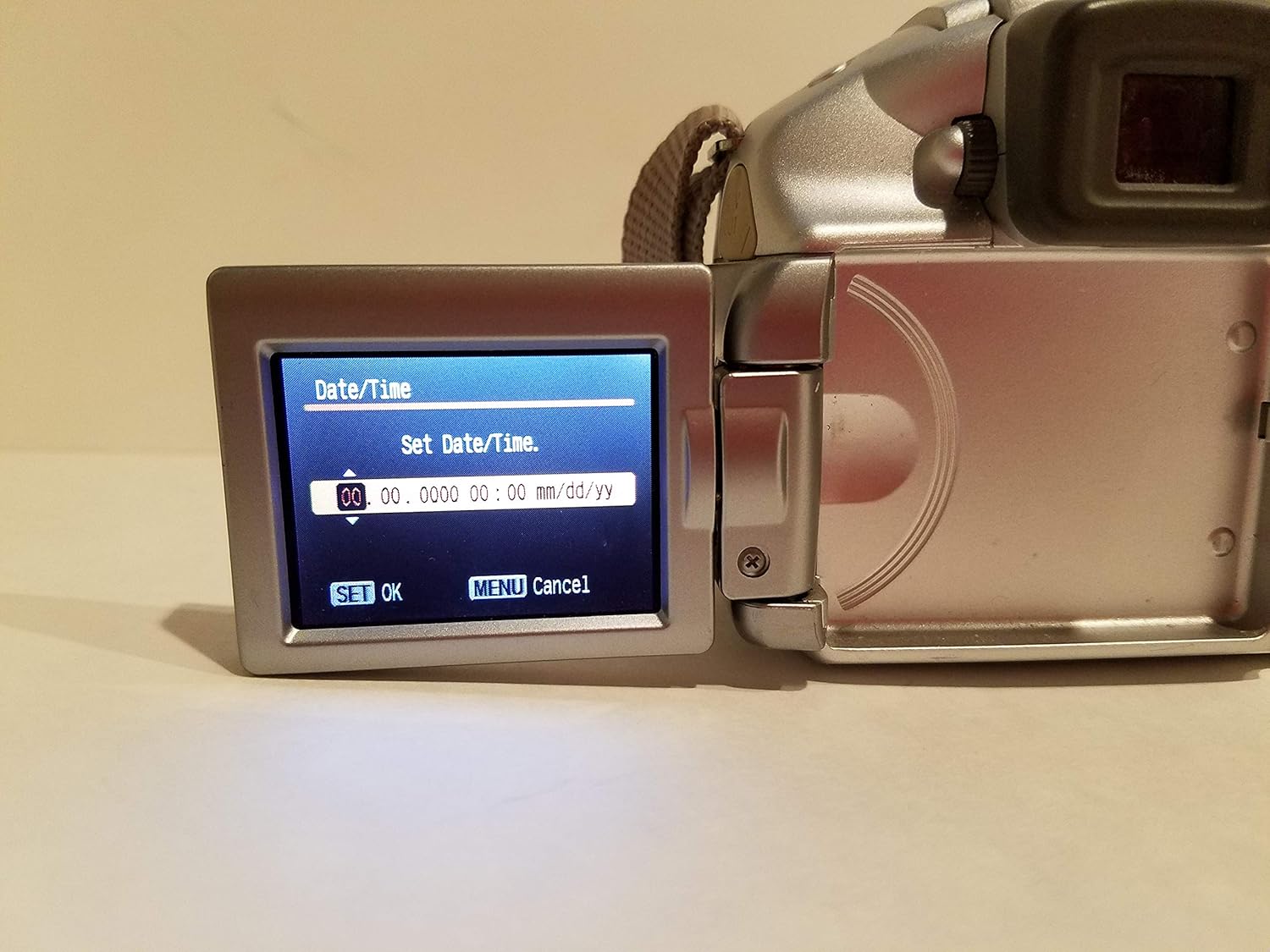
Figure 3.5.1: The camera's vari-angle LCD screen displaying the "Set Date/Time" menu, showing fields for year, month, day, hour, and minute. The "SET OK" and "MENU Cancel" options are visible at the bottom.
4. Kameraren funtzionamendua
4.1 Kameraren kontrolakview
Familiarize yourself with the main controls on the camera body. The rear panel features the vari-angle LCD, a control dial, and various function buttons for navigation and settings adjustment.

4.1.1. Irudia: Atzealdea view of the Canon PowerShot S2 IS camera, showing the closed vari-angle LCD, the electronic viewfinder, and control buttons including FUNC, JUMP, SET, MENU, and DISP.
4.2 Oinarrizko argazkilaritza
- Piztea: Sakatu BOTEREA button. The lens will extend, and the LCD will activate.
- Argazki modu bat hautatzea: Use the mode dial (usually on the top of the camera) to select your desired shooting mode, such as AUTO erabilera orokorrerako, PAISAIA, edo beste ESZENA moduak.
- Enfokatzea: Point the camera at your subject. Half-press the shutter button to activate autofocus. The camera will focus on the subject, and a green frame will appear on the LCD when focus is achieved. The camera uses TTL (Through-The-Lens) eta FlexiZone autofocus technologies.
- Zooma egitea: Use the zoom lever (typically around the shutter button) to adjust the 12x zoom optikoa. The camera also features a 4x zoom digitala for extended reach.
- Irudiaren egonkortzea: Kameraren ezaugarriak Irudiaren Egonkortze Optikoa (IS) to reduce blur caused by camera shake, especially at longer zoom settings. This function operates automatically.
- Using the Flash: The built-in flash can be set to Autoa, On, edo Desaktibatuta via the camera's menu or a dedicated flash button. For low-light conditions, the flash will automatically pop up if set to Auto.
- Argazki bat ateratzea: Fokatu ondoren, sakatu obturadore-botoia guztiz irudia ateratzeko.
- ReviewIrudiak: Sakatu JOLASTU button (often indicated by a triangle icon) to view your captured photos and videos on the 1.8-inch vari-angle LCD display.

4.2.1. irudia: Aurrealdea view of the Canon PowerShot S2 IS camera with the built-in flash popped up, ready for use in low-light conditions.
4.3 Bideo-grabaketa
The PowerShot S2 IS can record VGA (480p) video at 30 frames per second with stereo sound.
- Starting/Stopping Video: Switch the mode dial to the movie mode icon (usually a film camera symbol). Press the shutter button to start recording, and press it again to stop.
- MovieSnap Feature: While recording a movie, you can press the shutter button to capture a full 5.0-megapixel still image without interrupting the video recording.
- Audio ezaugarriak: The camera records in stereo and includes an adjustable microphone level setting and a wind filter option for improved sound quality.
- Zoom and Focus during Video: Digital zooming and manual focus adjustments are possible during movie recording.
4.4 Ezarpen aurreratuak
Access the camera's menu system using the MENUA button to adjust advanced settings:
- Esposizioaren kontrola: Manual exposure control is available for experienced users.
- Zurien balantzea: Adjust white balance settings to match lighting conditions (e.g., Flash torch).
- ISO sentsibilitatea: Select ISO settings from Auto, 50, 100, 200, 400 to control light sensitivity.
- Tenporizadorea: Set a delay before the shutter fires, useful for self-portraits or group shots.
- Etengabeko filmaketa: The camera supports continuous shooting at up to 30 fotograma segundoko.
5. Ordenagailu batera konektatzea eta inprimatzea
5.1 Ordenagailu batera konektatzea
To transfer images and videos to your computer:
- Ziurtatu kamera itzalita dagoela.
- Connect the camera to your computer using the supplied interface cable IFC-400PCU. The camera supports USB 2.0 Hi-Speed for fast data transfer.
- Turn on the camera. Your computer should recognize the camera as a removable storage device.
- Instalatu Digital Camera Solution CD-ROMa software if prompted or if you wish to use Canon's proprietary software for image management.
5.2 Direct Printing
The PowerShot S2 IS is compatible with Canon Direct Printing. You can print directly from the camera to a compatible Canon printer without a computer.
- Connect the camera to a compatible Canon Direct Printer using the supplied USB cable.
- Jarraitu kameraren LCD pantailan agertzen diren argibideei irudiak eta inprimatze-ezarpenak hautatzeko.
6. Mantentzea
6.1 Kamera garbitzea
- Kameraren gorputza: Erabili zapi leun eta lehor bat kameraren gorputza garbitzeko. Zikinkeria egoskorra bada, garbitu pixka batampen the cloth with water and then wipe dry. Do not use organic solvents like alcohol or paint thinner.
- Lentea: Gently remove dust with a blower brush. For smudges, use a lens cleaning cloth specifically designed for optical surfaces. Avoid touching the lens with your fingers.
- LCD pantaila: Garbitu astiro zapi leun eta lehor batekin. Saihestu pantailan gogor sakatzea.
6.2 Bateria zaintzea
- Always remove batteries when the camera is not in use for extended periods to prevent leakage.
- Gorde bateriak leku fresko eta lehor batean.
- If using rechargeable NiMH batteries, follow the manufacturer's instructions for charging and care.
6.3 Biltegiratzea
When storing the camera for a long time, remove the batteries and SD card. Store the camera in a cool, dry, well-ventilated area, away from dust and direct sunlight. Use a desiccant if storing in a humid environment.
7. Arazoak
| Arazoa | Balizko Kausa / Irtenbidea |
|---|---|
| Kamera ez da pizten. |
|
| "Black screen" or display issues. |
|
| Irudiak lausoak dira. |
|
| Flasha ez da pizten. |
|
| Cannot record video or take more photos. |
|
8. Zehaztapenak
| Ezaugarri | Xehetasuna |
|---|---|
| Ereduaren izena | Canon PowerShot S2 IS |
| Modelo zenbakia | 9883A019 |
| Argazki sentsorearen bereizmena | 5.0 megapixelekoa |
| Zoom optikoa | 12x |
| Zoom digitala | 4x |
| Irudi Egonkortzea | Optikoa |
| Lente mota | 36-432mm zoom lens (35mm equivalent) |
| Pantailaren tamaina | 1.8 hazbeteko (angelu aldakorreko LCD) |
| Bideo Ebazpena | 480p (VGA) at 30 FPS |
| Audio Sarrera | Microphone (Stereo) |
| Onartua File Formatua | JPEG (Stills), AVI (Video) |
| Biltegiratze euskarria | SD/MMC txartela |
| Konektibitatea | USB 2.0 Hi-Speed |
| Energia iturria | 4x AA-size batteries |
| Elementuaren pisua | 1.1 kilo |
| Kolorea | Zilarrezkoa |
9. Bermea eta Laguntza
For information regarding your product's warranty, please refer to the warranty card included in your product packaging or visit the official Canon website. For technical support, service, or to inquire about replacement parts, please contact Canon customer service through their official channels. Keep your purchase receipt as proof of purchase for warranty claims.
Informazio gehiago eta laguntza baliabideak aurki ditzakezu hemen: Canon Store on Amazon.


