1. Sarrera
The Extech EX310 is a compact, manual-ranging digital multimeter designed for a variety of electrical measurements. It features an extra-large 2000-count LCD and a built-in Non-Contact AC Voltage Detector (NCV) for enhanced safety. This device is capable of measuring AC/DC Voltage, AC/DC Current, Resistance, Diode, and Continuity, and includes a battery test function for 1.5V and 9V batteries. Its robust design, including a protective rubber holster and tilt stand, makes it suitable for field use.
2. Segurtasun informazioa
Always adhere to safety precautions when using any electrical testing equipment. Failure to do so may result in injury or damage to the meter or equipment under test.
- The Extech EX310 is UL listed with a CAT III – 600 Volt safety rating.
- Ez aplikatu bolumen baloratua baino gehiagotage, neurgailuan markatuta dagoen bezala, terminalen artean edo edozein terminalen eta lurraren artean.
- Always inspect test leads for damage before use. Replace if insulation is compromised.
- Kontu handiz ibili zirkuitu biziekin lan egitean.
- Erabili kontakturik gabeko bolumenatage (NCV) detector as a preliminary check for live AC voltage, but always verify with direct contact measurements when possible.
- Ziurtatu funtzio-etengailua tarte zuzenean ezarrita dagoela neurketak egin aurretik.
3. Produktuaren ezaugarriak
- 9-Function Manual-Ranging DMM: Neurriak AC/DC voltage, AC/DC current (up to 10 A), resistance, diode, continuity, plus 1.5 V/9 V battery tests.
- Kontaktu gabeko boltage (NCV) detektagailua: Built-in NCV with red LED and audible beeper alerts to the presence of live AC (100-600 VAC) without probes.
- Extra-Large 2000-Count Display: Clear, easy-to-read 1-inch digits on a high-count LCD ensure readability.
- Rugged, Portable Design: Compact meter (5.7 × 2.9 × 1.6 in, 9 oz) with protective rubber holster, tilt stand, and low-battery indicator.
- Reliable Safety & Accuracy: 0.5% basic accuracy. Designed to UL/CAT II-1000 V & CAT III-600 V safety standards.
4. Paketearen edukia
The Extech EX310 package includes the following items:
- Extech EX310 Mini Digital Multimeter
- Proba-buruak
- 9 voltioko bateria
- Okertu Stand
5. Produktua amaitu daview (Controls and Display)
Familiarize yourself with the components of your EX310 multimeter:

Irudia: Aurrealdea view of the Extech EX310 Mini Digital Multimeter, showing the large LCD display, function dial, NCV button, and input jacks.
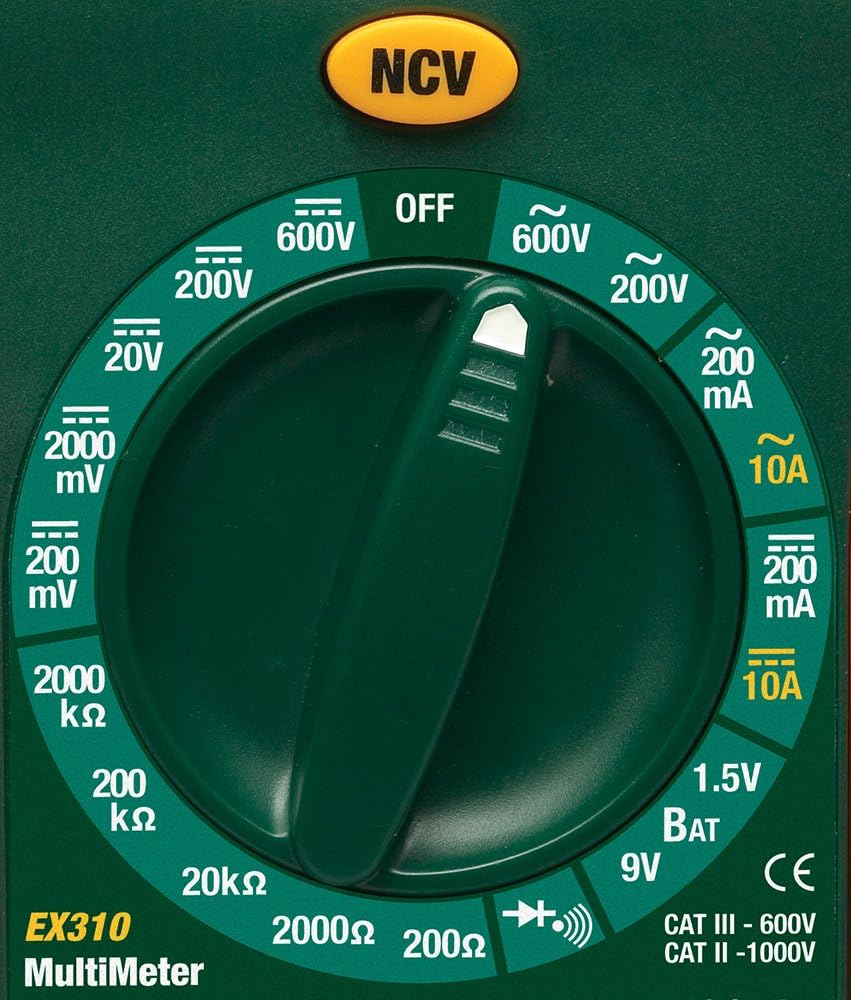
Image: Close-up of the Extech EX310's function dial, illustrating the various measurement ranges and functions such as voltage, current, resistance, diode, continuity, and battery test.
- LCD pantaila: Neurketa-irakurketak, unitateak eta funtzio-adierazleak erakusten ditu.
- Funtzio etengailua: Rotary dial to select the desired measurement function and range.
- NCV botoia: Activates the Non-Contact Voltage detection feature.
- Sarrerako Jackak: Proba-kableak konektatzeko terminalak (COM, VΩmA, 10A).
6. Konfigurazioa
6.1. Bateriaren instalazioa
- Ziurtatu multimetroa itzalita dagoela.
- Bilatu bateriaren konpartimentuaren estalkia neurgailuaren atzealdean.
- Kendu euskarri-torlojua(k) eta kendu estalkia.
- Insert a new 9V battery, observing correct polarity.
- Jarri berriro estalkia eta finkatu torloju(ekin).
Bateria baxuaren adierazle bat agertuko da pantailan bateria aldatu behar denean.
6.2. Proba-kableak konektatzea
Konektatu proba-kableak sarrera-hartune egokietara:
- Sartu probako kable beltza COM (common) jack.
- Neurketa gehienetarako (bolumentage, Resistance, Diode, Continuity, mA Current), insert the red test lead into the VΩmA jack.
- Korronte handiko neurketetarako (10A-ra arte), sartu proba-kable gorria 10A jack.
7. Funtzionamendu-argibideak
Before making any measurement, ensure the test leads are correctly connected and the function switch is set to the desired range.
7.1. AC/DC Voltage Neurketa
- Set the function switch to the desired ACV (~) or DCV (---) range (e.g., 200V, 600V).
- Connect the red test lead to the VΩmA jack and the black test lead to the COM jack.
- Ukitu proba-zundak zirkuituko puntuetan, non bolumena dagoen.tage neurtu behar da.
- Irakurri liburukiatagLCDaren balioa.
7.2. AC/DC Korrontearen Neurketa
Kontuz: Never attempt to measure current on a circuit with voltage present across the current terminals. This can blow the fuse or damage the meter.
- Itzali zirkuituari.
- Set the function switch to the desired ACA (~) or DCA (---) range (e.g., 200mA, 10A).
- Connect the red test lead to the appropriate current jack (VΩmA for mA, 10A for 10A) and the black test lead to the COM jack.
- Open the circuit where current is to be measured and connect the meter in series.
- Konektatu korrontea zirkuituari eta irakurri uneko balioa LCD pantailan.
7.3. Erresistentzia Neurketa
- Ziurtatu zirkuitua edo osagaia deskonektatuta dagoela.
- Set the function switch to the desired Resistance (Ω) range (e.g., 200Ω, 20kΩ).
- Connect the red test lead to the VΩmA jack and the black test lead to the COM jack.
- Ukitu proba-zundak neurtu beharreko osagai edo zirkuituan.
- Irakurri erresistentziaren balioa LCD pantailan.

Image: The Extech EX310 Multimeter displaying a reading while test leads are connected to a circuit board, demonstrating a typical measurement scenario.
7.4. Diodoaren proba
- Ensure the component is de-energized.
- Set the function switch to the Diode (→|) position.
- Connect the red test lead to the VΩmA jack and the black test lead to the COM jack.
- Ukitu zunda gorria diodoaren anodoan eta zunda beltza katodoan.
- Irakurri aurrerako liburukiatage drop on the LCD. Reverse the probes to check for an open circuit (OL).
7.5. Jarraitasun proba
- Ziurtatu zirkuitua edo osagaia deskonektatuta dagoela.
- Set the function switch to the Continuity (→))) position.
- Connect the red test lead to the VΩmA jack and the black test lead to the COM jack.
- Ukitu proba-zundak zirkuituaren edo osagaiaren gainean.
- An audible tone will sound if continuity exists (resistance below approximately 30Ω).

Irudia: Gertutik view of the Extech EX310 Multimeter with its test leads connected to an internal electronic circuit, demonstrating precise measurement capabilities.
7.6. Harremanik gabeko Voltage (NCV) Detekzioa
- Ezarri funtzioaren etengailua edozein posiziotan.
- Press and hold the NCV button.
- Move the top of the meter (where the NCV sensor is located) close to the suspected AC voltage source (e.g., wire, outlet).
- A red LED will illuminate and an audible beeper will sound, increasing in intensity as the meter gets closer to the live AC voltage.

Image: A hand holding the Extech EX310 Multimeter near an electrical wall outlet, demonstrating the use of the Non-Contact Voltage (NCV) detection feature to identify live circuits.
7.7. Battery Test (1.5V/9V)
- Set the function switch to the 1.5V BAT or 9V BAT position.
- Connect the red test lead to the VΩmA jack and the black test lead to the COM jack.
- Touch the red probe to the positive terminal and the black probe to the negative terminal of the battery.
- Irakurri bateria voltage LCD pantailan.
8. Mantentzea
8.1. Bateria ordezkatzea
Refer to Section 6.1 for detailed instructions on replacing the 9V battery when the low battery indicator appears.
8.2. Fusiblearen ordezkapena
If the current measurement functions cease to operate, the internal fuse(s) may need replacement. The fuses are typically located beneath the battery compartment. Refer to the full product manual for specific fuse ratings and replacement procedures. Always replace with fuses of the identical type and rating.
8.3. Garbiketa
Aldian-aldian garbitu kasua iragarkiarekinamp oihal eta detergente leun batekin. Ez erabili urratzailerik edo disolbatzailerik. Ziurtatu neurgailua guztiz lehor dagoela erabili aurretik.
9. Arazoak
- Ez dago pantailarik: Check the 9V battery. Ensure it is correctly installed and has sufficient charge.
- Irakurketa okerrak: Verify that the function switch is set to the correct measurement type and range. Ensure test leads are properly connected and making good contact with the circuit.
- Uneko neurketak ez du funtzionatzen: Check the internal fuse(s). Refer to the Maintenance section for fuse replacement.
- NCV-k ez du detektatzen: Ensure the NCV button is pressed and held. Confirm the presence of AC voltage (100-600 VAC) in the area being tested.
10. Zehaztapenak
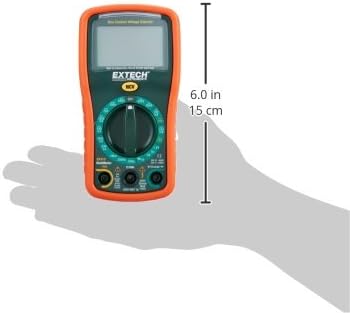
Image: Diagram illustrating the physical dimensions of the Extech EX310 Multimeter, showing a length of 6.0 inches (15 cm).
| Zehaztapena | Balioa |
|---|---|
| Marka | Extech |
| Modelo zenbakia | EX310 |
| Neurketa Mota | Multimetroa |
| Estiloa | Eskuliburua |
| Oinarrizko zehaztasuna | +/-%0.5 |
| Bistaratzea | 2000-Count LCD |
| Segurtasun Balorazioa | UL listed CAT III - 600V, CAT II - 1000V |
| Energia iturria | 9V-ko bateria |
| Elementuaren neurriak (L x W x H) | 5.7 x 1.6 x 2.9 hazbete (14.5 x 4.1 x 7.4 cm) |
| Elementuaren pisua | 0.704 ontza (0.02 kilogramo) |
| Dakarten osagaiak | Test leads, 9 Volt battery, tilt stand |
11. Bermearen informazioa
The Extech EX310 Mini Digital Multimeter is covered by a 1 urteko piezak eta eskulanaren bermea from the date of purchase. Please retain your proof of purchase for warranty claims. This warranty covers manufacturing defects and workmanship under normal use.
12. Bezeroarentzako arreta
For technical assistance, troubleshooting beyond this manual, or warranty service, please contact Extech customer support. Refer to the official Extech webgunea edo produktuaren ontzia kontaktu-informazio eguneratuena lortzeko.


