1. Sarrera
Eskerrik asko erosketagatik.asing the JVC KW-AVX810 Vehicle Multimedia Receiver. This unit is designed to provide advanced audio and video entertainment in your vehicle, featuring a 7-inch touch panel monitor, DVD playback, USB connectivity for iPod/iPhone, and Bluetooth readiness. This manual provides essential information for the proper installation, operation, and maintenance of your new multimedia receiver.
2. Segurtasun informazioa
- Instalazio profesionala gomendatzen da: Due to the complexity of vehicle electrical systems, professional installation is highly recommended to prevent damage to the unit or your vehicle.
- Elikatze-iturria: This unit is designed for 12V DC negative ground electrical systems. Ensure correct wiring to avoid short circuits or damage.
- Gidatzeko segurtasuna: Do not operate the unit's advanced features or watch videos while driving. Always prioritize safe driving practices.
- Aurpegi desmuntagarria: Handle the detachable faceplate with care. Avoid exposing it to direct sunlight or high temperatures for extended periods.
- Aireztapena: Ziurtatu aireztapen egokia dagoela unitatearen inguruan gehiegi berotzea saihesteko. Ez blokeatu aireztapen-irekidurak.
3. Paketearen edukia
Mesedez, egiaztatu elementu guztiak paketean daudela:
- JVC KW-AVX810 Multimedia Receiver
- Detachable Faceplate
- Kableatu Harness
- Muntatzeko Hardwarea
- Urruneko kontrola (barne badago)
- Erabiltzailearen eskuliburua (dokumentu hau)
4. Konfigurazioa eta instalazioa
4.1 Kableatutako konexioak
Refer to the wiring diagram below for proper connection of the power, speaker, and auxiliary cables. Incorrect wiring can cause damage to the unit or vehicle electrical system.
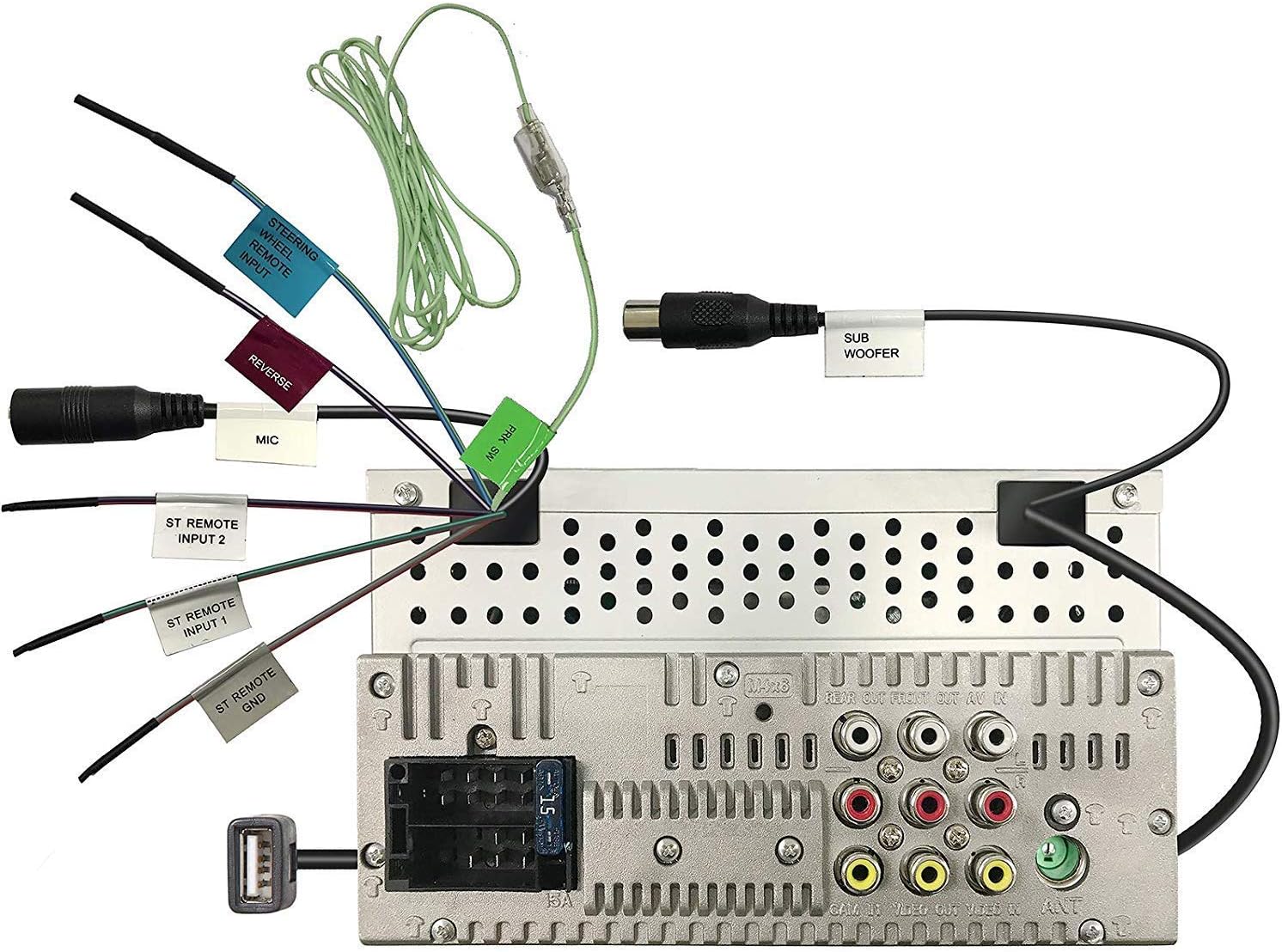
Figure 4.1: Rear panel wiring connections. This image displays the back of the JVC KW-AVX810 unit, illustrating various input and output ports. Key connections include the main power harness, speaker outputs, RCA pre-outs for front, rear, and subwoofer, video input/output, USB port, microphone input, and steering wheel remote input. Each connection is clearly labeled for identification.
- Konexio elektrikoak: Connect the yellow wire to the constant 12V supply, the red wire to the accessory 12V supply, and the black wire to a good chassis ground.
- Bozgorailu konexioak: Connect the speaker wires to the corresponding vehicle speakers, ensuring correct polarity.
- USB Sarrera: The USB port allows connection of compatible devices like iPods/iPhones for audio and video playback, and charging.
- RCA irteerak: Erabili hauek kanpoko konexioetarako amplifiers for front, rear, and subwoofer channels.
- Bideo sarrera/irteera: For connecting external video sources or monitors.
- Steering Wheel Remote Input: Connect to a compatible steering wheel control interface (sold separately) for integrated control.
4.2 Unitatea muntatzea
The KW-AVX810 is a double-DIN unit. Ensure your vehicle's dashboard opening is compatible. Secure the unit using the provided mounting brackets and screws. After mounting, connect all wiring harnesses before reassembling the dashboard.
5. Funtzionamendu-argibideak
5.1 Oinarrizko kontrolak eta pantaila
The unit features a 7-inch touch panel monitor for intuitive control. The main interface provides access to various functions.

Figure 5.1: Front panel and display. This image shows the JVC KW-AVX810's 7-inch touch panel display, featuring a graphical user interface with icons for various functions such as Tuner, Mirroring, AV-IN, Phone, BT Audio, and Settings. Volume controls and power button are visible on the left bezel. The current time is displayed prominently in the center.
- Piztu/Itzali: Press the power button (usually located on the left bezel) to turn the unit on or off.
- Bolumen kontrola: Use the volume up/down buttons or the on-screen controls to adjust the audio level.
- Iturburuaren hautaketa: Tap the desired source icon (e.g., Tuner, DVD, USB, BT Audio, AV-IN) on the touch screen to switch between functions.
- Aurpegi desmuntagarria: To detach the faceplate, press the release button (refer to the unit's specific mechanism). Always detach the faceplate when leaving the vehicle to deter theft.
5.2 Multimedia erreprodukzioa
- DVD/CD erreprodukzioa: Insert a disc into the slot. The unit will automatically switch to DVD/CD mode. Use the touch screen for playback controls (play, pause, skip, menu).
- USB/iPod/iPhone: Connect your device to the USB port. The unit will detect the device and allow you to browse and play media files. The KS-U20 cable (sold separately) may be required for iPod video functionality.
- Bluetooth audioa: Pair your Bluetooth-enabled device with the KW-AVX810. Once paired, you can stream audio wirelessly.
- Irrati-sintonizatzailea: Select the Tuner source. Use the touch screen to scan for stations, save presets, and switch between AM/FM bands.
5.3 Ezarpenak eta Pertsonalizazioa
Access the 'Settings' menu from the main screen to customize various aspects of the unit, including:
- Audio ezarpenak: Adjust equalizer (7-Band iEQ), balance, fader, subwoofer levels, and sound effects (Dolby 5.1 headphone surround sound).
- Pantailaren ezarpenak: Adjust brightness, contrast, and background.
- Sistemaren ezarpenak: Language, time, and other general preferences.
- Bluetooth ezarpenak: Manage paired devices and connection options.
6. Mantentzea
- Pantaila garbitzea: Use a soft, dry cloth to wipe the touch screen. For stubborn smudges, lightly dampen the cloth with water or a screen cleaner designed for electronics. Do not use abrasive cleaners.
- Cleaning the Faceplate: Wipe the detachable faceplate with a soft, dry cloth. Avoid harsh chemicals.
- Diskoak zaintzea: Diskoak ertzetik heldu. Garbi eta marradurarik gabe mantendu. Diskoak beren zorroetan gorde erabiltzen ez dituzunean.
- Arreta orokorra: Keep the unit free from dust and moisture. Avoid extreme temperatures.
7. Arazoak
If you encounter problems with your KW-AVX810, refer to the following common issues and solutions:
| Arazoa | Kausa posiblea | Irtenbidea |
|---|---|---|
| Botererik ez | Kableatu okerra; Fusible erreta; Ibilgailuaren bateriaren arazoa. | Check power connections (yellow, red, black wires). Inspect the unit's fuse and vehicle's fuse box. Ensure vehicle battery is charged. |
| Soinurik ez | Bolumena baxuegia; Isilarazi aktibatuta; Bozgorailuen kableatu okerra; Amparazte-gaia. | Increase volume. Check if mute is on. Verify speaker connections. If using external ampLikidatzailea, egiaztatu bere potentzia eta konexioak. |
| Pantailak ez du funtzionatzen | Faceplate not properly attached; Display settings. | Ensure faceplate is securely attached. Check display brightness/contrast settings. |
| USB/iPod not recognized | Incompatible format; Loose connection; Device issue. | Ziurtatu komunikabideak files are in a supported format. Reconnect the USB device. Try a different USB device. Update iPod/iPhone software if necessary. |
| Bluetooth konexio arazoak | Gailua ez dago parekatze moduan; Interferentzia; Beste gailu batekin parekatuta dago dagoeneko. | Ensure Bluetooth is enabled on both devices and in pairing mode. Delete previous pairings and re-pair. Move closer to the unit. |
If the problem persists after trying these solutions, contact JVC customer support or a qualified service technician.
8. Zehaztapenak
- Produktuaren neurriak: 18.39 x 17.81 x 10.01 cm; 2.6 kg
- Elementuaren eredu-zenbakia: KWM150BT+XV95BK+MAGNET
- Marka: JVC
- Konektibitate Teknologia: Bluetootha, USBa
- Kontroladore mota: Android (bateragarria)
- Ezaugarri bereziak: Built-In Bluetooth, FM Tuner, Subwoofer Pre-out
- Gailu bateragarriak: Smartphone
- HDMI portuak guztira: 1 (Note: This may refer to an internal component or specific model variant, as the main description does not highlight HDMI)
- Konektore mota: USBa
- Audio irteera modua: Inguratu
- Inguruko soinu-kanalaren konfigurazioa: 4.1
- Fabrikatzailea: JVC
9. Bermea eta laguntza
9.1 Bermearen informazioa
The JVC KW-AVX810 Vehicle Multimedia Receiver comes with a warranty. For Mobile Products, the warranty covers 1 urteko piezak eta eskulana from the date of purchase. Please retain your proof of purchase for warranty claims. The warranty does not cover damage caused by improper installation, accident, misuse, abuse, or unauthorized modification.
9.2 Bezeroarentzako laguntza
For technical assistance, service, or warranty inquiries, please contact JVC customer support. Refer to the official JVC webwebgunean edo produktuaren ontzian kontaktu-informazio eguneratuena lortzeko.