1. Sarrera
This manual provides essential information for the safe and efficient use of your Hama USB 7.1 Surround Sound Card, Model 00051620. Please read these instructions carefully before using the device and keep them for future reference. This external sound card allows you to connect headphones, microphones, or speakers with a 3.5mm jack to your computer or tablet via a USB-A port, enhancing your audio experience with simulated 7.1 surround sound.
2. Segurtasun-argibideak
- Do not open the device. Opening the device voids the warranty and may lead to electric shock.
- Babestu produktua zikinkeria, hezetasun eta gehiegizko berotzetik.
- Erabili produktua bere xederako soilik.
- Do not drop the product or expose it to severe shocks.
- Mantendu produktu hau, produktu elektriko guztiak bezala, haurren eskura.
- Bota ezazu berehala ontziratzeko materiala tokian tokiko araudiaren arabera.
3. Paketearen edukia
Egiaztatu zure paketeak elementu hauek dituela:
- 1x Hama USB 7.1 Surround Sound Card (Model 00051620)
- 1x Argibide eskuliburua
4. Produktua amaitu daview
The Hama USB 7.1 Surround Sound Card is a compact audio adapter designed to provide enhanced sound capabilities for your computer or tablet. It features a USB-A connector for easy plug-and-play functionality and includes dedicated ports for audio input and output.
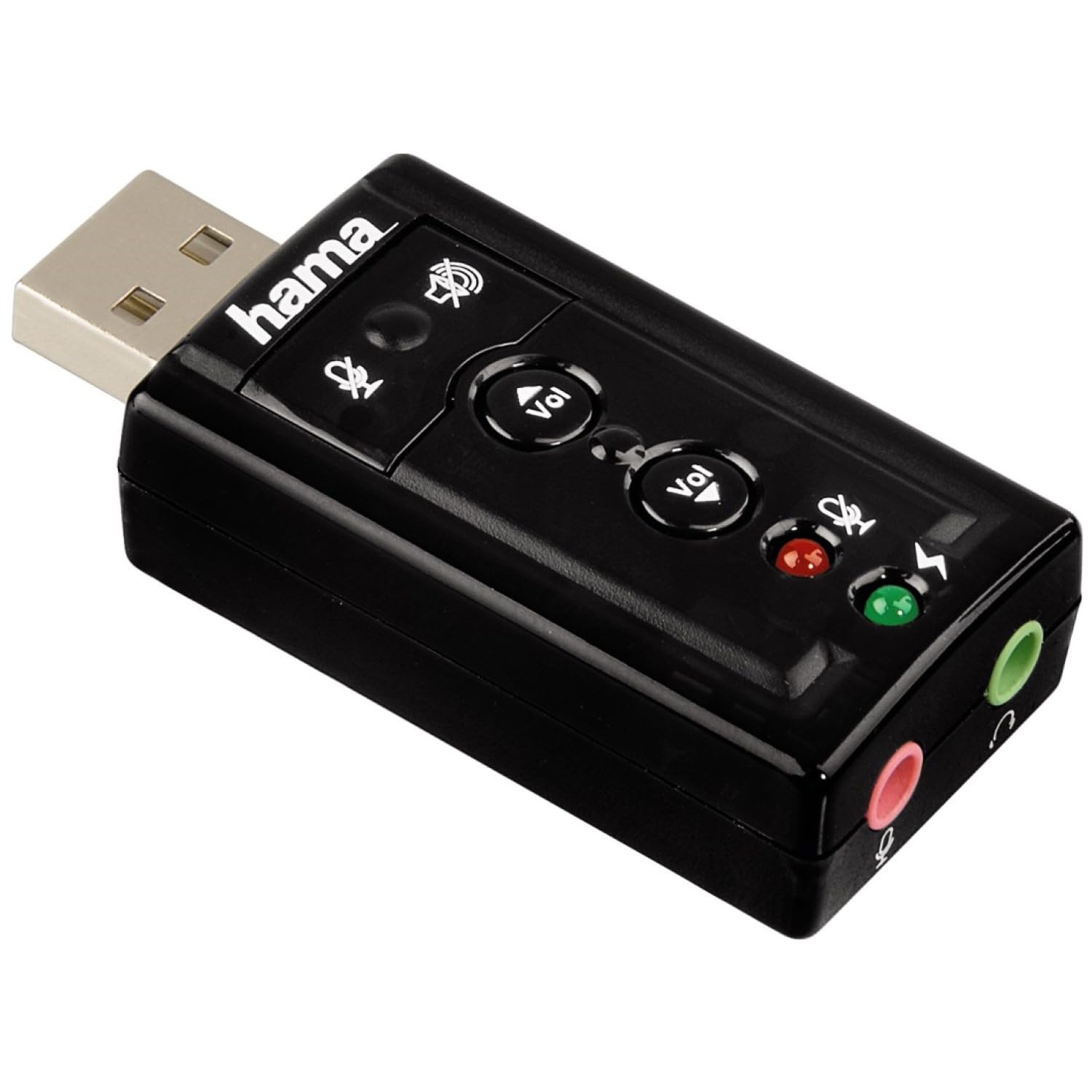
1. irudia: Goian view of the Hama USB 7.1 Surround Sound Card, showing the USB-A connector, volume control buttons, and mute indicators.
Kontrolak eta Portuak:
- USB-A Connector: For connecting to your computer or tablet.
- Bolumena igo / jaitsi botoiak: Audio irteerako bolumena doitzen du.
- Mikrofonoa isilarazteko botoia: Mutes or unmutes the connected microphone.
- Bozgorailua isilarazteko botoia: Mutes or unmutes the audio output to headphones/speakers.
- 3.5mm Microphone Jack (Red): Kanpoko mikrofono bat konektatzeko.
- 3.5mm Headphone/Speaker Jack (Green): Entzungailuak edo bozgorailuak konektatzeko.

Image 2: End view of the Hama USB 7.1 Surround Sound Card, highlighting the red microphone input jack and the green headphone/speaker output jack.
5. Sistemaren eskakizunak
- Operating System: Windows, macOS, or compatible tablet OS.
- Available USB-A port.
- Headphones, microphone, or speakers with a 3.5mm jack connector.
6. Instalazioa eta konfigurazioa
- Connect the Sound Card: Plug the USB-A connector of the Hama USB 7.1 Surround Sound Card into an available USB-A port on your computer or tablet.
- Gidariaren instalazioa: The device is typically plug-and-play, and your operating system should automatically detect and install the necessary drivers. If prompted, follow the on-screen instructions.
- Konektatu audio gailuak:
- For headphones or speakers, connect the 3.5mm jack into the berdea port on the sound card.
- For a microphone, connect the 3.5mm jack into the gorria port on the sound card.
- Konfiguratu audio ezarpenak: Access your operating system's sound settings to ensure the Hama USB 7.1 Surround Sound Card is selected as the default playback and recording device.
- Softwarearen instalazioa (aukerakoa): For advanced features like XeaR-Sound 7.1 surround simulation, 10-band equalizer, and karaoke functions, install the dedicated software. Refer to the manufacturer's websoftwarea deskargatzeko eta instalatzeko argibideetarako gunea.
7. Funtzionamendua
Basic Audio Control:
- Bolumenaren doikuntza: Use the 'Vol +' and 'Vol -' buttons on the sound card to increase or decrease the output volume.
- Mute Audio Output: Press the speaker mute button to temporarily silence the audio output. Press again to unmute.
- Mute Microphone Input: Press the microphone mute button to temporarily disable microphone input. Press again to enable.
Softwarearen Ezaugarri Aurreratuak:
If you have installed the optional software, you can access the following features:
- XeaR-Sound Technology: Enables simulated 7.1 crystal-clear surround sound for stereo speakers or headsets.
- 10 bandako berdinketa: Customize your audio experience with various presets (e.g., Jazz, Rock, Classic) or create your own.
- Additional Sound Effects: Apply various sound effects to your audio.
- Adjustable Room Acoustics: Modify the perceived acoustic environment.
- Karaoke Recording: Record karaoke performances with original voice suppression and tone adjustment capabilities.
8. Mantentzea
The Hama USB 7.1 Surround Sound Card requires minimal maintenance.
- Garbitu gailua d pixka batekin soilikamp, litxarrik gabeko oihala. Ez erabili garbiketa-agente erasokorrik.
- Ensure the USB port and audio jacks are free from dust and debris.
9. Arazoak
Soinu-irteerarik ez:
- Ensure the sound card is securely plugged into a USB port.
- Check if your headphones/speakers are correctly connected to the green jack.
- Verify that the speaker mute button on the sound card is not active.
- Confirm that the Hama USB 7.1 Surround Sound Card is selected as the default playback device in your operating system's sound settings.
- Adjust the volume using the sound card's buttons and your computer's volume controls.
Mikrofonoa ez dabil:
- Ensure your microphone is correctly connected to the red jack.
- Verify that the microphone mute button on the sound card is not active.
- Confirm that the Hama USB 7.1 Surround Sound Card is selected as the default recording device in your operating system's sound settings.
- Egiaztatu mikrofonoaren pribatutasun ezarpenak zure sistema eragilean.
Soinu-kalitate arazoak:
- Ziurtatu konexio guztiak seguruak direla.
- Try connecting the sound card to a different USB port.
- If using the optional software, check equalizer settings and disable any sound effects that might be causing distortion.
10. Zehaztapenak
| Ezaugarri | Xehetasuna |
|---|---|
| Marka | Hama |
| Modelo zenbakia | 00051620 (51620 bezala ere ezaguna) |
| Kolorea | Beltza |
| Konektorea | USB A male |
| USB estandarra | USB 2.0 |
| Bozgorailuaren konexioa | 3.5mm female jack |
| Aurikularretarako konexioa | 3.5mm female jack |
| Bolumen kontrola | Yes, with mute function |
| Audio irteera modua | Inguratu |
| Inguruko soinu-kanalaren konfigurazioa | 7.1 (simulated with software) |
| Gehienezko Sampling Tarifa | 48 kHz |
| Gailu bateragarriak | USB (PC, Laptop, Tablets) |
| Fabrikatzailea | Hama E.URL |
11. Ezabatzeko informazioa
Observe the applicable local regulations for the disposal of electronic devices. The product must not be disposed of with normal household waste. Dispose of the product according to the European Directive 2012/19/EU on waste electrical and electronic equipment (WEEE) at a designated collection point for electrical and electronic equipment.
12. Bermea
Hama GmbH & Co KG provides a limited warranty for this product. For detailed warranty terms and conditions, please refer to the official Hama webwebgunearekin edo jarri harremanetan zure tokiko saltzailearekin. Gorde erosketaren frogagiria bermearen erreklamazioetarako.
13. Bezeroarentzako arreta
If you have any questions about this product or require technical assistance, please contact Hama customer support. You can find contact information on the official Hama webgunea (www.hama.com) or through your local retailer.


